Conclusion
Superhuman is a powerful tool for those who heavily rely on email and are willing to invest time in learning a new workflow. It offers a structured and efficient way to manage emails, with a strong focus on keyboard shortcuts and AI support. Although the learning curve is steep and the price is high, the benefits for intensive users are substantial. For those less dependent on email, however, Superhuman may seem overly complex and expensive. It is a tool that rewards commitment but is not suitable for everyone.
Advantages
- Quick and efficient email management with keyboard shortcuts
- AI-support for writing and searching
- Good integration with other tools such as Grammarly and Coda
- Robust automation and team collaboration
- Transparent privacy and data handling
Disadvantages
- Steep learning curve
- High price, especially for less intensive users
- Can feel rigid until the workflow is fully understood
Table of Contents
- UI and overall usability
- Core features
- AI writing, drafting, and voice refinement
- AI-powered search and summarisation
- Automation, labels, and rules
- Snippets and templates
- Calendar and scheduling
- Team collaboration and the wider Superhuman ecosystem
- The wider Superhuman suite: Go, Grammarly, and Coda
- Performance
- Privacy and data handling
- Pricing and value for money
- Comparison with other tools
- Limitations and trade-offs
- Final verdict
- Frequently Asked Questions
Email is one of those tools that slowly takes up more time than anticipated. Constantly switching contexts, making repeated decisions, and remembering which emails need responses can be more draining than the actual task. Over time, this causes friction in the workday, particularly for those who depend heavily on email for coordination, planning, and decision-making.
Given these challenges, Superhuman presents itself as a complete rethinking of how email workflows should function rather than as an add-on or a thin productivity layer, prompting me to put it to the test. The promised speed, clarity, and structure can be attained in ways other than automation. Instead, the tool primarily relies on keyboard-driven actions, intentional interactions, and a carefully designed inbox.
The objective was to determine if this approach is genuinely effective for daily use, particularly for individuals handling a large volume of emails. Additionally, I wanted to know if the AI features felt truly useful or merely ornamental, and if the learning curve was worth the reward.
UI and overall usability
The first noticeable aspect of Superhuman is the deliberate feel of its interface. Nothing appears accidental. The inbox layout is tidy, organized, and focused, with minimal visual clutter. At the same time, it does not feel empty or oversimplified. There is a clear sense that the interface is designed around action rather than passive reading.
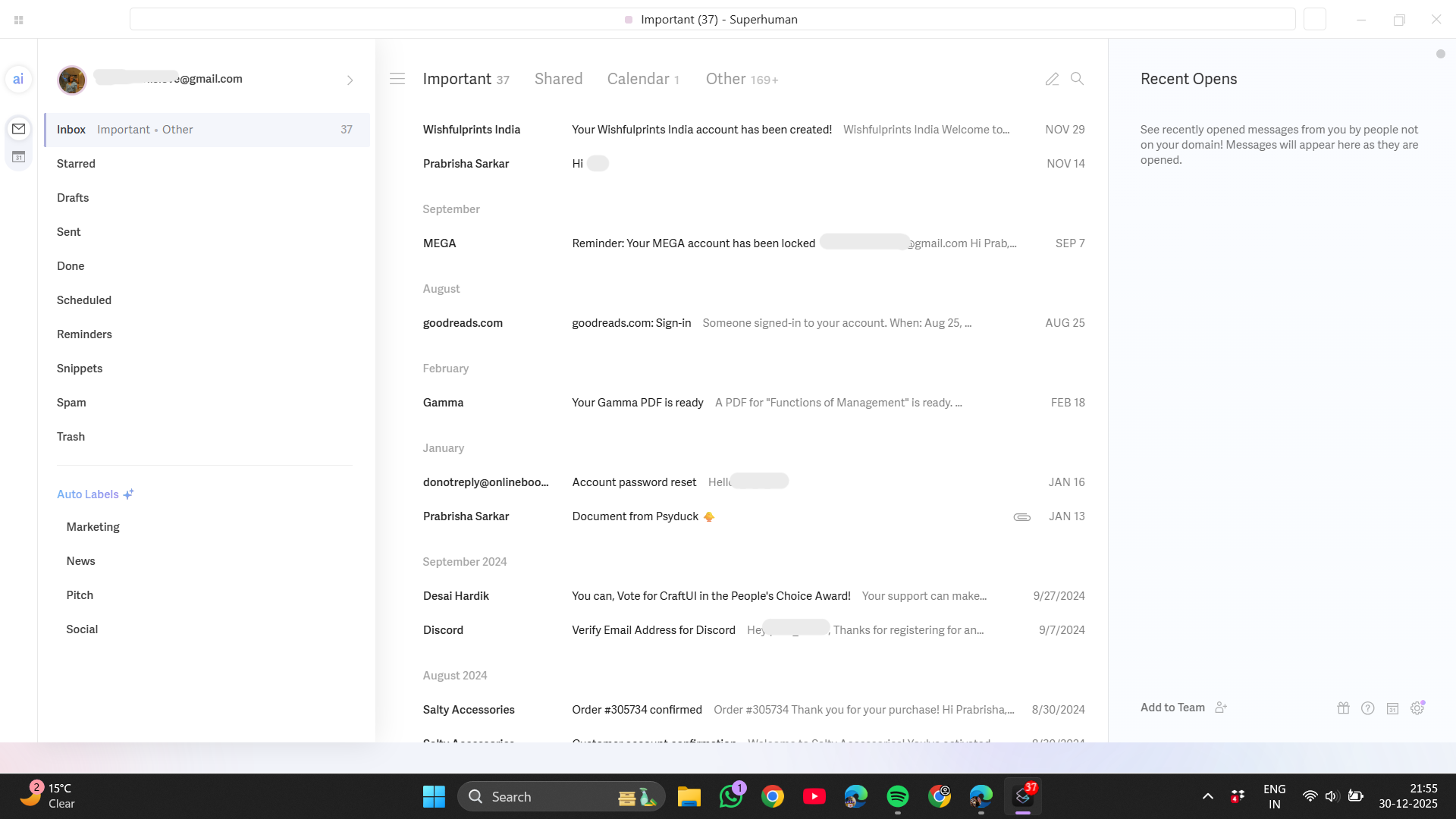
Navigation is swift, yet not as immediately intuitive as conventional email clients. Superhuman anticipates keyboard interaction from the outset. Many actions that would normally involve clicking menus are instead triggered by single-letter shortcuts or short key combinations.


Notable examples during use include:
- Pressing single keys to archive, snooze, mark emails as done, or move through threads
- Navigating between emails using simple keyboard controls instead of scrolling
- Triggering reply, forward, or scheduling actions without leaving the inbox view
This design decision yields two main outcomes: it renders the interface remarkably swift once habits are formed, yet it also presents a learning curve that cannot be disregarded. During the initial days, productivity can actually dip while learning what each shortcut does and how different actions chain together.
Superhuman integrates with Gmail, Google Workspace, and Outlook. It supports both personal and professional emails. The platform operates natively on macOS, Windows, iPhone, and Android. It is also accessible via web browsers like Chrome and Edge.

I used Superhuman primarily as a Windows app, and it did not feel heavy or resource-intensive. Performance remained smooth even with a busy inbox. The application felt responsive, and there was no noticeable lag when navigating between emails or switching views. Desktop clearly feels like the primary environment where Superhuman shines, especially because the shortcut-driven workflow makes the most sense with a keyboard.
Overall, usability markedly improves with time, but it requires upfront effort. This is not a tool that seamlessly recedes into the background; it demands learning.
Score: 8.3 / 10
Core features
Superhuman offers a broad set of features, but they are cohesively integrated rather than dispersed. The following core areas most distinctly define the experience.
Inbox workflow and organisation
Inbox management is central to Superhuman, and it’s evident. Newsletters, transactional emails, and calendar alerts are separated from messages needing direct responses.
A key highlight is how the tool promotes closure. Emails are intended to be addressed and then archived or marked complete. Marking messages as done using E becomes second nature, and the auto-advance feature ensures there is always a next clear action.
Some smaller workflow features proved more useful than anticipated. One-click unsubscribe made managing newsletters straightforward rather than something continually deferred.

The ‘Remind Me Later’ feature served as a subtle safety net for emails I couldn’t address right away but didn’t want to overlook.

‘Send Later’ altered my replying habits, allowing me to compose responses when convenient and dispatch them at the optimal moment. These features did not feel flashy, but together they reduced the constant back-and-forth switching between mails.

Bulk actions in Superhuman eased backlog management significantly. Quickly marking emails as read or unread, muting threads, archiving, deleting, starring, or managing labels in bulk helped declutter efficiently without overanalyzing each message. It turned inbox cleanup from a dreaded task into something I could finish in minutes and move on.

Subtle settings also streamlined daily email tasks. Managing signatures was simple, quick introductions made involving others more natural, and setting out-of-office replies was straightforward without navigating complex menus. Being able to block senders directly from the workflow added a sense of control, especially for repetitive or unwanted emails. These are not headline features, but together they removed small points of friction that usually add up over time.


This setup is particularly effective for high-volume inboxes, where decision fatigue can become a significant issue.
Score: 8.8 / 10
Keyboard shortcuts and command-driven control
Shortcuts are not an optional add-on in Superhuman; they are the main mode of interaction. Almost every meaningful action can be triggered without touching the mouse.
The command prompt, reachable via Ctrl + K, functions as a central control hub. From here, it is possible to perform actions, navigate settings, and trigger workflows quickly. This reduces the need to remember every shortcut individually, especially during the learning phase.
Daily-use shortcuts include:
- E to mark an email as done
- # to move an email to trash
- S to snooze
- Ctrl + K to open the command prompt
- Ctrl + J to open AI chatbot
- J / K to move between emails
- R to reply
- F to forward


These shortcuts are openly displayed. Superhuman prominently features them in the interface and settings, promoting learning over menu reliance.
The advantage of shortcuts is not just speed, it’s about flow. Once mastered, actions connect seamlessly. For example, replying, sending, and marking an email as done can happen in seconds without leaving the keyboard.
This approach rewards repetition and consistency. While it requires initial effort, the benefits are considerable for frequent email users.
Score: 9.3 / 10
Split inbox and prioritisation
Superhuman’s split inbox alters email management by making priorities visible rather than concealed behind filters. The split inbox quickly reduces clutter by categorizing emails according to intent, not just sender. Instead of showing everything in a single list, it separates emails into dedicated sections like Important, News, Calendar, and Other, which immediately reduces noise and decision fatigue.


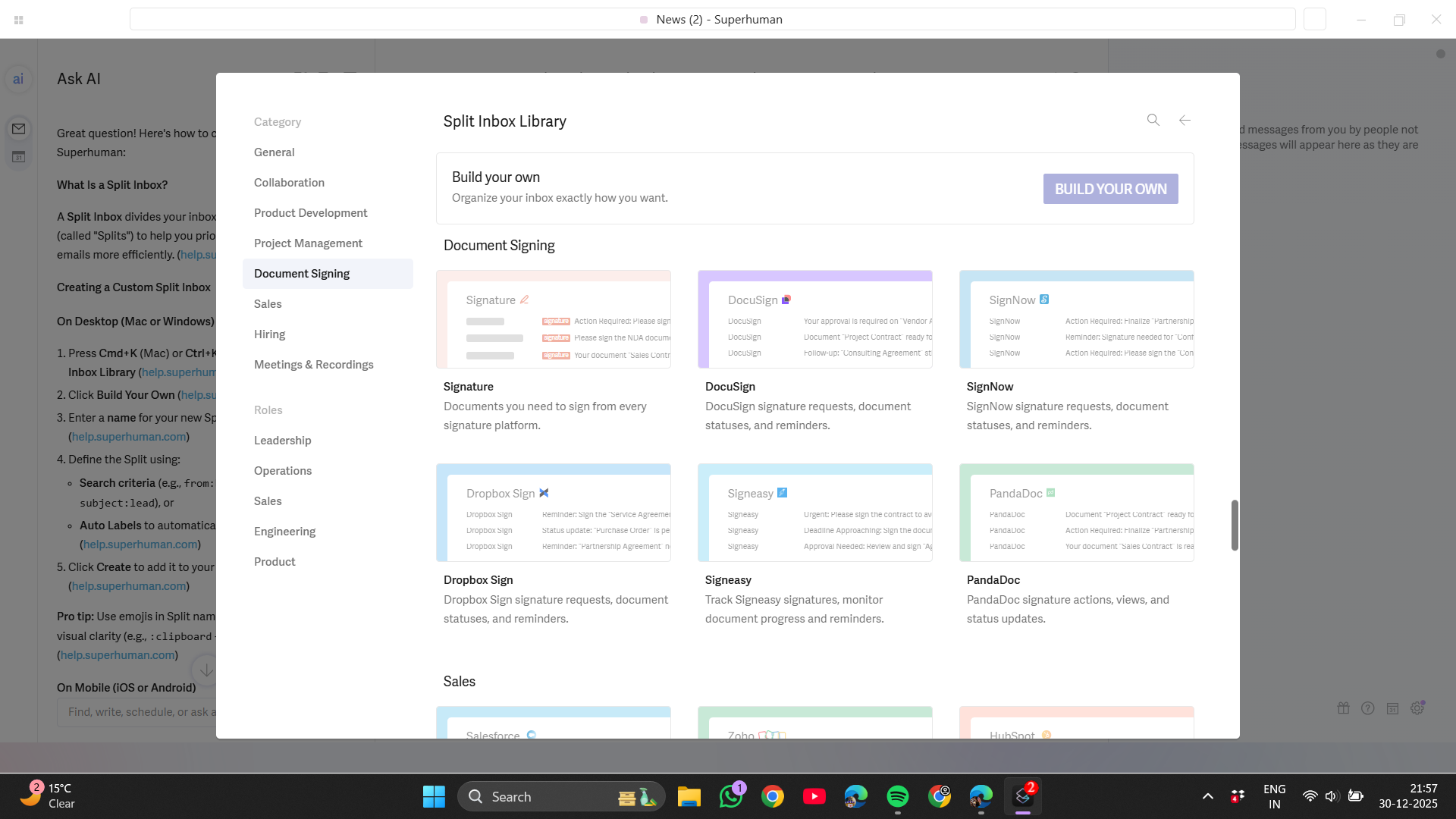


Key ways this helped in daily use:
- Important conversations stay front and centre
- Newsletters and automated emails are contained without being buried
- Calendar-related emails are grouped separately and easier to track
- Fewer emails linger without a clear action or status
Combined with shortcuts such as E to mark messages as done and S to snooze, the split inbox encourages quick, intentional decisions. For heavy email users, this structure becomes a core reason the inbox feels calmer and more manageable over time.
Score: 8.7 / 10
AI writing, drafting, and voice refinement
Superhuman’s AI writing tools are intentionally designed as supportive, not as replacements. Rather than promoting fully automated responses, the AI functions as a drafting and refining layer within the compose window. This distinction matters, because it preserves a sense of authorship while still reducing effort.


In daily use, the AI was most helpful once a rough draft already existed. Refining tone, tightening language, or expanding on a short reply felt natural and quick. Options to shorten, lengthen, or adjust voice made it easier to adapt responses depending on context, whether the email needed to sound more direct, more conversational, or more formal. The AI rarely introduced unnecessary complexity, and the output usually stayed close to the original intent.
What worked particularly well was using AI for small improvements rather than full rewrites. For example, turning a rushed reply into something clearer without changing its meaning took seconds. This was useful during busy stretches where attention was limited but quality still mattered.
That said, the AI is not meant to think strategically. It does not decide what should be said, only how something can be said better. This keeps expectations realistic. For heavy email workflows, this balance feels right. The AI speeds up writing without replacing judgment, which makes it easier to trust over time.
Score: 8.6 / 10
AI-powered search and summarisation
Search is a key area where Superhuman’s AI offers real advantages over typical email clients. Instead of relying purely on keywords, the AI allows more natural queries and provides summarised context when opening long or fragmented threads. This changes how older emails are revisited.

Practically, this reduced the need to reopen multiple messages to piece together a conversation. Thread summaries helped surface key points quickly, especially in long-running discussions or emails that had gone quiet for weeks. This was especially helpful when revisiting discussions with multiple participants or spanning several replies.

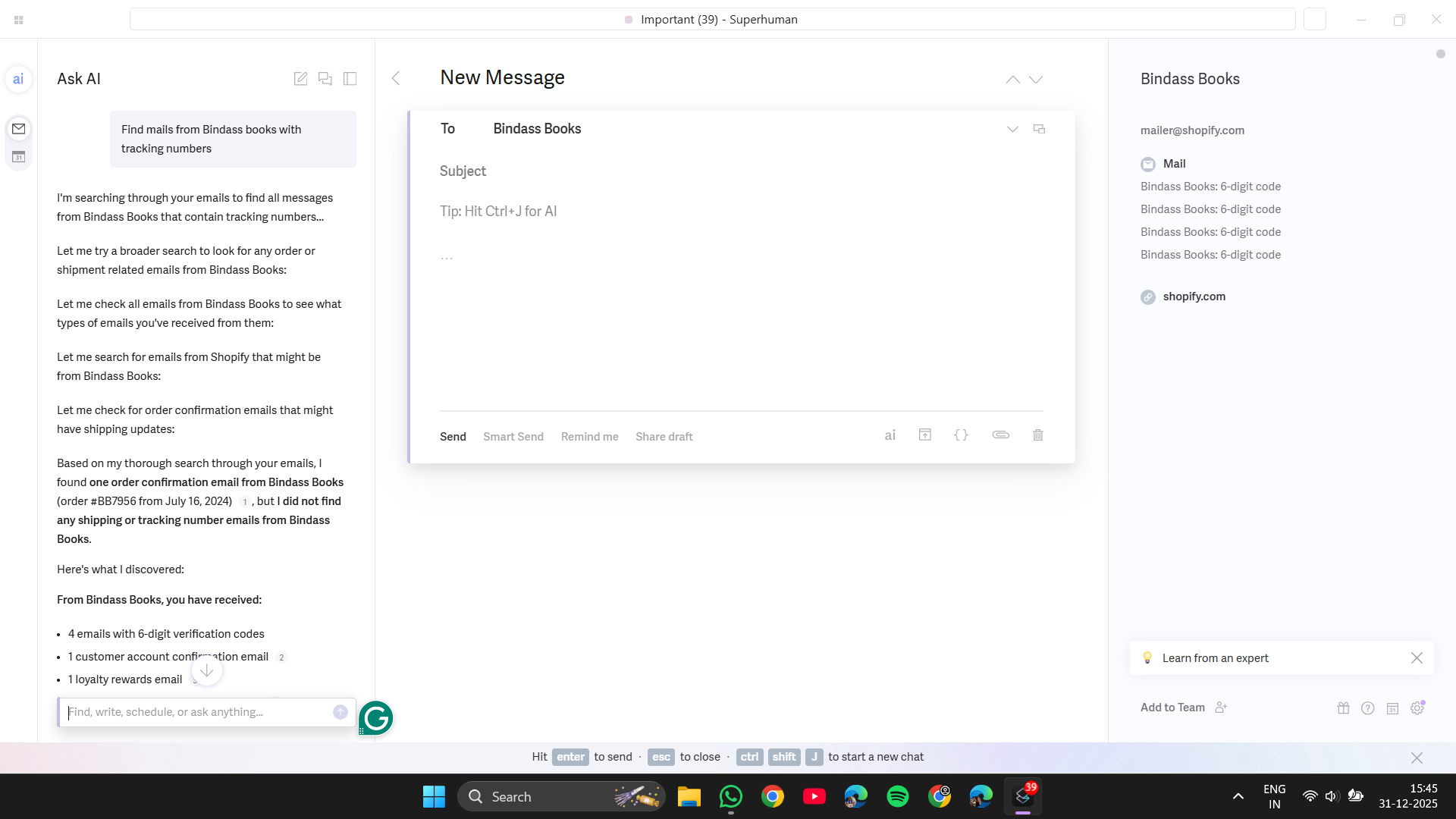


The AI-powered search also felt more forgiving. Slightly vague queries still surfaced relevant emails, reducing the need to remember exact phrasing or sender details. For inboxes with years of accumulated messages, this made retrieval noticeably easier.
A key design decision is that AI does not execute irreversible actions. It can summarise, surface, and organise, but deleting or bulk-moving emails remains manual. This keeps control with the user and avoids the risk of AI making destructive decisions.

Overall, the AI-powered search is a practical enhancement that eases retrieval rather than a flashy gimmick. It boosts recall and clarity without adding risk.
Score: 8.7 / 10
Automation, labels, and rules
Superhuman’s automation is robust yet deliberately limited. Rather than endless rule creation, it emphasizes structured, transparent, and predictable automation. This makes it easier to trust, especially in high-volume inboxes.
The automatic label system sorts emails into logical groups like finance, purchases, travel, and legal topics. These labels can trigger actions like auto-archiving, which keeps the inbox focused on messages that require attention. What makes this system effective is that it works quietly in the background without hiding important emails unexpectedly.


Custom labels can be generated via AI prompts, simplifying complex condition setup and making automation more user-friendly. At the same time, Superhuman includes safeguards like exception lists and “never archive” rules, ensuring important senders are always surfaced.


Automation here feels intentional rather than aggressive. It supports workflow without forcing decisions. Users can see exactly what rules are active and adjust them easily. For people managing complex inboxes, this balance between automation and control is one of Superhuman’s strongest qualities.
Score: 8.9 / 10
Snippets and templates
Superhuman’s snippets aim to cut down repetitive typing without sacrificing natural communication. They allow commonly used phrases, explanations, or responses to be inserted quickly, saving time on emails that follow familiar patterns.
Support for both private and team snippets extends their usefulness beyond individual tasks. For teams, shared snippets help maintain consistency while still allowing flexibility. Snippets can be triggered via shortcuts, keeping the workflow fast and uninterrupted.


An added layer of insight comes from basic analytics on snippet use, like frequency and reply rates. This helps identify which templates are actually effective rather than assuming all reusable responses perform equally.
Snippets do not feel restrictive. They are easy to modify once inserted, which prevents replies from sounding robotic. For users who send similar emails frequently, this feature reduces friction without sacrificing tone.
Score: 8.4 / 10
Calendar and scheduling
Superhuman’s calendar integration is intended to minimize back-and-forth rather than take the place of specialized scheduling tools. Coordination is made simple by the ability to view calendars, share availability, and add meeting links straight from the inbox.

Email-based meeting scheduling frequently results in needless conflict. Superhuman simplifies this by centralizing everything. Within the email flow, time zone awareness, availability sharing, and integration with Google Calendar, Google Meet, Zoom, and Microsoft Teams all function flawlessly.


This works best when email is the main coordination method. It doesn’t replace full scheduling tools but eases the process enough to lessen disruption. For busy workflows, this small improvement adds up over time.
Score: 8.2 / 10
Team collaboration and the wider Superhuman ecosystem
Superhuman’s collaboration features are straightforward and closely integrated with the inbox. Sharing drafts, internal comments, and read statuses streamline coordination without complicating the workflow.

Superhuman allows sharing of drafts and entire email threads for review or approval. Instead of forwarding emails or copying text elsewhere, the context stays attached to the thread itself. Feedback and comments feel contained and clear, which cuts down on back-and-forth. It’s a simple feature, but it makes collaborative email work feel more organised and less messy.


Read statuses provide a helpful clarity layer, particularly in shared inboxes, showing who has seen a message and preventing duplicate responses.
Team collaboration highlights:
- Shared drafts for quick review before sending
- Internal comments that keep feedback out of the thread
- Shared conversations with full context
- Team read statuses to reduce duplicate replies
Score: 8.0 / 10
The wider Superhuman suite: Go, Grammarly, and Coda
Superhuman is part of a broader ecosystem with tools like Go, Grammarly, and Coda, which enhance rather than replace the email experience.
Grammarly, including Grammarly Go, provides additional writing refinement. While Superhuman’s AI handles most email-specific tasks, Grammarly is more helpful for polishing language or external writing.

Go functions as a lightweight AI assistant across apps, useful for quick contextual help.

Coda is available for document creation and collaboration. I did not need to use Coda extensively, as it did not replace my primary document tools. However, it is useful for structured docs, tables, and collaborative work tied to projects.
These tools enhance the ecosystem without being essential.
Performance
Performance is vital for a speed-focused tool, and Superhuman consistently meets this expectation. On Windows, the app remained responsive during extended use and heavy email loads.
Keyboard actions registered instantly, which is essential given how heavily the workflow depends on shortcuts. Navigation between emails, opening threads, and triggering commands felt smooth and predictable. There was no sense of lag or visual delay that could interrupt flow.
Additionally, the application did not consume excessive resources. It operated efficiently in conjunction with other work tools, maintaining consistent performance without noticeable slowdowns. This matters because Superhuman is designed to be used continuously throughout the day, not opened occasionally.
Performance supports the tool’s philosophy. Instead of calling attention to itself, it stays out of the way and allows habits to form naturally.
Score: 8.9 / 10
Privacy and data handling
Superhuman is transparent about data handling, and reading the privacy policy reinforces that clarity. The approach is not minimal-data by design, but it is explicit and controlled.
Key points that stood out:
- User content such as emails and drafts is processed to deliver features
- User content is not sold or monetised
- AI models may be trained using user content, with opt-out controls available
- Email content is not shared with advertisers
- Technical and usage data is collected for performance and security
- Enterprise users benefit from SOC 2 compliance, SSO, audit logs, and admin controls

This setup is a compromise, as advanced inbox features need content access, a fact Superhuman acknowledges. Control is given through settings rather than vague promises.
Score: 8.3 / 10
Pricing and value for money
Pricing is one of the clearest filters when it comes to Superhuman. The tool is positioned firmly in the premium category, and the cost reflects that intention. Based on the pricing shown in the screenshots, Superhuman offers multiple tiers, each aimed at a different level of usage and organisational complexity.
The plans break down as follows:
- Starter
- Priced at approximately $25 per user per month, billed yearly
- Designed for individual professionals
- Includes core Superhuman Mail features
- Access to AI writing, search, and inbox organisation tools
- Business
- Higher per-user pricing than Starter $33 per user per month, billed yearly
- Adds team collaboration features
- Shared drafts, team snippets, and read statuses
- Administrative controls and team-level visibility
- Enterprise
- Custom pricing
- Advanced security and compliance features
- SSO, audit logs, and enterprise-grade controls
- Designed for large organisations with strict data requirements

This pricing structure makes sense when email is a core work tool rather than a secondary communication channel. For heavy email users, the cost can be justified over time through better organisation, faster response handling, and reduced cognitive load. The value compounds with consistent use.
The prices will probably seem high to lighter users. The return on investment rapidly decreases in the absence of consistent, high-volume workflows. Superhuman does not strive to be widely available or reasonably priced. The pricing is in line with its goal of being extremely effective for a particular audience.
Score: 7.9 / 10
Comparison with other tools
Superhuman vs Fyxer AI
Overall winner: Superhuman (or any other tool)
Superhuman and Fyxer AI both target heavy email users, but they solve different pain points.
- Workflow approach
- Superhuman is workflow-first and expects active participation through shortcuts and deliberate actions
- Fyxer works like a background assistant, handling drafts, meetings, and summaries automatically
- Strengths
- Superhuman excels at inbox speed, structure, and long-term control
- Fyxer excels at meeting notes, scheduling help, and assistant-style automation
- Weaknesses
- Superhuman requires time to learn and adjust habits
- Fyxer can feel less precise for inbox organisation and relies heavily on AI judgment
- Pricing
- Both start at around $30 per user per month
- Fyxer delivers value faster due to automation, while Superhuman’s value compounds over time
- Which is better
- Superhuman is better for people who live inside email
- Fyxer is better for people overwhelmed by meetings alongside email
Superhuman vs Shortwave
Shortwave takes a calmer, lighter approach compared to Superhuman’s demanding workflow.
- Workflow approach
- Superhuman is keyboard-driven and system-oriented
- Shortwave focuses on inbox calm, bundling, and AI replies inside Gmail
- Strengths
- Superhuman offers deeper automation, shortcuts, and team workflows
- Shortwave is easy to use from day one and reduces inbox noise quickly
- Weaknesses
- Superhuman has a steep learning curve
- Shortwave lacks depth for complex workflows and power users
- Pricing
- Superhuman costs around $30 per month
- Shortwave costs around $7 per month, making it far more accessible
- Which is better
- Superhuman is better for long-term efficiency and scale
- Shortwave is better for affordable, low-effort inbox relief
Superhuman vs Actor.do
Actor.do leans heavily into automation and inbox management through a separate dashboard.
- Workflow approach
- Superhuman keeps everything inside the inbox
- Actor.do centralises rules, cleanup, and drafting in an external interface
- Strengths
- Superhuman feels faster and more focused once learned
- Actor.do offers powerful automation, cleanup, and AI rules
- Weaknesses
- Superhuman can feel rigid initially
- Actor.do can feel overwhelming and less fluid
- Pricing
- Actor.do is generally cheaper than Superhuman
- Superhuman charges a premium for polish and speed
- Which is better
- Superhuman is better for daily email flow and momentum
- Actor.do is better for automation-heavy inbox cleanup
Limitations and trade-offs
Superhuman’s limitations stem from its core design principles. Its strong opinions come with trade-offs that may not appeal to all users.
- The learning curve is substantial and unavoidable
- Shortcut-heavy interaction requires patience and repetition
- Pricing restricts access for casual users
- AI features assist writing and organisation but do not automate decisions
- Some workflows may feel rigid until fully understood
Initially, Superhuman may seem slower, especially for those used to conventional email clients. It requires an upfront investment of time and focus to realize its benefits. This makes it less forgiving for people who want immediate gains.
At the same time, these trade-offs are intentional. The rigidity enables consistency, and the learning curve creates long-term speed. Superhuman is not flexible in the short term, but it becomes efficient in the long term for those willing to commit.
Final verdict
Superhuman does not aim for immediate user adoption. It’s designed for those willing to reconsider their email habits. The requirement to learn shortcuts, understand workflows, and configure automation is not a flaw, but it does limit who will benefit.
For heavy email users, the payoff is real. Over time, the inbox feels more controlled, less reactive, and more intentional. Tasks move toward completion instead of lingering. Writing becomes faster without losing clarity, and searching old conversations becomes less frustrating.
For everyone else, the experience may feel excessive. Superhuman is best seen as a long-term productivity investment rather than a convenience upgrade. When email is central to daily work, the tool earns its place. When it is not, the cost and complexity may outweigh the benefits.
Final score: 8.6 / 10
Email Management Tools: A Critical Comparison
In the realm of email management, finding the right tool can significantly impact productivity and workflow efficiency. This comparison delves into four prominent tools: Superhuman, Actor.do, Fyxer AI, and Shortwave. Each tool offers unique features aimed at streamlining email management, automation, and bulk handling. We evaluated these tools based on specific criteria such as pricing, automation capabilities, bulk management, integration, user interface, and overall value for money. The goal is to provide a clear understanding of which tool might best suit different user needs, from casual email users to power users who rely heavily on email for their daily tasks.
🔗 Superhuman vs Actor.do | Superhuman vs Fyxer AI | Superhuman vs Shortwave | Actor.do vs Fyxer AI | Actor.do vs Shortwave | Fyxer AI vs Shortwave
Superhuman wins overall due to its robust automation capabilities, strong AI support, and excellent bulk management features. While it has a steep learning curve and high pricing, the benefits for power users who heavily rely on email are substantial. Its integration with other tools and transparent privacy policies further solidify its position as the top choice for those willing to invest the time and money.
Frequently Asked Questions
Superhuman is an email tool designed to enhance productivity through keyboard-driven actions and a structured inbox. Unlike other email clients, it focuses on speed, clarity, and intentional interactions rather than just automation. It requires a learning curve but offers significant long-term benefits for heavy email users.
Superhuman offers multiple pricing tiers. The Starter plan is around $25 per user per month, billed yearly, and includes core features. The Business plan is $33 per user per month with team collaboration features. The Enterprise plan has custom pricing with advanced security and compliance features. It is positioned as a premium tool, reflecting its target audience of heavy email users.
Superhuman’s key features include a split inbox for prioritization, keyboard shortcuts for efficient navigation, AI-powered search and summarization, automation and labeling, snippets and templates for repetitive tasks, and integration with tools like Grammarly and Coda. It also offers team collaboration features and robust privacy controls.
Superhuman is not ideal for casual email users due to its steep learning curve and premium pricing. It is designed for individuals and teams who heavily rely on email for coordination, planning, and decision-making. Casual users might find the tool excessive and the cost unjustified.
Superhuman is transparent about its data handling practices. It processes user content to deliver features but does not sell or monetize this data. Users can opt out of AI model training, and enterprise users benefit from SOC 2 compliance, SSO, audit logs, and admin controls. The privacy policy is explicit and controlled, reflecting a balance between functionality and user privacy.
The main advantages of using Superhuman include enhanced productivity through keyboard shortcuts, a structured and prioritized inbox, AI-assisted writing and search, robust automation, and seamless team collaboration. It is particularly beneficial for heavy email users who need to manage high volumes of emails efficiently and effectively.
Superhuman differs from tools like Fyxer AI and Shortwave in its workflow approach and target audience. Superhuman is workflow-first and expects active participation through shortcuts, making it ideal for heavy email users. Fyxer AI focuses more on automation and meeting notes, while Shortwave offers a calmer, lighter approach with AI replies inside Gmail. Superhuman is more suitable for long-term efficiency and scale, whereas the others cater to different specific needs.
Superhuman’s limitations include a substantial learning curve, a high price point that may not be justified for casual users, and a workflow that can feel rigid initially. The AI features assist with writing and organization but do not automate decisions, requiring users to actively engage with the tool. These trade-offs are intentional and designed to create long-term efficiency for committed users.
Abonneer je op onze nieuwsbrief en ben als eerste op de hoogte van tijd- en geldbesparende AI-tools!
Comments