Conclusion
Wordtune is a reliable tool for refining and polishing existing text, offering a clean interface and useful features like rewriting, tone adjustment, and summarizing. Its strengths lie in its simplicity and affordability, particularly for non-native English speakers and those needing a straightforward editing tool. However, it falls short in several areas, such as the lack of templates, SEO tools, and long-form content generation, which limits its versatility. While it performs well as a secondary editing tool, it may not be indispensable for those requiring more comprehensive writing assistance.
Pros
- Reliable rewriting and tone adjustment features
- User-friendly and minimalistic interface
- Affordable pricing, especially the Unlimited plan
- Useful for non-native English speakers
- Effective summarizer tool
Cons
- Lacks templates and SEO tools
- Limited feature set compared to competitors
- Free tier is quite restrictive
- Not suitable for long-form content generation
Table of Contents
- Overview
- Initial Impressions and User Interface
- Core Features
- Performance and Output Reliability
- Pricing Breakdown and Limitations
- Privacy and Data Handling
- Wordtune vs Quillbot vs Hemingway Editor vs River Editor
- Final Verdict and Overall Score
- Frequently Asked Questions
Overview
I approached Wordtune with moderate expectations. It does not claim to be a comprehensive content platform, SEO tool, or article creator. Instead, it markets itself as a writing assistant that helps enhance and polish existing text rather than generate content from scratch. That’s fair. However, after extensive use, I repeatedly encountered the same frustration: much of what Wordtune’s paid features offer can be achieved by simply using any capable large language model (LLM) to rewrite, shorten, or expand text. The free tier, while functional, quickly reveals its limitations, making the experience feel more like a preview than a complete product.
Wordtune is suitable for writers, students, and professionals working mainly in English who seek an inline editing tool to refine phrasing, adjust tone, and tidy up existing text. Non-native speakers will find the rewrite and synonym features particularly beneficial. It also works well as a lightweight summarizer for lengthy documents, without the need for a complex research platform.
It is less suitable for bloggers aiming to generate complete articles, those requiring SEO tools, marketers looking for templates, or creators wanting detailed control over voice and structure. If your focus is on creating content rather than refining it, Wordtune may quickly leave you disappointed.
Initial Impressions and User Interface
The onboarding process is friendly and thoughtfully designed. It prompts users to specify their primary use case—be it school, personal, or professional—and then gathers details about their profession, company size, comfort level with English, and typical writing platforms. The options for the latter include Gmail, Outlook, WhatsApp, Google Docs, LinkedIn, Canva, Slack, Twitter, Notion, Facebook, and Instagram.


Inside the editor, the interface is uncluttered and minimalistic. It features a light theme with a spacious central writing area, a right-side panel for Ask AI and Proofread functions, and a slim toolbar at the top. While I prefer dark mode and was slightly disappointed that Wordtune does not offer it, the light interface is unobtrusive and straightforward, though somewhat plain.

What immediately stood out was the clean and unobtrusive design. There are no intrusive upgrade pop-ups, no distracting animations—nothing to demand unnecessary attention. The toolbar buttons are legible and well-labeled. As a tool meant to complement the writing process quietly, the initial impression is quite positive.

What was less impressive was the limited feature set. The formatting options include only basic headings, bullet and numbered lists, task lists, bold, italic, underline, and clear formatting. There are no templates, no content structuring guides, and only two style presets: Formal and Casual. For users accustomed to more feature-rich tools, this minimalism can quickly feel restrictive rather than focused.
Core Features
Rewrite, Formal, and Casual Tone
The core feature of Wordtune is its Rewrite function, which performs reliably. Highlight a sentence, click Rewrite, and a list of alternative phrasings appears below. Each suggestion varies slightly in structure or wording, with color coding indicating which words have changed. This makes it straightforward to see the differences without re-reading the entire text.
The Formal and Casual tone modes are positioned adjacent to the Rewrite button in the toolbar. Selecting either produces rewrites with adjusted tone. Formal suggestions tend to be more polished and structured, while Casual options relax the language and often simplify phrasing naturally. Both modes offer multiple alternatives, providing a choice rather than a single, AI-determined option.


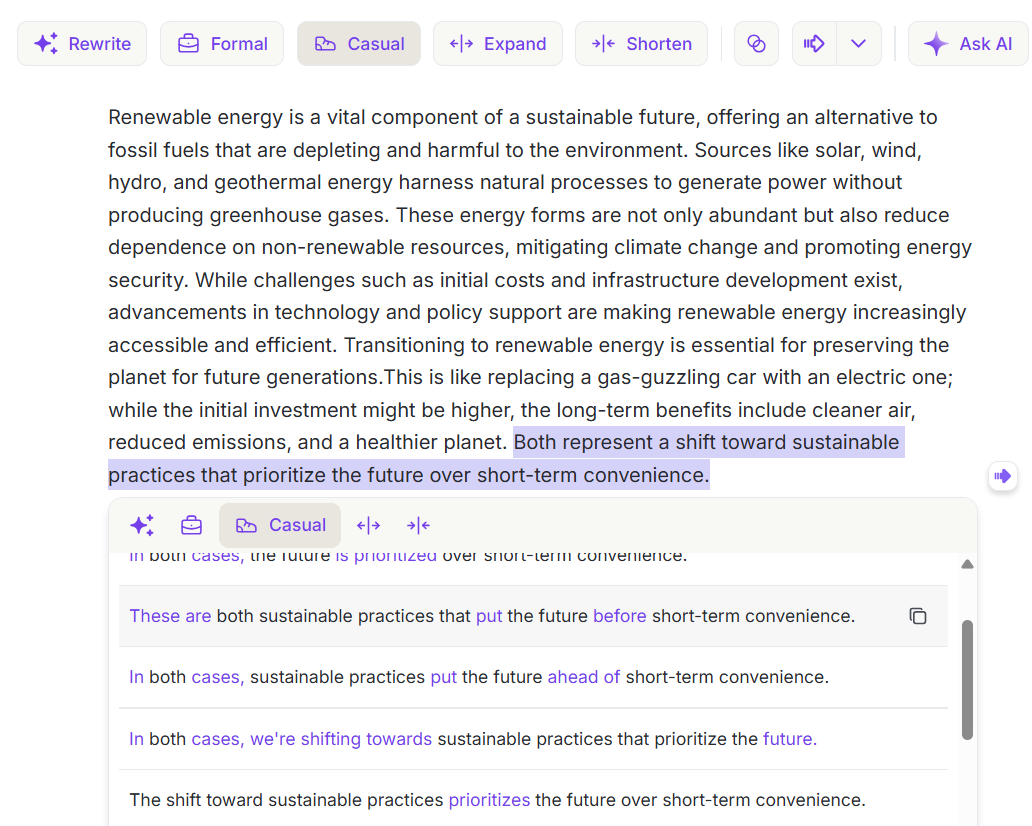
The quality of rewrites is solid for short sentences and acceptable for longer, multi-clause structures. Errors are rare, and the original meaning is usually maintained. While the suggestions may not dramatically enhance the sentence, they offer alternative perspectives on the same idea—helpful when something feels off but the reason isn’t clear. However, they tend to lack nuance and personal voice; the rewrites are clean but somewhat neutral, suitable for professional contexts but less so when personality or style are important.
Expand and Shorten
The Shorten function performed better than anticipated. Highlighting a two-sentence segment yielded multiple condensed versions, most of which preserved the original meaning while removing superfluous words. Occasionally, these shorter versions even improved the clarity or impact compared to the original, unlike some tools that simply delete words without considering context.


The Expand feature was inconsistent. When applied to a short sentence about renewable energy, it added relevant context and remained on topic. However, the expansions often felt like padding—filling space without offering new or surprising insights. While it can be useful for quick lengthening of brief paragraphs, it doesn’t develop ideas in a meaningful or in-depth manner.
The Dropdown Suggestions
The dropdown menu beneath the main toolbar offers more advanced options: Continue Writing, Explain, Expand On, Emphasize, Give an Example, Counterargument, Define, Give an Analogy, and Add a Conclusion. Contextual suggestions also appear depending on the current text, making it more dynamic.


Testing the Give an Analogy prompt on a paragraph about renewable energy yielded specific and relevant comparisons that genuinely related to the content. The Counterargument option can be helpful in academic contexts where opposing viewpoints are needed. Continue Writing provides a coherent next sentence that maintains the tone. Overall, these prompts seem thoughtfully designed to produce meaningful suggestions rather than generic filler.
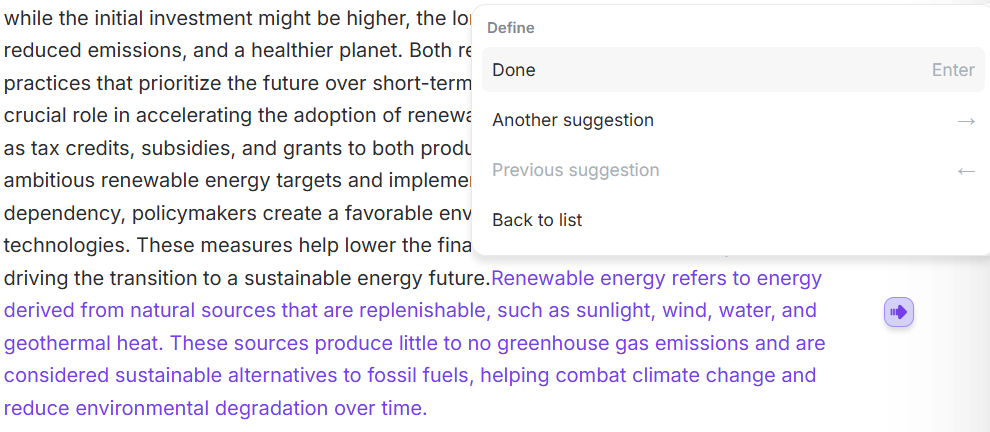
The Explain and Define options in the dropdown are less effective, often generating text that resembles dictionary entries rather than natural writing. They are functional but would require rewriting before being suitable for inclusion in a polished piece.
Synonyms and Proofread
The synonyms feature is simple and works exactly as expected. Click any word, get a small popup with alternatives. The options are contextually appropriate, not just dictionary synonyms dropped in randomly. When I clicked the word “convenience” in a sentence, it offered many synonyms. Most of those fit the sentence, and a few were more precise than my original choice. That is the kind of small, useful nudge that actually improves writing without getting in the way.


Proofread lives in the right panel alongside Ask AI. It scans the document and flags grammar and spelling issues. When I tested it on clean text, it returned “Fantastic! No edits needed,” which is a pleasant result, though not a very revealing one. From the onboarding tooltips, it is clear the tool catches things like “your” vs “you’re” and similar errors. It is not a replacement for a dedicated grammar checker like Grammarly or even Hemingway’s grammar layer, but as a quick sweep before submitting or publishing something, it does the job. Based on my testing, it handled surface-level grammar/spelling well but did not provide the depth of feedback or advanced writing suggestions typical of full grammar platforms like Grammarly.
Ask AI and Summarizer
Ask AI, powered by Jamba, is accessible in the right panel. It can generate drafts for emails, essays, LinkedIn posts, recruiting messages, and respond to various prompts. For example, when asked to write an essay on renewable energy, it produced a clear, organized paragraph with an Insert button to add it directly into the document. The process is seamless. However, the output tends to be concise and not suitable for long-form content; it provides well-structured short snippets that serve as useful starting points rather than complete articles.

The platform does not offer templates. Users needing specific formats—such as product reviews, how-to guides, or comparison outlines—must create their own. For a tool aimed at professionals and students working across various platforms, the lack of template support is a notable omission.


The summarizer is arguably the most impressive feature. It accepts input via PDF upload, URL, or pasted text, with a generous limit of 20,000 words per summary. The results are displayed side-by-side: the summary on the left and the source text on the right, with relevant passages highlighted in blue for clarity. A Notes tab allows users to add personal comments alongside the summary. This side-by-side view makes it easy to verify the summary against the original, making it highly practical for students and professionals dealing with lengthy documents.
Performance and Output Reliability
Wordtune demonstrated solid technical stability. No crashes occurred, suggestions appeared promptly, and inline highlighting was consistent. The rewrite feature, in particular, was responsive and delivered reliable results across various inputs.
Its limitations become apparent quickly. Wordtune is designed primarily for editing existing text. When attempting to generate content from scratch using only Ask AI and dropdown tools, the experience deteriorated. Suggestions lacked coherence without a solid source, and the interface offered no support for structuring original content.
This is a deliberate design decision. Consequently, Wordtune functions best as a second-pass editing tool rather than a first-draft creator. It is dependable for polishing and refining existing text but limited when it comes to initial content creation.
A more significant limitation is the daily rewrite cap on the free tier—just 10 rewrites per day. In practice, this limit is exhausted within minutes of serious use, leaving users to manually perform editing tasks that the tool is intended to assist with.
Pricing Breakdown and Limitations
Wordtune offers three annual billing plans.
- The Basic plan is free, providing 10 rewrites and AI suggestions daily, along with AI-generated content and three AI summaries per month. It includes unlimited spelling and grammar checks.
- The Advanced plan costs $6.99 per month, increasing the limit to 30 rewrites daily, 15 summaries per month, and offering unlimited AI suggestions, spelling, and grammar checks.
- The Unlimited plan is $9.99 per month, removing all limits on rewrites, summaries, vocabulary enhancements, clarity, fluency improvements, and including premium support.

The pricing is genuinely affordable. $9.99 per month for the Unlimited plan is competitive by any measure and the Advanced plan at $6.99 is quite cheap. But cheap does not mean worth it in every case.
My main concern with the pricing isn’t the cost itself, but the value it offers. Wordtune primarily charges for increased volume of rewrites and AI suggestions—features that capable large language models (LLMs) can perform for free, without daily limits. The summarizer is handy, but free alternatives are available. The proofread function is useful but not exclusive. Without additional features like templates, SEO tools, voice training, or long-form content generation, the paid tiers mainly unlock higher usage of a single function rather than offering fundamentally different capabilities.
Major limitations include:
- Absence of templates on all plans
- Lack of SEO integration across all plans
- Ask AI does not produce long-form content on any tier
- Limited tone and voice options—only Formal and Casual presets
Privacy and Data Handling
Wordtune gathers identifiers such as name, email, username, and password, as well as demographic information like age, gender, and marital status. It also collects payment details, communication data, geolocation via IP, usage patterns, and importantly, the content uploaded—texts, prompts, and documents.
Important points include:
- Uploaded content may be used for AI training
- Data sharing includes affiliates, service providers, legal authorities when necessary, and during business transfers such as mergers or acquisitions
- They declare they do not sell or share data for targeted ads
- Data is kept until deletion or user request, but may be retained longer for legal or regulatory compliance
- Aggregated and anonymized data may be stored indefinitely
- International data transfers can occur, safeguarded by contractual and legal measures
- Not designed for users under 18
The AI training note is the one that deserves attention. Content pasted into the summarizer or the editor can be used to improve Wordtune’s models. For anyone working with sensitive documents, client materials, or confidential drafts, that is something to be aware of before using the tool.
Content submitted—such as prompts, pasted text, or uploaded documents—may be used for AI training. While typical account data like email and billing info are shared with service providers, the ownership rights over input and output are not explicitly detailed in the privacy policy and should be reviewed in the Terms of Use. Generally, users retain ownership of their input, granting the platform a license to process it, while ownership of generated output varies.
Wordtune vs Quillbot vs Hemingway Editor vs River Editor
|
Feature |
Wordtune |
Quillbot |
Hemingway Editor |
River Editor |
|
Starting Price |
Free / $6.99/mo |
Free / ~$8.33/mo annually |
Free / $8.33/mo annually |
Free / $14/mo |
|
Core Focus |
Rewriting, tone adjustment, summarizing |
Paraphrasing, summarizing, grammar, translation |
Readability editing, sentence clarity |
Long-form document writing with AI assistance |
|
Long-form Generation |
No |
No |
No |
Yes |
|
Tone Control |
Formal/Casual only |
Multiple paraphrase modes |
Readability target adjustment |
Multiple voice presets and granular tags |
|
AI Humanizer |
No |
Yes |
No |
Yes (limited reliability) |
|
Summarizer |
Yes, 20,000 word limit |
Yes |
No |
No |
|
Grammar and Proofread |
Yes |
Yes |
Yes, with color highlighting |
Yes |
|
Dark Mode |
No |
No |
Yes |
No |
|
Daily Free Limits |
10 rewrites/day, 3 summaries/month |
~125 words paraphrase cap |
Full highlights free, AI locked |
250 one-time credits |
Quillbot is the closest comparison and honestly, for most use cases it delivers more practical value. The paraphraser gives more flexibility, the humanizer works, the translator is a bonus, and the pricing is comparable. Hemingway Editor wins for anyone focused on editing clarity and reading level, it does that specific job better than anything else in this list and the color-coded feedback system is genuinely smart. River Editor is the most capable of the four for actual writing work, with voice controls, long-form drafting, contextual AI editing inside documents, and a workspace that feels built for serious projects.
I’d argue QuillBot and Hemingway retain somewhat more distinct value than Wordtune. QuillBot offers a broader specialized editing toolkit (paraphrasing, summarization, grammar, citation/plagiarism features), while Hemingway provides focused readability analysis rather than generic AI rewriting. Wordtune overlaps more directly with free ChatGPT-style rewrite assistance, so its differentiation feels weaker by comparison.
Wordtune occupies a middle ground. It surpasses simple spell checkers but falls short of Quillbot’s paraphrasing capabilities, lacks Hemingway’s focused editing features, and doesn’t match River Editor’s strengths in long-form writing and voice control. Its most notable feature is the summarizer, but this alone isn’t sufficient to define the entire tool.
Final Verdict and Overall Score
Overall, Wordtune is a thoughtfully designed tool with a clear purpose, and it generally fulfills that role. Its rewriting suggestions are straightforward, the synonyms are subtly helpful, and the dropdown tools perform as advertised. The summarizer stands out as a feature I would frequently use. The interface is user-friendly, and the pricing—especially for the Unlimited plan—is reasonable in absolute terms.
In truth, Wordtune functions primarily as a polishing tool—something that can be achieved easily for free with capable AI assistants. While it offers a clean interface with some useful features, it doesn’t provide the depth or breadth to be indispensable. The absence of templates, SEO tools, voice training, long-form writing capabilities, and the limitations of Ask AI for longer content are significant gaps that the low cost doesn’t fully offset.
It’s a tool that’s easy to appreciate but difficult to rely on fully. Ideal for a secondary editing step, yet less suitable as the main component of a writing process.
Final Score: 6.4 out of 10
Frequently Asked Questions
Wordtune is a writing assistant designed to enhance and polish existing text. It offers features like rewriting, tone adjustment, summarizing, and basic grammar checks. It is not intended for generating content from scratch but rather for refining and improving already written material.
Wordtune offers reliable rewriting and tone adjustment features but lacks the specialized toolkit of Quillbot and the focused readability analysis of Hemingway Editor. While it is user-friendly and affordable, it may not be as indispensable as its competitors due to its limited feature set.
Wordtune has several limitations, including the absence of templates, SEO tools, and long-form content generation. The free tier is quite restrictive with only 10 rewrites per day, and the paid tiers mainly offer increased usage limits rather than fundamentally different capabilities.
Yes, Wordtune can be particularly beneficial for non-native English speakers. Its rewrite and synonym features can help refine phrasing and improve language use, making it a useful tool for those looking to enhance their English writing skills.
Wordtune offers three pricing plans: a free Basic plan with limited rewrites and summaries, an Advanced plan at $6.99 per month with increased limits, and an Unlimited plan at $9.99 per month with no limits on rewrites and summaries. All plans include spelling and grammar checks.
No, Wordtune does not currently offer a dark mode. The interface is minimalistic and straightforward but only available in a light theme, which might be a drawback for users who prefer darker interfaces.
No, Wordtune is not designed for generating long-form content. It is primarily a tool for refining and polishing existing text rather than creating content from scratch. Users looking for long-form content generation should consider other tools like River Editor.
Abonneer je op onze nieuwsbrief en ben als eerste op de hoogte van tijd- en geldbesparende AI-tools!
Comments