Conclusion
Auto-Post.io is a solid tool for bloggers seeking consistent content generation and scheduling with minimal manual effort. It excels in its campaign system and user-friendly dashboard, making it a good choice for those using supported platforms like WordPress, Webflow, or Wix. However, its limitations in integrations, average writing quality, and lack of advanced customization options make it less suitable for those desiring more control and higher-quality writing. Overall, it’s a decent tool but not exceptional.
Pros
- User-friendly dashboard and interface
- Effective campaign system for automated blog publishing
- Basic SEO features and scoring
- Responsive performance and quick content generation
- Reasonable pricing structure
Cons
- Limited integrations (only WordPress, Webflow, and Wix)
- Average writing quality with a lack of tone customization
- Basic editor without AI assistance or advanced rewriting tools
- Lack of deeper SEO optimization suggestions
Table of Contents
- Introduction
- Getting Started & First Dashboard Experience
- Core Features
- Writing Quality & Performance
- Credits, Plans & Pricing
- Privacy & Data Handling
- Comparison: Auto-Post.io vs BlogDog vs ContentPen
- Final Verdict & Overall Score
- Frequently Asked Questions
1. Introduction
I went into Auto-Post.io hoping for a flexible tool that would allow me to experiment with tone and structure. From the description, it felt like an effective automation tool for bloggers seeking consistent content generation and scheduling with minimal manual effort. And that is exactly what it tries to be. It’s clearly built around campaigns and recurring publishing rather than hands-on writing.
From what I understood, Auto-Post.io is clearly aimed at users who want automated blog publishing. It’s not for casual writing or intensive editing, but rather a campaign-style system where content is generated and scheduled regularly. It feels more like a content machine than a writing assistant. That distinction became very clear as I explored further.
But very early on, I realized this isn’t really a writing assistant in the traditional sense. It’s more of a system. A machine that runs in the background and produces blog posts based on keywords and frequency settings. While not inherently negative, this shapes the overall experience. Personally, I prefer tools that allow deeper voice customization, so I was curious how this platform balances automation with control.
2. Getting Started & First Dashboard Experience
The initial step was selecting between website connection or manual campaign creation. Immediately, a limitation became apparent: only three integrations are supportedWordPress, Webflow, and Wix. Since I blog on Hashnode, connecting wasn’t possible, leaving manual setup as the only route. It’s somewhat restrictive that only these specific platforms are supported; it would be more flexible if the tool could analyze any URL for context and keywords.


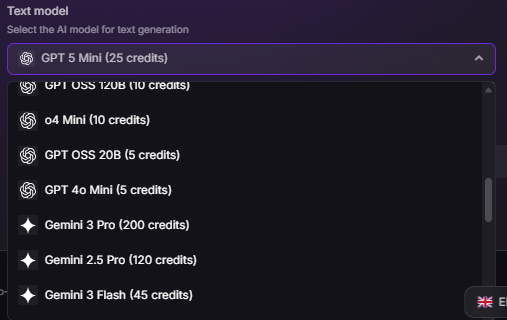
Creating the campaign was straightforward. I input a campaign name, added keywords manually, and chose from various models for text and image generation, which I appreciated. Being on the free plan, I selected GPT-5 Mini for text and Google Nano Banana for images due to their lower cost and default recommendations. A web search toggle was available to enhance content freshness, though it consumes more credits; I turned it on briefly to test its functionality..

The dashboard interface was quite user-friendly. I favor dark themes, which might have influenced my impression, but it appeared clean and well-organized. Active campaigns, generated posts, and overview panels were all clearly visible without clutter. Watching content blocks being automatically generated under the campaign was surprisingly satisfying..

Frequency settings were adjustable, with a default of daily, and easy to modify via a simple slider. It worked smoothly. However, a clear limitation was that without connecting a supported website, automatic publishing isn’t feasible. Content is generated but remains inactive..
Overall, onboarding was straightforward and not overwhelming. The structure is logical. My main wish is for less restrictive integrations, as that was the first significant hurdle I encountered..
3. Core Features
Campaign System + Keyword Management
The platform centers on campaigns. After creating one manually, all other functions branched from there. I could set the post generation frequency, which was defaulted to daily, and adjusting it was straightforward. The scheduling controls felt intuitive and not overly technical..


Without a website connection, I still saw content blocks being generated within the campaign. Watching this happen made the automation feel tangible—it wasn’t just a static dashboard but an active content creator..

Keyword management offered two options: generate from a connected website or input manually. Since Hashnode couldn’t be connected, manual entry was my only choice. It worked adequately but felt somewhat limited. An ‘improve keywords’ feature was available but locked behind a subscription. On the free tier, keyword management is functional but lacks advanced metrics like search volume or difficulty..
Score: 8/10
Article Generation + Editor Experience
The article generated was approximately 1,400 to 1,500 words, which felt sufficiently substantial. It was a full-length post with proper structure, clear headings, and a logical flow..

The article included a single featured image at the top—adequate but nothing special. It looked clearly AI-generated, which I see as a drawback. Beyond that, no additional images appeared within the content, making the blog look somewhat plain with long text sections after the intro..

The writing was very structured—clean, organized, almost textbook-like. It didn’t seem chaotic or messy, but it also lacked a human touch. The tone was safe, with predictable transitions. It didn’t feel robotic, but it lacked nuance. Overall, it was average—usable but not remarkable..
There was no option to adjust tone—no casual, formal, storytelling presets, or the ability to upload previous content for training. No brand voice customization was available. The output was essentially what the system deemed best based on the keywords..

The editor is simple, with basic formatting options like headings, bold, italics, and lists. All edits are manual—there’s no AI assistant or rewriting tool within the editor to help refine content. Many platforms now offer such features, but this one does not..
Meta titles and descriptions are automatically generated, which is convenient. The SEO score is visible, so it’s not entirely barebones. However, from a content refinement standpoint, it feels quite basic..
Score: 7/10
SEO Features
The SEO section displays a numeric score, which I found helpful. It breaks down elements such as title, meta description, keyword usage, content quality, images, and categories, providing useful feedback..

Basic SEO features are present: keyword targeting, generated meta descriptions, and a visible score. However, deeper optimization suggestions, like internal linking prompts, were absent or not active in the generated content..
Overall, the SEO capabilities feel moderate—better than some competitors like Blogdog, but not highly advanced..
Score: 7/10
Calendar
The calendar view stands out as one of the more organized features. It clearly displays scheduled and published posts, making the automation process feel structured rather than chaotic..

However, without a supported website connection, it remains mainly a visual planning tool. Automated publishing relies entirely on integrations, so the calendar’s usefulness is limited unless fully connected..
Score: 6.7/10
Integrations + Website Analysis
Integrations are restricted to WordPress, Webflow, and Wix. Since I use Hashnode, I couldn’t connect my blog, which was the main obstacle for me..

Website analysis depends on integration. On the free plan, only two analyses are available before needing to upgrade or purchase credits. I didn’t explore this in detail due to the connection limitations..

The integration instructions themselves are clear and well explained. So structurally, the system is organized. But the lack of broader platform support makes it feel narrow in real-world use.
Overall, the platform feels stable and system-oriented, with a strong focus on automation. Customization and flexibility, however, are secondary priorities..
Score: 6.5/10
4. Writing Quality & Performance
Performance-wise, the platform operates smoothly. I encountered no crashes, delays, or loading problems. Content generation was quick, and navigating between dashboard, campaigns, and calendar was responsive, indicating solid technical performance..
Now the more important part. Writing quality. The article length, around 1,400 to 1,500 words, is actually decent. It’s not short. It has structure, clear headings and logical sections and it reads cleanly. That part is solid but depth is where it starts feeling average.
The writing follows a very predictable structure: introduction, explanation, subheading, explanation. It’s neat but lacks natural expressiveness. It doesn’t scream AI, but it feels formulaic and neutral—lacking personality or sharp insights. Grammatically, it’s polished, but it doesn’t engage or stand out..
Compared to ContentPen, it feels less rich; compared to BlogDog, it’s noticeably better. Overall, it’s somewhere in the middle—usable and decent, but not particularly exciting..
Overall, I’d call the writing quality average. Structured, readable, not embarrassing. But not premium either.
5. Credits, Plans & Pricing
Auto-Post.io runs entirely on a credit system. Every generation consumes credits. The model chosen affects how many credits are used. Turning on web search also consumes extra credits. So there’s constant awareness of usage.
The free plan gives 1,000 credits, which roughly translates to about four blog posts depending on settings. It’s enough to test things, but not enough to run a serious automation setup. Though I burned through 650 credits with just 2 blog posts, which I believe was due to toggling on the web search feature.

Paid plans are structured like this:
- Silver – €9.99 per month
- Gold – €19.99 per month
- Platinum – €49.99 per month

Higher plans obviously give more credits and additional features. There’s also the option to buy extra credits separately, and even an auto-purchase setting if credits run out.

One thing I noticed is website analysis seems limited on the free plan. It looks like only two analyses are allowed before requiring more credits or an upgrade.
Pricing wise, it’s not unreasonable. But when I factor in the average writing quality and limited integrations, I don’t immediately feel like it’s a no-brainer subscription either. It feels fairly priced for what it offers. Just not groundbreaking.
6. Privacy & Data Handling
I went through the privacy section just to see if anything felt off, and honestly it reads pretty standard. Nothing overly complicated, nothing that made me pause too much.
- They collect basic stuff like IP address, where the visit came from, ISP details, and of course whatever personal information is entered while using the platform. That’s pretty expected. It says the data is mainly used to run and improve the service, plus basic analytics. So nothing dramatic there.
- Some information is required if certain features are used, which makes sense. It’s not one of those zero-data tools. Using it means sharing some data, that’s just part of how these systems work.
- They clearly state that data isn’t sold or randomly shared. If the company is ever sold, the new owner would still have to follow the same privacy rules. That part felt reassuring at least.
- Cookies are used for navigation and analytics. Disabling them is possible, but parts of the platform might stop working properly. So technically there’s a choice, but realistically cookies are kind of necessary.
- They also mention database protection and compliance with French data regulations. User posts that break laws can be removed, and abuse can lead to action. So they do draw a line there.
Overall, it feels normal. Not overly invasive. Not overly minimal either. Just what would be expected from a SaaS tool operating in Europe.
7. Comparison: Auto-Post.io vs BlogDog vs ContentPen
|
Factor |
Auto-Post.io |
BlogDog |
ContentPen |
|
Starting Price |
€9.99/month (Silver) |
~€19/month |
$39/month |
|
Article Length |
~1,400 – 1,500 words |
~1300 words |
~4,000 words |
|
Writing Quality |
Average, structured but slightly flat |
Weak, clearly AI |
Stronger, more complete |
|
SEO Optimization |
Basic SEO score, title, meta |
Very shallow |
Detailed SEO score, keyword panel |
|
Images Included |
Single featured image |
None |
Multiple images throughout |
|
Internal Linking |
Not obvious in editor |
Not visible |
Visible in article info |
|
Editor AI Assistance |
None |
None |
Built-in AI chat helper |
|
Customization (Tone/Voice) |
None |
None |
Presets + editable settings |
When I look at Auto-Post.io, BlogDog, and ContentPen side by side, the difference really comes down to depth and control. Auto-Post.io sits somewhere in the middle. It has a clean UI, a proper campaign system, and decent automation, but the writing quality feels average and integrations are limited. BlogDog felt the weakest to me. The articles were thinner, clearly AI-generated, and lacked real SEO depth or refinement tools. ContentPen, on the other hand, even though on the pricier side, felt the most complete to me. The articles were longer, more detailed, included multiple images, and the built-in AI editing tools actually made a difference.
If I had to choose purely based on overall usefulness, ContentPen wins for me despite being pricier. It simply feels more comprehensive and reliable. Auto-Post.io is fine if the main goal is structured automation on supported platforms. BlogDog would be my last choice out of the three.
8. Final Verdict & Overall Score
After testing Auto-Post.io, I see it as a stable, clean platform primarily focused on automation. Its campaign system is well-organized, the dashboard is user-friendly, and the SEO scoring is useful. The pricing is reasonable. However, the writing quality is average, integrations are limited, and there’s no tone customization, brand voice training, or AI editing within the editor. It functions adequately but lacks depth and power..
It’s suitable for bloggers on WordPress, Webflow, or Wix seeking regular automated content. For those desiring more customization or higher-quality writing, it may feel somewhat restrictive. Personally, I consider it solid but not exceptional..
Overall, I would rate it a 7 out of 10.
Frequently Asked Questions
Auto-Post.io is an automated blog publishing tool designed for bloggers seeking consistent content generation and scheduling with minimal manual effort. It is aimed at users who want to automate their blog publishing rather than those looking for a hands-on writing assistant. It is best suited for bloggers using WordPress, Webflow, or Wix.
Auto-Post.io generates articles based on keywords and frequency settings, producing structured and clean content around 1,400 to 1,500 words. However, the editor is basic, offering only fundamental formatting options without AI assistance or advanced rewriting tools. The writing lacks a human touch and tone customization, making it feel somewhat formulaic.
The main limitations of Auto-Post.io include restricted integrations (only WordPress, Webflow, and Wix), average writing quality with a lack of tone customization, and basic SEO features. Additionally, without a supported website connection, automatic publishing is not feasible, and the free plan has limited credits and website analyses.
Auto-Post.io sits in the middle when compared to BlogDog and ContentPen. It offers better writing quality and SEO features than BlogDog but falls short of ContentPen’s depth and control. ContentPen provides more detailed articles, multiple images, and built-in AI editing tools, making it a more comprehensive and reliable choice despite its higher price.
Auto-Post.io offers several pricing plans: Silver at €9.99 per month, Gold at €19.99 per month, and Platinum at €49.99 per month. Higher plans provide more credits and additional features. The free plan gives 1,000 credits, enough for about four blog posts, but with limited website analyses and features.
Auto-Post.io’s privacy policy is standard for a SaaS tool. It collects basic information like IP addresses and personal data entered on the platform, using it to improve the service and for analytics. Data is not sold or randomly shared, and the platform complies with French data regulations, ensuring a level of data protection.
Auto-Post.io offers basic SEO features, including a numeric SEO score that breaks down elements like title, meta description, keyword usage, content quality, images, and categories. It provides generated meta descriptions and keyword targeting but lacks deeper optimization suggestions like internal linking prompts.
Abonneer je op onze nieuwsbrief en ben als eerste op de hoogte van tijd- en geldbesparende AI-tools!
Comments