Conclusion
BlogDog presents itself as a straightforward, automated blogging tool aimed at small businesses and founders who need basic SEO content without much effort. While it delivers on speed and simplicity, the overall experience feels restrictive and the content quality falls short of expectations. The articles generated are shallow, lack depth, and are clearly AI-written, making them unsuitable for those seeking high-quality, engaging content. Compared to competitors like Nextblog and Contentpen, BlogDog feels basic and underwhelming, especially in terms of SEO features and customization options.
Pros
- Supports many European languages
- Clean and straightforward dashboard
- Quick article generation
- Clear integration instructions
Cons
- Strict integration requirements
- Shallow and obviously AI-generated content
- Limited free experience with only one draft allowed
- Basic SEO features lacking depth and optimization tools
Table of Contents
- Introduction
- Getting Started & Dashboard Experience
- Core Features
- Keyword Management
- Article Generation
- Editor Experience
- SEO Features
- Integrations & Publishing
- Calendar & Draft Limits
- Performance & Writing Quality
- Pricing, Plans & Limits
- Privacy & Data Handling
- Comparison: BlogDog vs Nextblog vs Contentpen
- Final Verdict
- Frequently Asked Questions
1. Introduction
When I first encountered BlogDog, I initially thought: This could be one of those tools that quietly manages SEO blogging in the background while I focus on other tasks. It markets itself as an automated blogging solution for founders and small businesses who understand the importance of SEO but tend to postpone it.
Based on my experience, BlogDog is designed for those who prefer not to spend time writing articles weekly. It seems targeted at business owners seeking traffic without delving deeply into content strategy. The overall approach is very much about ‘set it up once and let it operate autonomously.’
However, I must be upfront: it is not designed for those who prioritize high-quality writing. It does not cater to users wanting control over tone, voice, depth, structure, or storytelling. Nor is it suitable for those expecting content that feels handcrafted. I anticipated something akin to polished long-form SEO content, but what I received was merely functional and not particularly impressive.
My initial impression? Clean branding, bold promises, and high expectations. Yet, as I tested it, those expectations gradually diminished.
2. Getting Started & Dashboard Experience
The setup process starts with entering a website URL. That part is mandatory. There’s no skipping it. A language dropdown is available, which is nice, and then the tool scans the website to ‘understand’ the niche. One positive note is that Blogdog supports many (European) languages.

In my case, it didn’t work with my Hashnode blog at all. That was frustrating. I had to use a generic URL just to move forward. That already made the whole process feel slightly rigid. The system seems strict about what it accepts.

After the URL step, there’s a form asking for business name, what the business does, ideal customer, and what the blog should achieve. Those fields are editable, which I liked. At least that part didn’t feel locked in. Everything can be adjusted manually.

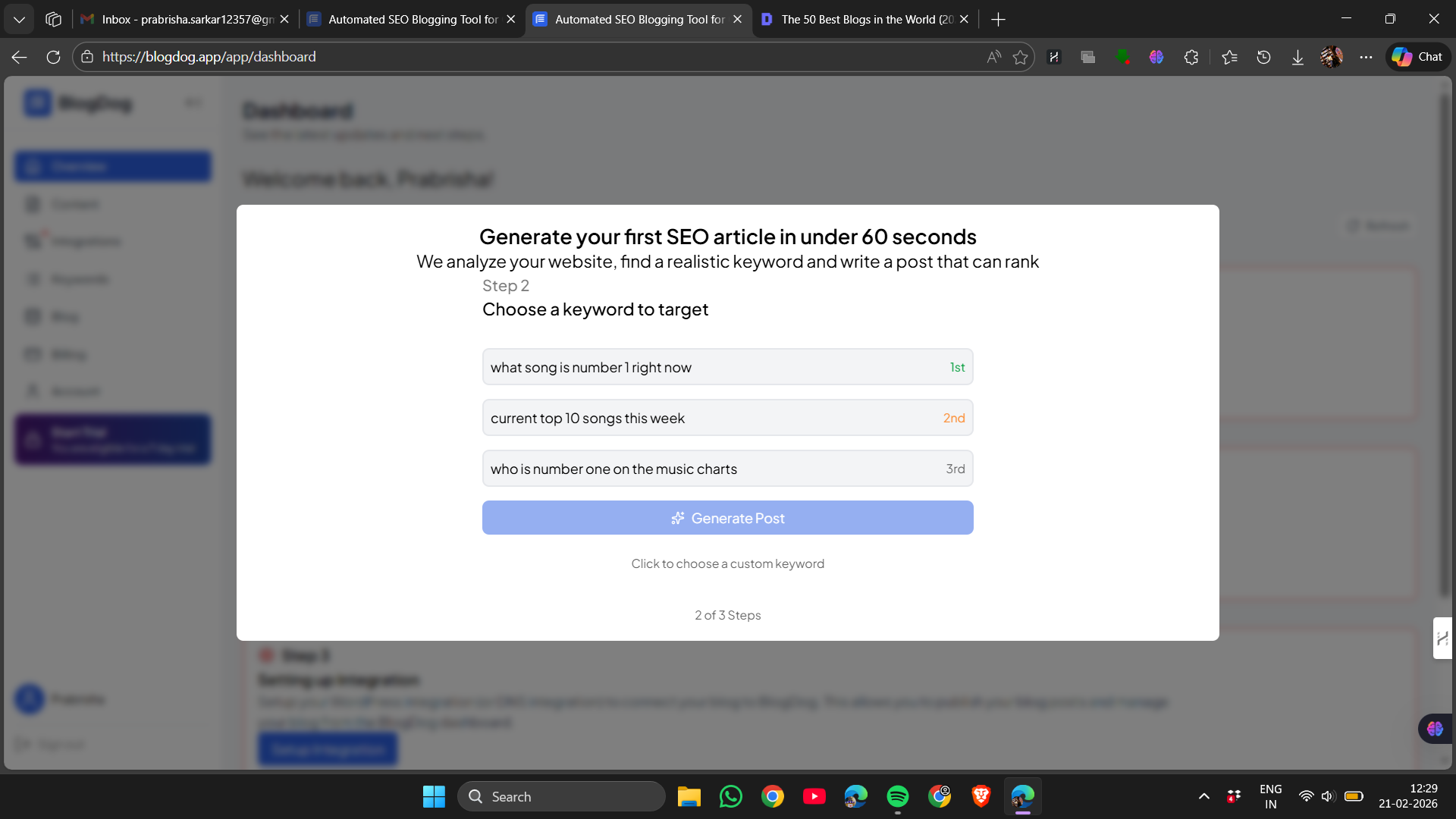
Now here’s where things became even more strict. BlogDog requires either a domain connection or installing its WordPress connector plugin before publishing. There’s no casual testing and publishing freely. It’s either fully integrated or nothing. The integration steps are explained clearly, I’ll give that its due credit. The instructions are neat and structured. But still, it felt unnecessarily restrictive, especially when you first want to just test it out instead of going all-in.

The dashboard itself looks clean. Sidebar has Overview, Content, Integrations, Keywords, Blog, Billing, Account. Very minimal and very simple.

The calendar view exists, which is good. But only one draft is allowed before subscription kicks in. After that, everything turns into “Subscription Required.” That part honestly killed the exploration vibe a little. It felt like being shown a demo instead of actually being allowed to use the system.
Overall, the experience wasn’t confusing. It was straightforward. But it didn’t feel flexible. It felt controlled. And that’s not something I felt was a good thing.
3. Core Features
Keyword Management
After the website scan, BlogDog automatically generates a list of keywords based on the niche. That part actually worked decently. The keyword list looked relevant and aligned with the topic I had entered. There’s also a suggestions panel on the side where more ideas appear, which I liked because it at least gives direction.

But that’s kind of where it stops. I didn’t see any search volume, difficulty score, competition level, nothing like that. It’s just… keywords. Plain list. I can remove them manually, add a few more, but there’s no deeper data behind them. So it feels basic. Useful, but very entry level.
Score: 7/10
Article Generation
Now coming to the main thing: article generation.
The articles are generated quickly. Like genuinely fast. Within seconds, a full draft appears in the editor. So in terms of speed, no complaints at all. But the output itself? That’s where I felt disappointed.
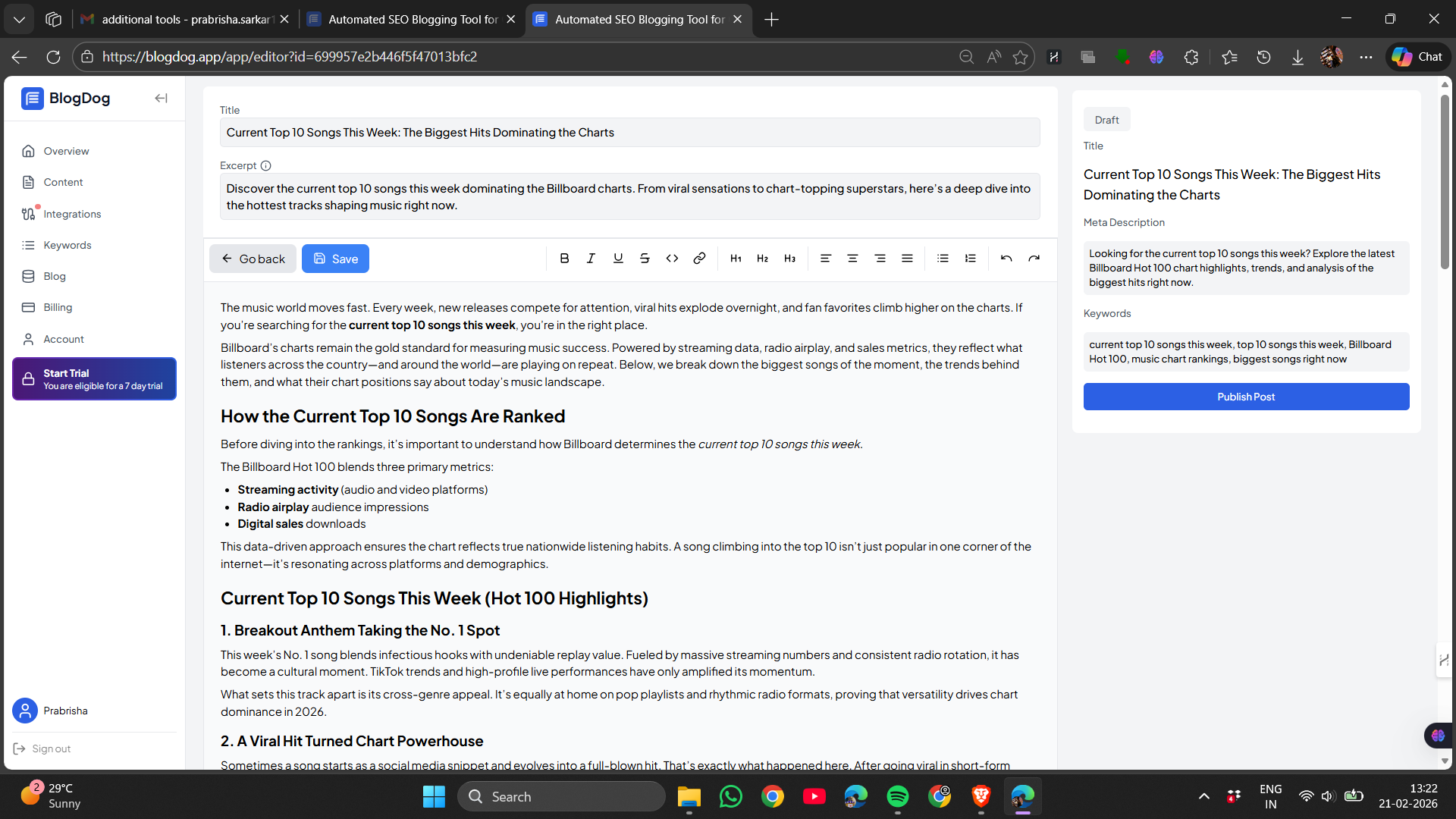
The articles weren’t very long. They looked structured properly with headings and subheadings, but the content felt thin. It didn’t go deep into anything. It felt like it was summarizing instead of actually explaining. And there were no images at all. Not even a featured image inserted automatically. Just plain text throughout.
And I’m going to be honest: the writing felt completely AI generated. Not subtle. Not slightly robotic. Completely. The phrasing was predictable. The transitions felt templated. Certain sentences had that overly polished but empty tone. There was no personality in it. No nuance. No natural flow. It felt like something that checks boxes but doesn’t really say anything memorable.
It didn’t feel publish ready. At least not without serious editing. I was expecting something closer to long form SEO content that feels almost human. Instead it felt like first draft material that still needs a lot of work.
Score: 6.8/10
Editor Experience
The editor itself is very simple. Standard formatting options are there. Headings, bold, italics, lists. That’s it.
There’s no AI chat inside the editor. No assistant sitting on the side helping refine sections. No rewrite button. Nothing interactive. Everything has to be edited manually. That part felt outdated honestly, especially when many tools now offer in-editor help.
There’s also no tone customization. No option to select voice style. No way to upload past articles so the system learns from them. It just generates content based on the initial input and that’s it.
Titles and meta descriptions are generated automatically, which is good at least. That saves some time. But beyond that, editing feels fully manual.
Score: 6.3/10
SEO Features
This part was underwhelming.
There’s keyword targeting and auto-generated meta description. But I couldn’t find any SEO score. No optimization bar. No checklist. No suggestions like “add more keywords here” or “increase readability.” Nothing like that.
There’s also no visible internal linking system inside the article. No automatic external linking either. Which is strange because internal linking is mentioned in the pricing section. But during actual use, I didn’t see links being added or suggested.
So overall, the SEO side feels very surface level. Just basic optimization, not strategic.
Score: 5.7/10
Integrations & Publishing
Integration is strict. Either connect a custom domain or install the WordPress plugin. There’s no option to casually generate and publish freely without that setup.

It didn’t work with Hashnode, which was frustrating. I had to use a generic URL just to continue testing. That made the system feel rigid. Like it only works properly within a specific structure.
That said, the integration instructions are clearly written. The WordPress connector steps are explained properly. So from a documentation standpoint, it’s organized. But from a flexibility standpoint, it’s very limited.
Publishing is basically locked behind proper integration and subscription. So testing the full workflow without committing feels restricted.
Calendar & Draft Limits
There is a calendar view, which visually looks clean. It shows scheduled posts and drafts. That part is nicely designed.
But here’s the catch. Only one draft is allowed before the subscription wall appears. After that, post generation gets disabled and everything starts showing “Subscription Required.”
So while the calendar exists, it doesn’t feel fully usable unless upgraded. It feels more like a preview of what the system could do rather than something that can actually be explored deeply on the free tier.

Overall, the features sound solid in theory. But in actual use, they feel basic. Nothing feels advanced. Nothing feels particularly smart. It works, yes. But it doesn’t feel powerful or polished.
4. Performance & Writing Quality
Performance-wise, I didn’t face any crashes or loading issues. The dashboard worked smoothly. Article generation was quick. Clicking between Keywords, Content, and Calendar didn’t feel laggy. So technically, it runs fine. But performance isn’t the real question here. Writing quality is. And honestly, this is where BlogDog falls short for me.
The articles felt shallow. Not terrible, but shallow. They had headings and structure, yes. But the depth just wasn’t there. It felt like surface-level explanations stretched into sections. No strong insight. No strong perspective. Just safe, general content.
It sounded very AI. Not subtle AI. Very clear AI patterns. Repetitive phrasing. Predictable transitions. Slightly over-polished sentences that don’t really say much. I didn’t feel like a human wrote it. I felt like a system assembled it.
There were no images to make it visually engaging. No extra formatting to make it feel premium. Just text.
Compared to other tools I’ve tested like Nextblog or Contentpen, this felt weaker. It didn’t feel like something I would confidently publish without rewriting major portions.
So performance is stable. But writing quality? Below expectations.
5. Pricing, Plans & Limits
BlogDog currently pushes one main plan which is around €19 per month, discounted from €39. It promises 30+ AI-written blog posts per month, keyword targeting, automatic publishing, and internal linking. On paper, that sounds generous. But the free experience is extremely limited. Only one draft is allowed before the subscription wall shows up everywhere. After that, content generation is basically disabled. So testing feels restricted.

There’s no visible advanced tier breakdown like some other tools. It’s very straightforward. Subscribe or don’t use it fully.
Given the writing quality I experienced, €19 per month doesn’t feel unreasonable, but it doesn’t feel like great value either. Especially when other tools at offer deeper SEO analysis, better customization, or stronger output. It feels like a basic automation tool with a paid gate very early in the journey.
6. Privacy & Data Handling
From what I read, BlogDog collects basic user information like name, email, payment details, domain information, and content preferences. It also gathers session data, IP address, device and browser details, and analytics usage.
It stores generated content and preferences to create posts, which makes sense given how the system works.
Processing is based on contract performance, legitimate interest, consent, and legal obligations. Data isn’t sold, but third-party processors like Stripe and LogRocket are used.
Active subscription data is retained while the account is active. After cancellation, personal data is deleted within 90 days. Payment records can be kept for up to 10 years due to legal requirements.
Users have GDPR rights including access, rectification, erasure, portability, and objection. Security measures include HTTPS, secure authentication, access controls, and regular security assessments.
Data is processed in the EU, and any transfers outside the EU use proper GDPR safeguards. Cookies used are essential and analytics only. No third-party marketing cookies. And it’s not meant for users under 18.
Overall, the privacy setup feels standard and compliant. Nothing alarming. But it is still a SaaS platform storing content and analytics data, so it’s not minimal either.
7. Comparison: BlogDog vs Nextblog vs Contentpen
|
Point |
BlogDog |
Nextblog |
Contentpen |
|
Starting Price |
€19/month |
$29/month |
$39/month |
|
Article Length |
Short to mid length |
3000+ words |
~4000 words |
|
Images Included |
None |
One main image |
Multiple images throughout |
|
SEO Depth |
Basic (meta + keyword) |
Structured SEO format |
SEO score, keyword panel, linking visibility |
|
Internal Linking |
Not clearly visible |
Automatic |
Visible & structured |
|
Tone Customization |
None |
Minimal |
Custom presets available |
|
AI Editing Inside Editor |
No |
No |
Yes (AI chat) |
|
Writing Quality |
Weakest of the three |
Decent |
Strongest overall |
BlogDog feels the most basic. It generates content, yes. But the depth and polish just aren’t there. It feels like entry-level automation.
Nextblog feels more aggressive about automation. Long articles, auto publish, internal linking built in. It’s decent for scaling content quickly.
Contentpen feels the most complete. Better structure, better images, deeper SEO panel, more customization. Even though the AI chat isn’t perfect, it still gives more control.
If I had to rank them purely on quality and usefulness:
- Contentpen
- Nextblog
- BlogDog
BlogDog just doesn’t compete at the same level.
8. Final Verdict
After testing BlogDog properly, I’ll be honest. I expected more.
The setup is clean. The integration steps are explained clearly. Keyword generation works fine. But the article quality just didn’t meet expectations. It felt thin, obviously AI-written, and not something I’d confidently publish without heavy editing.
The strict integration requirement and single-draft limit also made the experience feel gated very early.
It’s not terrible. It works. But it doesn’t feel premium or powerful.
For small businesses who just want very basic automated blogging and don’t care much about tone or depth, it might be enough.
But compared to Nextblog and especially Contentpen, it falls behind.
Overall score: 6.6/10
Frequently Asked Questions
BlogDog is an automated blogging solution designed for founders and small businesses who understand the importance of SEO but tend to postpone it. It is targeted at business owners seeking traffic without delving deeply into content strategy, offering a ‘set it up once and let it operate autonomously’ approach. However, it is not suitable for those prioritizing high-quality writing or control over tone and depth.
The setup process for BlogDog starts with entering a website URL, which is mandatory. The tool scans the website to understand the niche and supports many languages. However, it requires either a domain connection or installing its WordPress connector plugin before publishing, which can feel restrictive for users who want to test it casually.
BlogDog’s core features include keyword management, article generation, and a simple editor. It generates articles quickly but the content often feels shallow and AI-generated. The editor lacks advanced features like AI chat or tone customization. SEO features are basic, with keyword targeting and auto-generated meta descriptions but no deeper optimization tools.
BlogDog feels more basic compared to Nextblog and Contentpen. Nextblog offers longer articles and better automation, while Contentpen provides better structure, images, deeper SEO panels, and more customization. In terms of quality and usefulness, Contentpen ranks highest, followed by Nextblog, with BlogDog trailing behind.
BlogDog offers a main plan priced at around €19 per month, discounted from €39. This plan promises 30+ AI-written blog posts per month, keyword targeting, automatic publishing, and internal linking. However, the free experience is extremely limited, allowing only one draft before requiring a subscription.
BlogDog collects basic user information and content preferences to generate posts. Data is processed in the EU with GDPR safeguards for any transfers outside the EU. Users have GDPR rights including access, rectification, erasure, portability, and objection. Security measures include HTTPS, secure authentication, access controls, and regular security assessments.
BlogDog is a basic automation tool that works but doesn’t feel premium or powerful. The article quality is often shallow and AI-generated, lacking depth and personality. The strict integration requirement and single-draft limit make the experience feel gated early. It might be sufficient for small businesses seeking basic automated blogging, but it falls behind compared to competitors like Nextblog and Contentpen.
Abonneer je op onze nieuwsbrief en ben als eerste op de hoogte van tijd- en geldbesparende AI-tools!
Comments