Conclusion
Anyword is a competent AI writing tool that caters well to marketing teams and performance-focused copywriters who need a high volume of short-form copy variations quickly. Its performance prediction feature is intriguing and can be useful for comparing content variations, although it shouldn’t be the sole metric for publishing decisions. However, the tool falls short in delivering high-quality long-form content and lacks the depth in brand voice training that some of its competitors offer. While it has its strengths, particularly in its comprehensive template library and integrations, Anyword doesn’t excel in any single area enough to make it the obvious choice in a crowded market.
Pros
- Comprehensive template library for short-form copy
- Performance prediction scores for comparing content variations
- Well-structured and readable long-form content output
- Useful integrations for marketing teams
Cons
- Long-form writing lacks personality and requires significant editing
- Brand voice training is not as deep or effective as competitors
- Performance prediction scores can be misleading and aren’t always reliable
- Pricing structure limits access to key features on the entry plan
Table of Contents
- Introduction
- First Impressions and Dashboard Experience
- Core Features
- Performance and Output Reliability
- Pricing Breakdown and Limitations
- Privacy and Data Handling
- Anyword vs. Writesonic vs. GravityWrite vs. Contentpen vs. River Editor
- Final Verdict and Overall Score
- Frequently Asked Questions
Introduction
The AI writing tools space has gotten crowded enough that every new tool needs a clear reason to exist. Some go all-in on SEO. Some focus on long-form quality. Some are built around collaboration and editing. Anyword’s answer to “why should you pick us” is performance prediction, which claims it can estimate how well your copy will perform in Google rankings before publishing. That’s an interesting pitch, and on paper it sounds like exactly the kind of thing a performance marketer would pay for.
After spending real time inside the platform though, my honest take is that Anyword is a solid but unremarkable tool that does a lot of things adequately without doing any single thing well enough to make it the obvious choice. It’s not bad. It’s just deeply middle-of-the-road, and in a space this competitive, that’s not a great place to be.
Anyword suits marketing teams and performance-focused copywriters who are running paid campaigns across multiple channels and need a large volume of short-form copy variations fast. It also works reasonably well for small marketing teams that want brand voice and audience persona controls baked into the same platform.
It does not suit solo writers, bloggers, or freelancers who primarily need quality long-form content. It’s not built for anyone who wants a clean, distraction-free writing environment. And if someone is comparing it to tools like Writesonic or Contentpen on the basis of writing quality alone, Anyword is going to come up short.
First Impressions and Dashboard Experience
The onboarding process is quite typical for a B2B-oriented tool. It starts by asking about your current role, with options like Content Marketing, Demand Gen, Social Media Manager, Product Marketing, VP Marketing, and Founder/CEO. Then it asks about company size and website URL before dropping you into the main dashboard.

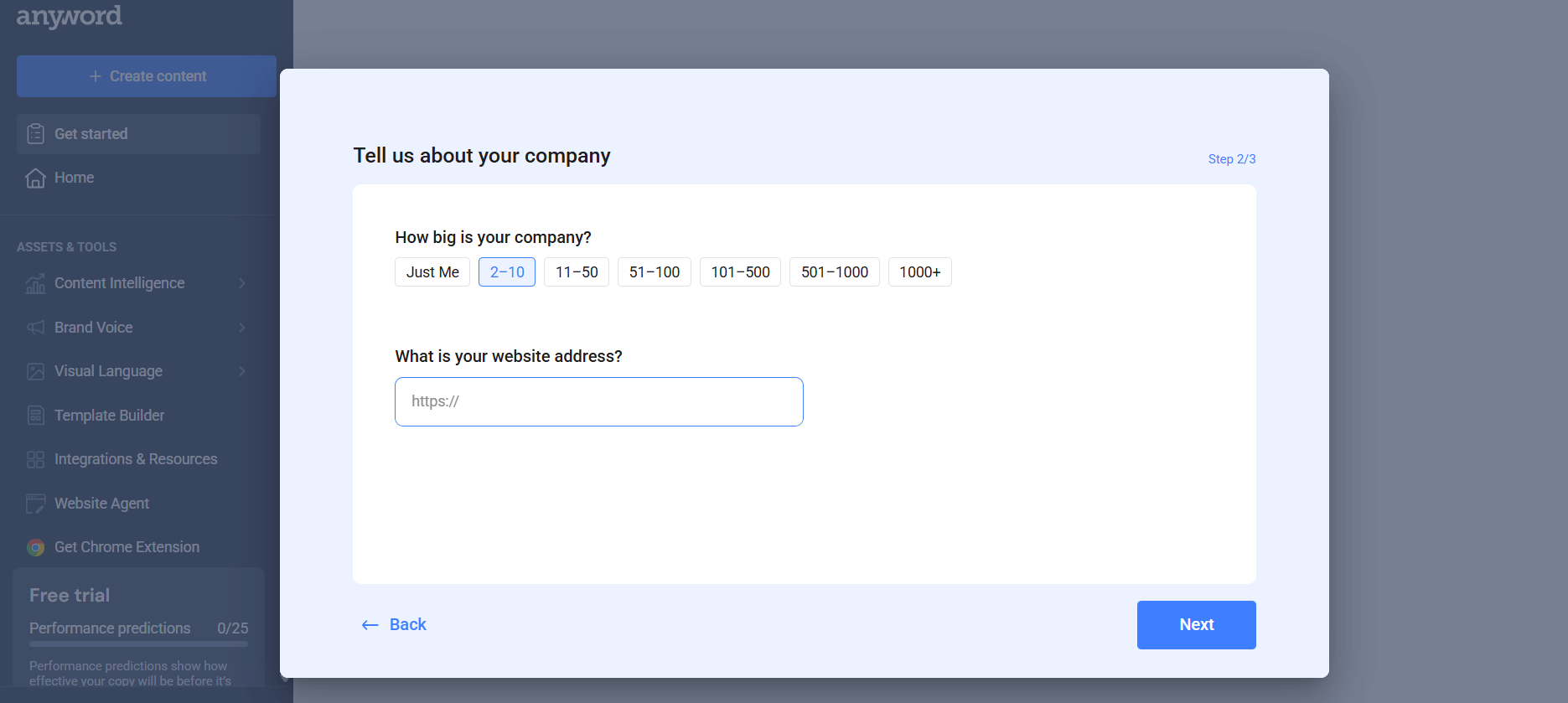

The home screen shows a “Let’s get started” checklist: connect your apps, set up tone of voice, set up target audiences, create long-form content, create a social post, improve existing content. It’s a sensible onboarding structure, but the whole thing reads more like a product walkthrough than an actual workspace. The left sidebar houses Content Intelligence, Brand Voice, Visual Language, Template Builder, Integrations and Resources, Website Agent, and a Chrome Extension link.
My initial impression is that this tool is clearly aimed at marketing teams rather than individual writers. The dashboard doesn’t feel warm or approachable. It feels corporate. There’s nothing wrong with that if the target audience is genuinely a marketing team at a mid-size company, but for anyone coming from a simpler writing tool, it can feel heavier than it needs to be.
Navigation is fine once you figure out where things are, but it does take a few sessions. The sidebar categories make logical sense but the sub-sections within Brand Voice and Content Intelligence especially require some exploration before the layout clicks. Nothing broken, just not intuitive on day one.
Core Features
Blog Wizard
The Blog Wizard is Anyword’s long-form content feature and it runs through a 6-step flow: language selection, brief, title, outline, facts and statistics, and generation. The brief step is where you define your content type (how-to guide, listicle, product review, product comparison, opinion piece), add your SEO primary keyword, secondary keywords, and select target audience personas.


The title step produces several headline options, each accompanied by a performance prediction score. I liked this part more than I expected. Seeing a score beside each title does actually push you toward picking the one that’s framed more compellingly, even if the science behind the number is hard to verify.


The outline step features a helper panel on the right that suggests section topics with summaries, and allows web searches or file imports to create a custom outline. This is functional but nowhere near as thorough as what Writesonic’s Article Writer offers, which lets you configure H2 and H3 structure in detail, set word count per section, and add expert guidance notes at the section level.


The facts and statistics step, currently in beta, fetches external data points from the web, allowing you to select relevant ones to incorporate into your article. The idea is good. The execution is a work in progress. Some of the facts it pulled were relevant, others were loosely related at best.
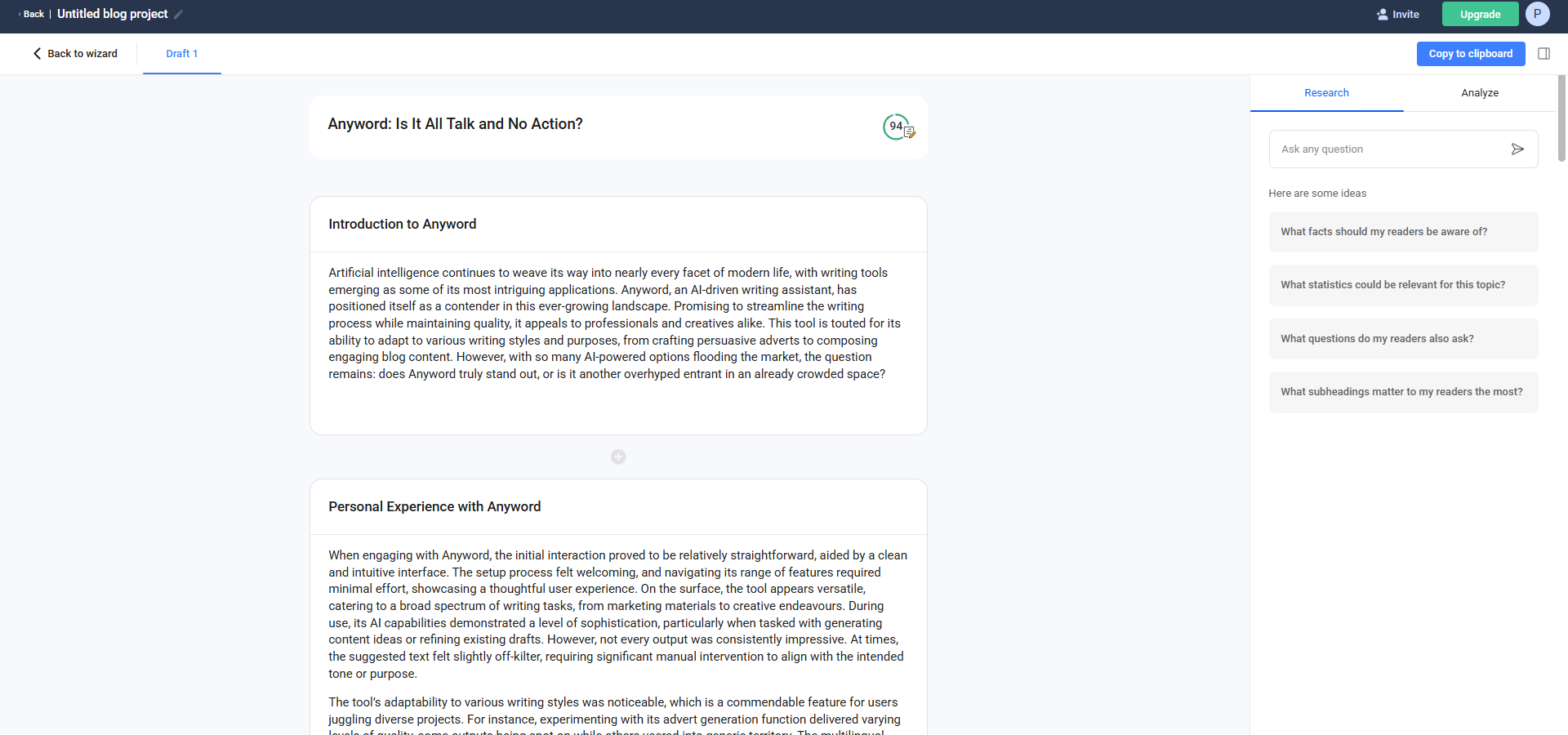


Regarding word count, the Blog Wizard allows generation of up to 3,000 words. The generated output was well-structured and readable, albeit somewhat safe. It covered the topic, used proper subheadings, didn’t repeat itself excessively. What it lacked was any real personality or opinionated angle. It read like a competent but personality-free draft, which means editing is not optional if the goal is something worth actually publishing.
Short-form Templates
This is where Anyword truly excels more than in other areas. The template library has 100+ options spread across Social, Ads, Email, Website, Blog/Article, Ecommerce, Images, and Other categories. The ad templates alone cover Google Ads, Meta Image Ads, LinkedIn Video Ads (product demo, special offer, thought leadership), Pinterest Image Ads, Outbrain Ads, Taboola Ads, and X Ads. Email templates cover welcome drip campaigns, cold outreach, discount and promotion, event announcements, and newsletters. That level of channel-specific coverage is genuinely useful for a marketing team managing paid and organic copy across multiple platforms.


Every template within the short-form editor enables setting a target audience, tone of voice, and occasionally A/B testing points. Outputs come with performance scores, and you can generate multiple variations in one go and compare them. For pure volume short-form copy generation this works well. So I think, to some extent, especially with the prediction score, it can be considered a strong point for Anyword.
Brand Voice
Brand voice configuration in Anyword offers three options: manual trait selection (up to five traits like Formal, Friendly, etc.), providing on-brand text for the system to learn from, or training a custom model via third-party integrations such as Facebook or HubSpot.


The manual trait selection is the weakest of the three. It’s subtle enough that you can still feel the underlying AI neutrality underneath the chosen traits.
The on-brand text option is more interesting in theory, but it still requires meaningful editing to actually apply the voice cleanly to outputs. This is the area where Anyword genuinely falls behind Writesonic, which lets you upload a DOCX file of your own writing and generates a detailed brand voice summary from it. That approach feels more grounded because it’s working from actual writing samples rather than abstract trait labels. With Writesonic I noticed a clearer directional shift in tone. With Anyword it felt more like a surface-level adjustment.
Target Audiences
Audience personas can be created manually or by pasting sample text or URLs, prompting Anyword to suggest suitable profiles. Each persona includes a name, gender toggle, age range slider, and an optional pain points field. In the Blog Wizard, you can attach multiple personas to a single brief, and Anyword will use them to shape the framing of the output. This is a thoughtful feature and works reasonably well in practice, especially for short-form copy where audience targeting makes a tangible difference in phrasing.


Content Improver
The Content Improver allows pasting existing copy, selecting the content type (such as blog post, email, Meta ad, etc.), and choosing an improvement mode: generate higher-scoring content, correct spelling and grammar while maintaining structure, make it more casual, longer, shorter, or enhance structure and vocabulary. You can also add custom instructions.


I tested it on a blog headline and it bumped the performance score from 97 to 98, which is almost meaninglessly marginal but the actual copy it suggested was sharper. For short-form content this tool adds genuine value. For long-form content i.e. blogs it’s less useful because the content type options are limited. We can only improve headline, description and such and not the actual content inside the blog and the improvements tend to stay surface-level.
Performance Prediction Scores
This feature, the performance prediction scores, is Anyword’s main selling point, but they are interesting yet not sufficiently reliable to be the sole quality criterion. The scoring system evaluates content variations based on their predicted conversion or engagement potential, and on the free trial you get 25 predictions. The issue is that the score sometimes rewards clickbait-adjacent phrasing over genuinely good copy. A headline that was arguably weaker in substance scored higher than a clearer, more honest one in my testing. The score is a useful nudge in the right direction but I would not make publishing decisions based on it alone.
Image Generation
Anyword offers a prompt-based image generator with style options such as Photography, Watercolor, Sketch, Vector Art, Background, Cyberpunk, Infographic, and Typography-focused styles. You can add overlay text, set aspect ratio, and target specific audience personas. The image I generated was visually decent but nothing I would call distinctive. It’s a useful enough feature for creating quick social media visuals without leaving the platform, but it’s not something I would rely on for any serious visual creative work.


Integrations and Content Intelligence
The integrations panel allows connections to Google Ads, Instagram, LinkedIn, HubSpot, Meta Ads, Salesforce, and your website. The idea is that connecting these gives Anyword performance data to improve its content generation accuracy and help train custom models. It shows sample data in dashboard cards for each integration, with a Connect button to link real accounts. It pulls your real campaign performance data into Anyword and uses it to train a scoring model specific to your brand. Over time, the tool learns what actually converts for your audience rather than scoring against a generic dataset. The longer one runs campaigns through it, the sharper the predictions get. That’s a genuinely rare pitch in this space. Most AI writing tools generate from the same base model regardless of the past results. This is a genuinely useful setup for a marketing team that wants one platform to hold both content creation and performance data. For a solo user or freelancer, it’s overkill.


However, I must admit I couldn’t test this feature fully; it showed an error when attempting to connect to my website, so its usability remains uncertain.
Performance and Output Reliability
During testing, the platform operated smoothly without crashes, generation failures, or lag in the editor. On output quality, the short-form templates produced consistently usable copy. Not always brilliant, but consistently usable. For an ad headline or an Instagram caption, the outputs were solid enough to work from even if they occasionally drifted into generic territory.
Long-form blog outputs proved more challenging: while the articles were correctly structured and didn’t break down midway, they consistently lacked personality. The writing had that slightly over-polished neutrality that AI long-form content tends to default to when there’s no strong voice signal. I had to do a meaningful amount of editing to get any of the blog outputs to a place where they felt like a real person had written them with an actual opinion.
Performance scores add value but are primarily useful for comparing variations rather than serving as an absolute quality metric. The score can make you feel like you’re being objective when you’re actually just picking the phrasing an algorithm prefers, which isn’t always the same as picking the better copy.
Pricing Breakdown and Limitations
No free plan is available; the trial offers 2,500 word credits, 25 performance predictions, and 50 data rows. Subscribed users get unlimited word count and the what’s gated instead is the number of performance predictions, seats, access to custom AI models, and features like content intelligence,

- Starter: $49/month, 1 seat, 50 performance predictions, 50 performance data rows, 1 brand voice, 100+ templates, Blog Wizard with plagiarism checker, Chrome Extension
- Data-Driven: $99/month, 3 seats, 100 performance predictions, 50 performance data rows, real-time predictions for manual edits
- Business: Custom pricing, 3 seats, 250 predictions, 5,000 performance data rows, custom-built AI models, real-time content intelligence, A/B testing, onboarding and account setup, priority support
- Enterprise: Custom pricing, 500+ predictions, 10,000+ data rows, private LLM, custom integrations, SSO, full API access, dedicated customer success manager

While pricing isn’t unreasonable for marketing teams, the $49/month Starter plan’s cap of 50 performance predictions is quite limiting. Since performance prediction is the main differentiator, restricting it on the entry plan feels like paying for the key feature only to be told to upgrade to access it fully.
The plagiarism checker is only available in paid plans, and advanced features such as content intelligence and custom AI models are restricted to the Business tier and higher.

For solo marketers or freelancers, the value for money is debatable, especially compared to Contentpen or GravityWrite, which offer similar or better features at lower prices.
Privacy and Data Handling
Anyword gathers standard account details, usage data, interaction logs, and device information. Payment is processed via third-party providers. Uploaded content for brand voice training is used within the platform for personalization purposes. Data is not sold to third parties, according to policy. Security features include encryption and access controls. Enterprise-grade security and SSO are exclusive to the Enterprise plan, relevant for larger teams with compliance needs.
There are no obvious red flags in the data handling but this is not a zero-data platform and anyone uploading sensitive brand materials or proprietary copy should factor that in. The third-party integration data flow specifically worth noting: when you connect a platform like HubSpot or Meta Ads, that performance data feeds back into Anyword’s model training for your workspace. That’s the product working as designed, but it’s worth being aware of.
Anyword vs. Writesonic vs. GravityWrite vs. Contentpen vs. River Editor
|
Feature |
Anyword |
Writesonic |
GravityWrite |
Contentpen |
River Editor |
|
Core use case |
Marketing copy and ad campaigns |
SEO content and GEO visibility |
Long-form blogs and SEO writing |
SEO-driven content strategy |
Document editing and long-form writing |
|
Long-form capability |
Moderate, up to 3,000 words |
Strong, up to 5,000 words with 10-step flow |
Strong with humanized blog writer |
Strong, ~4,000 words with SEO depth |
Strong within editor-first environment |
|
Brand voice training |
Trait selection or on-brand text |
Upload doc, URL, or text with detailed summary |
Basic tone settings |
Presets with tone, POV, format control |
Preset modes and granular style tags |
|
Performance or SEO features |
Performance prediction scores |
Keyword research, site audit, GEO tracking |
SEO titles, meta descriptions, blog workflows |
SEO score, keyword research, linking tracker |
No dedicated SEO tools |
|
Starting price |
$49/month |
$79/month |
$19/month |
$39/month |
Free, $14/month for Plus |
|
Free plan |
No, trial only |
No, 7-day trial only |
Yes but very limited |
Trial with 3 articles/month |
Yes with 250 credits |
|
Best suited for |
Marketing teams, paid ads managers |
SEO agencies, content teams at scale |
Bloggers, SEO writers, content marketers |
Niche site owners, SEO-focused bloggers |
Writers, researchers, long-form editors |
Anyword sits in an awkward middle position within this group and that’s not a compliment. It has more channel-specific templates than River Editor, more marketing ad depth than GravityWrite, and a unique performance scoring system that none of these other tools offer. But Writesonic’s brand voice training is meaningfully better because uploading a DOCX and getting a detailed tone of voice summary from your actual writing is a more reliable process than picking adjectives from a list. GravityWrite’s humanized blog writer produced content that felt more readable and less obviously AI-generated than anything Anyword’s Blog Wizard gave me. Contentpen offers tighter SEO depth, better content planning workflows, and comparable or better writing quality at a lower starting price. River Editor, even though it’s a completely different type of product, gives you a more satisfying actual writing experience.
For teams focused on marketing copy for paid channels, Anyword can be suitable. However, if the main priority is high-quality writing, precise brand voice, or SEO-optimized content, other tools may be more appropriate at various price levels.
Final Verdict and Overall Score
Anyword is a competent marketing copy tool that has clearly been built with a specific user in mind: performance marketers who want data attached to their copy decisions. The performance prediction scoring system is genuinely interesting as a concept and the template library is one of the more comprehensive ones I’ve seen for multi-channel ad copy. The integrations setup for connecting marketing platforms is also well thought out for team contexts.
The problems start when you look at what surrounds that core pitch. The long-form writing quality is average. The brand voice training works but doesn’t go deep enough to be impressive. The performance prediction scores are useful as relative comparisons but not reliable enough to be the quality authority they’re positioned as. And the pricing structure actively limits access to the headline feature on the entry plan, which creates a frustrating experience for anyone trying the tool before committing.
There’s nothing too broken about Anyword. There’s also nothing that makes it a clear first choice. It lands somewhere in the comfortable middle of this space, which is fine if the middle is where your budget and requirements sit, but not fine if you’re trying to find the tool that’s actually best at any specific thing.
Overall Score: 7.2 out of 10
Frequently Asked Questions
Anyword is an AI writing tool that specializes in performance prediction for marketing copy. It claims to estimate how well your copy will perform in Google rankings before publishing, making it suitable for marketing teams and performance-focused copywriters.
Anyword is best suited for marketing teams and performance-focused copywriters who need a large volume of short-form copy variations quickly. It is not ideal for solo writers, bloggers, or freelancers who primarily need quality long-form content.
Anyword’s performance prediction feature evaluates content variations based on their predicted conversion or engagement potential. It provides a score that can help users choose more effective copy, although it should not be the sole criterion for publishing decisions.
Anyword offers several main features including the Blog Wizard for long-form content, short-form templates for various marketing channels, brand voice configuration, target audience personas, content improver, performance prediction scores, and image generation.
Anyword sits in a middle position compared to other AI writing tools. While it offers unique performance prediction scores and a comprehensive template library, tools like Writesonic provide better brand voice training and GravityWrite offers more humanized blog writing.
Anyword offers several pricing plans: Starter at $49/month, Data-Driven at $99/month, and custom pricing for Business and Enterprise plans. The Starter plan includes 1 seat, 50 performance predictions, and access to the Blog Wizard with a plagiarism checker.
Anyword does not offer a free plan, but it does provide a trial with 2,500 word credits, 25 performance predictions, and 50 data rows. This allows users to test the platform before committing to a paid plan.
Anyword’s Blog Wizard allows generation of up to 3,000 words and provides well-structured and readable content. However, the output often lacks personality and opinionated angles, requiring meaningful editing to make it publish-ready.
Abonneer je op onze nieuwsbrief en ben als eerste op de hoogte van tijd- en geldbesparende AI-tools!
Comments