Conclusion
Pressmaster stands out as a comprehensive content ecosystem rather than just another blog writing tool. It excels in providing a natural and controlled writing experience, making it ideal for creators focused on building authority and long-term content strategies. The platform’s strengths lie in its smooth editor, helpful AI chat, and fair credit system, which collectively enhance the writing and editing process. However, its user interface may not appeal to everyone, and its SEO capabilities are somewhat basic. Despite these minor drawbacks, Pressmaster’s broad integrations and social tools make it a robust choice for serious content creators.
Pros
- Comprehensive content ecosystem with a strategic approach
- Natural and controlled writing quality
- Smooth editor with integrated AI chat
- Generous credit system for exploration
- Broad integrations with various platforms
Cons
- User interface may not appeal to everyone
- Basic SEO capabilities
Table of Contents
- Introduction
- Getting Started, First Impressions & Dashboard Experience
- Core Features
- Articles
- Calendar
- Integrations
- Social Suite
- Writing Quality, Output Evaluation & Performance
- Privacy & Data Handling
- Credits, Plans, Pricing & Usage
- Comparison: Pressmaster vs ContentPen
- Final Verdict
- Frequently Asked Questions
Pressmaster review
Introduction
When I first encountered Pressmaster, I didn’t see it as merely another blog writing tool. It felt more substantial. It positions itself as a comprehensive content ecosystem rather than just a basic AI article generator. It offers writing, repurposing, trend discovery, content planning, social posting, scheduling, everything in one workspace. Naturally, I was eager to explore it thoroughly instead of just producing a single article and moving on.
After exploring the dashboard and testing its features, it became evident that Pressmaster isn’t solely focused on generating the longest SEO blog posts. It seems designed for creators who are committed to establishing authority. Founders, personal brands, LinkedIn content creators, newsletter writers—those who view content as part of a broader system rather than isolated posts. It’s organized. Strategic. Almost as if it aims to assist in shaping positioning, not just producing paragraphs.
However, it might not be suitable for someone solely seeking automatic blog scraping and instant 4,000-word SEO articles from a URL. Platforms like ContentPen or similar are heavily geared toward automated content generation from existing websites. Pressmaster operates differently. It offers more control, which also requires more manual input. For niche bloggers using platforms like Hashnode and seeking extensive auto-analysis of their domains, this approach may feel less automated compared to those blog-centric tools.
Simply put, Pressmaster appears designed for those focused on developing a distinct voice rather than just increasing traffic. It’s more ecosystem-oriented than automation-focused. Whether that’s a strength or a weakness depends entirely on the user’s priorities.
Getting Started, First Impressions & Dashboard Experience
Upon first logging in, I immediately appreciated that I could skip the URL setup. That was a pleasant surprise, as most other tools I’ve used tend to enforce that step, adding a domain, connecting a blog, verifying the site, making it feel like a chore. Here, I could proceed without obstruction. This small flexibility made the onboarding process feel more relaxed.


Next, it inquired about my brand and content identity. I took my time filling it out properly, including adding my Hashnode blog, which surprisingly integrated smoothly. That was a refreshing change, as I’ve encountered issues with Hashnode not being accepted correctly on other platforms. It felt like a small but significant win.


Credits were displayed prominently at the top. And honestly, 8,000 credits on a free trial felt quite generous. Most free tiers are limited and make me hesitant to click around. Here, I managed to generate an article, create a social thread, and test various features, all without quickly depleting my credits. It allowed for genuine exploration without the fear of running out too soon.
There was no complicated model selection or technical setup, no “choose between five engines” dilemma. It simply allowed me to start working immediately. I prefer this straightforward approach; too many technical toggles can often create unnecessary confusion.
Regarding the dashboard, it’s clean but quite bright. Personally, I favor darker, more minimal interfaces, so it wasn’t exactly my ideal UI. Initially, it felt somewhat crowded due to the numerous features listed in the side menu: Dashboard, Calendar, Trendmaster, Supernova, Twin, Pins, Social Suite, Accelerator, Newsroom. It’s quite a bit to take in at first glance.

Initially, I wondered what all these features were for. However, after a few minutes, it became clearer. The platform feels less like a simple writing tool and more like a central hub for content management, that’s the overall impression.
At the top, my credits were displayed transparently, which I appreciated. I dislike hidden usage systems. Additionally, the weekly schedule preview added a sense of organization, showing planned content rather than just scattered documents.
Overall first impression? Slightly visually overwhelming, yet quite powerful. It’s not ultra-minimalist or styled in a dark, moody aesthetic I prefer. Instead, it’s functional, organized, and serious. It seems designed for those who want to manage content systematically rather than just write and publish.
Core Features
Articles
This was the feature I examined most thoroughly.
Unlike tools like ContentPen or NextBlog, Pressmaster didn’t simply scrape my blog to generate an article automatically. I had to specify what I wanted to write about, which I actually appreciated. It offered greater control rather than making assumptions about what I should publish.

Within the article creation process, there’s an interesting step called the interview. Instead of merely requesting a topic, it asks detailed questions about style, tone, perspective, audience, and positioning. Its goal is to tailor the article’s voice. While it’s designed for manual input, there’s also an AI assistant called Pressmaster AI. I tested it, and it seemed to generate responses based on the provided blog, which were reasonably aligned, just needing minor adjustments.
. 

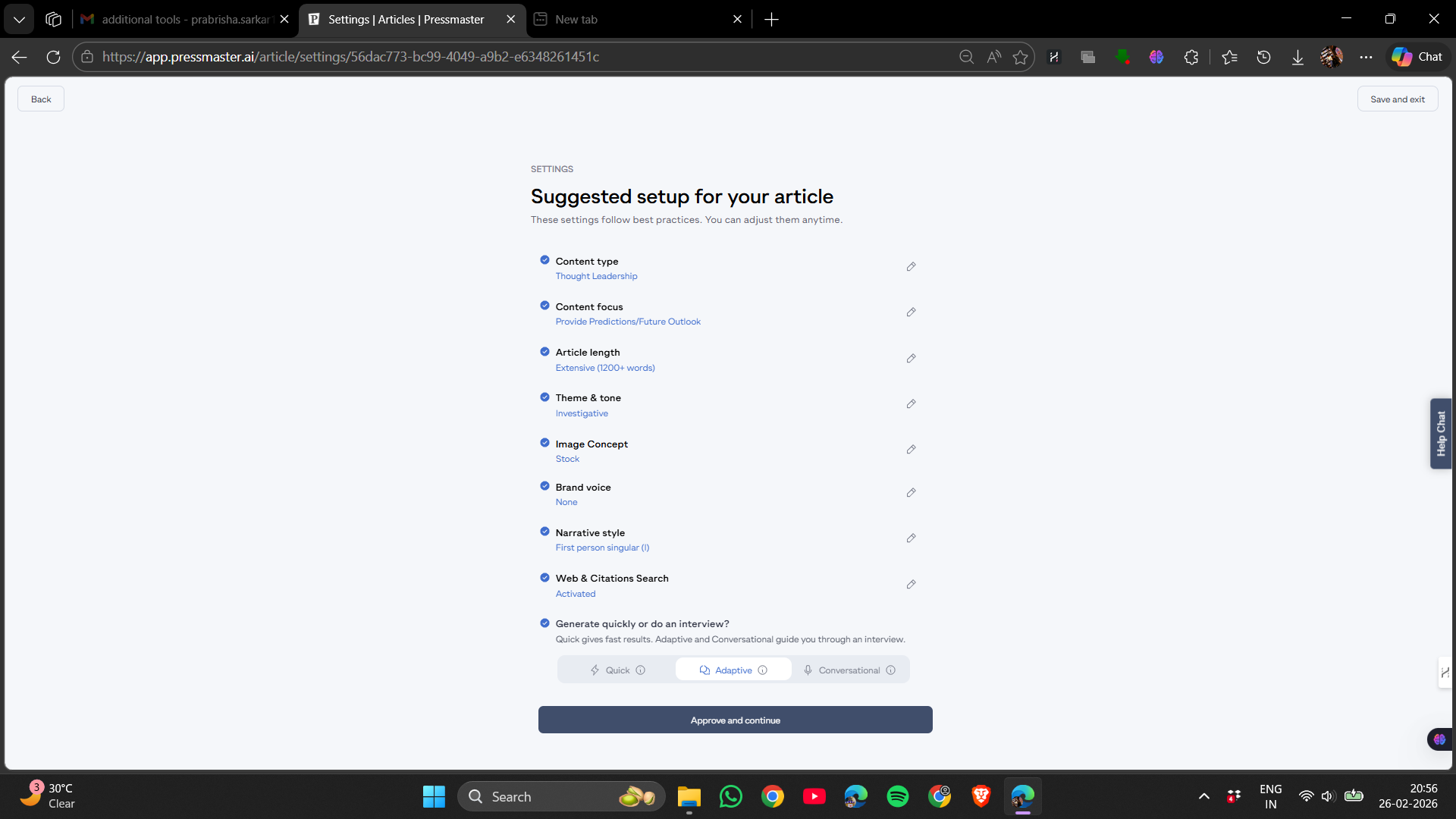
Next, based on my input topic, it created an outline first. The structure was logical, not random or cluttered, with headings flowing coherently. The complete article then came together, and I was genuinely impressed.
The writing quality didn’t feel robotic or artificial. It wasn’t overly dramatic or filled with exaggerated transitions. It was well-structured, balanced, and read like a solid draft that only needed light editing, no major rewrites necessary.
However, the article included only a single header image. Unlike ContentPen, which inserts multiple images throughout, this felt more minimalist in that regard.
The in-article editor is arguably one of Pressmaster’s strongest features.
It’s a clean, distraction-free environment, free of unnecessary buttons. I could click into any section and edit naturally, similar to a standard document. Nothing felt restricted or rigid.

The AI chat integrated within the editor was particularly useful. I could request simplification, expansion, rewriting, or clarification, and the responses were inserted directly into the text at the appropriate spot. This seamless integration made a noticeable difference, feeling more like a natural part of the editing process rather than an add-on.


Customisation options were available both before and after content generation. I could adjust tone, length, and overall direction. While not overly granular, these settings provided sufficient control to influence the output without feeling restrictive.

SEO titles and meta descriptions were generated automatically alongside the article, with options for manual editing. The SEO score was displayed, offering a quick overview, even if it wasn’t highly technical.
Overall, the editor was practical and smooth to use. It wasn’t flashy or experimental, but straightforward and functional, making writing and editing a seamless experience rather than a chore.
Rating: 9.5/10
Calendar
The calendar was simple and intuitive. I could view scheduled content by date and plan drafts in advance. It was clear and didn’t require a tutorial to understand.


Although I didn’t connect a website for automatic publishing, I could still observe how scheduling functions. It displayed posting frequency and patterns clearly.
It felt more operational than decorative, something a serious content creator would use regularly. It was clean, functional, and straightforward.
Rating: 8/10
Integrations
Integrations are among Pressmaster’s strengths. Unlike some tools limited to just a few platforms, it supports a broad range—including WordPress, Webflow, Wix, Blogger, Zapier, Figma, and various social media channels. This flexibility sets it apart from more closed ecosystems.

I chose not to connect my personal accounts to keep test and real environments separate, but browsing the options indicated that the platform is designed for actual workflows. The Zapier integration, in particular, unlocks significant automation possibilities beyond simple blogging.
Compared to BlogDog, which had limited website integrations, Pressmaster feels much more flexible. Unlike Autopost, which was confined to certain CMS platforms, Pressmaster’s integrations seem broader and more suited to creators.
Although I didn’t test every integration directly, the overall impression is that this aspect is well-developed and not an afterthought.
Social Suite
The Social Suite feature was a pleasant surprise. Instead of providing a single generic caption, it first asks for the post topic, then generates multiple options. It even indicates which version or hook might perform better, almost like predicting engagement. I could see different angles on the same idea and pick the one that suited me. It felt deliberate and aimed at optimization, not just filling space. Having multiple options was a definite plus.
I experimented with creating a Twitter thread. While I didn’t connect my personal account, I was still able to generate preview content and see how it would look.
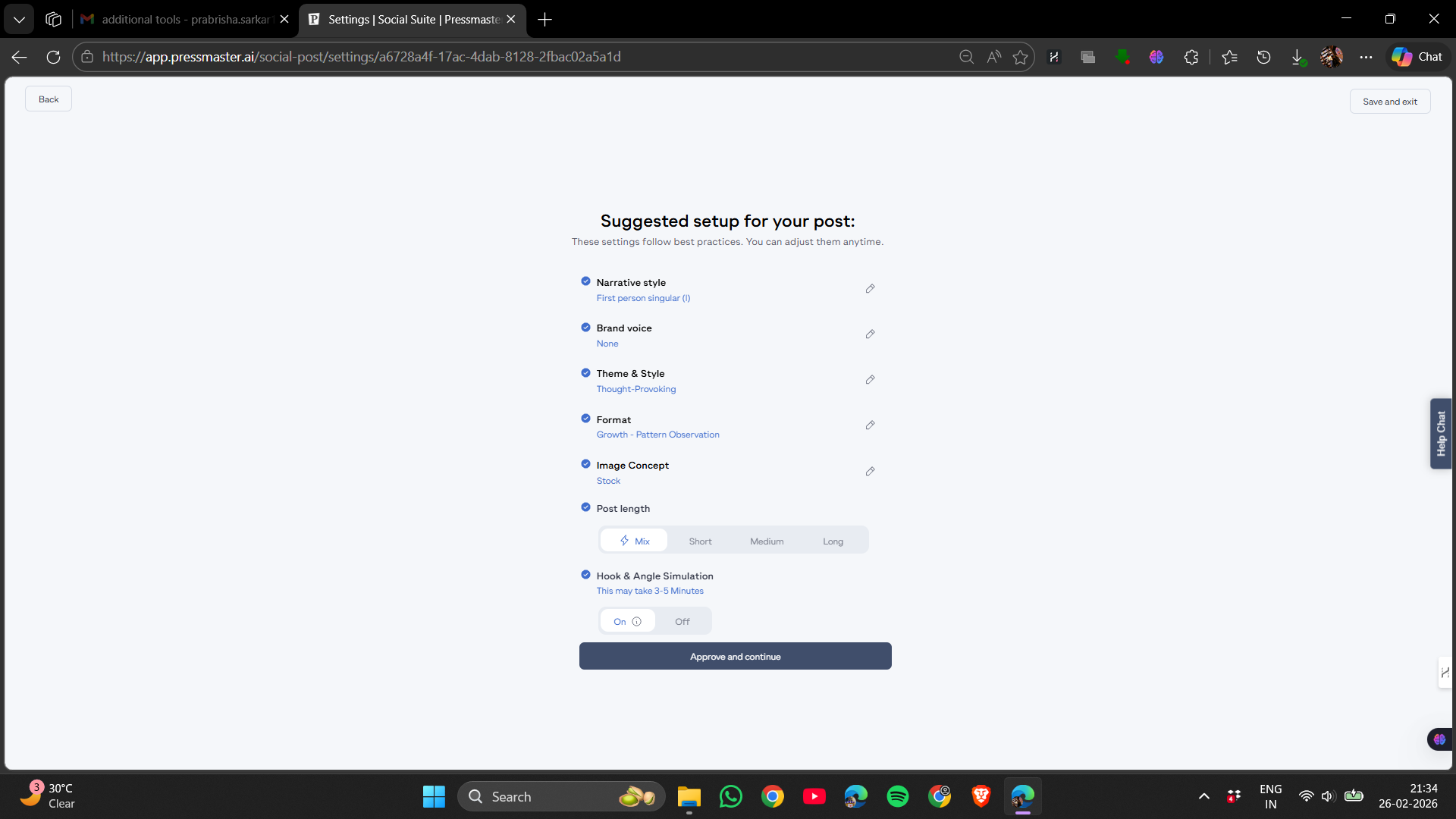


It didn’t stop at a single caption; it structured an entire thread. The ideas were coherent, and it understood the context, expanding the content into platform-specific posts seamlessly.

This level of multi-channel content understanding is rare among writing tools. Most blog generators focus solely on blogs, but here, it felt like the platform comprehended multi-platform content. The preview layout looked realistic, making it easy to envision the final post.
It didn’t come across as gimmicky; it felt purposeful. For anyone aiming to build a personal brand across multiple platforms, this feature alone could give Pressmaster a significant edge.
Rating: 9/10
Writing Quality, Output Evaluation & Performance
Having thoroughly tested various sections, I can confidently say that the writing quality is solid, neither overly dramatic nor exaggerated, but consistently strong.
The article I produced didn’t seem cobbled together from clichés. It had a clear structure, logical flow, and natural transitions. It avoided the typical predictable patterns like ‘Firstly,’ ‘Secondly,’ or ‘In conclusion,’ that often make AI content feel formulaic.
It read like a well-organized first draft from someone who understands structure, if not deep personality. That’s perfectly acceptable. I’d prefer refining a structured draft over rewriting a chaotic one.
One notable aspect is that it avoids overly fancy language. The tone is clear, direct, and informational, which makes editing much easier.
The AI chat within the editor functioned smoothly. When requesting refinements, responses were relevant and contextually appropriate. The ability to insert changes directly into the text, rather than copying and pasting, made the workflow seamless.
Performance was consistently smooth, articles generated swiftly, social threads loaded promptly, with no lag or crashes. Credits were deducted accurately, and the system felt stable. Stability is crucial when evaluating such tools.
Compared to other tools I’ve tested, the writing here felt more natural and controlled, less overtly ‘AI-like.’ Not perfect, but certainly above average.
Privacy & Data Handling
They collect typical account details such as contact information, payment data, device info, analytics, geolocation, and the content or conversations created within the platform. If voice features are used, biometric voiceprints may be collected with explicit consent. This is clearly outlined.
As an AI-driven platform, prompts, uploaded files, and chat history might be processed by third-party AI providers. They specify Data Processing Agreements and retention periods typically between 30 and 90 days. Users should be aware that content could pass through external AI services.
In summary, key privacy points include:
- Collection of personal, payment, device, analytics, and content data.
- AI prompts and uploaded files may be processed externally.
- Biometric voice data collected only with explicit consent.
- Data shared with providers such as Stripe and for legal or business reasons.
- Users can request data access, corrections, deletions, and opt out of marketing.
- Encryption and access controls are implemented, but no system is entirely risk-free.
They explicitly state that users are responsible for reviewing AI-generated content, with limited liability on their part.
Personally, I consider it similar to other advanced SaaS platforms—suitable for professional content, but I would be cautious about uploading highly sensitive information. Transparency is there, but it remains a data-driven AI system.
Credits, Plans, Pricing & Usage
The credit system is notably generous for a free trial.
I started with 8,000 credits, which is honestly a lot compared to most platforms. I generated a full article, created a social thread, even tested the AI chat inside the editor and the credits didn’t evaporate instantly. That gave me plenty of room to explore rather than panic about running out.
Each credit deduction was clearly displayed, providing transparency. It never felt confusing or hidden, and I always had a clear view of what was consuming my credits.

Regarding pricing after the free credits are exhausted, the plans are simple:
- Starter – around $22 per month
- Pro – around $44 per month
- Leader – around $72 per month
- Agency – around $150 per month
- Enterprise – custom pricing
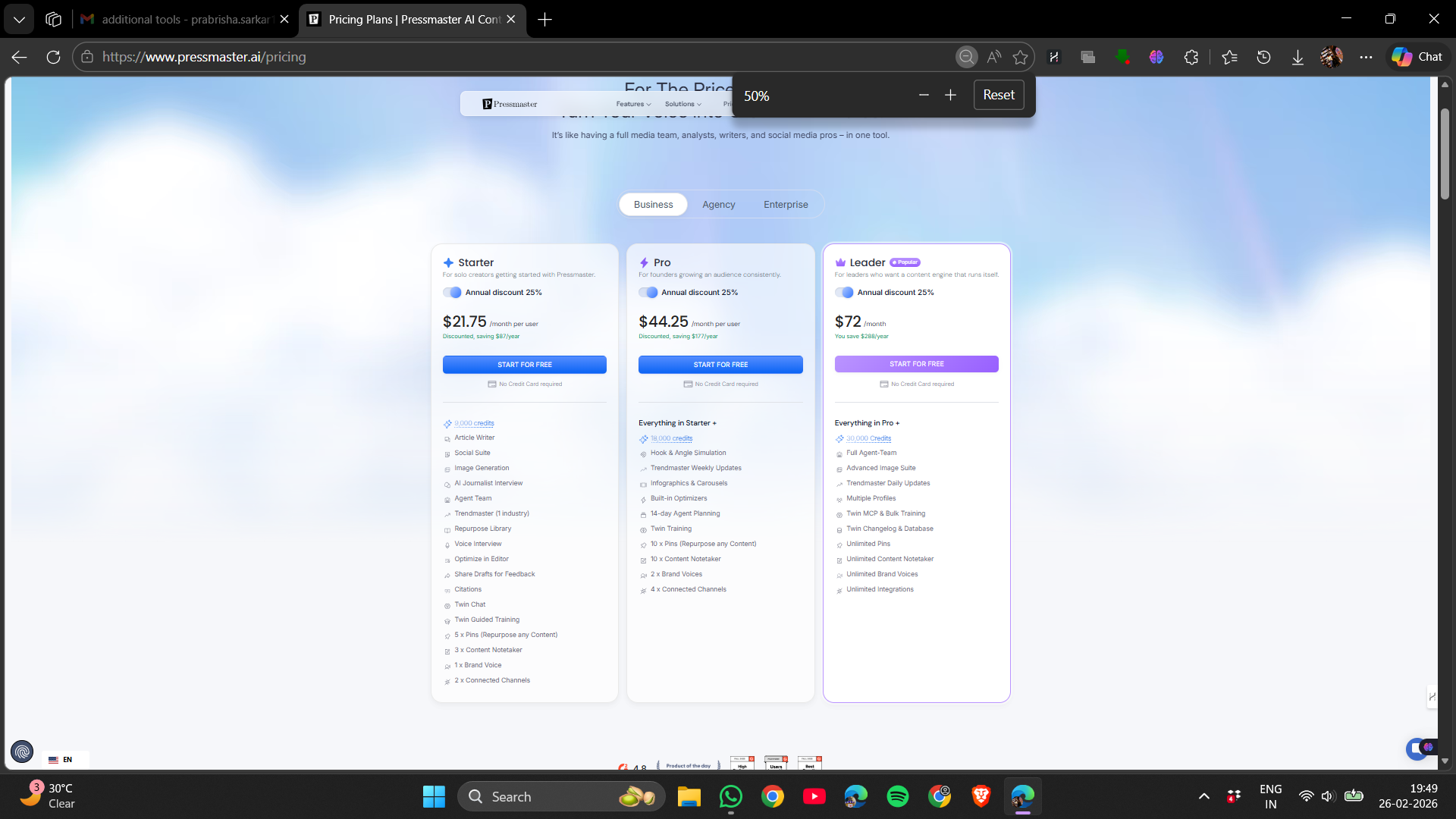
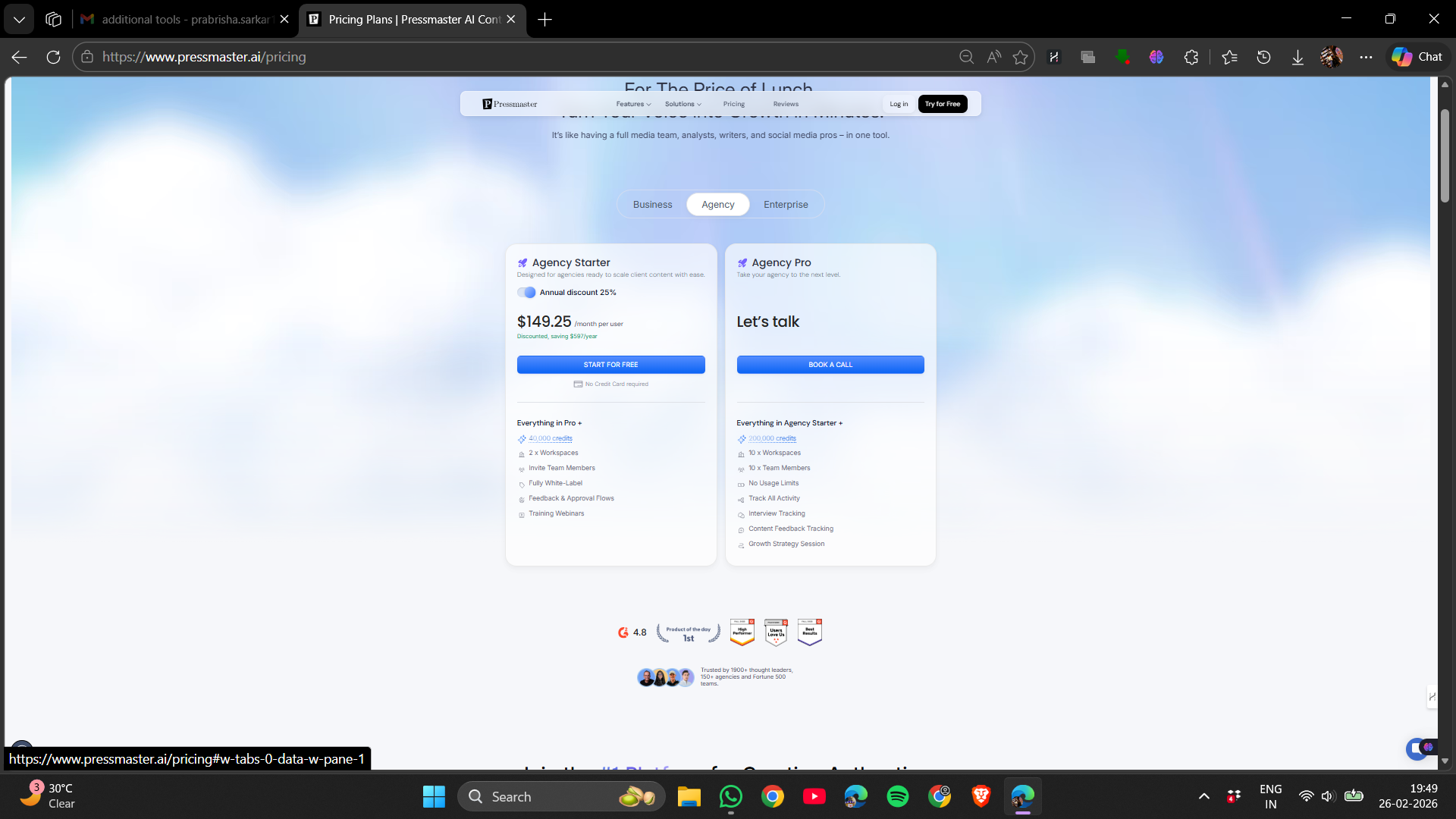
Each tier comes with increasing credits and access to more features. The idea seems to be that if someone creates a lot of content or uses advanced modules like Trendmaster or Supernova regularly, a higher tier makes sense.
Based on my experience:
- Free tier is genuinely generous and lets you explore most core features
- Credit consumption felt reasonable and not overly aggressive.
- Paid plans are priced accordingly, reflecting the value of the features provided.
- Heavy users or teams will likely need a paid plan eventually.
Overall, the pricing structure feels fair. Credits are only deducted during actual content generation, and I never felt charged for simple navigation. It’s a practical model for consistent content creators, especially with real-time credit tracking to help manage workflow.
Comparison: Pressmaster vs ContentPen
|
Feature |
Pressmaster |
ContentPen |
|
Starting Price |
~$24/month |
~$39/month |
|
Free Trial Generosity |
8,000 credits, very usable |
Limited words, stricter cap |
|
Article Length |
~1,400 – 1,500 words |
3,000 – 4,000+ words |
|
Writing Quality |
Structured, natural, controlled |
Long but slightly more SEO-heavy |
|
Editor AI Assistance |
Built-in AI chat with direct insert |
AI editor available |
|
SEO Depth |
Basic SEO score + meta |
Strong SEO focus |
|
Visual Content |
Single header image |
Multiple images throughout |
|
Social Publishing |
Strong built-in social suite |
Limited |
|
Integrations |
Broad (WordPress, Webflow, Zapier, etc.) |
Blog-focused |
|
Best For |
Personal brands & ecosystem content |
SEO-heavy blog automation |
In comparison, ContentPen excels in long-form SEO blogging, producing large, image-rich articles optimized for search rankings.
Autopost appears more automation-oriented, ideal for those seeking scheduled blog posts with minimal manual effort.
For me, Pressmaster stands out. Its writing feels more natural, and the editing experience is smoother. The social tools and ecosystem features give it a broader scope than just a blog generator. While the articles may be shorter than ContentPen’s, they seem more controlled and less mechanical.
Overall, if I had to choose based on writing quality, ecosystem capabilities, and usability, I would favor Pressmaster. It seems more strategic and less purely automated.
Final Verdict
Having thoroughly tested Pressmaster, I can confidently say it’s more than just a blog writer—it’s a comprehensive content system.
The quality of writing genuinely impressed me. It felt natural, not robotic or overly stuffed, and didn’t require me to rewrite from scratch. The editor was smooth, the AI chat was helpful, and the credit system was fair. That already sets it apart from many other tools.
Its differentiator is the ecosystem. Features like Trendmaster, Twin, Supernova, and Social Suite suggest it’s designed for creators with long-term strategies—focusing on positioning, distribution, and content repurposing, not just SEO traffic.
It’s not without flaws. The UI isn’t my personal aesthetic preference, and its SEO capabilities are basic. For those solely interested in generating large 4,000-word auto blogs, ContentPen may still be more suitable.
Considering all aspects—writing quality, flexibility, ecosystem features, and fair credit policy—Pressmaster ranks among the more comprehensive tools I’ve evaluated. It feels stable, well-designed, and thoughtfully constructed.
Overall rating: 9.1/10
Frequently Asked Questions
Pressmaster is a comprehensive content ecosystem designed for creators focused on building authority. Unlike other tools that primarily generate SEO blog posts, Pressmaster offers writing, repurposing, trend discovery, content planning, social posting, and scheduling in one workspace. It is more strategic and ecosystem-oriented, making it suitable for founders, personal brands, and content creators rather than those seeking purely automated blog scraping.
Pressmaster’s article creation process involves specifying what you want to write about and going through an interview step that asks detailed questions about style, tone, and audience. It then generates an outline and a complete article that reads like a solid draft needing light editing. The in-article editor is clean and distraction-free, with an integrated AI chat for seamless editing and refinements.
Pressmaster offers several key features including article creation with an integrated AI editor, a calendar for scheduling content, broad integrations with platforms like WordPress and Zapier, and a Social Suite for generating and optimizing social media posts. Additionally, it provides tools like Trendmaster, Supernova, and Twin for content strategy and repurposing.
Pressmaster collects typical account details, payment data, and content created within the platform. AI prompts and uploaded files may be processed by third-party AI providers with Data Processing Agreements. Users can request data access, corrections, deletions, and opt out of marketing. While encryption and access controls are implemented, users should be cautious about uploading highly sensitive information.
Pressmaster offers several pricing plans: Starter at around $22 per month, Pro at around $44 per month, Leader at around $72 per month, Agency at around $150 per month, and Enterprise with custom pricing. Each tier comes with increasing credits and access to more features, making it suitable for different levels of content creation needs.
Pressmaster focuses on creating natural, structured, and controlled articles within a comprehensive content ecosystem, making it ideal for personal brands and content strategies. In contrast, ContentPen excels in generating long-form, image-rich SEO blog posts optimized for search rankings. Pressmaster offers a smoother editing experience and broader ecosystem features, while ContentPen is more suited for SEO-heavy blog automation.
The writing quality in Pressmaster is solid and natural, avoiding overly dramatic or robotic language. Articles have a clear structure, logical flow, and natural transitions, making them read like well-organized drafts. The AI chat within the editor provides relevant and contextually appropriate responses, enhancing the overall writing and editing process.
Abonneer je op onze nieuwsbrief en ben als eerste op de hoogte van tijd- en geldbesparende AI-tools!
Comments