Conclusion
Contentpen stands out as a robust tool tailored for serious bloggers and SEO-focused content creators. It excels in generating long, structured, and keyword-heavy articles that are optimized for search engines. The tool offers a comprehensive suite of features, including keyword research, SEO scoring, and extensive customization options, making it a strong contender in the realm of AI-powered content generation. However, it may not be the best fit for casual bloggers or those seeking a platform for creative writing, as its strengths lie in its strategic, SEO-driven approach.
Pros
- Generates long, structured, and SEO-optimized articles
- Extensive customization options and presets
- Comprehensive keyword research and SEO tools
- Supports multiple integrations for direct publishing
- Built-in AI chat for editing and improvements
Cons
- Not suitable for casual or creative writing
- Higher pricing compared to simpler tools
- AI chat edits can feel more robotic and less human-like
Table of Contents
- Introduction
- Getting Started, Setup & First Impressions
- Core Features
- Performance & Writing Quality
- Plans, Credits & Pricing
- Privacy & Data Handling
- Comparison: Contentpen vs Nextblog
- Final Verdict & Overall Score
- Frequently Asked Questions
Contentpen Review
Introduction
When I first encountered Contentpen, I initially thought it was just another AI blog generator. There are so many of them now, and most of them kind of feel the same after a point. But after actually using it properly, I realised it’s not really built for casual bloggers or people who just want to write random posts now and then.
Contentpen is clearly made for people who care about SEO. Niche site owners. Bloggers trying to rank seriously. Agencies handling multiple clients. People who want long, structured, keyword-heavy articles that are built to perform, not just read nicely. It’s very strategy-focused.
If you are someone who just wants to write personal reflections, creative essays, or short opinion pieces, this probably isn’t for you. It doesn’t feel like a creative writing space. It feels like a system, a content engine. That’s not inherently a bad thing, but it’s important to be aware of.
Having used Nextblog earlier, I immediately noticed that Contentpen is more SEO-focused and structurally more serious. It’s less casual. It expects us to actually have a website, a plan, and some intention behind what we’re publishing.
Getting Started, Setup & First Impressions
Creating a Workspace
The first thing I noticed is that we absolutely need a website URL to get started. There’s no skipping that.
With Nextblog, I had used my LinkedIn profile URL and it worked there. So I tried the same thing here. It did not work at all. I kept trying and then realised Contentpen doesn’t really treat LinkedIn as a “website.”

So I had to dig up an old personal blog I had created some time ago. That URL worked immediately. So yeah, it clearly prefers actual websites and not social media profiles.
I kind of liked that honestly. It makes it feel more serious. But at the same time, if we don’t already have a website, we might struggle at this stage.
Reviewing and Customizing Brand Information
After putting in the URL, it scans our website and fills in information about our brand. Things like business description, target audience, content pillars, and positioning.
What I liked is that nothing is locked. I could edit everything, remove what it guessed and add my own positioning. I could completely rewrite the brand description if I wanted. It’s very flexible.
It suggested things for my blog like workplace culture, societal shifts, professional development, and I could tweak it as much as I wanted. And the best part was, what it pulled from the site too was surprisingly accurate.
This part actually felt quite thoughtful. It’s not just generating articles blindly but rather tries to understand our overall direction first.

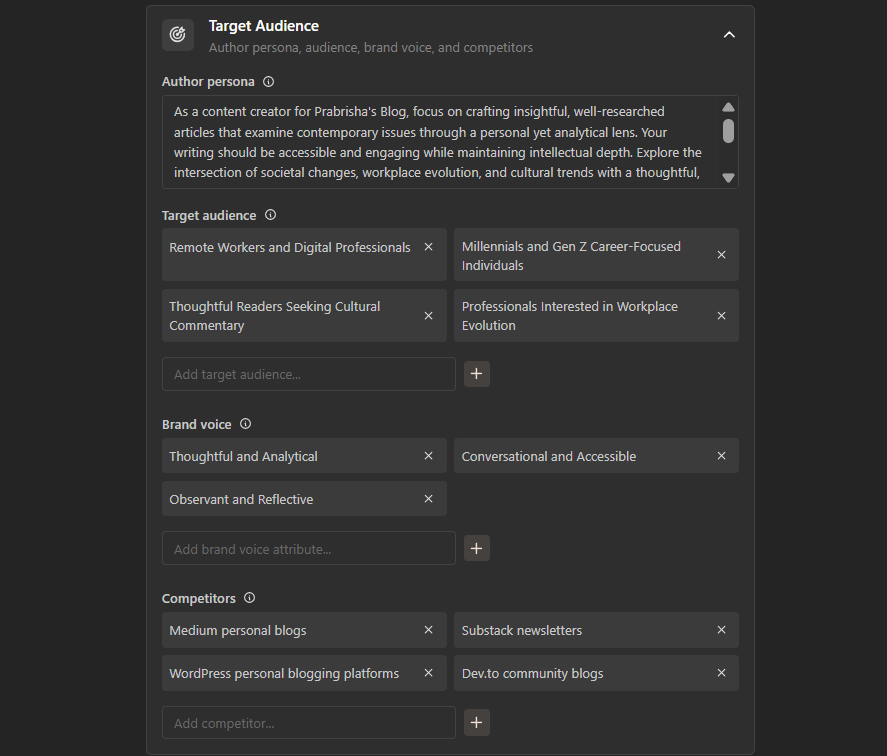


After that, it gave me suggested article topics based on my website and positioning. I picked one of the suggested topics and created an article from there. The suggestions were not random clickbait. They were structured and kind of strategic. That gave me a good first impression honestly.
First Look at the Dashboard
After completing the setup, I arrived at the main dashboard.
There is a Planner section where I can view all generated articles. I could view them in list format, board format, or even calendar format which felt very organized.

Then there’s a Keywords section, which is clearly one of the core parts of this tool. It provides keyword suggestions including search volume, difficulty, and value, emphasizing its SEO orientation. And I could directly generate articles from the keywords too.
There’s also Analytics and Opportunities but it was behind a paywall, though it seemed like a feature which tracks our content’s ranking in real time. And also another feature where we could add our own content, like files or websites to build the knowledge base of Contentpen.


Overall, my first impression was that this isn’t a “write something quickly and post” kind of tool. It’s built for structured content planning.
Core Features
Keyword Research & Article Generation
The keyword section is honestly where Contentpen starts showing what it’s actually built for.
It doesn’t just say “enter a topic.” It gives us a full keyword dashboard. We can see search volume, difficulty score, intent. It almost feels like a mini SEO tool inside a writing platform.

I selected one keyword and generated an article from it. And I was genuinely shocked at the length. The article generated for me was 3,997 words, far from a short blog post, more akin to a comprehensive pillar page.
Nextblog gave me something touching the 3,000 mark. It gave decent content, yes, but Contentpen went deep. Structured headings, multiple sections, and surprisingly, a lot of images inserted throughout the article at regular intervals.
That was a big difference.
Nextblog gave me one image at the top. Contentpen inserted multiple realistic images inside the article naturally. That immediately made the article feel more “publish-ready.”
Now about the writing itself…. Well, it was structured and very much so. I could tell it’s built with SEO in mind. It didn’t sound extremely human or conversational, but it also didn’t scream “this is AI” in every line. It was somewhere in between. It was not creative writing but not robotic either. Just… quite optimized.
Score: 8.5/10
Planner & Workflow
The Planner section was actually useful. I could see my articles in list view, board view, or calendar view. I personally liked the calendar view because it makes an actual content schedule, not just drafts sitting around.

We can schedule articles directly to calendar which felt clean and simple. Compared to Nextblog, it felt more organized. It’s more complete as a system.
Score: 8/10
Presets & Content Control
This is something I genuinely liked. There’s a Presets section where we can control tone of voice, target audience, article size, formatting options, point of view, whether we want FAQs, conclusions, bullet points, headings, even image style. I could edit the default preset or create my own.

So if one always writes in first person and wants medium-length articles with clear headings and FAQs, they can lock that in. That level of control was not there in Nextblog. Nextblog felt simpler. This feels more customizable. It’s small things like these that make Contentpen feel like a serious content tool and not just a generator.
Score: 9/10
Editor Experience, SEO & AI Chat
The editor itself is quite detailed. I could see:
- Word count
- Version history
- Table of contents
- SEO title and description
- Internal and external linking status
- Featured image settings
- Image style
- Target audience tags
- Tone of voice settings
- SEO score


The SEO score is shown clearly. Mine was 62 percent, marked as “Average.” It even breaks down where improvements are needed like keyword optimization or linking strategy which was very helpful.


Now the AI chat inside the editor is something I liked but also had mixed feelings about. We can highlight text and ask it to rewrite or expand. It’s convenient. Way better than Nextblog where I had to manually edit everything outside the tool.
But here’s the issue. When I used the chat to rewrite sections, the rewritten content felt very AI. Very obvious. I could see the patterns of over-explaining and repetitive transitions and telltale signs like em dashes… Those kind of things.
Also, when I inserted the edited content, it got added to the bottom of the article instead of replacing the selected part. So I had to manually move it to the right place. Not a huge problem, but slightly annoying. Still, having built-in editing is better than not having it at all.
Score: 8.3/10
Integrations, Linking, Media Library & Publishing
There’s also integrations like WordPress, Ghost, Webflow, Shopify, webhooks and more.

I didn’t connect mine, so I can’t speak from experience there. But theoretically we can directly publish from the platform. I also saw that I could schedule the generated articles in the calendar and choose on which day I wanted them published.
There’s also internal and external linking shown inside the editor. I could see whether links were added properly and how many were included. It doesn’t just dump content, it actually keeps linking structure in view, which is helpful for SEO without manually checking everything.


There’s a Media Library too where we can upload our own images. The tool also generates AI images automatically inside articles, which I liked because it makes the article look full and not empty.
Nextblog felt visually minimal. Contentpen feels more content-heavy.
Performance & Writing Quality
I’ll be honest here. The performance was solid. It did not lag for me. The article generation took a little time obviously because it was generating almost 4,000 words, but it wasn’t frustrating or broken. It felt stable.
Now about the writing quality, which is the main thing. The initial complete article it produced did not come across as obviously AI-generated. That was a pleasant surprise. It was highly structured as well. Clear headings and subheadings, logical flow, proper introductions, conclusions, even FAQs. It was clearly written with SEO in mind.
And it didn’t even have those dramatic AI phrases everywhere. No excessive motivational tone and no weird over-polished corporate vibe. It felt neutral and informative just, not very humanized though.
It doesn’t resemble a personal rant or deep storytelling. Instead, it feels like a well-organized writer who has researched the topic thoroughly. So if someone reads it casually, they probably won’t instantly think “this is AI.” But if one is used to reading AI content, they can still notice the patterns.
It’s clean. A little safe. Slightly predictable in structure. Now the problem starts when I use the AI chat to edit something. That part felt much more AI.
The rewritten sections were more obvious. Longer than needed. A bit dramatic sometimes. Repetitive transitions like with generic AI kind of tone. That’s where I felt the AI presence more clearly.
So my conclusion on writing quality:
- Initial full article is structured, SEO-focused, decent quality, not too robotic
- Chat-based edits is more AI feeling, slightly exaggerated tone
SEO depth felt average to good. It covered related subtopics properly. Readability was also fine. Not complicated language, not too basic either.
Overall, for ranking blogs, it’s strong. For deeply personal storytelling blogs, maybe we’ll need to heavily editing.
Plans, Credits & Pricing
Now this is where we need to really understand how it works. Contentpen runs on plans plus credits. From what I saw:
Starter plan is around $39 per month, Premium is $79 per month. Agency is $199 per month.

Each plan limits:
- Number of articles per month
- Workspaces
- Users
- AI images
- Some advanced features
On the trial, I had 3 articles per month limit. It clearly shows usage like 1/3 articles used, 1/3 keyword generations used, and so on. Limits reset monthly.
If we run out, we can buy extra article credits separately. Something like:
- 10 credits
- 50 credits
- 150 credits


Credits don’t expire, which is actually nice. Opportunities and Analytics are locked under higher plans. Webhooks also seem Pro-only. So this is not a cheap casual tool.
It’s clearly built for:
- Serious bloggers
- SEO-focused creators
- Agencies
- People managing multiple clients
Compared to Nextblog, this is more expensive but also more feature-heavy.
If we just want simple blog generation, Nextblog feels lighter and cheaper. If we want keyword data, internal linking tracking, SEO scoring, calendar scheduling, presets, publishing integrations and longer content, Contentpen gives more value. It depends on what we need honestly.
Privacy & Data Handling
Contentpen’s privacy policy aligns with what one would expect from a reputable SaaS provider. It collects substantial data but clarifies the reasons.
In simple terms, here’s what stood out to me:
- It collects basic account info like name, email, password, plus payment details and device data.
- Usage activity is tracked, including generated content and interactions.
- Sensitive data is only processed with explicit consent.
- Data is used to run the service, process payments, improve features, personalize experience, and for marketing which we can opt out of.
- Data may be shared with payment processors, service providers, affiliates, or authorities if legally required, but it is not sold.
- International data transfers may happen, with safeguards in place.
- Security measures include encryption, secure servers, access controls, and confidentiality agreements.
- Users have rights to access, correct, delete, restrict, object, withdraw consent, and request portability under GDPR and CCPA.
- Cookies are used for analytics and functionality, with consent for non-essential ones.
- Data is retained only as long as necessary, and policy updates are communicated.
Overall, it feels structured and compliant. Not minimal, but not shady either. It’s clearly built for businesses, so data handling reflects that. I wouldn’t treat it as a zero-data platform, but I didn’t see any red flags either.
Comparison: Contentpen vs Nextblog
|
Point |
Contentpen |
Nextblog |
|
Starting Price |
$39/month |
$29/month |
|
Article Length |
~4,000 words |
~3,000+ words |
|
Images |
Multiple images inserted throughout |
One main image at top |
|
SEO Tools |
SEO score, keyword tracking, linking overview |
Basic SEO structure |
|
Internal Linking |
Visible and structured inside editor |
Needs to be enabled manually |
|
AI Editing |
Built-in AI chat |
No built-in editor chat |
|
Automation |
Scheduling and publishing |
Strong auto-generate and auto-publish |
|
Writing Quality |
More structured and slightly better tone |
Good but slightly more robotic |
In my view, Contentpen feels more comprehensive. It offers keyword research, SEO scoring, presets, version history, image management, linking insights, and AI editing. It feels like a full SEO content system.
Nextblog feels more automated. If I want to just turn on content production and let it run, Nextblog might actually be simpler. But in terms of depth, writing quality, and overall control, I would pick Contentpen. It just feels more serious.
Final Verdict & Overall Score
Having used Contentpen thoroughly, I can confirm it’s not merely a blog generator but a structured SEO content engine.
The 4,000-word output impressed me. The image placement impressed me. The presets and customization options impressed me. And honestly, the writing quality was better than I expected.
It remains optimized. It doesn’t sound deeply human or emotional, but it is clean, well-organized, and highly functional. The only weak spot for me was the AI chat edits, which felt more obviously AI compared to the original article, but at least it had an AI editor.
The pricing is indeed on the higher end, but it provides greater control and more features than simpler platforms. So overall, I’d say Contentpen is built for serious SEO-focused creators.
Final overall score: 8.7/10
Frequently Asked Questions
Contentpen is an AI-powered content generation tool designed for serious bloggers, niche site owners, and agencies focused on SEO. It is built for creating long, structured, keyword-heavy articles aimed at ranking well in search engines, rather than for casual or creative writing.
Contentpen is more SEO-focused and structurally serious compared to tools like Nextblog. It offers features such as keyword research, SEO scoring, presets, version history, and image management. While Nextblog may be simpler and cheaper, Contentpen provides more depth, writing quality, and overall control, making it suitable for serious content creators.
Contentpen offers several key features including keyword research and article generation, a planner for content scheduling, presets for content control, an SEO-focused editor, AI chat for editing, integrations with platforms like WordPress and Shopify, and a media library for image management. It also provides analytics and opportunities tracking for content performance.
Contentpen operates on a subscription model with different plans: Starter at $39 per month, Premium at $79 per month, and Agency at $199 per month. Each plan has limits on the number of articles, workspaces, users, AI images, and access to advanced features. Additional article credits can be purchased if needed, and credits do not expire.
The writing quality in Contentpen is structured, SEO-focused, and decent. The initial articles generated are not overly robotic but are optimized for search engines. While the content may not be deeply human or emotional, it is clean, well-organized, and functional. However, AI chat edits can feel more obviously AI-generated with a slightly exaggerated tone.
Contentpen is not ideal for creative writing or personal blogs. It is designed for SEO-focused content creation and lacks the creative writing space. If you are looking to write personal reflections, creative essays, or short opinion pieces, Contentpen may not be the best fit.
Contentpen supports integrations with various platforms including WordPress, Ghost, Webflow, Shopify, and more. These integrations allow for direct publishing from the Contentpen platform, making it easier to manage and schedule content across different websites and blogs.
Abonneer je op onze nieuwsbrief en ben als eerste op de hoogte van tijd- en geldbesparende AI-tools!
Comments