Conclusion
NextBlog is a powerful tool designed for those who prioritize SEO traffic and consistency over creative writing. It excels in generating long-form, structured, and SEO-optimized blog posts, making it ideal for SEO-focused website owners, personal brand builders, and agencies managing multiple sites. The automation features, such as auto-generation, auto-publishing, and internal linking, are impressive and can significantly streamline content production. However, the writing quality, while clean and organized, lacks a distinctive human voice and personality, requiring manual editing for more nuanced or opinionated pieces.
Pros
- Excellent automation features for content generation and publishing
- Generates long-form, SEO-optimized blog posts
- Clean and organized post management dashboard
- Strong integrations with various platforms
- Stable performance with no technical glitches
Cons
- Writing quality lacks personality and human touch
- Requires a website URL, limiting its use for those without a site
- Pricing may be high for solo bloggers or casual users
Table of Contents
- Introduction
- First Impressions, Getting Started & Dashboard
- Core Features
- Project Creation & Automated Blog Generation
- Scheduling, Auto Publishing & Internal Linking
- Post Management & Workflow
- Integrations & Publishing Options
- Performance & Writing Quality
- Credits, Plan Limits & Pricing
- Privacy
- NextBlog vs Arvow
- Final Verdict & Overall Score
- Frequently Asked Questions
Introduction
NextBlog is built for people who want blog content without sitting down and writing it themselves. It’s clearly made for founders, niche site owners, personal brand builders, and small teams who care about SEO traffic and consistency more than “creative writing.” If the goal is publishing optimized articles regularly and we don’t want to manually draft 3000+ words every time, this tool makes things much easier.
It’s not built for writers who love crafting sentences. It’s also not ideal if we want full creative control over tone and storytelling. The output is structured and optimized, but it does feel somewhat generic. So if we’re expecting deeply human storytelling out of the box, this is probably not the tool.
From what I experienced, NextBlog is more of a growth machine than a writing playground. It’s designed to scale content. Not to romanticize it.
Who it’s built for:
- SEO focused website owners
- Personal brand builders
- Agencies managing multiple sites
- People who want automated blog publishing
Who it’s not built for:
- Creative writers
- People who don’t have a website yet
- Anyone who wants short casual posts instead of long SEO articles
Overall, it feels like a tool made for traffic generation first, personality second. And that’s not necessarily bad. It’s just very clear about what it is.
First Impressions, Getting Started & Dashboard
The first thing I noticed is that we cannot do anything without a website URL. It’s required. There is no “just try writing” option. We have to create a project and enter our site URL. I for one, used my Linkedin url to test out how it actually works. The whole system is website-centered.
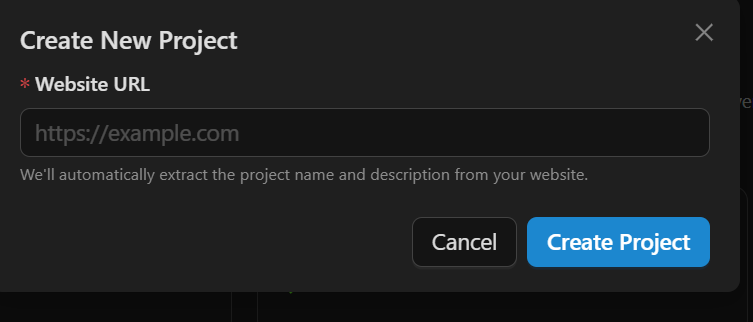
Once I entered the URL, it automatically pulled in a project name and generated a description. It even generated relevant imagery for the blog posts later. That part was smooth actually. I didn’t have to manually explain what my site was about. It kind of figures it out from the URL.
The dashboard itself is clean, and I personally also prefer the dark theme. Left sidebar with Dashboard, Projects, Posts, Billing. Nothing overwhelming. I saw my AI credits immediately, which I liked because I always want to know how close I am to hitting a limit.

Inside a project, I could enable auto generation and auto publishing. There’s also scheduling where we literally choose which days of the month it should generate content. That level of control surprised me. It’s not just “publish weekly.” We can control exact days and exact number of articles we want generated or published each day.

What stood out to me is how production focused it felt. The moment we create a project, it’s ready to generate 3000+ word blog posts. It wasn’t just a lightweight content tool, it was trying to produce serious, long articles.
The overall first impression for me was that it feels efficient, maybe even slightly aggressive about automation. It assumed that I wanted content running on autopilot.
Core Features
Project Creation & Automated Blog Generation
Everything in NextBlog starts with a project. And like I said before, we absolutely need a website URL. There’s no skipping that. At first I found that slightly restrictive, but after using it I realized why. The whole system is built around our site context.


When I entered my URL, it automatically generated the project name and description. I didn’t have to sit and explain my niche manually. It pulled that from the site. That saved time to be honest.
Then comes the main thing, blog generation. I generated two articles and both were over 3000 words. Not 800. Not 1200. Full long form content. Structured with headings, subheadings, intro, sections, and even labeled them as SEO Optimized too.

The structure was solid, it didn’t feel haphazard. The headings made sense. It clearly followed an SEO pattern and that formula was very visible.
Now the writing quality. I won’t lie. It’s good. It’s readable. It flows logically. But it does feel AI-ish. The tone is slightly polished in a predictable way. The sentences are clean but safe. I didn’t feel personality in it only structure.
If I wanted to publish it as is, I probably could. But if I wanted it to sound very human or opinionated, I would have to edit it. It also automatically assigns a cover image and creates the slug. That part was smooth. I didn’t have to hunt for visuals. Everything felt production ready.
So overall, the generation feature is powerful. But it’s built for scale. Not voice.
Score: 7.9/10
Scheduling, Auto Publishing & Internal Linking
This is where NextBlog becomes very automation heavy.
Inside the project settings, I could toggle auto-generate blogs and auto-publish blogs. That’s huge. It means I technically never have to log in again if I don’t want to. Of course I had the auto-publish option off, mainly because I used my linkedin URL for the blog generation and what I wanted was not to publish blogs but rather to test the writing capability of Nextblog, so I can’t claim anything with absolute surety.

The scheduling surprised me. We can literally choose which days of the month to generate content. Day 1, Day 2, Day 3 and so on. That level of granular control is not something I’ve come across before. There’s also internal linking. It automatically adds internal links between posts. I personally like that because internal linking is annoying to do manually. It helps SEO in a very practical way.
But again, this tool is very system driven. It assumes that we want content to be generated and published consistently, almost mechanically. If someone wants to craft each article emotionally, this setup might feel too robotic, for traffic sites though? It makes sense.
Score: 8.5/10
Post Management & Workflow
I actually liked the post dashboard.
Each post shows:
- Word count
- SEO optimized label
- Status like Draft or Needs Review
- Preview, Approve, Edit buttons


That workflow felt clean. I didn’t publish but rather I previewed first. The preview shows the full blog layout with cover image and formatted content. And I could even edit inside the article. Editing is simple where we can modify title, slug, description, and content. The editor is straightforward. It wasn’t overly complex or cluttered… one thing though… the editing had to be completely manual, there was no AI chat or helper who would take instructions from us and edit the content.
Score: 7.3/10
Integrations & Publishing Options
NextBlog integrates with a lot of platforms.
I saw:
- WordPress
- Webflow
- Shopify
- Wix
- Notion
- Ghost
- API options
- Webhooks
- Subdomain publishing
This tells me clearly that it’s meant for people who already have a site infrastructure.

The fact that it supports API and subdomain publishing makes it feel slightly more serious. More business oriented. Not casual blogging. It also mentions 50+ languages and instant hosting on paid plans. So technically we could build an entire automated content engine around it.
Personally, I think the integrations are one of its most strong point because without them, automation means nothing. But then again, when everything revolves around websites. If we don’t have one, this tool doesn’t really serve us.
Performance & Writing Quality
From a technical standpoint, I didn’t face any glitches. No crashes. No loading errors. Pages switched smoothly. Posts generated without freezing. Even the 3000+ word articles loaded properly in preview mode. So performance wise, it’s stable. I can’t complain there.
Now for the more important part… the writing quality. The blogs it generated were long. Proper long form. Structured with clear headings and subheadings. The intro sets context. Then it breaks into sections. Then actionable points. Then conclusion. It clearly understands SEO structure very well.
But here’s the thing, it’s safe and generic writing.
The sentences are clean. Grammar is proper. Flow is logical. But it doesn’t sound like a real person thinking. It sounds like a very well trained system writing to rank. If that makes sense. There’s a pattern to it. Slightly repetitive transitions. Predictable phrasing. A bit formal. It’s not bad. It’s just not deeply human.
I didn’t feel like it was garbage content. Definitely not low effort. It’s actually well organized and informative. But if someone reads a lot of AI written blogs, they will probably recognize the tone.
For SEO sites or niche blogs where consistency matters more than personality, this works very well. For brand storytelling or strong opinion pieces, it needs editing.
So I would say its structurally strong and SEO focused but not very emotionally unique or nuanced. It’s good writing. Just not distinctive writing.
Credits, Plan Limits & Pricing
NextBlog runs on a plan based model with article limits.
From what I saw:
Starter $29 per month
- 1 project or website
- 20 AI articles per month
- Basic SEO and AEO optimization
- Email support
Growth $49 per month
- 3 projects
- 60 AI articles per month
- Advanced SEO + AEO
- Priority support
Pro $99 per month
- Unlimited projects
- 150 AI articles per month
- Full SEO + competitor analysis
- Dedicated account manager
There is a 14 day free trial on paid plans. No permanent free plan.

Inside the dashboard, I could see AI credits too. It showed 60 out of 60 credits available at one point. So it clearly tracks usage behind the scenes. The limits are very real. Once you hit your article quota, that’s it for the month. And for each blog I auto generated it exhausted 1 credit for me.
The pricing is not cheap. This tool is clearly meant for businesses running multiple sites or agencies pushing volume content. If one is just a solo blogger experimenting, $29 per month for 20 articles might feel like overkill.
But if someone is running content at scale, 60 or 150 long form blogs per month is actually quite aggressive.
For me personally, it feels like a business tool. Not a casual writer tool.
Privacy
NextBlog follows what I’d call a normal SaaS privacy model. Nothing shocking, but it does collect quite a bit because of how the platform works.
When I create an account, it collects basic details like name, email, and password. It also collects profile info such as company name, website URL, and content preferences. Since the whole tool revolves around a website URL, this part makes sense.
If I subscribe, billing details are involved too, though payments are handled by third party providers.
It also tracks usage data. That includes what blogs I generate, keywords I enter, API usage, and how I interact with features. So yes, the content I create inside the tool is part of stored data.
They mention encryption in transit and at rest, access controls, secure data centers, and employee training around data protection. So structurally, it looks secure and organized.
Overall, it feels like a typical business level privacy setup. Not invasive, but not minimal either. I’d feel fine using it for content automation, just not with highly sensitive material.
NextBlog vs Arvow
|
Point |
NextBlog |
Arvow |
|
Starting Price |
$29/month (Starter) |
$39/month (Solo, billed yearly) |
|
Core Focus |
Automated long-form blog generation |
SEO article creation with campaign structure |
|
Automation |
Strong auto-generate and auto-publish system |
Automation exists but more campaign-based |
|
Content Length |
3000+ words by default |
Long-form, but more controlled |
|
Internal Linking |
Built-in automatic linking |
More manual SEO editing control |
|
Ease of Setup |
Requires website URL from start |
Slightly more flexible setup |
If I’m being honest, NextBlog feels more aggressive about automation. It wants to run content on autopilot. For someone managing multiple niche sites, that’s powerful. But Arvow feels slightly more controlled. I felt like I had more influence over structure and SEO adjustments inside the editor. If my goal is pure scale and publishing many long blogs per month, I would choose NextBlog. If I care more about refining and controlling each article before it goes live, I would lean toward Arvow. Personally, I think NextBlog wins for automation, but Arvow wins for hands-on SEO control. It really depends on whether I want volume or precision.
Final Verdict & Overall Score
After properly testing NextBlog, my overall feeling is that it’s a content production engine. Not a writing tool in the emotional sense. It’s built for scale.
The blogs it generated were long, structured, and clearly SEO focused. I didn’t get short shallow drafts. I got full 3000+ word articles that were ready to publish after review. That’s impressive. But the tone does feel AI. Clean, organized, slightly predictable.
What I liked most was the automation. Auto-generate, auto-publish, scheduling by exact dates, internal linking. It really does feel like I could set it up and let it run. What I didn’t love was the lack of strong personality in the writing. It’s good, but it’s not distinctive. It needs editing if brand voice matters.
Overall, I see NextBlog as a serious tool for traffic-focused site owners. Not for creative writers.
Overall score: 8/10
Frequently Asked Questions
NextBlog is an AI-powered tool designed for generating long-form, SEO-optimized blog content automatically. It is ideal for SEO-focused website owners, personal brand builders, agencies managing multiple sites, and those who want automated blog publishing. However, it is not suited for creative writers or those who want full creative control over tone and storytelling.
NextBlog generates blog content by requiring a website URL to create a project. It then uses AI to produce long-form articles, typically over 3000 words, with structured headings, subheadings, and SEO optimization. The content is generated automatically and can be set to publish on specific days, making it highly efficient for consistent content production.
Key features of NextBlog include automated blog generation, scheduling and auto-publishing, internal linking, and a clean post management dashboard. It also offers integrations with platforms like WordPress, Webflow, Shopify, and more. The tool is designed to scale content production and is highly automation-focused.
NextBlog offers three pricing plans: Starter at $29 per month for 1 project and 20 AI articles, Growth at $49 per month for 3 projects and 60 AI articles, and Pro at $99 per month for unlimited projects and 150 AI articles. Each plan includes different levels of SEO optimization and support, with a 14-day free trial available for paid plans.
The writing quality of NextBlog is structured, SEO-optimized, and readable, but it can feel somewhat generic and AI-generated. The content is long-form and well-organized, making it suitable for SEO and traffic generation. However, it may lack a distinctive human voice and personality, requiring editing for more nuanced or opinionated pieces.
NextBlog is more focused on aggressive automation and long-form blog generation, making it ideal for scaling content production. Arvow, on the other hand, offers more hands-on SEO control and a slightly more flexible setup. NextBlog wins for automation and volume, while Arvow is better for precision and individual article refinement.
No, NextBlog does not offer a permanent free plan. However, there is a 14-day free trial available for its paid plans. This allows users to test the features and capabilities of NextBlog before committing to a subscription.
Abonneer je op onze nieuwsbrief en ben als eerste op de hoogte van tijd- en geldbesparende AI-tools!
Comments