Conclusion
Cleanfox stands out as a focused and effective tool among various email tools for tackling the specific issue of newsletter clutter in your inbox. Unlike broader inbox management tools like Clean Email, which offers extensive categorization and automation features, or InboxPurge, which focuses on quick mass unsubscriptions, Cleanfox zeroes in on newsletter cleanup with a user-friendly swipe interface, setting it apart from other AI tools that try to do too much. Its straightforward approach, combined with a user-friendly interface, makes it a refreshing alternative to more complex inbox management tools. While it may not address all types of email clutter, its reliability and simplicity make it a valuable tool for those overwhelmed by newsletters. The fact that it is completely free adds to its appeal, making it a worthwhile option for anyone looking to declutter their inbox without any hidden costs.
Pros
- Focused specifically on newsletter cleanup, making it highly effective for this task
- User-friendly interface with a unique swipe card system that makes the process enjoyable
- Completely free with no hidden costs or premium upgrades
- Supports multiple inboxes and offers full control to the user
- Provides clear and straightforward language, making it accessible for newcomers
Cons
- Does not address general email clutter such as receipts or random messages
- Lacks advanced automation features like rules or tagging
- Privacy considerations due to anonymous data usage for analytics
Table of Contents
- The Onboarding: Clear, a Bit Long, but Comfortingly Secure
- The Interface: Unexpectedly calming, and surprisingly… enjoyable?
- How Cleanfox Compares to Other Inbox-Cleaning Tools
- Cleanfox vs. Clean Email
- Cleanfox vs. InboxPurge
- Performance: Does It Actually Clean Our Inbox?
- Privacy & Security: The Most Crucial Aspect
- Pricing and Value: Hard to Argue With Free
- Who Cleanfox Is Really Best For (and When It Falls Short)
- Final Thoughts and Overall Score
- Frequently Asked Questions
A certain kind of frustration gradually accumulates silently in our inbox. We may not notice it daily. We assume we’ll handle it later. Suddenly, the count jumps from a few manageable promotions to hundreds of newsletters from sources we barely recall visiting. All of us have experienced that moment of staring at our inbox and wondering, “How did it become this overwhelming?”
Cleanfox positions itself as the tool that addresses one specific issue: inbox clutter. Focusing on a specific type of digital mess, newsletters and recurring senders, rather than trying to fix every aspect of our inbox. After extensive testing, I began to understand why this focused approach proves so effective.
This review details my entire experience with Cleanfox, from setup to the thoughtful design choices that make it feel respectful rather than intrusive.
The Onboarding: Clear, a Bit Long, but Comfortingly Secure
Getting started with Cleanfox is straightforward: enter your email address and link your mailbox. Initially, I anticipated the standard OAuth popup, clicking “Allow,” and the connection being seamless. However, with Gmail, Cleanfox adopts a somewhat more manual process. At present, I didn’t encounter an Outlook integration page, but it will undoubtedly be a valuable addition once supported.
This involves enabling IMAP access, verifying multi-factor authentication, and creating an app-specific password. Admittedly, it takes a few extra minutes. We’ll find ourselves copying code, following directions, and switching between tabs. It keeps us somewhat more engaged than one might anticipate, but it’s not hard.

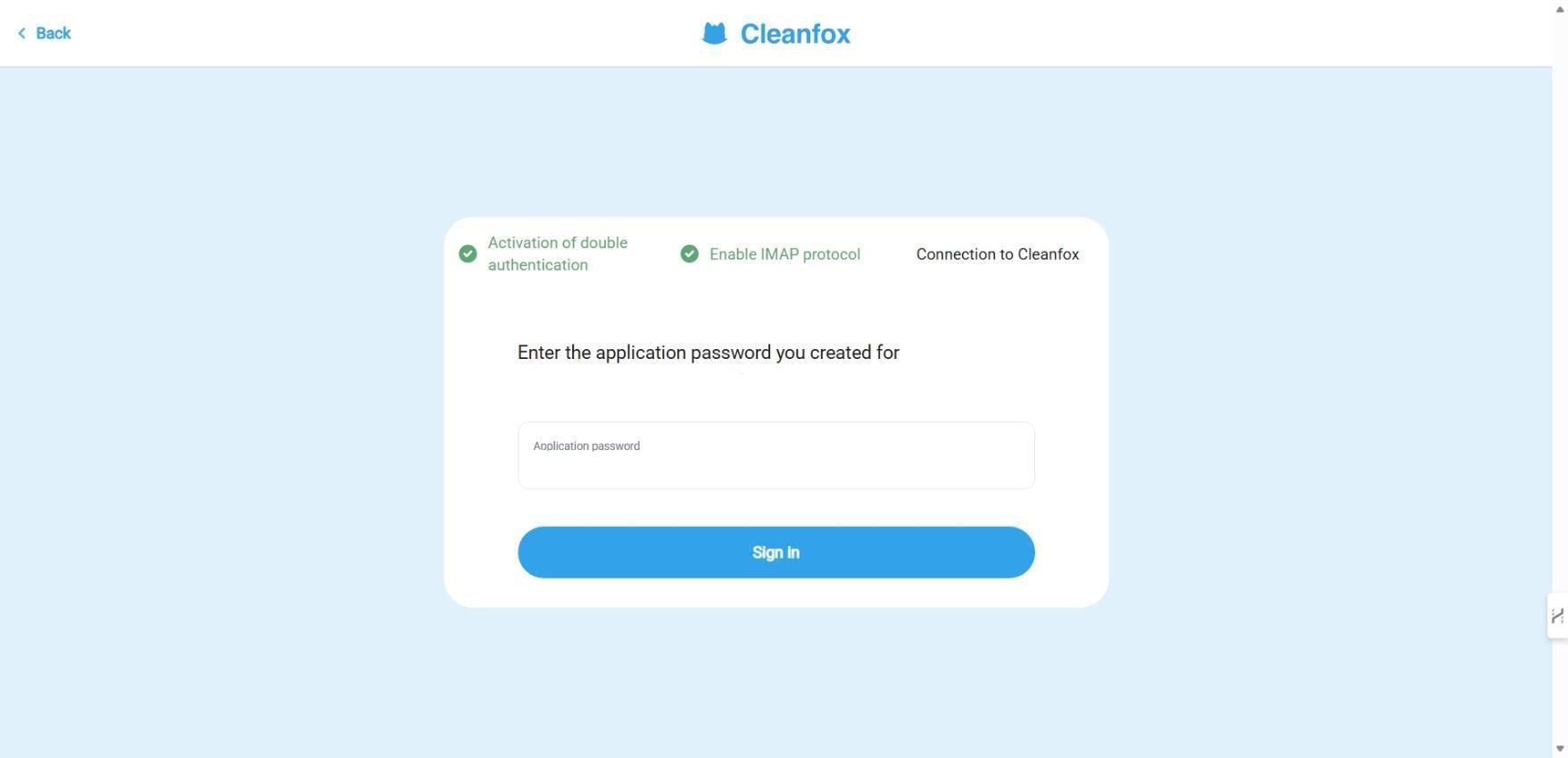


The more I repeated these steps, the clearer it became: this was a sign of care, not inconvenience. It didn’t seem like a clumsy integration or a workaround. It appeared as if Cleanfox was making a genuine effort to ensure only the necessary data is accessed, and solely by us. The platform clarifies the purpose of each step instead of demanding blind trust, which I appreciated.
After connection, Cleanfox begins analyzing your mailbox. It doesn’t scan randomly. It specifically detects newsletters—recurring senders that accumulate over months or years.
And that’s where the magic begins.
Setup & First Impressions Verdict: A few more steps than expected, but it builds confidence rather than doubt.Score: 8 / 10
The Interface: Unexpectedly calming, and surprisingly… enjoyable?
Cleaning out our inbox isn’t typically something we look forward to. However, Cleanfox’s design warrants some praise. Rather than cluttered panels and countless icons vying for attention, it offers a gentle, minimal interface that feels almost serene.
There are essentially three main elements to engage with:
• Newsletters (list view)• Swipe cards (like a mini-game)• Undo actions (reversing cleaning or keeping decisions)
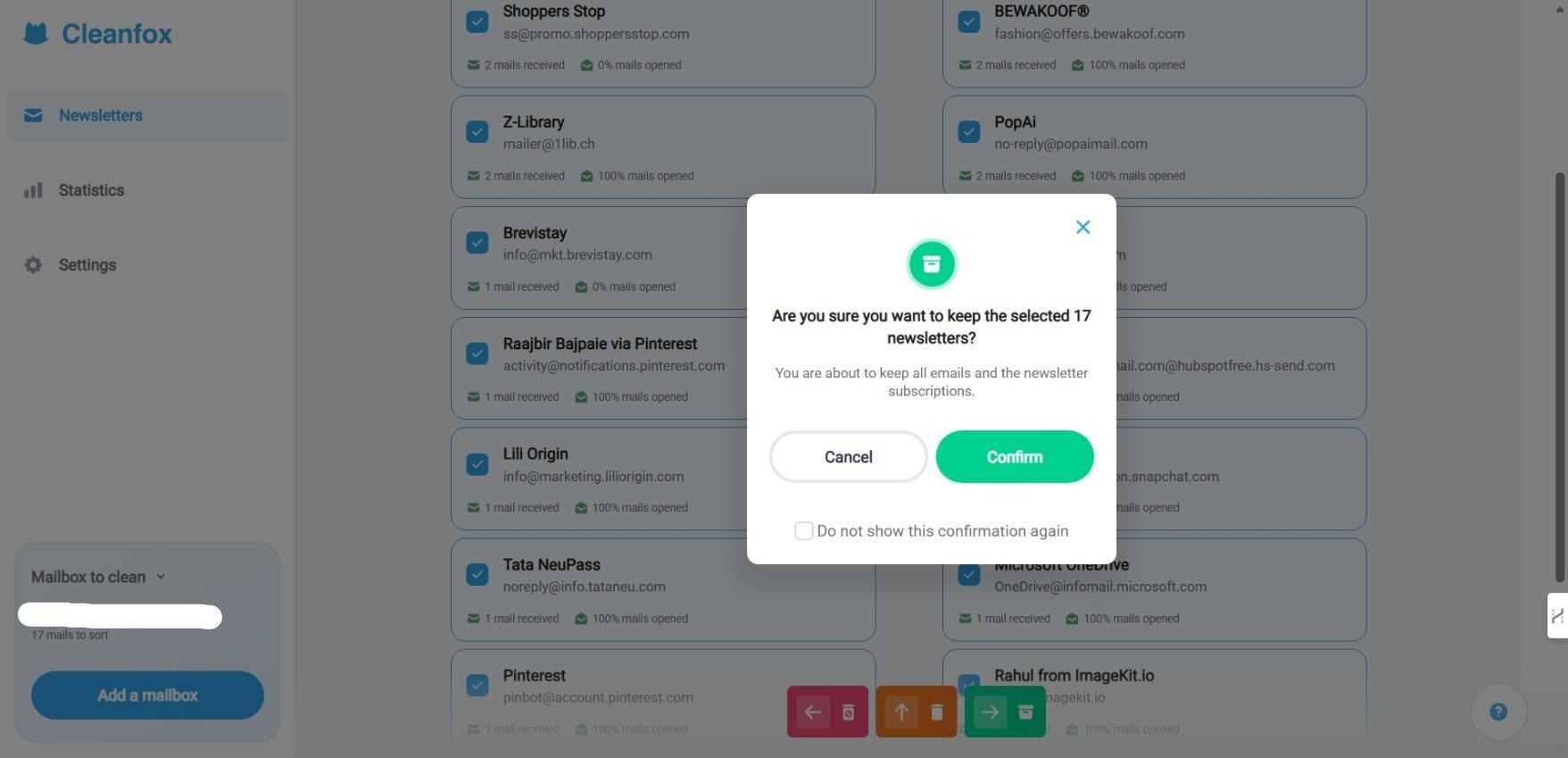
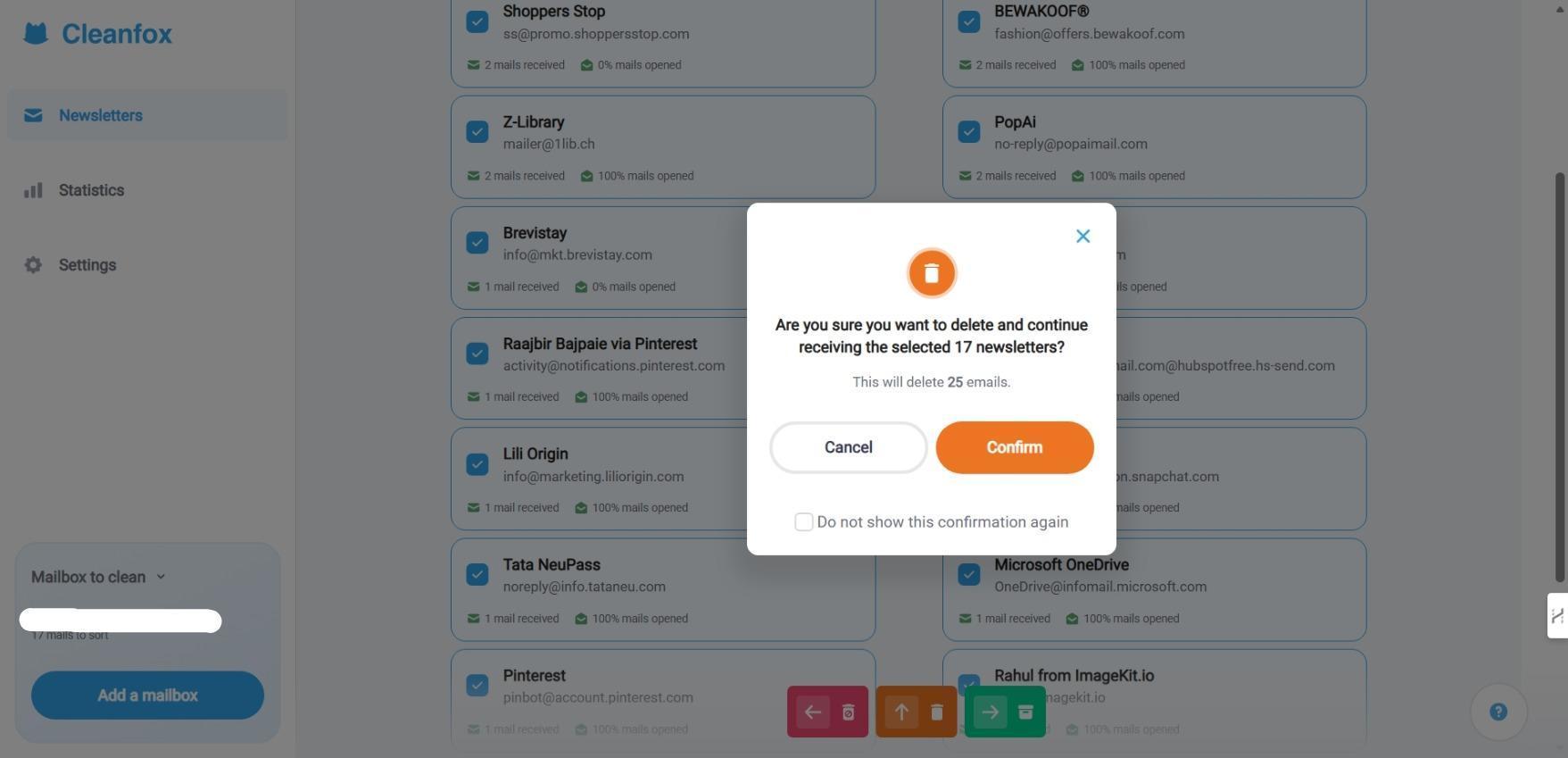
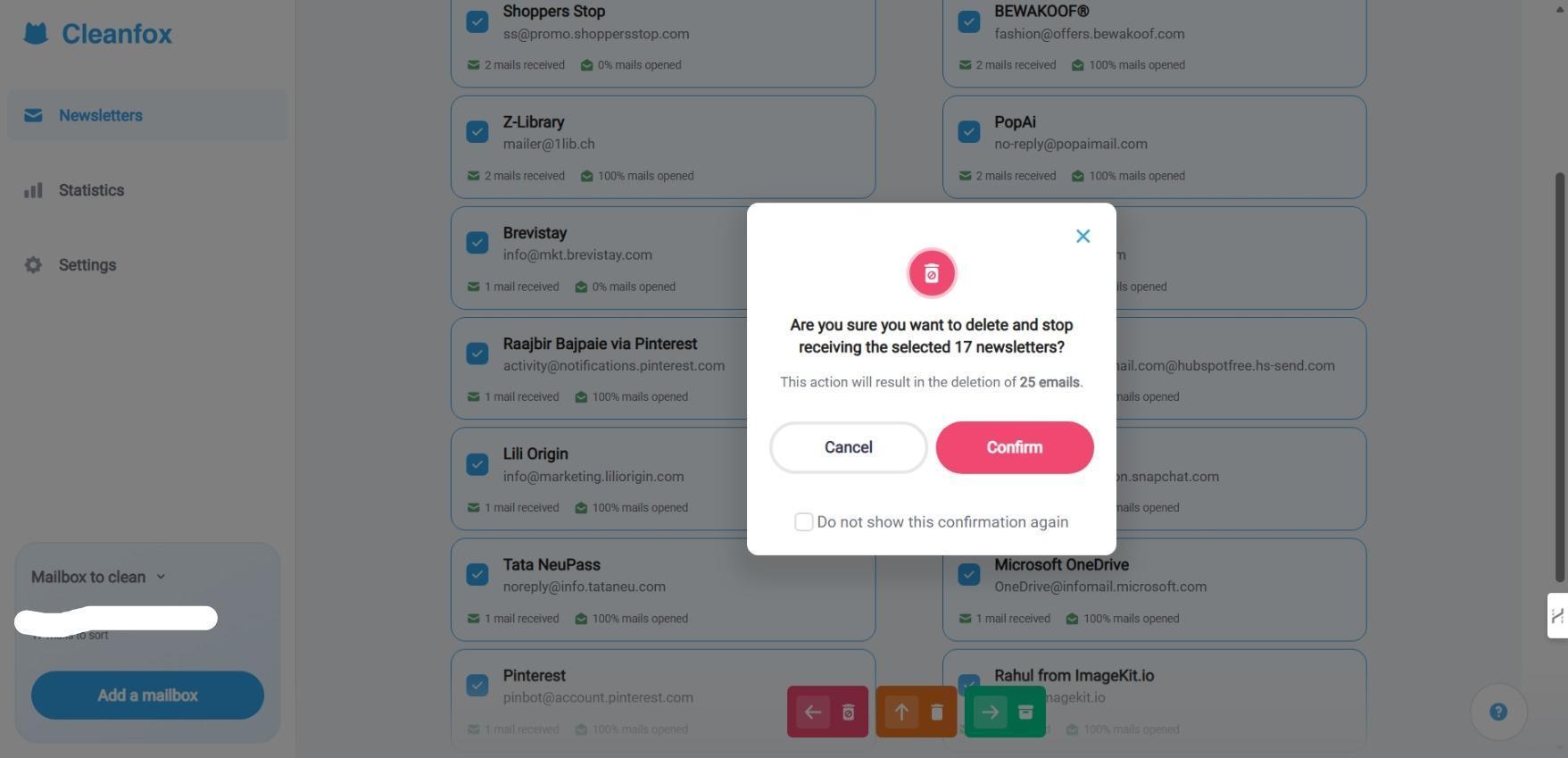
The card system immediately caught my eye. Each sender appears as a digital playing card. It prompted a simple question: what’s my next move with this recurring newsletter?
Then, we swipe:
• Right, Keep receiving• Up, Delete emails but remain subscribed• Left, Delete and unsubscribe completely

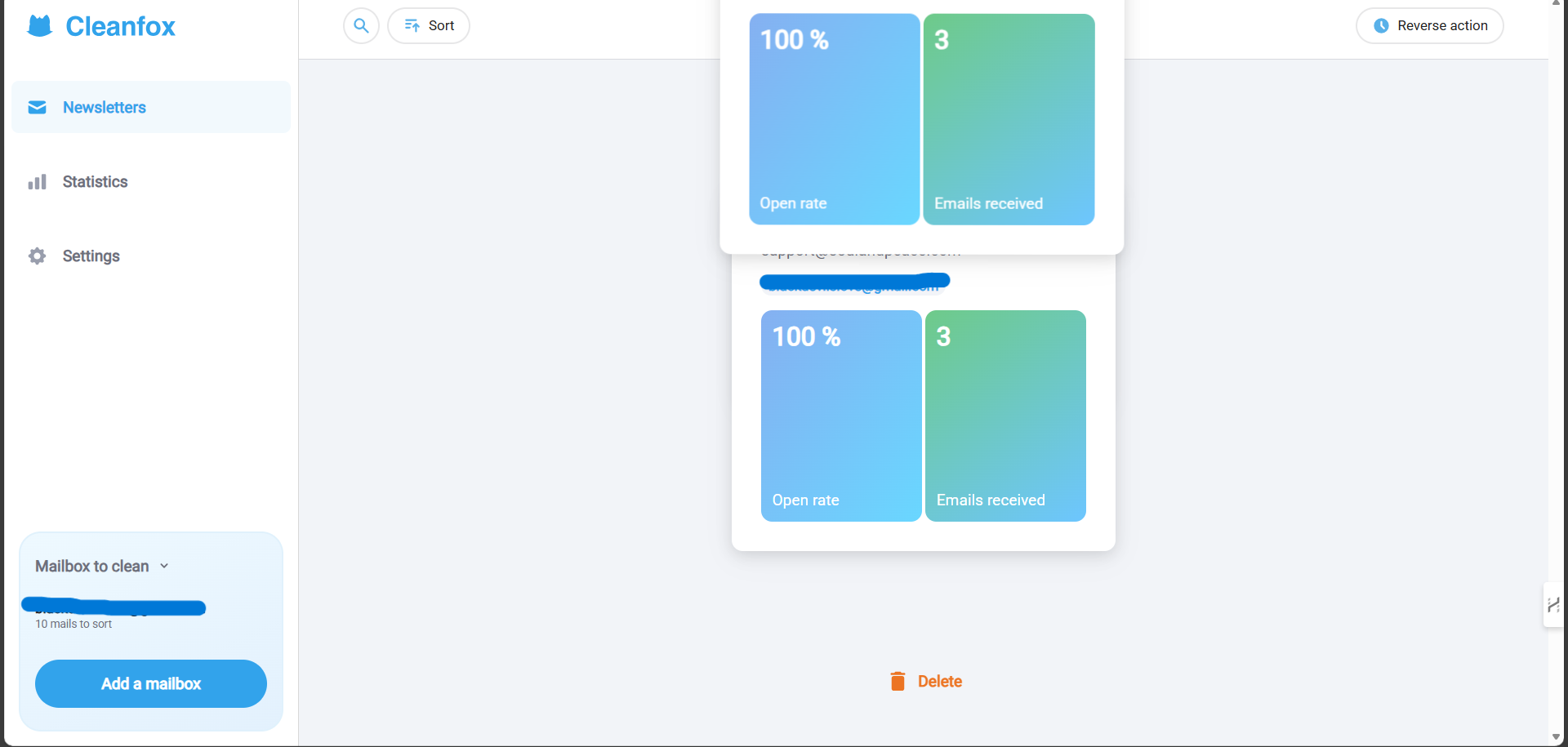
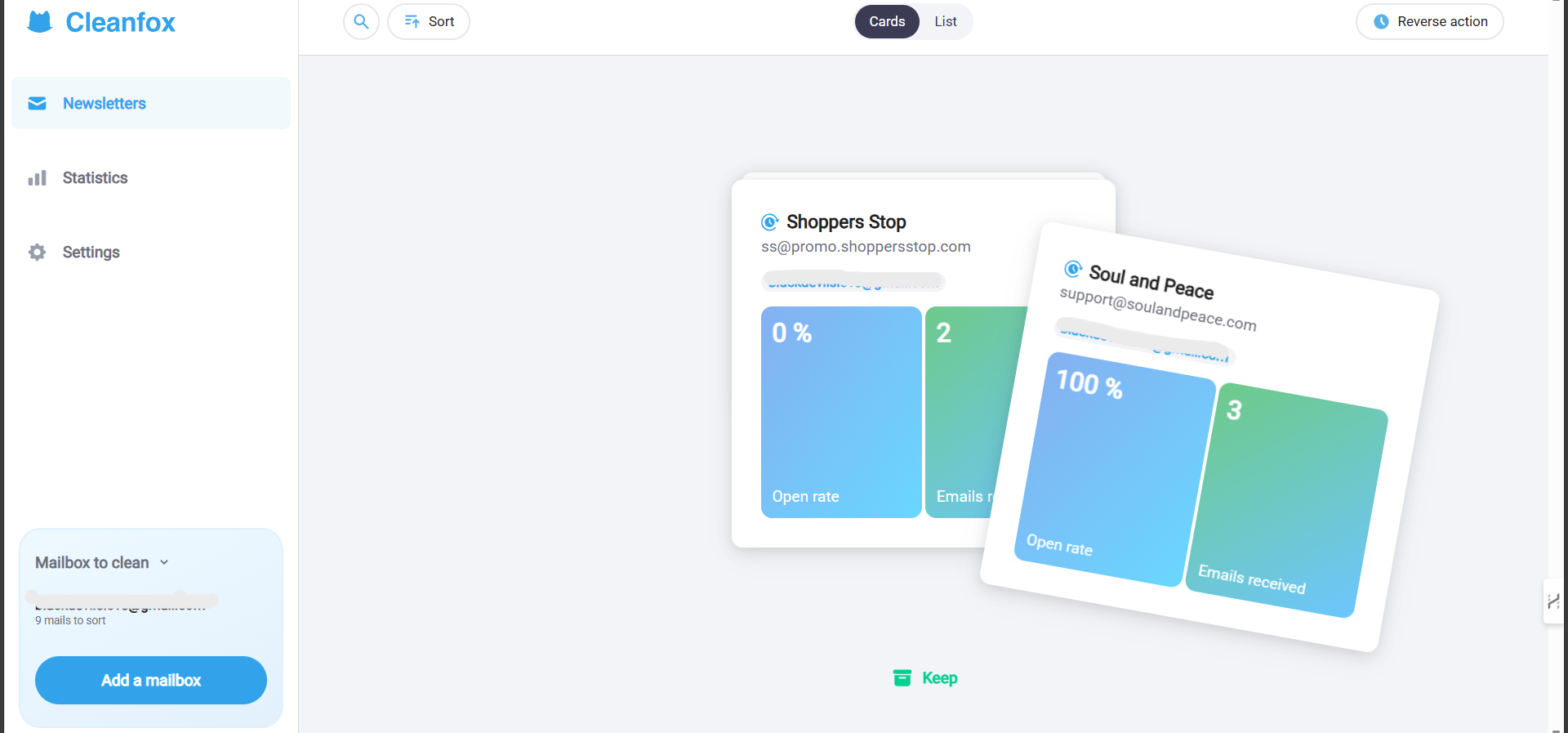
It’s not only clever; it’s effective, making it one of the more intuitive AI tools available for this specific task. Decisions are made one sender at a time, without feeling overwhelmed. And somehow, swiping through them builds momentum.
If gamification isn’t appealing, the list view is available. Bulk actions speed up the process when we already know what to delete.
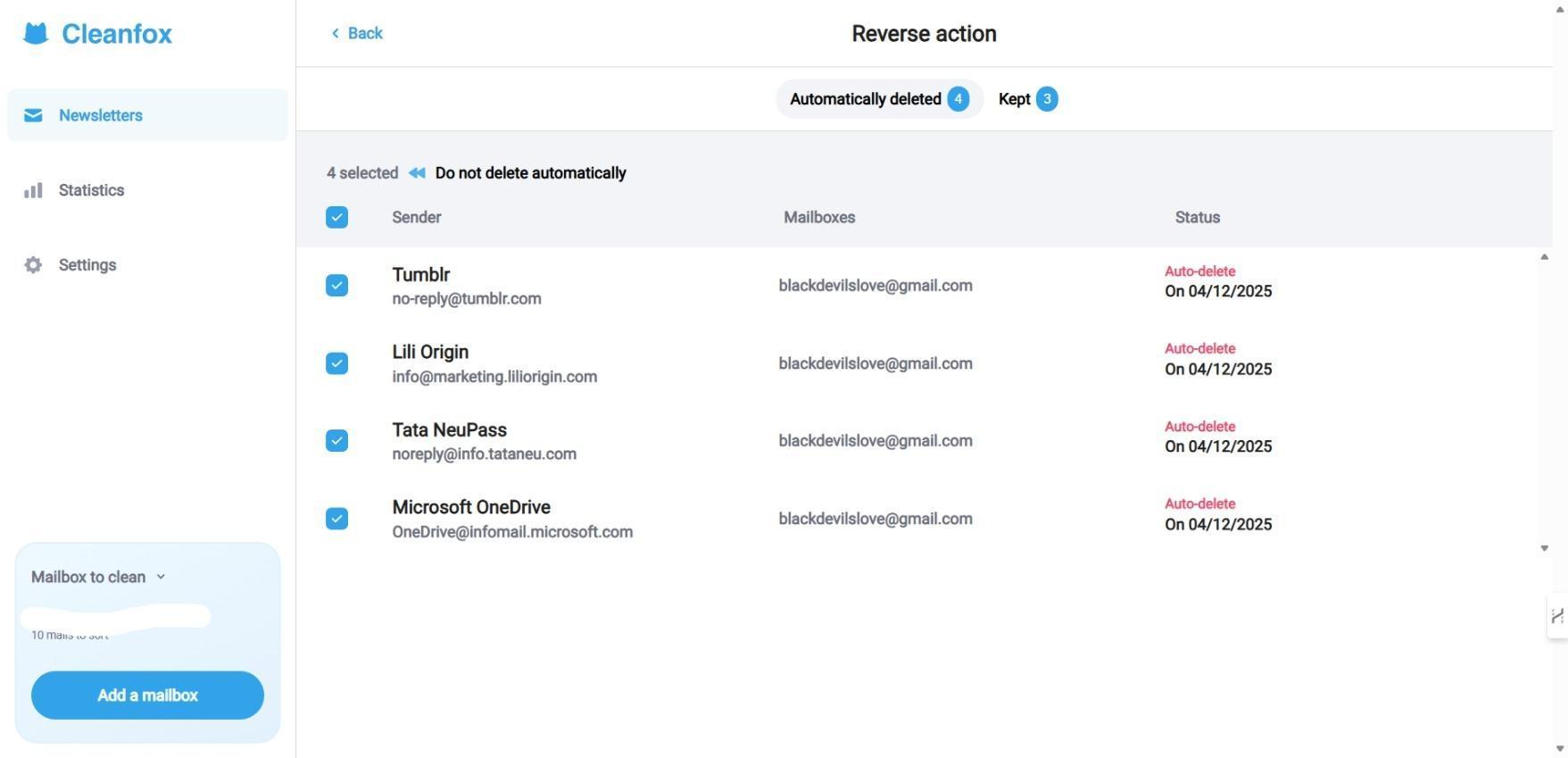

A small but significant detail: everything can be undone. If we swipe left too hastily and regret unsubscribing, we can easily undo it. This alone makes the process feel safe. We’re not on a tightrope with irreversible decisions. There’s room to reconsider.
I can even sort newsletters by open rate, number of emails, or date received to prioritize the most relevant senders. Or search up any particular newsletter I wanted to.
UI & Experience Verdict: Refreshingly intuitive and even enjoyable to use.Score: 9 / 10
What CleanfoxDoes and What It Doesn’t
Cleanfox isn’t aiming to be a comprehensive productivity or inbox management tool, unlike many AI tools that try to tackle every aspect of email management. It clearly states its purpose: reducing newsletter clutter.
Here’s what it excels at: automatically identifying newsletters.
No need to hunt for unsubscribe links or check sender details. It consolidates all recurring senders in one view.
As previously noted, Cleanfox offers three straightforward options: keep the subscription, delete old emails but stay subscribed, or delete everything and unsubscribe. This simple set covers most scenarios, like wanting occasional sale alerts without clinging to outdated promotions.

It supports multiple inboxes. Have more than one email? No problem. Cleanfox allows you to add additional accounts for thorough cleaning.
Full control remains with us
Nothing happens automatically without our approval. No risk of “oops, I deleted too much.”
Clear, straightforward language
Even newcomers will find the decisions explained simply and clearly.
No hidden costs
In my testing, all key features were accessible without any additional purchase.
What Cleanfox does not do:
- It doesn’t organize personal clutter such as receipts or random individual messages.
- It lacks advanced automation features like rules or tagging.
- It isn’t a substitute for Gmail filters or comprehensive inbox management.
However, this narrow focus makes it highly reliable.
Features: Focused, effective, and distraction-free. Score: 8.8 / 10
How Cleanfox Compares to Other Inbox-Cleaning Tools
Before testing Cleanfox, I knew many tools claimed to do everything. Cleanfox’s minimalist, focused approach intrigued me, so I compared it with others like Clean Email and InboxPurge.
While testing various email tools, I compared Cleanfox to two other notable options dedicated to mailbox cleaning: Clean Email and InboxPurge. Each of these tools has its strengths, but Cleanfox’s unique approach sets it apart.
Cleanfox vs. Clean Email
Clean Email adopts a broader, all-purpose inbox management approach, offering features like email categorization, advanced automation rules, and long-term inbox habit reshaping. However, many of its best features require a premium subscription, which can be a drawback for users seeking a free solution. It groups emails by category, automates filters, cleans old notifications, and aims to reshape long-term inbox habits. It’s powerful, but many of its best features require payment.
In contrast, Cleanfox concentrates solely on newsletters. It doesn’t attempt to automate every aspect or create complex rules. It straightforwardly allows us to decide what to keep, delete, or unsubscribe from.
Clean Email is like a full renovation; Cleanfox is more like tidying up one room—focused and effective.
Cleanfox vs. InboxPurge
InboxPurge favors quick, mass unsubscriptions and deletions, making it ideal for users who want fast results with minimal deliberation. However, its straightforwardness can feel less reassuring, and it comes with a cost of $48 annually for unlimited credits, whereas Cleanfox offers its services completely free of charge. Ideal for those seeking fast results with minimal deliberation. Particularly efficient for Gmail users.
However, InboxPurge’s straightforwardness offers less reassurance during the process. Using Cleanfox’s swipe card design gives us the ability to make mistakes with confidence, enable thoughtful decision-making, and aid in having an enjoyable process. This feature makes Cleanfox safer, more deliberate, and suitable for those hesitant to delete potentially useful emails. InboxPurge is costly, $48 annually for unlimited credits, while the free version offers only 20 credits for unsubscribing.
What this comparison reveals
Comparing these tools side-by-side clarified Cleanfox’s role:
- It’s the most user-friendly of the three, offering a unique swipe card design that makes the process of cleaning newsletters not only effective but also enjoyable. This feature is particularly beneficial for users who want to make thoughtful decisions without feeling rushed.
- It keeps control with us, avoiding rushes.
- It performs its task without hiding key features behind paywalls.
Cleanfox focuses on one task and executes it well.
While it doesn’t handle all email clutter or automation, for newsletter overload, it’s direct and simple.
Performance: Does It Actually Clean Our Inbox?
My main doubt was whether Cleanfox would truly deliver: would emails vanish? Would unsubscribes be effective? Would changes show correctly in Gmail?
And yes, it did.
All actions I requested from Cleanfox were executed precisely:
• Bulk deletions proceeded smoothly• Unsubscribe requests succeeded without issues• No communications appeared to be lost afterward
No freezing or sync issues occurred. Cleanfox updates progress clearly, keeping us informed.
It’s subtle but important: the tool doesn’t rush. It allows us to review, reconsider, and proceed at our own speed.
Performance: Reliable, efficient, and free of surprises. Score: 8.7 / 10
Privacy & Security: The Most Crucial Aspect
While Cleanfox’s setup feels secure and effective, its privacy stance isn’t flawless. Mailbox data may be used anonymously for analytics, which could be a concern for privacy-conscious users. While not necessarily harmful, this represents a trade-off for those seeking absolute privacy without any data sharing or storage.
Privacy: Good cleanup, but not the strictest privacy option. Score: 6 / 10
Pricing and Value: Hard to Argue With Free
There’s no traditional pricing page; all essential features are free.
Includes:
- No trial limitations
- No tiered subscriptions
- No paywalls during cleaning
- No action caps or credit system
It seems designed more out of goodwill and environmental awareness than profit, even hinting that cleaner inboxes help reduce digital carbon footprints—a rare positive note.
Few tools manage to do their job well without constantly pushing premium upgrades.
Pricing: Outstanding value. Score: 10 / 10
Who Cleanfox Is Really Best For (and When It Falls Short)
Using Cleanfox reveals it’s perfect for a particular inbox issue. Ideal for those overwhelmed by newsletters seeking a fast, hassle-free cleanup. Its friendly interface, undo options, and sense of control make it reassuring. It’s among the rare tools that provide real results without upselling.
However, its limited scope means it won’t resolve all inbox clutter. General clutter such as receipts or random messages isn’t addressed. While the swipe system is engaging for fewer senders, it may feel slow with hundreds of subscriptions. Setup may be slightly longer due to Gmail security steps, but it offers strong privacy reassurance.
Best for: Those overwhelmed by newsletters, seeking a free, privacy-minded way to declutter quickly.Not suitable for: Users needing advanced automation, rules, or broader inbox management.
Cleanfox is best seen as a specialist helper—excellent at one thing, not a universal fixer. While tools like Clean Email offer a wide range of features for comprehensive inbox management, and InboxPurge provides quick mass unsubscriptions, Cleanfox focuses solely on newsletter cleanup, making it highly effective for its specific purpose.
Final Thoughts and Overall Score
Focusing on one task, Cleanfox thoughtfully offers a calm, tidy, and safe way to regain control over endless newsletters.
It’s refreshing to see a tool that avoids the common pitfalls of many AI tools, such as hype, costly upsells, and unnecessary complexity. Honest, useful, and unexpectedly pleasant, Cleanfox is a tool I believe is worth using, despite privacy considerations.
Few AI tools balance value and simplicity without upselling, but Cleanfox does so quietly. For those overwhelmed by newsletters, it’s highly recommended.
Final score: 8.8 / 10
Frequently Asked Questions
Cleanfox is a tool designed to help users clean up their inboxes by focusing specifically on newsletter clutter. It connects to your email account, identifies newsletters and recurring senders, and allows you to decide whether to keep, delete, or unsubscribe from them using a simple swipe interface.
Yes, Cleanfox is completely free to use. It offers all its essential features without any paywalls, tiered subscriptions, or action caps. There are no hidden costs or premium upgrades required to access its full functionality.
Cleanfox stands out due to its focused approach on newsletter cleanup. Unlike Clean Email, which offers broader inbox management features, or InboxPurge, which favors quick mass unsubscriptions, Cleanfox provides a user-friendly, deliberate, and enjoyable process with its swipe card design. It is also free, whereas the others may require payment for full functionality.
Cleanfox takes privacy seriously, with a secure setup process that ensures only necessary data is accessed. However, it does use mailbox data anonymously for analytics, which might be a concern for privacy-conscious users. The setup involves enabling IMAP access and creating an app-specific password, adding an extra layer of security.
Cleanfox excels at automatically identifying newsletters and providing three straightforward options: keep the subscription, delete old emails but stay subscribed, or delete everything and unsubscribe. It supports multiple inboxes and offers full control to the user, with clear, straightforward language and no hidden costs.
Cleanfox is ideal for individuals overwhelmed by newsletter clutter who seek a fast, hassle-free cleanup. Its friendly interface, undo options, and sense of control make it reassuring for those who want to declutter quickly. However, it is not suitable for users needing advanced automation, rules, or broader inbox management.
Cleanfox’s interface is designed to be calming and enjoyable. It features a minimal design with three main elements: a list view of newsletters, swipe cards for easy decision-making, and undo actions. The card system allows users to swipe right to keep, up to delete emails but remain subscribed, or left to delete and unsubscribe completely, making the process intuitive and engaging.
Abonneer je op onze nieuwsbrief en ben als eerste op de hoogte van tijd- en geldbesparende AI-tools!
Comments