Conclusion
Friday Email AI presents itself as a promising tool with a range of features aimed at simplifying email communication. It offers cross-platform support, multilingual abilities, and a straightforward interface. However, its high subscription cost and limited free trial make it less appealing compared to other tools in the market. The need for manual copying and pasting, along with its struggle to understand thread context, further diminishes its value. While it has potential, it currently feels incomplete and overpriced for the features it offers.
Pros
- Cross-platform availability with Chrome extension, web version, and mobile apps
- Multilingual abilities and tone customization
- Fast performance with quick response generation
- Comprehensive privacy policy and data handling practices
Cons
- Very limited free trial with only five credits
- High subscription cost for the features offered
- Struggles with thread context understanding
- Requires manual copying and pasting of text
Table of Contents
- Getting Started & First Impressions
- Core Features: Generally Good, Sometimes Frustrating
- Performance: Fast, Yet Sometimes Slow
- Pricing & Plans
- Privacy and Data Handling: Transparent Enough but Trust Required
- Comparison with Similar Tools
- Who Will Actually Like Friday Email AI
- Who Probably Will Not
- Final Verdict: Strives to help but not the right fit for my inbox
- Frequently Asked Questions
Email assistants are supposed to simplify life. That is why I keep testing different ones, hoping at least one will make inbox communication feel less like a chore and more like a normal interaction. When I found Friday Email AI (also known as Friday: AI Email Assistant), the promise sounded familiar but ambitious, smart replies, clean writing, cross-platform access and better control over email communication.
So, I tried it inside Gmail using the Chrome extension and also on its standalone website to see if it genuinely does anything that improves my workflow. What I discovered was a tool that technically functions, but primarily behind a paywall that appears sooner than anticipated. And for the feature set, the subscription is surprisingly steep.
Here is everything worth knowing from my own hands-on experience.
Getting Started & First Impressions
Friday Email operates in two environments:
- A Chrome extension that runs within Gmail
- A dedicated website for composing or rewriting emails
- Mobile apps for Android and iOS
Getting started was straightforward: a simple login with Gmail and minimal permissions. The extension appears as a sidebar and a dropdown in Gmail, while the website gives a clean editor-style interface.

But the first surprise arrived quickly: I initially had only two writing credits before even signing in and just three more after signing in. That means only five total free actions such as grammar checks, email generation or rewriting before hitting a paywall.
That creates a very rushed “trial window”. I barely got the chance to explore its potential before being asked to subscribe.
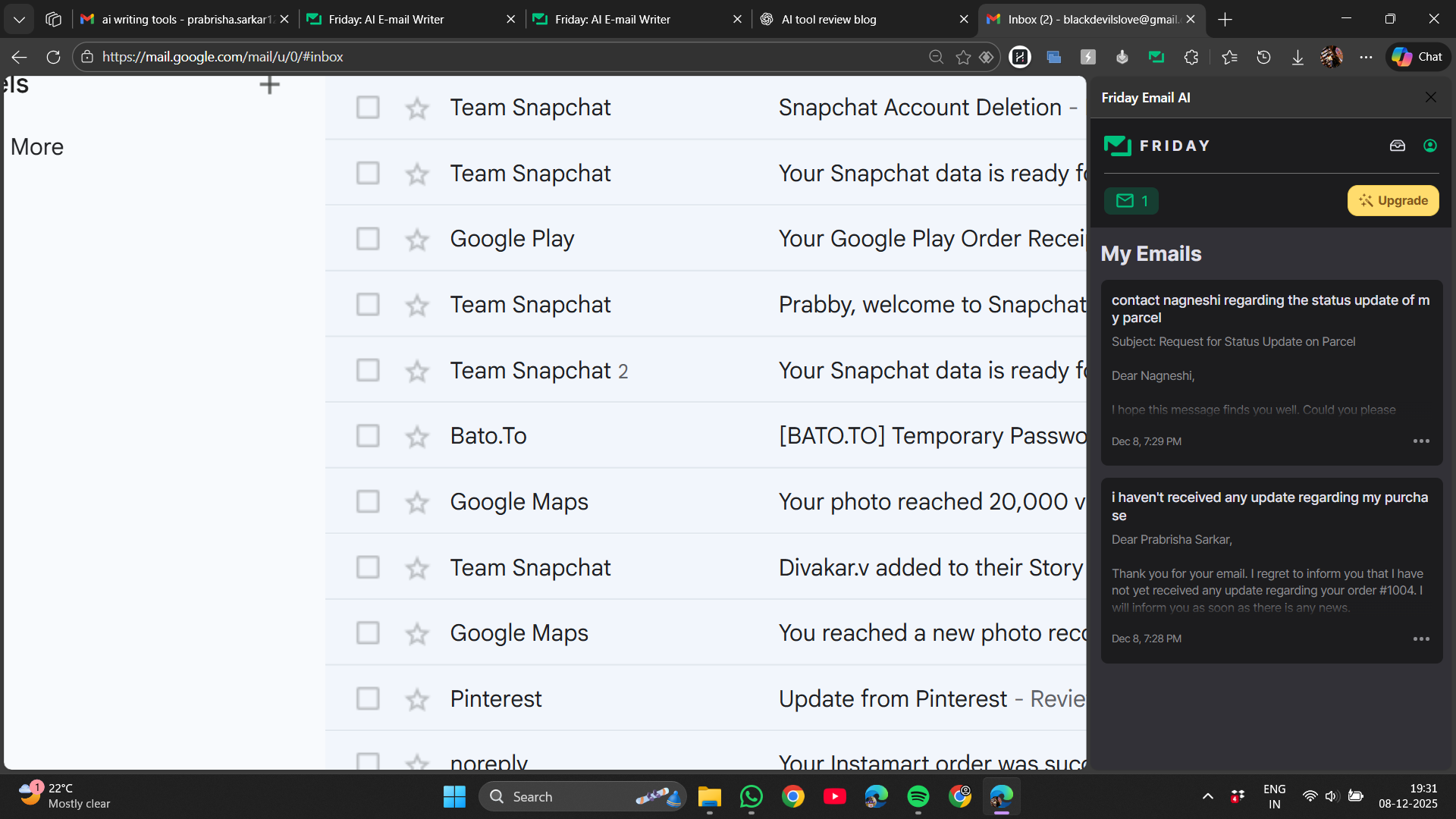

The interface is functional but not particularly inspiring. The Chrome extension panel sits inside Gmail and looks a bit cramped. The web version feels more comfortable which is why I preferred it to the extension, and I do have a liking to dark UI mode, but still it was a little plain. It does not create that polished impression that a premium priced tool usually should.
But I did like the cross-platform availability as a chrome extension plus availability as mobile apps and the easy onboarding.
UI & Setup Score: 7/10
Core Features: Generally Good, Sometimes Frustrating
Friday AI focuses on helping us write emails. The range of controls feels promising at first and includes:
- Email generation from short prompts
- Reply generation inside threads
- Grammar and clarity rewrite suggestions
- Tone and length customization
- Multilingual abilities
- Basic organizational choices
- Cross platform consistency


Messages typically sounded polite, professional, and clear. I liked that I could pick whether I wanted something shorter or more detailed, and even emoji’s/no emoji’s. There is a sense of flexibility.
However, there are several notable limitations that shaped how useful it felt in real inbox moments.
- Thread context is challenging: One response I generated completely ignored the previous thread’s topic, misinterpreted the context entirely, and produced a false reply. It’s akin to throwing someone unfamiliar into a dispute and expecting them to resolve it immediately. Friday AI requires much better awareness of conversational flow.

- Manual copying and pasting undermine the convenience claim: Inside Gmail, I had to manually copy the email text into the extension and then paste the output back into the reply box. WriteMail.ai manages this process more smoothly. Here, the extra steps accumulate and hinder the quick workflow I was expecting.
- Identity? Never recognized: The tool never identified my name or signature unless I entered them manually each time. For a tool aimed at speeding up communication, this missing automation hampers efficiency.

- Credits disappear immediately: A total of five free uses is highly limiting. It makes it hard to fully explore the features before deciding whether to pay.
- Basic grammar check exists but feels unnecessaryIt does the job, however other tools like Grammarly or even Google’s built in corrections offer more, for free.

I could feel the potential, but the execution kept hitting small delays and oversights. The AI messaging felt like a helpful assistant with a slightly unreliable memory.
Core Feature Score: 6/10
Performance: Fast, Yet Sometimes Slow
Friday Email is quick. Responses generate in a few seconds whether rewriting or drafting from scratch. There were no crashes or loading freezes during my tests. Performance feels smooth on both web and mobile.
However, the logic behind responses still has room to grow.

Areas where it struggled:
- Thread comprehension: It occasionally overlooks significant parts of the conversation context
- Relevance: Responses can seem generic or vague
- Repetitive phrasing: It often relies on predictable sentences
- Manual copying needed: Unlike more intelligent Gmail-native tools
Strengths:
- Simple, direct requests
- Polite, professional tone
- Fast corrections for awkward grammar
A humorous moment: I prompted it to reply to an email complaining about a delay. The AI responded as if the sender was the one complaining about the lack of an update. Not ideal for real-world use.
Friday Email’s speed is a plus, but speed alone isn’t sufficient when accuracy is uncertain and context is misunderstood.
Performance Score: 6.2/10
Pricing & Plans
Friday Email AI starts off miserly with only two free credits before sign-in and three more after sign-in. Five total. Once those are gone, the AI politely steps aside and shows us the subscription screen. The pricing feels less friendly, almost like a surprise enemy attack.
Current plans listed on the website include:
- 1 Week: $6.99
- 4 Weeks: $29.99
- 12 Weeks: $59.99

There’s no annual discount or long-term pricing to make the investment more appealing. Even the 12-week plan remains in the “pricey for what it offers” category.
Next are the Guides—mini courses on writing better emails. A good concept, but each is locked behind an additional fee. Examples include:
- Craft Insightful Subject Lines
- Engage Readers and Define Expectations
- Write Short Actionable Emails
- Create Focused Easy-to-Read Emails
- Reply Promptly and Inline
- Create Scannable Emails

Each guide costs about $20, totaling $120 if bought separately. The full bundle costs $60, offering a significant discount, but it still feels expensive. This upsell is surprising for a tool that already requires a subscription before offering substantial use.

So yes, while Friday AI claims to help “reduce stress,” its pricing structure unfortunately does the opposite.
Pricing Score: 5/10
Privacy and Data Handling: Transparent Enough but Trust Required
I truly appreciate how comprehensive the privacy policy is. Every time an AI tool enters our inbox, it looks into actual conversations and private information rather than just scanning random text. I therefore want to feel as though I am fully aware of what is happening behind the scenes.

Friday Email AI does seem to take that responsibility seriously. From what I could gather:
- It only works with the messages I choose to involve in the tool instead of grabbing my entire inbox for fun
- It uses reliable services like Google Cloud and OpenAI to handle the AI processing
- It follows GDPR and Swiss data laws, which means I can request to access or delete my data if needed
- There are protections in place even when data moves across borders
- And refreshingly, it doesn’t try to promise “perfect security” because no one in tech can honestly do that
So yes, it still comes down to trust, because it is reading and rewriting my emails, but the policy didn’t give me any panic sirens. It feels responsible enough for everyday use, just not the kind of thing I’d run top-secret files through.
Privacy Score: 8/10
Comparison with Similar Tools
Having tested several AI email assistants, I rank Friday AI near the bottom—somewhat underwhelming and just… there.
WriteMail.AI: This felt more polished than Friday, with fewer issues.
- It produces more natural, context-aware replies
- No more copying threads; it functions directly within Gmail
- It recognizes my name and signature, like a proper assistant
- The free version is genuinely usable
- And the voice-to-email feature? Truly excellent
WriteMail’s pricing starts at $6.95/month for 50 emails, $11.95/month for 150 emails, and $19.95/month for 500 emails, with most advanced features locked to the higher tiers. Which is a great deal honestly for the features we’re getting.
WriteMail feels like the polished, finished product that Friday aspires to be someday. Friday still feels like a work in progress.
Google Gemini integrated directly into Gmail has a key advantage: it’s where I already am. No extensions, no extra steps. Pricing varies from free to ~$20/month for the Pro plan, and up to ~$250/month for the Ultra tier designed for enterprises. Given these benefits, the Pro plan appears a better value than Friday’s offerings.
- Built right into Gmail
- Understands long threads better than most dedicated AI email apps
- Doesn’t rush to lock features behind a paywall
- Has Google-level security and scale backing it
Friday operates separately from Gmail, claiming this offers flexibility. Personally, I’m unsure if that’s an advantage or just adds unnecessary clicks.
Ready To Send targets business and marketing emails. Pricing begins at $5/month (Starter), $12 (Basic), $24 (Plus), and $49 (Premium), with annual plans offering discounts. Overall, a better value than Friday AI.
- Great for structured, professional emails
- Auto replies that actually make sense
- Not the warmest tone, but very functional
- Free tier gives around 200 email replies which is roughly 40 times what Friday offers
Friday falls short of being as smart as WriteMail.AI or Gemini, or as cost-effective as Ready To Send. It attempts both casual and professional tones but doesn’t excel at either.
Who Will Actually Like Friday Email AI
This tool might suit:
- People needing occasional writing assistance
- Users switching between email platforms on various devices
- Anyone willing to subscribe early to access features
- Users who prefer a standalone app over Gmail modifications
Who Probably Will Not
Not suitable for:
- Anyone seeking free or budget-friendly options
- People who send numerous replies daily
- Users depending on AI to accurately interpret threads
- Users expecting automated signatures and identity management
- Those averse to manual copying and pasting
- Users prioritizing the best value for money
Final Verdict: Strives to help but not the right fit for my inbox
Friday Email AI aims to be helpful. It writes decently and the speed kept me productive rather than stuck editing. Its cross-platform support and multilingual features are definite strengths.


Yet, for me, five credits vanished before the tool proved itself. The pricing appears high for what is ultimately a below average experience. And although the app tries to simplify communication, I kept doing extra manual steps.
There’s potential, and it’s not a terrible tool—just incomplete and pricey. With better reply accuracy and a more generous free tier, it could become a useful assistant. Currently, it feels caught between being underpowered to justify the cost and too limited to enjoy without a subscription.
Overall Score: 5.7/10
Frequently Asked Questions
Friday Email AI is an email assistant tool designed to simplify email communication. It operates as a Chrome extension within Gmail, a standalone website, and mobile apps for Android and iOS. It offers features like email generation from prompts, reply generation, grammar checks, and tone customization. However, it has a limited free trial and requires a subscription for continued use.
Friday Email AI offers several subscription plans: $6.99 for 1 week, $29.99 for 4 weeks, and $59.99 for 12 weeks. There are no annual discounts or long-term pricing options, making it relatively expensive compared to similar tools. Additionally, there are paid guides available for around $20 each or $60 for a bundle.
Friday Email AI focuses on helping users write emails with features like email generation from short prompts, reply generation within threads, grammar and clarity suggestions, tone and length customization, multilingual abilities, and basic organizational choices. It also offers cross-platform consistency. However, it has limitations in thread context understanding and requires manual copying and pasting of text.
Friday Email AI falls short compared to tools like WriteMail.AI. WriteMail.AI offers more natural, context-aware replies, recognizes user names and signatures, and has a more usable free version. WriteMail.AI also integrates more smoothly with Gmail and offers a voice-to-email feature. Friday Email AI feels more like a work in progress with a higher price point.
Friday Email AI can be suitable for occasional writing assistance and users who switch between email platforms on various devices. However, it may not be ideal for professionals who send numerous replies daily or depend on AI to accurately interpret threads. The tool has limitations in thread context understanding and requires manual copying and pasting, which can hinder productivity.
Friday Email AI has a comprehensive privacy policy and takes data handling seriously. It only works with messages the user chooses to involve, uses reliable services like Google Cloud and OpenAI for AI processing, and follows GDPR and Swiss data laws. Users can request to access or delete their data if needed. However, as with any AI tool, trust is required as it reads and rewrites emails.
The main drawbacks of Friday Email AI include a very limited free trial with only five credits, a high subscription cost for the features offered, and the need for manual copying and pasting of text. Additionally, the tool struggles with thread context understanding, produces generic or vague responses, and does not recognize user names or signatures automatically.
Abonneer je op onze nieuwsbrief en ben als eerste op de hoogte van tijd- en geldbesparende AI-tools!
Comments