Conclusion
QuillBot proves to be a reliable and consistent tool, particularly excelling in paraphrasing, summarizing, and basic editing tasks. Its minimalistic and uncluttered interface is a strength, providing a clean workspace that is easy to navigate. However, it falls short in generating creative content from scratch and lacks advanced tone customization in its free version. While the tool is stable and predictable, it can feel somewhat mechanical and limited in adaptability. The free tier is quite restrictive, making the premium version a more viable option for frequent users.
Pros
- Reliable and consistent performance in paraphrasing and summarizing
- Uncluttered and straightforward interface
- Effective grammar checker for surface-level mistakes
- Supports numerous languages
- Good value for money compared to competitors like Grammarly
Cons
- Limited creativity and tone customization in the free version
- Restrictive word limits in the free tier
- Some features feel more like extras than core components
Table of Contents
- Introduction
- Dashboard, UI, and Initial Impressions
- Core Tools and Features
- Performance & Reliability
- Privacy & Data Handling
- QuillBot vs Grammarly Comparison
- Final Verdict
- Frequently Asked Questions
QuillBot Review
Introduction
QuillBot is one of those tools that quietly appears on the radar, prompting me to give it a try. It’s not flashy or overly promoted, but it managed to catch my interest. Rather than just taking its landing page promises at face value, I wanted to experience the tool firsthand. As I navigated through the platform, I began to see where QuillBot truly excels and where it falls short. It’s more about how it performs in practice than what its marketing claims suggest.
Based on my experience, QuillBot is best suited for users who already have text and want to refine or improve it—such as students, writers, or anyone focused on rewriting or paraphrasing. It’s less suitable for those aiming to generate complete content from scratch or engage in deep creative processes. In essence, it functions more as a supportive tool rather than a primary creator.
Dashboard, UI, and Initial Impressions
Upon opening QuillBot for the first time, I immediately noticed how uncluttered and calm the interface was. There was no overwhelming clutter or heavy panels, and I didn’t feel the need for a tutorial just to get started. The layout felt familiar almost instantly, which I appreciated. The dashboard is straightforward: tools are on the left, content in the center, and the structure remains consistent regardless of what I select. This consistency is more important than many realize.

A few things caught my eye immediately: the left sidebar clearly lists the available tools, each opens in a dedicated space, and there are no intrusive popups. Everything feels lightweight and responsive. The design feature is visible early on, resembling a very minimal version of Canva—simple and unobtrusive. I didn’t delve deeply into it, but it seems functional enough.


What I valued most was the consistency across features. Transitioning from paraphrasing to summarizing or grammar checks didn’t feel like switching to a different platform. The user interface language remains uniform throughout. Even when certain features are limited or locked behind paywalls, the overall interface stays clear and uncluttered, avoiding confusion.
Overall, the dashboard is designed to be unobtrusive. It doesn’t attempt to dazzle or impress; it simply provides a clean workspace. For a tool focused on writing and editing, this minimalistic approach is actually a strength.
Score: 8/10
Core Tools and Features
The more I used QuillBot, the clearer it became: this platform isn’t aiming to be flashy or clever. Its goal is to be reliable. Whether it succeeds depends heavily on the writing stage I’m in. I kept noticing that the tools seem to assume I already have a draft, a purpose, and direction. Without those, the tools can feel somewhat empty or uninspired.
Paraphrasing Tool
I kept returning to the paraphrasing tool because that’s where QuillBot feels most assured. Repeated use revealed its pattern: it primarily rewrites by restructuring sentences and swapping out words, but it seldom reconsiders the underlying ideas. This can be helpful in some situations, but limiting in others.
For a safer, more neutral rephrasing, it performed well. However, when I sought a more vivid or expressive tone, it fell short—mainly because tone customization is locked behind the premium tier. On the plus side, it supports numerous languages, which is a useful feature.


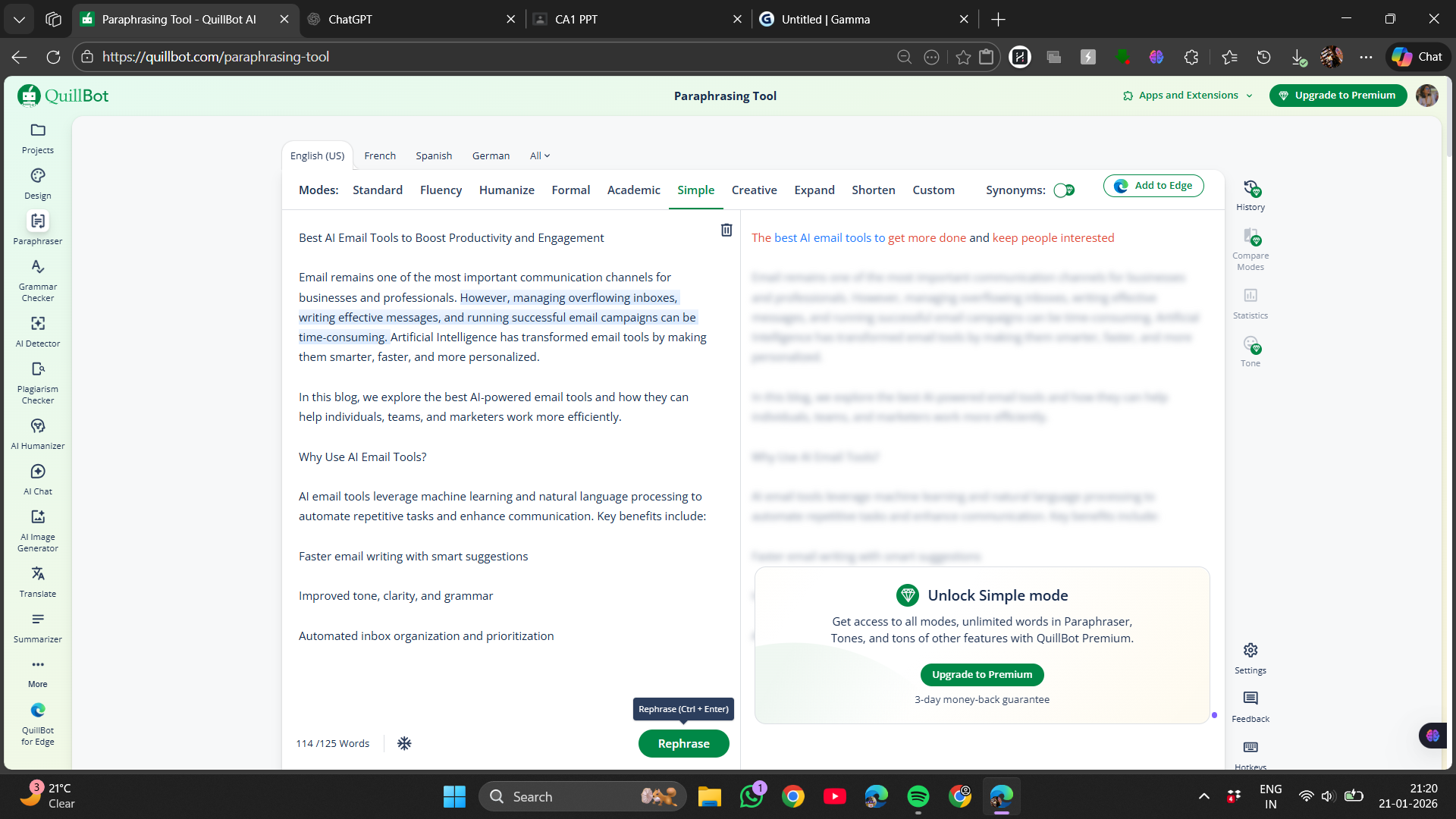

The word limit, which forced breaking text into small chunks, became tiresome over time. It fragmented longer editing sessions. After multiple rewrites, I also noticed the text feeling somewhat mechanical—not incorrect, but predictable.
Score: 7.8/10
Grammar Checker
The more I used the grammar checker, the clearer its purpose became. It’s not designed to teach new rules but to catch common mistakes that can be overlooked when tired or rereading a text multiple times—like comma errors, agreement issues, or repeated words.
What stood out is its polite approach. It doesn’t bombard the page with warnings or bright colors. Suggestions appear subtly, allowing me to accept or ignore them at my discretion—something I appreciated, especially when I don’t want to fix every minor issue.
- Effective at catching surface-level mistakes
- Doesn’t overly interfere with the writer’s voice
- Easy to dismiss when necessary

However, it doesn’t truly grasp the intent behind sentences. If a sentence is technically correct but awkward or emotionally dull, it often leaves it untouched. It cleans up surface errors but doesn’t reshape or refine the tone. I viewed it more as a final polish rather than an active editing partner.
Score: 7.4/10
Summarization Tool
I found myself using the summarizer more often than anticipated—mainly because it didn’t resist or complicate the process.
When I input longer content, the summaries felt clear and easy to read. It didn’t overly compress or oversimplify the ideas. It seemed as if it genuinely tried to understand the structure before shortening, which is not always the case with similar tools.
- Bullet point summaries were clear
- Paragraph summaries remained coherent
- No random ideas were dropped


I noticed that each summary tends to follow a similar pattern. While not inherently bad, it suggests the tool is better suited for internal notes or quick overviews rather than polished publication. Nonetheless, it effectively reduces content without losing essential information.
Score: 8/10
AI Detection and Humanization Tools
My expectations for the AI detector were modest, but I ended up testing it more out of curiosity. I input various texts—some obviously human-written, others more artificial—and observed its responses.


The results generally seemed fair. It didn’t loudly flag everything as AI or pretend to be infallible. That balance was important. The humanizer worked well, making generic text appear more natural and reducing AI-like qualities by at least 60-70%. I could also select synonyms if the meaning wasn’t conveyed accurately.
I wouldn’t rely on it as definitive proof, but as a quick checkpoint to review, it served its purpose. It made me feel more comfortable trusting the results than I initially expected—though I remain cautious.
A useful addition was the AI review and suggestion feature in the editor, similar to Grammarly but with fewer restrictions. Being in beta, its suggestions weren’t always perfect, but with further development, it has the potential to become quite valuable.

Score: 8.2/10
Plagiarism Detection
This feature was completely locked behind the premium tier, so I couldn’t test it myself.

This significantly impacts its perceived value. Positioned as an essential feature, its inaccessibility meant it never integrated into my workflow. It was just a reminder of its existence without practical use.
- No free testing available
- Entirely behind paywall
- Difficult to assess usefulness
I cannot judge its quality directly, as I didn’t have access. This limits the perceived value of the feature at the free tier.
Translation Tool
The translation feature was straightforward.
I tested it with a few simple sentences, and it handled them smoothly. Grammar remained correct, and the original meaning was preserved. It didn’t attempt to overly embellish or simplify.
- Translations felt accurate
- Sentence structure stayed natural
- No awkward phrasing

While not highly expressive, it is reliable. For general translation tasks, it performs its function effectively without unnecessary complication.
Score: 8.7/10
AI Image Generation
The AI image generator seemed more like a supplementary feature rather than a core component. I tried a few prompts, and the results were acceptable but not remarkable. The images appeared decent but lacked originality or a distinctive style.
More noticeable than the images was how quickly the feature’s limits kicked in. After a few attempts, it restricted further use and directed users toward premium plans. This made experimentation difficult.
- Output quality was adequate
- Style options were restricted
- Free usage is very limited


It functions, but it doesn’t encourage experimentation. I see it more as a utility for quick visuals rather than a creative tool. The usage cap prevents thorough testing, and it feels more like a teaser for subscription plans.
Score: 7/10
Citations & References
This section of QuillBot is quite organized but requires manual input.
It offers tools for managing citations and references, which I found useful in theory. Everything is neatly organized. However, it doesn’t help in sourcing or automatically verifying references.
- Manual entry required
- No source detection
- Clean, organized layout


It’s helpful if you already have sources in mind. For research from scratch, it offers limited assistance—more about organization than source discovery.
AI Chat Function
I tested the AI chat lightly to gauge its role.
It responded promptly and handled simple prompts effectively. I didn’t explore complex reasoning or lengthy dialogues, and it doesn’t seem designed for that.
- Fast replies
- Clear answers
- Best for quick checks
It feels useful as a quick reference tool inside the platform. Something to ask a small question or generate a short response. For deeper thinking, I’d look elsewhere.


Overall, from the image generator onwards, these tools feel more like extras than core features. They add convenience but don’t define QuillBot. Its strength remains in editing, rewriting, and summarizing. The other features are helpful but not essential.
Score: 7.8/10
Performance & Reliability
Extended use revealed that QuillBot’s performance leans heavily on consistency. It responds swiftly, processes text almost instantly, and remains stable without crashes or freezes. From a technical standpoint, it feels reliable. This stability fosters confidence during use.
What’s more noticeable is the consistent predictability of its output. Paraphrasing results are similar each time, summaries maintain quality throughout, and grammar suggestions stay surface-level. This reliability is helpful when I need straightforward editing without unexpected results.
- Tools perform consistently across sessions
- No abrupt shifts in output style
- Results remain steady in quality
However, this stability also means limited adaptability. If a sentence requires emotional nuance or a tone shift, QuillBot doesn’t inherently recognize or implement that. It follows instructions within its narrow scope, with advanced tone options and many functions locked behind paywalls.
It’s not unreliable, but its reliability is limited. It performs well within its scope—supporting editing and rewriting once the initial ideas are in place. It doesn’t guide, challenge, or reimagine content. As long as I accept this role, it remains dependable, though somewhat restrained.
Pricing & Access Limits
The limitations of the free version become clear quickly. It’s not just about testing the tools; it’s about encountering restrictions almost immediately. The pricing structure appears as:
- Free Plan
- Premium: $14.95/month
- Annual Premium: $79.95/year

Engaging in more substantial tasks—such as rewriting multiple paragraphs or summarizing lengthy content—quickly hits the usage caps. This disrupts workflow, requiring manual copying and switching contexts. The paraphrasing word limit, in particular, hampers maintaining a steady rhythm.
Premium unlocks the full platform, whereas the free version is suitable only for occasional, quick edits. Frequent use quickly runs into restrictions, creating friction.
Privacy & Data Handling
Privacy policies are often similar across platforms, and QuillBot is no exception. Its approach aligns with standard practices for large AI services, especially those under Learneo, which includes other educational products. Data collection occurs through various means—what I type, site usage, sessions, cookies, and tracking tools. While expected, it’s important to remain aware of this.
Key points include Learneo acting as the primary data controller, with data gathered from usage, interactions, and tracking. This data is used for service operation, personalization, product improvement, and AI training—an aspect that’s significant. Overall, the privacy approach is standard—acceptable but not minimal.
QuillBot vs Grammarly Comparison
|
Aspect |
QuillBot |
Grammarly |
|
Starting Price |
~$8.33/month when billed annually (approx. $99.95/year); ~$13.31 quarterly; ~$19.95 monthly |
~$12/month when billed annually ($144/year); ~$30/month billed monthly |
|
Free Plan |
Yes, but with strong caps (paraphrase limit ~125 words) |
Yes, basic grammar & spelling with limited AI tools |
|
Writing/Editing Quality |
Good for rewriting, paraphrasing, summaries |
Strong grammar, tone, and clarity suggestions |
|
Paraphrasing Strength |
Strong core tool, multiple modes in premium |
Basic rewrite |
|
Output Quality |
Often smooth and usable |
In-depth stylized suggestions |
|
Plagiarism Checker |
Premium only, limited usage |
Included in Pro, broad scanning |
|
Tone Detection/ Style |
Basic |
Strong across tones and styles |
|
Best For |
Rewrites, paraphrasing, summarization |
Polishing grammar, tone, clarity |
Given a choice, I’d prefer QuillBot for rewriting and summarizing. Its outputs are practical and don’t feel like starting from scratch. Its pricing is more approachable. Grammarly remains excellent for grammar, tone, and polishing, but it doesn’t integrate as seamlessly into my workflow.
Final Verdict
QuillBot is clear about its purpose: it’s not designed to help generate ideas or plan from the ground up. Instead, it acts as a finishing tool—cleaning, condensing, or making existing text safer. When approached with this mindset, its functionality becomes more understandable.
The platform demonstrates stability and predictability. Paraphrasing, summarizing, and basic editing perform reliably, with the interface remaining unobtrusive. No bugs or erratic behavior were encountered. However, limitations become apparent—especially regarding creative nuance and tone—unless I actively intervene.
The free tier suffices for quick fixes, but restrictions appear rapidly. Premium offers more flexibility, yet it remains more of a supportive tool rather than a true writing partner.
Score: 8/10
Frequently Asked Questions
QuillBot is best suited for users who already have text and want to refine or improve it, such as students, writers, or anyone focused on rewriting or paraphrasing. It is less suitable for generating complete content from scratch or engaging in deep creative processes.
QuillBot’s interface is uncluttered, calm, and straightforward. The dashboard is consistent and easy to navigate, with tools listed clearly on the left sidebar. It is designed to be unobtrusive, providing a clean workspace without overwhelming the user.
QuillBot’s paraphrasing tool is reliable for safer, more neutral rephrasing. It restructures sentences and swaps out words but seldom reconsiders the underlying ideas. However, it may feel somewhat mechanical and predictable after multiple rewrites, and advanced tone customization is locked behind the premium tier.
QuillBot’s grammar checker is effective at catching common mistakes like comma errors, agreement issues, or repeated words. It offers a polite approach with subtle suggestions, allowing users to accept or ignore them. However, it doesn’t grasp the intent behind sentences or refine the tone, making it more suitable for a final polish rather than active editing.
The free plan of QuillBot has strong limitations, such as a paraphrase limit of around 125 words. Engaging in more substantial tasks quickly hits usage caps, disrupting workflow and requiring manual copying and switching contexts. The free version is suitable only for occasional, quick edits.
QuillBot is preferred for rewriting and summarizing, with practical outputs and more approachable pricing. Grammarly, on the other hand, excels in grammar, tone, and polishing but may not integrate as seamlessly into some workflows. QuillBot is more of a finishing tool, while Grammarly offers in-depth stylized suggestions.
QuillBot demonstrates stability and predictability in its performance. It responds swiftly, processes text almost instantly, and remains stable without crashes or freezes. However, its reliability is somewhat limited as it doesn’t inherently recognize or implement emotional nuance or tone shifts.
QuillBot offers a free plan with strong limitations and a premium plan. The premium plan is priced at $14.95 per month or $79.95 per year when billed annually. The free version is suitable for occasional use, while the premium plan offers more flexibility and unlocks the full platform.
Abonneer je op onze nieuwsbrief en ben als eerste op de hoogte van tijd- en geldbesparende AI-tools!
Comments