Conclusion
Spark Mail offers a refreshing and practical approach to managing email overload. Its minimalistic design and smart inbox categorization significantly reduce visual clutter, making it easier to navigate through daily emails. While it doesn’t aim to replace a human assistant, its core features like snoozing, reminders, and templates genuinely enhance productivity. However, it’s not without its flaws, such as occasional misclassification of important emails and repetitive tutorial pop-ups. Overall, Spark Mail is a dependable and user-friendly tool that brings a sense of organization and efficiency to daily email management.
Pros
- Minimalistic and calm design reduces visual clutter
- Smart inbox categorization for easier navigation
- Useful core features like snoozing, reminders, and templates
- Effective search function for quick retrieval of emails and attachments
- Seamless calendar integration for easy event addition
Cons
- Occasional misclassification of important emails
- Repetitive tutorial pop-ups can be annoying
- AI features can feel bland and lack personality
Table of Contents
- UI / Dashboard:
- Core Features:
- Search Bar:
- Spark’s AI:
- Performance:
- Pricing & Value:
- Worth considering if:
- Not advisable if:
- Privacy & Security:
- Day-to-day workflow impact:
- Who Spark Makes the Most Sense For
- Frequently Asked Questions
Email is unavoidable in my life. College messages, banking alerts, job responses, subscriptions I can’t recall signing up for—all of it lands in my inbox. After years of Gmail clutter, Spark offered a refreshing change. It didn’t claim to eliminate stress entirely, but it aimed to make managing the flood of messages somewhat easier, which motivated me to test it thoroughly.


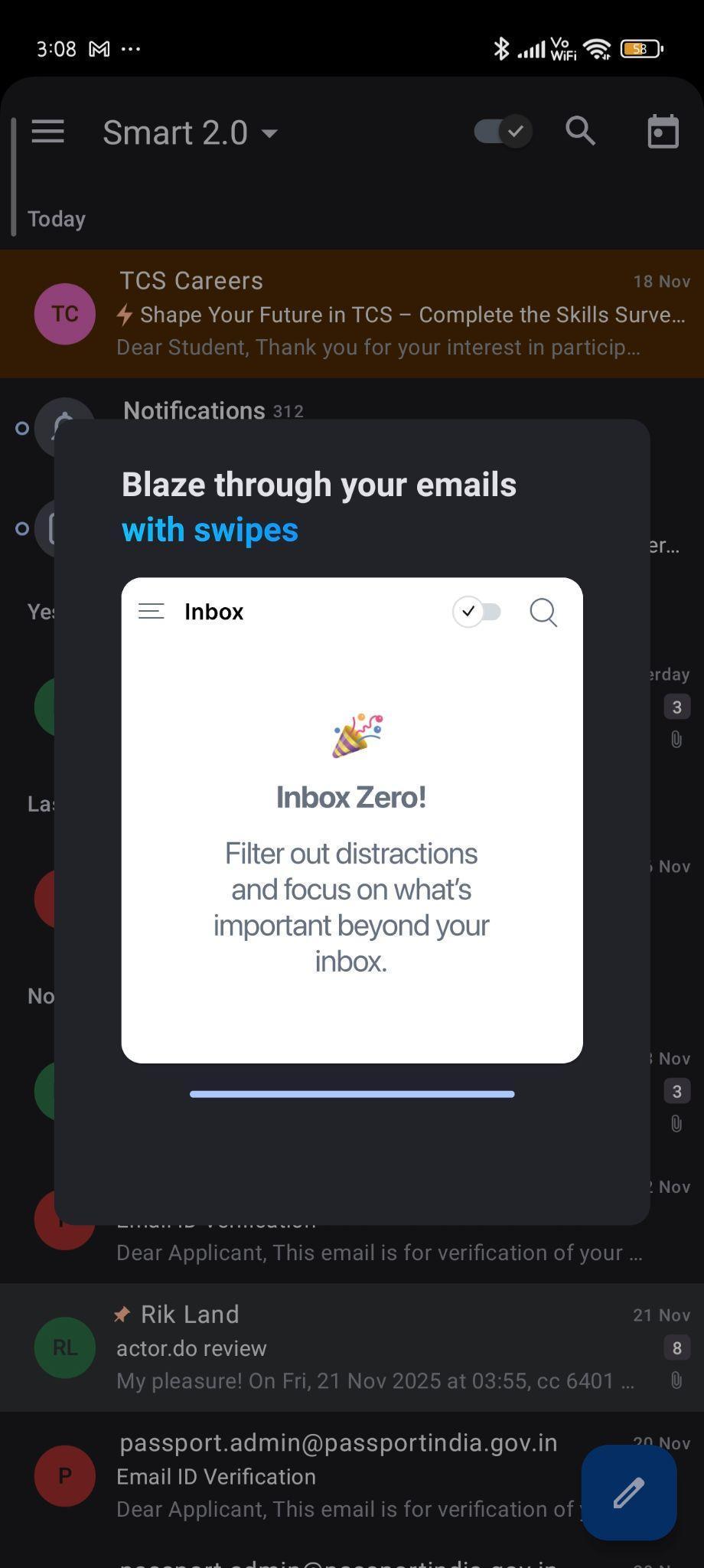
Living with Spark long enough to understand both its strengths and lingering annoyances gave me a clearer picture.
UI / Dashboard:
The first thing that struck me was Spark’s calm appearance. Its minimalistic design feels intentional. The smart inbox categorizes messages into sections like People, Notifications, and Newsletters—simple, but it significantly reduces the visual clutter, making it easier to navigate without feeling overwhelmed. Genuine responses no longer get lost among marketing emails.
Fyxer offers a more in-depth understanding of conversation context, but Spark’s visual sorting feels quicker for daily use.

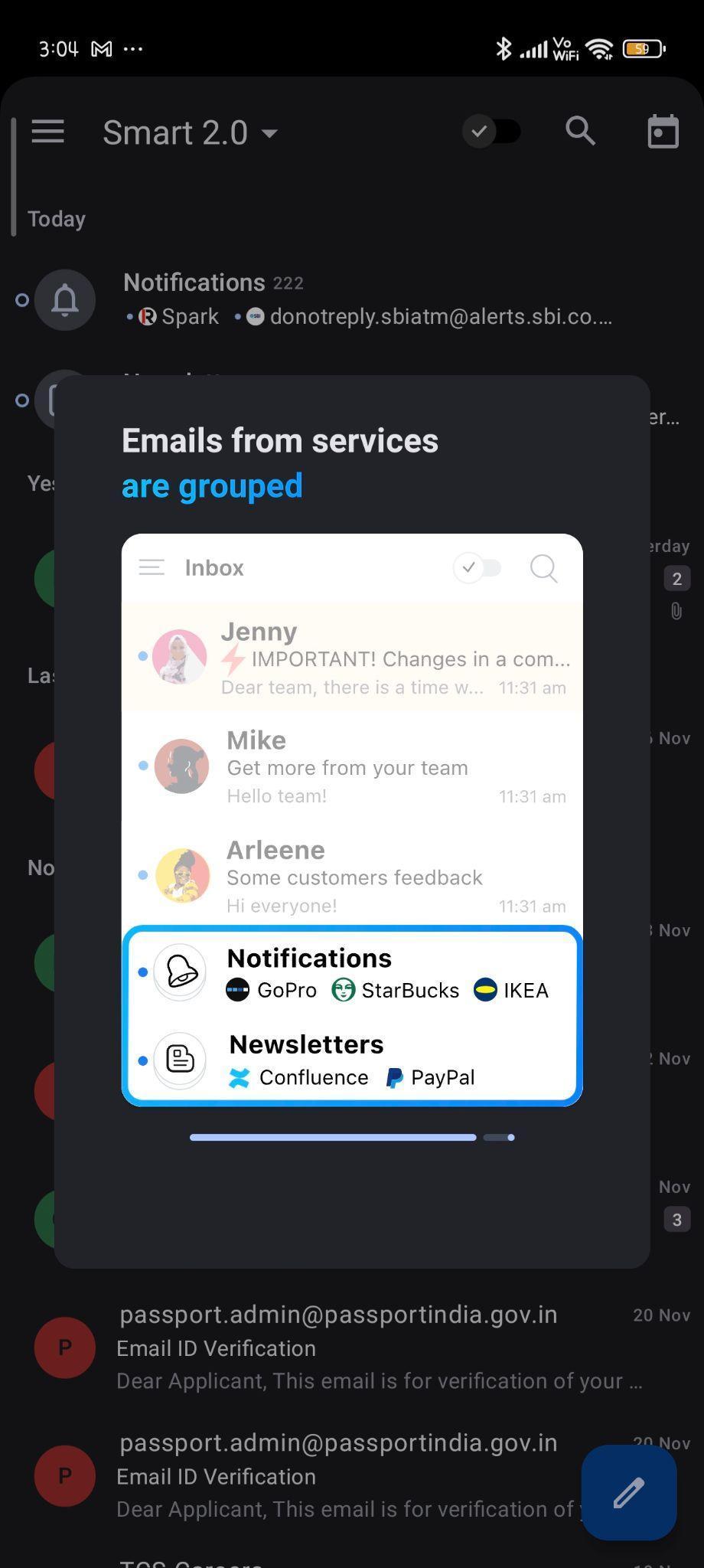

I appreciate that Spark’s interface is understated. The swipe gestures are smooth and modern, reminiscent of crossing items off a to-do list app, and the color palette is muted. The icons are clean and unobtrusive.
That said, it’s not flawless. Spark occasionally misclassifies important emails into lower-priority folders. Additionally, tutorial pop-ups tend to repeat more often than needed, as if Spark forgets I’ve already learned the swipe gestures.


Its greatest strength lies in how swiftly it provides a sense of organization before I even begin reading.
UI Verdict: Calm and in control, even when my inbox isn’t. Score: 8.8 / 10
Core Features:
Unlike Fyxer, Spark doesn’t aim to replace a human assistant. Instead, it concentrates on everyday email tasks—small actions that collectively save a significant amount of time.
What actually helps in real life:
A few features genuinely changed my email habits in a practical sense:
Snoozing

Spark simplifies snoozing emails for tomorrow or next week, preventing important messages from getting lost at the bottom of the unread list.
Reminders
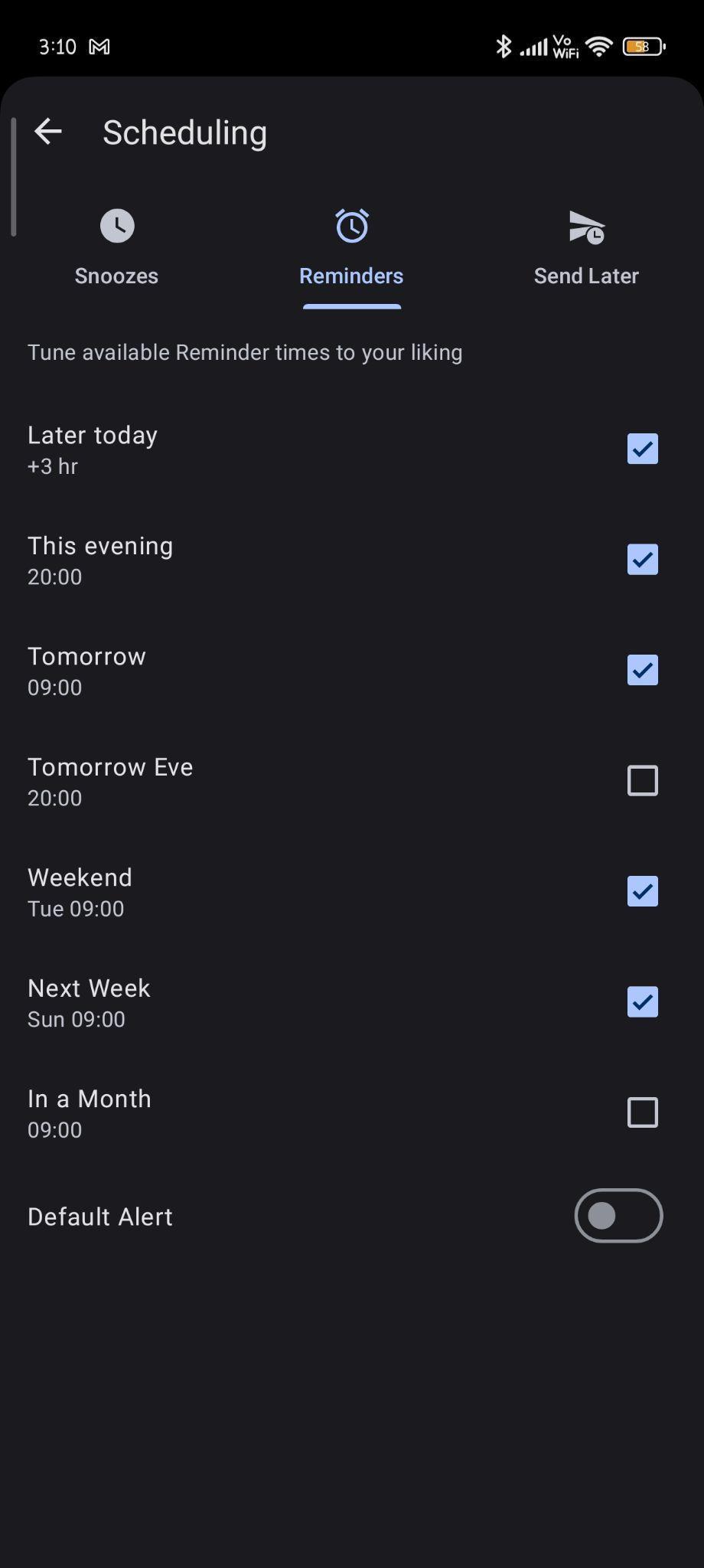
Follow-up reminders act as gentle prompts. If someone doesn’t reply to a message I’ve sent, Spark can remind me later. I need to activate this per message, typically via the “remind me” option when sending something important. It’s a subtle nudge, enough to prevent unintentional ghosting.
Priority

Prioritizing emails is straightforward—just tap the thunder icon. It’s quick, convenient, and keeps important messages pinned at the top, ensuring they don’t get buried. It’s a visual reminder rather than an automation, saying, “Hey, don’t forget about this one.”
Send Later

My favorite feature is Send Later. I often compose emails late at night but want them to appear as if I reply during working hours. Spark allows me to maintain that illusion. While Actor.do can automate scheduling with rules, Spark makes it feel like a seamless part of composing the message.
Templates

I frequently send similar messages for academic or internship applications. Templates with placeholders save me time on writing polite introductions repeatedly. Fyxer offers smarter, more context-aware replies, but Spark’s templates are quicker for straightforward, repetitive messages. However, Spark doesn’t autofill names in templates; I have to do that manually.
PinningPinning turned out to be more useful than I anticipated. It transforms my inbox into a to-do list without additional effort.

Search Bar:
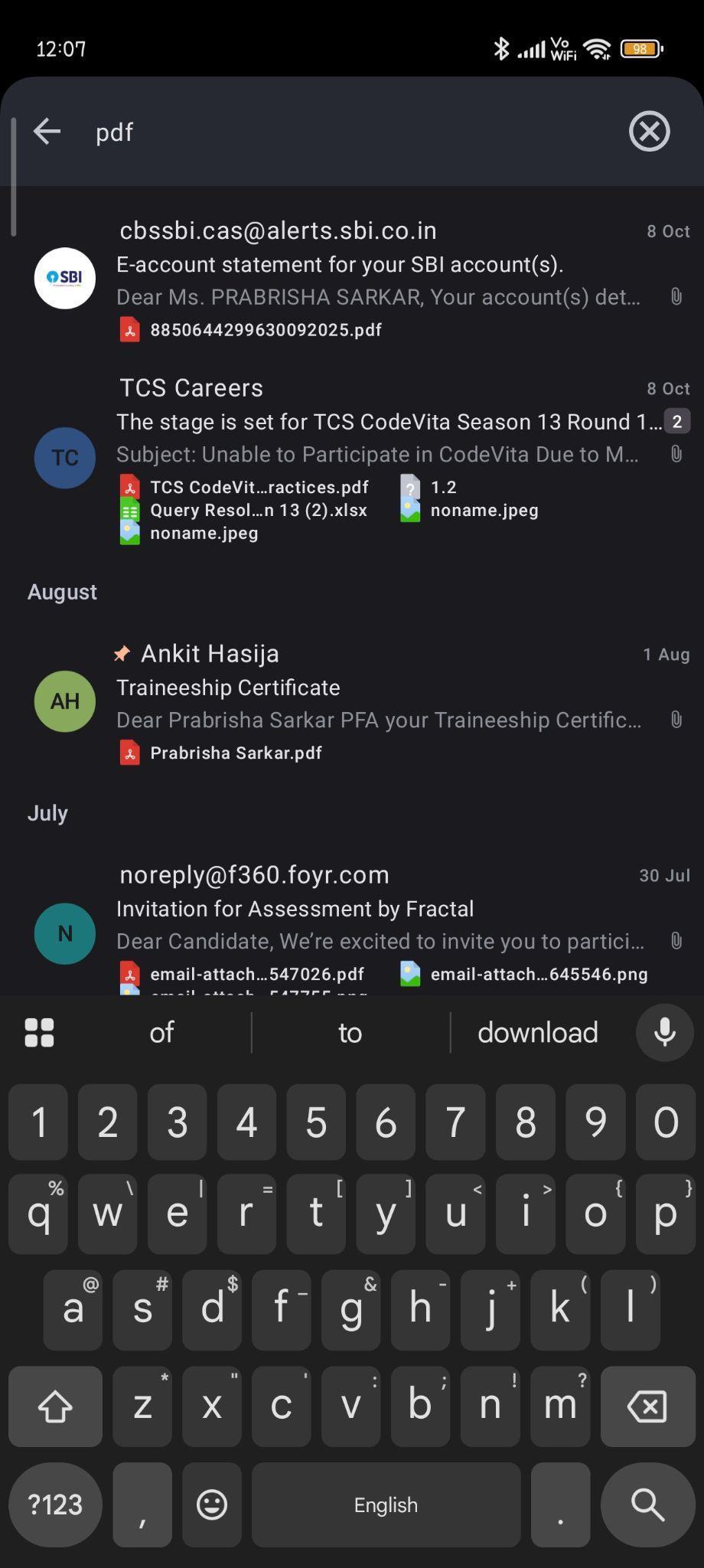

Spark’s search function is genuinely effective. It doesn’t just return random emails containing the search term; it locates specific files, attachments, or phrases. For example, typing “PDF” instantly displays all relevant documents in my inbox. While Gmail also has search, Spark’s results feel more precise and intentional, making it easier to find what I need quickly.
Calendar:

Spark integrates well with calendars. Adding events from emails is almost instant—when there’s a proper invite or if I manually select “add to calendar,” Spark does it seamlessly. However, it doesn’t automatically pick up casual messages like “let’s call tomorrow at 9.” It’s a useful shortcut, but not a full AI scheduler. When I receive an invitation, I don’t need to leave the app or memorize details; Spark adds it directly to my calendar. It’s another subtle way Spark helps turn inbox chaos into organized structure. In contrast, Actor.do attempts automation but can feel cumbersome for quick scheduling.
Undo Send:
Finally, Undo Send is available. I didn’t think I’d need it until I accidentally sent an email without the attachment I was mentioning. That brief window to undo a mistaken send is invaluable.

Having those few seconds of safety before regret becomes permanent? A 10/10 feature.
Spark’s AI:
Spark has recently introduced AI compose and reply features. They work adequately for quick, simple responses—fast, clear, and mostly grammatically correct. However, compared to more advanced assistants like Fyxer, Spark’s suggestions can feel somewhat bland and lacking personality. The AI is suitable for brief, everyday replies, but Fyxer excels when responses require deeper context or emotional nuance. Spark remains primarily a visually organized email app, while tools like SaneBox or Clean.Email offer more thorough inbox cleaning. Spark is more of an AI-enhanced email client, whereas Fyxer or Actor.do aim to act as your inbox assistant.


Meeting notes:
On desktop, Spark offers a meeting notes feature linked to emails and calendar events. On mobile, it’s mostly just a menu option, hinting that a more comprehensive version exists elsewhere.

Fyxer remains superior for meeting insights and follow-ups, whereas Spark’s meeting notes are quite basic and mainly desktop-focused. Spark does have a meeting recording and transcription feature, but in my experience, the quality was lacking. I tested it during a few ad-hoc video calls; it recorded and transcribed, but missed key points, overlooked follow-up tasks, and occasionally garbled names or context. The result was more a rough outline than a reliable summary.
In summary, Spark emphasizes practical improvements to daily workflows rather than flashy AI features. That’s likely why I continued to use it.
Core Features Verdict: Dependable enhancements without unnecessary complexity. Score: 8.5 / 10
Performance:
I dislike waiting for my email app to respond. Spark is quick and responsive, which is more important than many realize. Scrolling is smooth, composing emails is instant, and searching through old files is lag-free. Even on a mid-range Android device, Spark performs reliably.
It manages multiple accounts seamlessly, without syncing issues. Notifications are stable and don’t disappear randomly, unlike some other apps. Calendar sync delays happen occasionally but are infrequent and not critical.
Compared to other tools I use,
- Shortwave is faster at raw UI speed
- Fyxer takes longer since it digs deeper
- Actor.do sometimes gets slowed down by automation syncing
Spark remains in that sweet spot of being fast enough that I hardly notice the technology working behind the scenes.
Performance Verdict: Fast, stable, and unobtrusive—exactly how email responsiveness should feel. Score: 9 / 10
Pricing & Value:
The free version of Spark provides the essentials, but most of its standout features are reserved for Premium.

Premium costs approximately $99 annually for individual users.
I evaluate pricing based on value rather than just numbers. Here’s a straightforward breakdown:
Worth considering if:
- Email constitutes a significant part of your daily tasks
- You manage multiple inboxes that require frequent attention
- Templates and Send Later features genuinely save me hours each month
- You appreciate well-designed apps (since part of the cost reflects UI quality)
Not advisable if:
- Your inbox is already well-managed
- You won’t utilize AI or additional features much
- Cost is a bigger concern than smooth performance
It occupies a middle ground, offering value to many, especially once email becomes more than just casual Gmail notifications.
Clean.Email provides more focused power for inbox cleaning, but Spark offers broader support for daily email management. While Spark is good at organizing and deleting emails, it’s not a replacement for dedicated tools like Clean.Email, which specialize in that area. Spark aims to be a versatile daily email assistant.
Pricing Verdict: Fair value for those whose email is integral to daily life. Score: 7.8 / 10
Privacy & Security:
Whenever an app requests inbox access, I scrutinize its privacy policy carefully. Spark does not store emails on its servers; they remain with Gmail, which is reassuring.
Spark only accesses message content when AI features are used. This is standard practice among modern email apps. It’s not inherently risky, but it’s worth knowing.
SaneBox still remains the privacy champion because it processes headers, not content.Fyxer requires much deeper trust because it reads full conversations to understand context.Spark’s AI primarily analyzes the message you’re replying to, not your entire inbox history—unlike more advanced assistants like Fyxer. However, it still requires permission to read email content to generate replies, placing it in a moderate privacy position.
I’m comfortable using Spark for everyday interactions, but I avoid sending highly private or sensitive messages via AI features.
Privacy Verdict: Adequate for everyday use. Score: 8 / 10
Day-to-day workflow impact:
Before Spark, my inbox felt chaotic, making me procrastinate checking email. Now, the organized layout encourages me to engage more readily.

Spark’s Teams feature transforms email into a collaborative tool. It allows sharing inboxes, assigning messages, and co-drafting replies. Although I don’t use it frequently, it could be a significant productivity boost for teams or shared accounts.


Spark integrates with tools like Notion, Todoist, Asana, Zoom, and others. These connections reinforce that email is often just the beginning of work, not the end.
Several subtle yet noticeable improvements include:
- I process messages more quickly
- I keep better track of important responses
- I avoid procrastinating on emails more often
- Cleaning out my inbox now takes minutes rather than hours
None of these changes are revolutionary, but they make the experience noticeably smoother. When email is a daily task, smoothness truly counts.
Spark didn’t change who I am, but it certainly lowered my frustration levels.
Workflow Verdict: More efficiency, less frustration. Score: 8.7 / 10
Who Spark Makes the Most Sense For
Spark works well for those who spend a lot of time in their inbox and want it organized, but don’t need a full AI assistant. It appeals to users who value clean design, small daily features like snoozing and scheduling, and prefer AI nudges over full automation. If email is an integral part of your routine and you seek a smoother experience without losing control, Spark is a good fit.
For those needing advanced automation or highly context-aware writing, Spark isn’t the ideal choice—Fyxer or Actor.do may be better suited. And if your inbox is minimal, Gmail often suffices.
Spark comfortably occupies the middle ground—helpful, consistent, and unobtrusive, without attempting to dominate your inbox.
Final thoughts:
Spark doesn’t revolutionize email, but it alleviates much of its frustration—and honestly, that’s enough for me.
While some apps aim to be AI-driven assistants, Spark feels like a tool designed by people who understand how email functions in everyday life. It doesn’t attempt to predict my personality or automate everything into a sci-fi scenario.
Spark helps me finish email tasks faster, with fewer headaches and less confusion about where messages have gone.
Overall score: 8.6 / 10
A practical, useful, and user-friendly email tool that deserves a place in daily life—especially when inbox chaos is a constant. Available on both mobile and desktop, it ensures my inbox is with me everywhere, which I find quite convenient.
Frequently Asked Questions
Spark Mail offers several notable features, including a smart inbox that categorizes emails, snoozing and reminders for important messages, and a ‘Send Later’ function. It also provides templates for repetitive emails, a robust search function, and seamless calendar integration. The ‘Undo Send’ feature is particularly useful for preventing accidental sends.
Spark Mail prioritizes privacy by not storing emails on its servers; they remain with your email provider like Gmail. It only accesses message content when using AI features, which is standard practice. However, it does require permission to read email content to generate replies, placing it in a moderate privacy position.
Yes, Spark Mail includes a Teams feature that allows for sharing inboxes, assigning messages, and co-drafting replies. This can be a significant productivity boost for teams or shared accounts, making it a collaborative tool for managing emails collectively.
Spark Mail focuses on practical improvements to daily workflows rather than advanced AI features. While Fyxer offers more context-aware replies and deeper automation, Spark excels in providing a visually organized inbox with dependable enhancements like snoozing, reminders, and templates. Spark is more of an AI-enhanced email client, whereas Fyxer aims to act as a full inbox assistant.
Spark Mail offers a free version with essential features, but most standout features are reserved for Premium. The Premium version costs approximately $99 annually for individual users. This pricing is considered fair value for those who heavily rely on email for daily tasks and can utilize the additional features effectively.
On desktop, Spark Mail offers a meeting notes feature linked to emails and calendar events, including meeting recording and transcription. However, the mobile version is more basic, and the transcription feature can sometimes miss key points or garble context. For advanced meeting insights and follow-ups, other tools like Fyxer may be more suitable.
Spark Mail improves day-to-day workflow by providing an organized layout that encourages quicker message processing and better tracking of important responses. It helps avoid procrastination on emails and reduces the time spent cleaning out the inbox. These subtle improvements make the email experience noticeably smoother and less frustrating.
Abonneer je op onze nieuwsbrief en ben als eerste op de hoogte van tijd- en geldbesparende AI-tools!
Comments