Actor.do Review: My Honest Experience With This AI Email Assistant That Tries to Do Everything
Conclusion
Actor.do is a comprehensive AI email assistant that offers a wide range of features, making it a versatile tool for managing your inbox. It excels in automation, organization, and personalization, providing a robust set of tools that can significantly streamline email management. However, its feature-rich dashboard can initially feel overwhelming, and it may not be the best fit for those seeking deep, long-form drafting or handling highly confidential inboxes. Overall, it’s a strong value for users who want more than just basic email functions.
Pros
- Comprehensive feature set for email management
- Highly customizable AI training for personalized responses
- Powerful automation and cleanup tools
- Works with both Gmail and Outlook
- Good value for the range of features offered
Cons
- Initial setup can be time-consuming
- Dashboard may feel overwhelming at first
- Not ideal for highly confidential inboxes
- Longer emails may require manual expansion
Table of Contents
- 1. Dashboard & UI
- 2. Setting Up the AI Assistant
- 3. Email Analysis
- 4. Label Management
- 5. Email AI Training
- 6. AI Rules for Emails
- 7. Cleanup Rules & Deleting Emails
- 8. Email Apps
- 9. Subscription Management
- 10. Email Export & WhatsApp Integration
- 11. Reminders
- 12. Scheduling Bookings, Events & Agenda Management
- 13. Drafting & Replying to Emails
- 14. Draft Settings & Follow-Up Settings
- Performance
- Pricing & Value
- Privacy & Security
- Final Summary
- Frequently Asked Questions
I’ve tried quite a few AI email tools over the last year, mostly because my inbox has slowly become a mix of useful messages, ignored notifications, forgotten newsletters, and occasional chaos. I’m always experimenting with anything that claims it can help communicate faster or stay organised without constantly checking emails. That’s how I ended up testing Actor.do, an AI assistant that positions itself as more than just a reply generator. It wants to manage labels, automate your inbox, help with scheduling, clean things up, handle subscriptions, create rules, and even export messages to WhatsApp.
It has a ‘Swiss army knife’ vibe for Gmail, less focused on writing than HeyHelp, less on cleaning than Clean.Email, and not as heavily geared towards executive assistance as Fyxer, but positioned somewhere in between. Having used it consistently, setting routines, teaching it my tone, and applying it to daily tasks, here’s my honest assessment of its strengths, areas for improvement, and its place within the landscape of modern AI email tools. Additionally, it also works with Outlook, which makes it a flexible and useful tool. Though I mostly used it inside Gmail, but knowing of its interoperability is an add-on to its skillset.
1. Dashboard & UI
Instead of sitting inside Gmail, Actor.do is an internet-based dashboard that sits next to it. My initial response upon opening it was a mixture of curiosity and mild overwhelm. There are multi-step configurations, labels, toggles, and panels. It feels more like a productivity app than a simple Gmail extension. But after a few minutes of clicking around, the layout made sense.


The dashboard comprises:
- My assistant settings (this is where tone, behaviour, and preferences live)
- Email analysis tools
- Label management
- Rules & automations
- Cleanup tools
- Scheduling & booking tools
- Email apps (their term for mini-modules)
- Exports & integrations
The UI isn’t minimalist, but it is functional. Once I familiarized myself with the layout, it was straightforward to navigate. Compared to a more sophisticated assistant like Fyxer, it offers more flexibility, though it’s less visually refined and can initially feel overwhelming. With some patience, it becomes manageable.
Verdict: A feature-rich dashboard that initially feels hectic but, once we get used to it, becomes actually helpful.
Score: 7.9/10
2. Setting Up the AI Assistant
Setting up the assistant was somewhat more time-consuming than with simpler tools, but this allowed for significantly greater control over its behavior. I could configure:


- My greeting style and sign-off style
- Email draft size
- Calendar management and task management
- What I would like my AI assistant to do
Verdict: The setup requires patience from our side, but the control it gives later is worth the effort.
Score: 8.5/10
3. Email Analysis
One of the first things Actor.do did was analyse my inbox. It grouped messages into categories such as:
- pending replies
- non-priority notifications
- newsletters
- emails requiring follow-up
- clutter
- personal vs. automated

It also highlighted threads where I may have forgotten to respond. This part reminded me a little of Fyxer’s “analysis before drafting,” but in Actor.do the emphasis is more on decision-making rather than writing.
The analysis isn’t flawless; sometimes it mislabels sentimental emails as non-priority. Nonetheless, it provides a clearer picture of my inbox contents beyond a simple long list.
Verdict: Good high-level visibility into inbox patterns, with occasional misclassifications.
Score: 8/10
4. Label Management
Actor.do allows for more structured label management. I could:
- rename labels in bulk
- merge multiple labels
- assign rules to labels
- shift messages across categories
- clean up old or unused labels

For long-time Gmail users with numerous labels, this feature is genuinely useful. It’s not flashy, but highly practical.
Verdict: A tidy, underrated feature for long-term Gmail organisation nerds.
Score: 8.3/10
5. Email AI Training
This feature enables me to train Actor.do to mirror my tone, structure, and style. I can upload email samples or paste text to teach it my communication style.
In practice, this enabled me to:
- fewer overly formal drafts
- more natural sign-offs
- shorter replies when needed
- messages that felt more “me” and less “AI email bot”
Compared to Fyxer, which can be overly chatty, Actor.do feels more obedient, sticking closely to what I’ve trained it to do rather than improvising.

Verdict: A strong personalisation tool that makes replies sound more authentic over time.
Score: 9/10
6. AI Rules for Emails
Actor.do shines in automation. I could create AI-based rules such as:
- “If newsletter, archive automatically.”
- “If sender is X, prioritise.”
- “If subject contains invoice, label as Finance and notify me.”
- “If the message looks like a request, draft a reply immediately.”
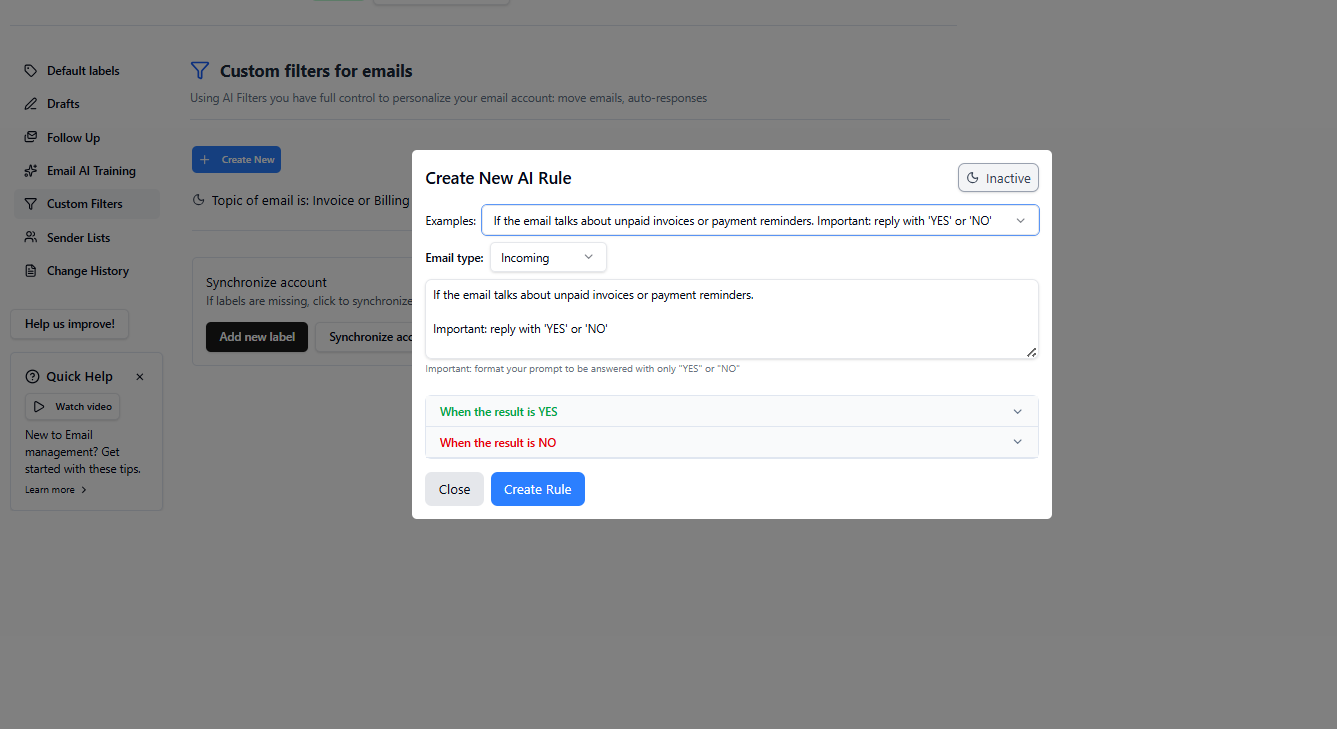
It resembles a more intelligent version of Gmail filters. The rule creation interface is straightforward, with the assistant offering suggestions based on inbox patterns.
Verdict: A flexible, powerful automation engine that makes Gmail filters feel outdated.
Score: 9/10
7. Cleanup Rules & Deleting Emails
Cleanup rules enable automation of long-term inbox maintenance:
- delete emails older than X months
- auto-archive “read & irrelevant” mail
- bulk remove repeated notifications
- sweep old promotional content


I appreciated being able to run these rules manually or set them to operate passively. Actor.do resembles Clean.Email in this aspect, effectively preventing the inbox from becoming a time capsule.
Verdict: Strong cleanup options, especially for inboxes that haven’t been cleaned in years.
Score: 8.8/10
8. Email Apps
Actor.do features ‘Email Apps’, small tools designed for specific tasks. Examples include:
- Export emails
- Subscription manager
- Email to whatsapp
- Clean email account
- Past email analysis

Though small, these tools add up. While not groundbreaking, they saved me from repetitive manual work.
Verdict: A nice collection of bite-sized helper tools that reduce repetitive email work.
Score: 8.2/10
9. Subscription Management
Actor.do provides tools to unsubscribe from unwanted emails or mute specific senders. It functions similarly to Clean.Email’s unsubscribe feature, though I found Clean.Email slightly more effective for bulk management.

Still, Actor.do handled everyday newsletter clutter well and helped me stop repeat senders from slipping into my inbox unnoticed.
Verdict: Effective for casual subscription cleanup; not perfect but definitely useful.
Score: 8/10
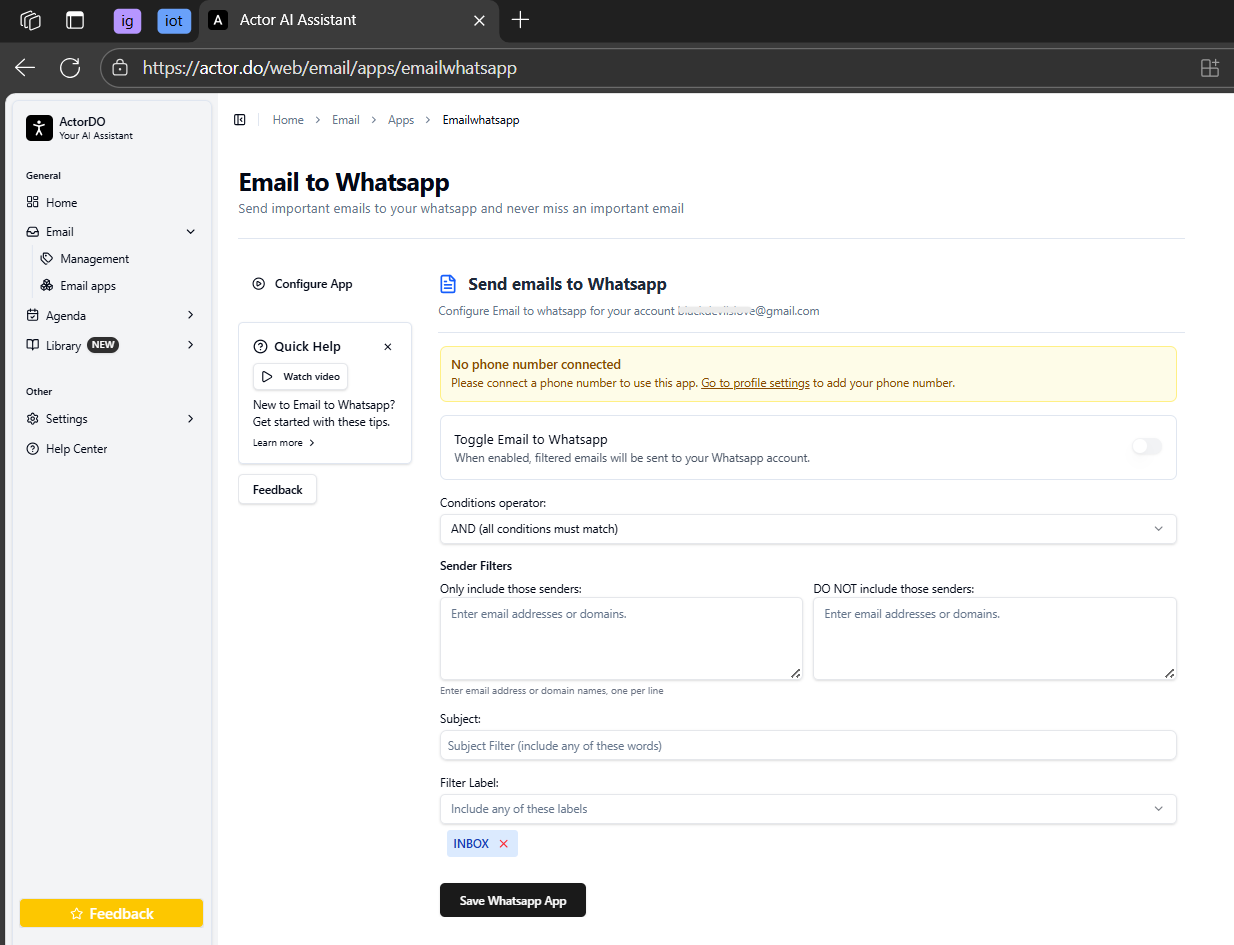
10. Email Export & WhatsApp Integration
I didn’t anticipate valuing this feature, but exporting emails or forwarding them to WhatsApp proved quite handy. When sharing documents or threads with someone outside Gmail, it saved several steps.
It’s niche, but thoughtful.

Verdict: A small but convenient perk for sharing information outside email.
Score: 8.4/10
11. Reminders

Actor.do can set reminders for emails I need to follow up on. It functions somewhat like Gmail snooze, but with greater context awareness. For example:
- “Remind me if they don’t reply in 3 days.”
- “Remind me tomorrow morning before my meeting.”
It’s not as advanced as some dedicated task managers, but acceptable for inbox-based tasks.
Verdict: Useful, simple reminders that help me not forget important threads.
Score: 8/10
12. Scheduling Bookings, Events & Agenda Management
Actor.do lets me:
- propose meeting times
- create events
- manage agendas and give daily briefing
- coordinate bookings

It’s lighter than Fyxer’s calendar tools but still helpful. For simple scheduling, it worked well. For complex meeting setups, Fyxer still handles context better.


Verdict: Solid scheduling tools for everyday use, though not as deep as specialised assistants.
Score: 7.8/10
13. Drafting & Replying to Emails
Actor.do can draft replies directly from its dashboard. My experience:
Good for short repliesVery fastTone matches what I trainedEasy to edit before sending


But when a longer reply was needed, the tool sometimes produced something too short or overly simplistic. It’s not that it refuses to write long messages, the length just isn’t always satisfactory.
Compared to Fyxer’s longer, more conversational drafting style, Actor.do is more concise and structured.
Verdict: Great for quick replies, but long emails may require manual expansion.
Score: 8.2/10
14. Draft Settings & Follow-Up Settings
Draft settings let me adjust:
- tone
- length
- proactiveness
- style
- format
- font
Follow-up settings help me automatically check if a thread needs revisiting. Actor.do can gently nudge me when a conversation goes silent. Not too aggressive, not too passive.


Verdict: Thoughtful controls that help the assistant stay aligned with my communication style.
Score: 8.6/10
Performance
Actor.do responded promptly in all tests. Automations executed swiftly, rules were applied immediately, and email analysis did not cause any freezes.
Compared to Fyxer, Actor.do appears:
- less heavy
- less context intensive
- faster for basic tasks
It avoids overthinking each email, resulting in a snappy experience.
Verdict: Smooth, reliable performance that keeps the workflow moving.
Score: 9/10
Pricing & Value
Actor.do’s pricing varies based on the number of accounts and usage levels. It falls within the mid-tier range:
- Not as expensive as Fyxer
- More expensive than basic cleanup tools like SaneBox
- Worth it if automation matters
- Optional if we only need basic drafting or light cleanup

I valued the free trial period to explore its features before making a commitment.
In price comparison, Actor.do offers substantial features at a lower cost, while Fyxer’s higher price is justified for those seeking more human-like drafting and comprehensive meeting workflows. The best choice depends on whether value or depth is the priority.
Verdict: Strong value for people who want automation and depth; less necessary for casual users.
Score: 8/10
Privacy & Security
Actor.do needs access to inbox content to do its job, drafting, rules, cleanup, and scheduling all depend on reading messages. The tool shows clear permission prompts and explains what it accesses.
It doesn’t feel any riskier than similar assistants, but, as always:
- not ideal for highly confidential professions
- safe enough for general workplace communication
Verdict: Transparent permissions and reasonable security, but sensitive inboxes should review carefully.
Score: 7.8/10
Final Summary
After weeks of usage, I see Actor.do as a comprehensive “everything in one place” assistant for people who want more than just drafting or cleanup. It automates, organises, trains, analyses, sorts, schedules, nudges, and drafts, all in a single dashboard.
Best for:
Gmail users with cluttered inboxesPeople who want automation beyond simple filtersUsers who like training an AI to match their voiceAnyone who appreciates an “all-rounder” assistant
Not ideal for:
People needing deep, long-form draftingHighly confidential inboxesThose who prefer ultra-simple toolsUsers already satisfied with Gmail’s built-in tools
Overall Score: 8.2/10
Actor.do is a clever, adaptable AI assistant suited for users willing to fine-tune and customize its behavior. Although it can seem complex and overwhelming due to its many features, it provides a range of tools that genuinely streamline email management.
Frequently Asked Questions
Actor.do is an AI email assistant that offers a wide range of features including email management, automation, scheduling, and more. Unlike other tools that focus solely on drafting or cleaning, Actor.do positions itself as a comprehensive solution, similar to a Swiss army knife for Gmail and Outlook users. It provides more flexibility and control compared to tools like HeyHelp or Clean.Email, but may not be as specialized as Fyxer for executive assistance.
The Actor.do dashboard is feature-rich and initially feels overwhelming due to its multi-step configurations and numerous panels. However, once familiarized, it becomes straightforward to navigate. It is functional rather than minimalist, offering a variety of tools for email analysis, label management, automation, and more.
Yes, Actor.do offers robust AI training features that allow you to teach it your tone, structure, and style. You can upload email samples or paste text to help it learn your communication preferences. This personalization makes replies sound more authentic and less robotic over time.
Actor.do allows you to create a variety of AI-based rules for email management. Examples include automatically archiving newsletters, prioritizing emails from specific senders, labeling and notifying you about invoices, and drafting immediate replies to requests. These rules are more intelligent than standard Gmail filters and can be tailored to your specific needs.
Actor.do provides strong cleanup options, including deleting emails older than a specified period, auto-archiving read and irrelevant mail, and bulk removing repeated notifications. It also offers structured label management, allowing you to rename, merge, and assign rules to labels, which is particularly useful for long-term Gmail organization.
While Actor.do has transparent permissions and reasonable security measures, it may not be ideal for highly confidential professions. It requires access to your inbox content to perform its functions, which could be a concern for those handling sensitive information. It is generally safe enough for standard workplace communication.
Actor.do falls within the mid-tier range for pricing. It is less expensive than Fyxer but more costly than basic cleanup tools like SaneBox. The pricing is justified by its comprehensive features, making it a strong value for users who prioritize automation and depth in email management.
Abonneer je op onze nieuwsbrief en ben als eerste op de hoogte van tijd- en geldbesparende AI-tools!
Comments