Conclusion
Rytr presents itself as a versatile AI writing assistant, and while it does offer a wide range of use cases, its performance falls short in several areas. The tool is best suited for short-form writing tasks and idea generation, but it struggles with producing high-quality, reliable content without significant human intervention. The user interface is clean and straightforward, but it lacks the inviting feel that would encourage prolonged use. The free plan is quite restrictive, making it difficult to thoroughly test the tool’s capabilities. Overall, Rytr is a functional tool for quick drafts and starting points, but it may not be the best choice for those seeking a comprehensive writing assistant.
Pros
- Offers a wide range of use cases for different writing tasks
- Clean and straightforward user interface
- Supports over 20 languages
- Quick generation of text
Cons
- Output quality is inconsistent and often requires significant cleanup
- Free plan is very restrictive
- Inline editing features do not behave as expected
- Lacks depth in creative and long-form writing capabilities
Table of Contents
- Introduction: What Rytr Is and Who it’s for
- UI, First Impressions, and Setup Flow
- Core Features
- Use Case Driven Writing
- Writing Inside the Editor
- Tone, Language, and Creativity Controls
- Tested Use Cases
- Rytr Chat
- Performance, Output Quality, and Reliability
- Pricing, Limits, and How It Pushes Frase
- Privacy and Data Handling
- Rytr vs Koala vs Frase
- Final Verdict
- Frequently Asked Questions
Introduction: What Rytr Is and Who it’s for
Rytr positions itself as a general purpose AI writing assistant, and honestly, that framing is mostly accurate. It’s not trying to be an SEO platform, it’s not trying to compete with tools like Frase or Koala when it comes to long form writing. From the moment I landed inside the product, it was clear that Rytr is built around helping with small, specific writing tasks, not full articles or deeply structured content.
Everything inside Rytr revolves around use cases. Not documents, not projects, but use cases. That difference matters more than it sounds like it should.
From my time using it, Rytr feels designed for:
- Short form writing tasks
- Idea generation rather than execution
- Quick drafts that still need human cleanup
- People who want help starting, not finishing
What it doesn’t really try to do:
- Write full long form blog posts
- Handle SEO or SERP analysis
- Guide content strategy in any meaningful way
That’s not necessarily a flaw. But it sets expectations. And once I understood those limits, the rest of the experience made more sense, even when it frustrated me.
UI, First Impressions, and Setup Flow
The UI is clean, simple, and very straightforward. There’s nothing visually overwhelming here, which I appreciated at first. It doesn’t try to look flashy or overly modern. It just works, mostly.
When I first opened Rytr, the layout made it obvious what I was supposed to do next. The setup flow is minimal and fast. There’s no heavy onboarding, no forced tutorial that blocks progress. I could start writing almost immediately, which is good.
The core layout stays consistent:
- A left side panel where I select language, tone, and use case
- A main editor area where content appears
- A top navigation for Documents, Write, Chat, and History
- A very visible upgrade button reminding me about limits
Some UI choices that stood out to me, both good and bad:
- Language selection supports 20+ languages, which is genuinely useful
- Tone selection is extensive and easy to switch between
- Creativity level is adjustable, but the impact feels subtle
- Credit usage is always visible, and it feels… stressful honestly
The dashboard doesn’t feel cozy or inviting. It feels functional. Almost transactional. I never forgot that I was working within limits, because the interface keeps reminding me of it.
Another thing I noticed pretty quickly is that Rytr isn’t really built around sitting and writing for long stretches. The design encourages quick actions: Pick a use case – Generate something – Edit a little – Move on
Overall, my first impression was neutral leaning positive. Clean, easy to understand, not confusing. But also not something I wanted to live in for hours. It felt like a tool I’d open briefly, not a workspace I’d settle into.
Score 7/10
Core Features
Rytr doesn’t really present “features” in the traditional sense. Everything is framed as use cases, and that framing changes how the tool feels when actually using it. I didn’t feel like I was exploring a toolkit. It felt more like picking from a menu of tasks and seeing what comes out. That approach can be helpful, but it also makes the experience feel fragmented.
Use Case Driven Writing
The biggest core experience inside Rytr is choosing a use case and letting the tool generate something based on that. There are a lot of them. Probably more than most people will ever need.
Some of the categories I noticed:
- Blog ideas and outlines
- Emails and email replies
- Ads and social media posts
- Product descriptions
- Business ideas, pitches, CTAs
- Creative things like poems, story plots, lyrics


This is where Rytr does have a clear plus point. It’s not boxed into business only writing. It clearly wants to cover creative and casual use too, even if I couldn’t fully test that because of limits. Customising use cases is also an option Rytr offers, but locks behind its paywall.

But here’s the thing I kept running into. Every use case feels isolated. If I generated something and wanted to build on it using another use case, Rytr didn’t really help me do that smoothly. It just kept adding new content instead of replacing or refining what was already there.
Score 7.6/10
Writing Inside the Editor
The editor itself is very basic. It supports headings, formatting, and inline actions, but the behavior of those actions frustrated me more than once.
When I tried to:
- Rephrase a paragraph
- Improve grammar
- Continue writing from a specific section
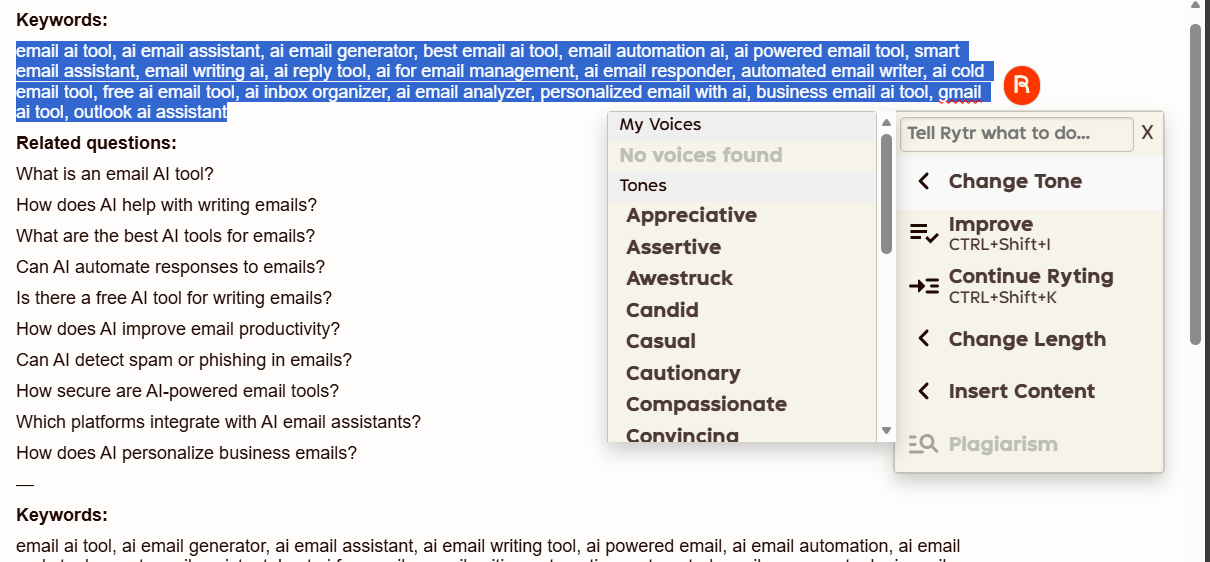

Rytr didn’t replace the selected text. It just started writing after it. So I had to manually clean things up every single time. That breaks flow very fast.
It felt like the tool didn’t understand editing as an iterative process. It treats writing as additive, not corrective. That made me cautious. I couldn’t trust it to refine text without making a mess.
Score 6/10
Tone, Language, and Creativity Controls
There are a lot of tones available. Way more than most tools offer, honestly.Things like:
- Earnest
- Candid
- Passionate
- Informative
- Humorous
- Critical
- Inspirational and more…

Switching tones is easy. Whether the output truly changes in a meaningful way is another question. Sometimes it did, sometimes it didn’t. There’s also the option of customising tone, but it’s entirely locked behind the paywall

Language support is solid. 20+ languages is not nothing. But there’s a catch.


- Default language can only be changed once per month
- Multi language flexibility is locked behind paid plans
That made experimenting feel risky. I didn’t want to waste my one change just to test something.
Creativity levels exist too, from low to max. I used “optimal” most of the time. The difference between levels wasn’t always obvious, and higher creativity didn’t necessarily mean better writing. Just more words, sometimes less clarity.
Score 6.7/10
Tested Use Cases
Keyword generation is a use case, but it’s one of the few things I actually tested properly before running out of credits.
What I liked:
- Multiple variants per generation
- Clear keyword grouping
- Easy to scan outputs
What I didn’t like:
- Repetition across variants
- Very generic phrasing
- Felt more like a brainstorming list than real research
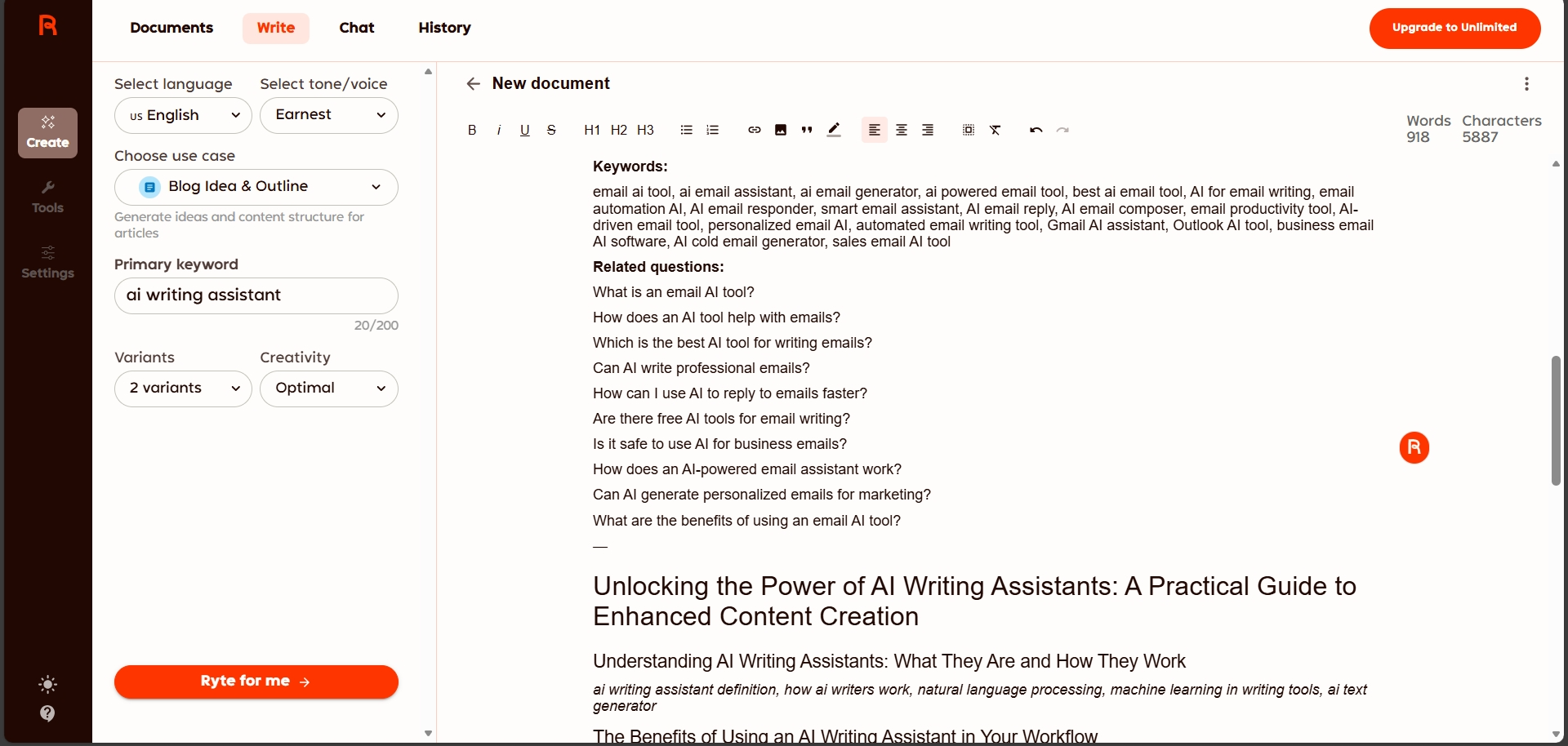
Again, usable as a starting point, but not something I’d rely on without heavy manual filtering.
I also tried the blog outline generation use case, because that’s one of the more common things people would actually use Rytr for. The outline it generated was… fine, but very basic. It gave me generic section ideas, the kind that could apply to almost any blog on that topic. Nothing wrong with it, but nothing memorable either.

After that, I tried using the inline editor to actually build out the content from the outline. This is where things got mixed for me.
For live writing, Rytr can feel usable at first. It does generate text quickly, and if I’m just trying to get words on the page, it technically works. But the output started showing the usual AI signs pretty fast. Repetition of the same ideas, very safe phrasing, and those obvious patterns like em dashes and generic transitions that instantly make the writing feel artificial.

It wasn’t completely unusable, but it wasn’t something I’d trust blindly either. I had to keep stopping, rewriting, and cleaning things up manually. So while Rytr might help with drafting in real time, the generation quality isn’t strong enough to rely on without constant human intervention.
Score 5/10
Rytr Chat
Rytr also includes a chat interface, which is clearly meant to position it as a more general purpose AI assistant rather than just a use case based writing tool. The chat sits alongside the editor and looks simple enough, nothing confusing or overloaded.
But in my case, I couldn’t really test it.
I opened the chat and asked what it could do. Rytr responded by listing the kinds of things it’s capable of, like helping with writing, answering questions, and assisting with creative tasks. And that was basically it. I didn’t get the chance to try follow-up prompts, longer conversations, or actual creative back and forth inside the chat because of hitting the limit cap.

So my experience with Rytr Chat stops at awareness, not usage.
Because of that, I can’t speak to how useful or reliable it would be in practice. I don’t know how it handles context over multiple messages, or whether it behaves differently from the main editor. From the single response I saw, it felt similar in tone and structure to the rest of Rytr’s output, but that’s as far as I can honestly go. The chat exists, it answers, but I wasn’t able to explore it beyond that first interaction.
Score 6.3/10
Performance, Output Quality, and Reliability
From a technical angle, Rytr works. Pages load fine, generations happen quickly, and nothing feels broken in a literal sense. But performance isn’t really about speed, it’s about whether the tool actually delivers on what it claims to help with. And this is where things start falling apart for me.
The output quality is inconsistent. A lot of the writing felt repetitive and filled with very obvious AI phrasing. Even when I changed tones or adjusted creativity, the structure of the sentences often stayed the same. It sounded like AI trying to sound human, which is never a great sign.
Reliability is another issue. Inline actions like rephrasing or improving text didn’t behave the way I expected. Instead of refining what I selected, Rytr often just continued writing after it. That meant extra cleanup every time, which slowed things down instead of helping.
For creative use cases, Rytr claims it can write things like poems, story plots, and creative articles. I liked that ambition, but I wasn’t able to verify how good it actually is there. From what I did see, the writing leaned safe and generic, not expressive or surprising.
If I had to describe how Rytr feels to use, honestly, I’d say it’s good at starting things, bad at finishing them. Useful in short bursts but not trustworthy enough to run on autopilot
It’s a general writing assistant, yes. But it needs a lot of human intervention, cleanup, and decision making. Which is fine. Just not something I could rely on heavily, especially under such tight limits.
Pricing, Limits, and How It Pushes Frase
Rytr’s pricing is simple on the surface, but the limits shape the experience a lot.
From what’s shown:
- Free plan
- 10,000 characters per month
- Very limited testing room
- Saver plan – $9/month
- 100,000 characters per month
- Unlimited plan – $29/month
- Unlimited characters
- Access to more tones and features


The free plan runs out extremely fast. I exhausted it quickly just testing a few use cases. That meant I never really got to explore:
- Creative writing quality
- Chat depth
- Long term consistency across outputs
Because of that, Rytr ended up feeling restricted, not flexible. Even when it offers many use cases, the limits make those options feel theoretical.
Another thing that stood out early is how Rytr positions itself far from long-form writing. Right from the beginning, it nudges users toward Frase for long-form content, SEO, and SERP analysis. It doesn’t hide this. It almost treats Frase like a companion or sister tool that’s required if serious content or SEO is the goal.

That messaging made one thing clear to me. Rytr is not meant for long articles or SEO optimization. It’s meant for short-form writing and general assistance. For anything beyond that, it points elsewhere.
Given the pricing, I didn’t feel Rytr offered enough unique value. Tools like ChatGPT can already do similar things without such tight character pressure, and Koala is clearly better for actual writing.
Privacy and Data Handling
Rytr collects standard usage and technical data, including device IDs, IP addresses, cookies, and optional location data. This is used to run the service, personalize output, manage accounts, and communicate updates. There’s also mention of targeted advertising, which is worth noting.
From what’s outlined:
- No sale of identifiable personal data
- Data may be shared with vendors, partners, and affiliates
- International data transfers can occur, including to the US
- Cookies and third-party trackers are used
- CCPA and GDPR rights are clearly stated
- Consent withdrawal can limit access to certain features
Nothing here felt alarming, but it also didn’t feel minimal. It felt like a standard SaaS privacy setup, functional and compliant, not especially privacy-first. I didn’t feel unsafe using it, but I also didn’t feel like privacy was a major selling point.
Rytr vs Koala vs Frase
|
Aspect |
Rytr |
Koala |
Frase |
|
Starting price |
$9/month (Saver) |
$49/month |
$38/month |
|
Core focus |
General writing use cases |
Long-form writing |
SEO research and planning |
|
Full article generation |
No |
Yes |
Yes |
|
Writing quality |
Repetitive, obvious AI |
Stronger draft flow |
Structured but rigid |
|
SEO features |
na |
na |
Strong |
|
Best strength |
Many use case options |
Writing speed and drafts |
SERP and research depth |
For me, Rytr doesn’t really compete with Frase or Koala in a serious way. It’s not trying to. Its only real strength is the number of use cases it offers, and that’s useful for quick, short tasks. But when it comes to actual writing quality, it falls behind fast. The output needs too much cleanup, and I wouldn’t trust it blindly for anything important.
Koala is the clear winner for writing. It helps me draft faster and with less friction. Frase wins when SEO and planning matter more than the writing itself. Rytr sits on the side. Helpful sometimes, but not something I’d reach for daily.
Final Verdict
Rytr does what it says on the surface, it’s a general AI writing assistant with a lot of use cases. But when I used it, I felt like it fell vastly behind, especially on it’s writing abilities. Drafts often needed reworking, inline edits didn’t behave as I expected, and there was a lot of cleanup required for even simple outputs. The creative side sounded promising, but I couldn’t really test it deeply before hitting the usage cap.
Overall Score 5.7/10
Frequently Asked Questions
Rytr is an AI writing assistant focused on short-form writing tasks and idea generation. It is designed for users who need quick drafts and help starting writing projects, rather than those looking for long-form content creation or SEO optimization.
Rytr’s UI is clean and straightforward, making it easy to start writing quickly. However, it can feel transactional and not particularly inviting for long writing sessions. The interface is functional but constantly reminds users of their limits, which can be stressful.
Rytr’s core features revolve around use-case driven writing, offering a wide range of templates for different writing tasks. It includes tone and language selection, creativity level adjustments, and a basic editor. However, the features can feel fragmented and not well-integrated for a smooth writing process.
Rytr offers a variety of tones and supports over 20 languages. While switching tones is easy, the impact on the output can be subtle. Language flexibility is limited in the free plan, allowing only one change per month, which can be restrictive for multilingual users.
Rytr’s free plan is quite limited, offering only 10,000 characters per month. This restriction makes it difficult to thoroughly test the tool’s capabilities, including creative writing and chat functions, without quickly hitting the usage cap.
Rytr does not directly compete with Koala or Frase. Koala excels in long-form writing and drafting speed, while Frase is strong in SEO research and planning. Rytr is more suited for short, specific writing tasks and offers a wide range of use cases, but its writing quality and reliability fall behind the other tools.
Rytr offers a free plan with 10,000 characters per month, a Saver plan at $9/month with 100,000 characters, and an Unlimited plan at $29/month with unlimited characters and access to more tones and features. The free plan is quite restrictive, pushing users towards paid plans for more extensive use.
Rytr includes use cases for creative writing like poems and story plots, but the output can be generic and repetitive. The tight limits on the free plan make it difficult to thoroughly evaluate its creative writing capabilities, but initial impressions suggest it may not be the best tool for expressive or high-quality creative content.
Abonneer je op onze nieuwsbrief en ben als eerste op de hoogte van tijd- en geldbesparende AI-tools!
Comments