Conclusion
Mailstrom stands out as a robust and efficient tool for managing large, cluttered inboxes. It offers a comprehensive suite of features that go beyond simple unsubscribing, providing users with powerful batch actions and long-term organizational tools. While it may not be the most beginner-friendly or the cheapest option, its performance and capabilities make it a worthwhile investment for those with extensive email management needs. The tool’s ability to handle heavy-duty tasks and its respectful approach to privacy further enhance its appeal.
Pros
- Comprehensive inbox management with powerful batch actions
- Handles large volumes of emails swiftly and reliably
- Offers long-term organizational tools like Chill, Block, and Expire
- Respectful approach to privacy and data security
- Transparent pricing with no hidden upsells
Cons
- Not the most beginner-friendly option
- Can be overwhelming for users seeking simple solutions
- Requires a paid plan for sustained results
Table of Contents
- Getting Started: Setup and Initial Impressions
- UI and Dashboard: Clean and Practical
- Hands-On Experience: The Core Features That Matter Most
- Grouping that actually saves time
- Bulk Actions That Work Quickly
- Unsubscribe Options That Are Direct
- Surprisingly: Replying directly within Mailstrom
- Chill, Block, and Expire: Automated Inbox Management
- Undo: Confidence to Act
- Performance: Designed for Heavy-Duty Tasks
- Pricing: The True Cost of Mailstrom
- Mailstrom in the Context of Email Cleanup Tools
- Ideal Users for Mailstrom
- Final Verdict: A Robust Cleanup Solution, Especially for Large Inboxes
- Frequently Asked Questions
Inbox cleanup tools all aim to solve the same persistent problem: newsletters accumulating, old messages concealing important ones, and the nagging guilt of a four-digit unread count staring back at us each morning. Over the past few weeks, I have reviewed several email cleanup tools to determine what genuinely works in real inboxes, not just on marketing websites.
This time, Mailstrom takes the spotlight.
Mailstrom offers more than the typical unsubscribe-and-delete automation. It aims to restore control by allowing users to manage overwhelming inbox clutter in powerful batches, rather than hours of scrolling and deleting. I was curious to see how well this approach performs in practice.
Getting Started: Setup and Initial Impressions
Mailstrom supports Gmail, Outlook, Yahoo, AOL, Fastmail, and various IMAP accounts — a flexibility that is quite reassuring. Connecting my Gmail took a few minutes, mainly because Mailstrom requests IMAP/SMTP permissions instead of just a limited inbox view. It feels more “backend-level” compared to browser extensions or simple OAuth logins. After setup, a brief guided tour appears, explaining key actions such as:
- How to group emails by sender, subject, time, social category, etc.
- How to unsubscribe or block with a click
- How to reverse actions using the Undo panel

This onboarding isn’t flashy, but it actually helped.
When I mentioned it only took a couple of minutes to set up Mailstrom, most of that time was not spent on manual work. I clicked to connect my Gmail, granted permissions, and Mailstrom took over. The brief wait was mainly for the app to scan and organize my inbox in the background. Setup involved just a few clicks; the rest was Mailstrom doing the heavy lifting. Once connected, it started sorting thousands of emails into clear categories. My initial impression: it transforms chaos into a visible, manageable structure.
UI and Dashboard: Clean and Practical
Mailstrom’s interface makes a solid first impression by remaining unobtrusive. It doesn’t chase after a flashy modern look just for aesthetics. Everything is arranged to facilitate quick action. The familiar three-column layout works effectively once you start navigating:
- The left panel lists every grouping option: by sender, mailing lists, time, subject, social category, and more.
- The middle panel shows the largest clusters inside whichever grouping is selected.
- The right panel displays actual emails before any bulk action takes place.
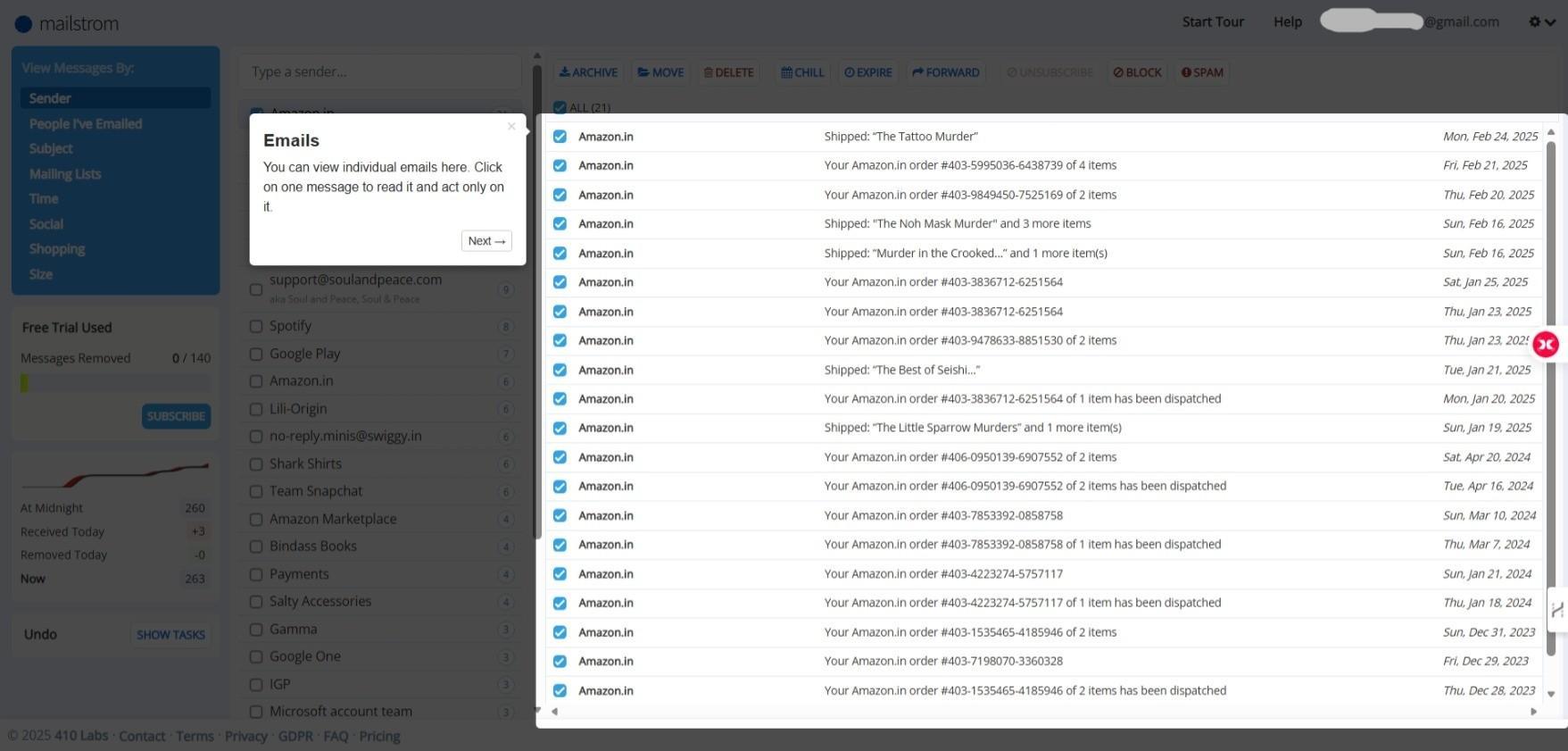


The workflow felt intuitive: identify the problem, select the group, and clear it out.
I appreciated how each change appears instantly. When a large batch of messages is removed, the counts update immediately, maintaining motivation during extended sessions. The primary action buttons stay fixed across categories, eliminating the need to search for controls.
Mailstrom features a simple dashboard displaying top senders and inbox activity over time, providing a sense of progress without overwhelming with analytics. The overall design aims to feel productive rather than complicated, which is evident during use.
Score: 8.7 / 10
Hands-On Experience: The Core Features That Matter Most
Navigating Mailstrom feels potent because each bulk action is accessible with a single selection. I tested its core features extensively:
Grouping that actually saves time
Grouping emails by sender quickly reveals which senders dominate the inbox. Grouping options include:
- Subject reveals repeat alerts and receipts
- Time allows cleaning chunk by chunk (example: “everything from dd/mm/yyyy”)
- Social/Shopping helps target promotional clutter
This approach made identifying unnecessary emails far easier than scrolling through Gmail as usual.
Bulk Actions That Work Quickly
Bulk actions are conveniently presented as buttons at the top:
- Archive
- Move
- Delete
- Chill
- Expire
- Forward
- Unsubscribe
- Block
- Spam-marking


All actions execute instantly on the selected messages. Even deleting hundreds simultaneously worked smoothly.
Unsubscribe Options That Are Direct
Unsubscribing is straightforward—no need to open new tabs. One click suffices. Mailstrom also allows bulk selection of newsletter senders for mass removal. It attempts the standard unsubscribe link first; if that fails, which is common with some senders, it automatically blocks and filters the sender. A minor caveat: if a sender’s messages include both useful and unwanted emails, the useful ones might also be filtered, but this can be reversed easily.
Surprisingly: Replying directly within Mailstrom

Surprisingly, Mailstrom permits manual replies or forwarding directly within its interface, without switching to other tabs. This allows handling a few critical messages during cleanup.
Chill, Block, and Expire: Automated Inbox Management
These three subscription features support long-term inbox organization:
- Chill hides messages temporarily: returns them later on a chosen date
- Expire automatically removes older messages from the same sender
- Block: block senders or lists


The intention is clear: not every email warrants deletion or unsubscribing. Some are useful for later.
Undo: Confidence to Act


All bulk actions can be undone via a simple task log. Accidentally blocked a sender? No problem.
Overall Score: 8.7 / 10.
Performance: Designed for Heavy-Duty Tasks
Many inbox tools perform well only with light loads. Mailstrom, however, appeared ready for a cluttered, large inbox right from the start. Tasks that would be slow in Gmail—like selecting hundreds of emails or clearing a sender—were almost instantaneous.
Sorting by various categories remained quick, even with more demanding filters like:
- “Emails from 1-10 MB”
- “Everything older than three years”
- “Top senders this month”
- “All social notifications”
Bulk operations finished swiftly and reliably. Even when selecting emails spanning multiple years, the interface occasionally paused briefly but never froze or crashed.


Unlike in Gmail, where I often hesitate before batch actions, Mailstrom’s speed encouraged me to continue confidently.

A nice bonus was Mailstrom’s near real-time updates of inbox stats. After deleting thousands of emails, the quick drop in the inbox count made the results feel immediate and satisfying. It keeps users visually informed, which is crucial when tackling years of clutter.


Score: 8.5 / 10
Pricing: The True Cost of Mailstrom
Mailstrom is not a free tool indefinitely, and its pricing reflects that. After testing the free tier, I reviewed the paid plans available during my trial:
- Basic- Good for one email account. Around $9/month or $59/year
- Plus- Up to three accounts. Around $14/month or $99/year
- Pro- For power users or people managing many inboxes. Around $29/month or $199/year
The free trial allows for about 140 email removals, enough to preview Mailstrom’s capabilities but not to clear a large, neglected inbox. Features like Expire, Chill, and advanced filters are subscription-only. Mailstrom clearly expects a paid plan for sustained results.

Fortunately, pricing is transparent with no confusing credits or hidden upsells. The business model is clear: this is a paid productivity tool, not a data-driven advertising service.

Score: 8.2 / 10
Privacy & Data Handling
During testing, I closely examined how Mailstrom handles inbox data. It requires access to email content to perform grouping and cleanup functions, but its policy states this access is solely for feature support. There’s no ad targeting, data selling, or behavioral profiling, which was reassuring.

Some technical data, like browser info or visit times, is collected discreetly to ensure smooth operation. If support is needed, Mailstrom may temporarily access small amounts of personal data, such as the account email, strictly for troubleshooting or legal compliance. Internal access to inbox data is strictly controlled and monitored.
Following GDPR principles, users can request to view, update, or delete their data at any time. When an account is deleted, Mailstrom retains data briefly for potential reactivation but can permanently erase it upon request.
Cookies and select analytics tools are used solely to enhance performance. Overall, Mailstrom’s privacy approach appears respectful, collecting only what is necessary and recognizing that inbox access is a matter of trust.
Score: 9 / 10
Mailstrom in the Context of Email Cleanup Tools
After trying several inbox cleanup apps, Mailstrom begins to stand out more clearly in context.
Cleanfox and Leave Me Alone are more like “newsletter cleaners,” ideal for unsubscribing, scanning bulk promotional messages, and reducing marketing clutter. They focus on a specific issue: newsletters as the main problem. For many users, that’s a sufficient approach.
In contrast, Mailstrom adopts a broader perspective on inbox management:
- It extends beyond newsletters,
- It considers inbox overload as a multi-faceted issue,
- It emphasizes bulk actions over isolated fixes,
- It promotes long-term organization rather than quick fixes.
For those whose inbox issues include:
- years of receipts
- social notifications
- shipping updates
- password change alerts
- transaction logs
- conversations from apps that no longer exist
… Mailstrom is much better suited for this kind of digital excavation.


Its complexity may deter some users. It offers many features, which can feel overwhelming for those seeking just two buttons: unsubscribe and delete.
Each tool now appears to serve a different niche:
- Cleanfox: Fast, free relief from newsletters, but privacy concerns exist
- Leave Me Alone: Clear unsubscribe tracking with strong privacy focus
- Clean Email: More automation, but slower and more cumbersome
- Mailstrom: Comprehensive inbox management with bulk actions and long-term tools
Personally, I prefer Clean Email’s UI, especially its dark mode. However, Mailstrom offers most of the same features at a lower cost with a paid plan, making it generally better value despite its simpler interface.
For a heavily cluttered inbox—years of receipts, alerts, notices—Mailstrom is my top choice; it manages large volumes more effectively than anything else tested. However, for lighter clutter or just newsletters, I wouldn’t justify the cost. Simpler tools like Leave Me Alone are more affordable and less overwhelming.
While related, each tool targets a different user need.
Ideal Users for Mailstrom
Mailstrom is best suited for those whose inboxes are not just cluttered but have accumulated over years without proper upkeep.
Those most likely to benefit from Mailstrom are:
- possess thousands or even tens of thousands of untouched messages
- desire automation to maintain control long after initial cleanup
- prefer to organize, categorize, and actively manage different types of communication
- wish to manage multiple accounts from a single interface
Conversely, it might not suit those who:
- simply wants to unsubscribe quickly and move on
- won’t pay for inbox management tools
- is uncomfortable with granting extensive email permissions
- prefers minimal interfaces with fewer choices
Mailstrom is designed with a purpose: to re-engage users with their inboxes, not to encourage avoidance.
Final Verdict: A Robust Cleanup Solution, Especially for Large Inboxes
Mailstrom makes a compelling case for what’s possible when email management extends beyond small-scale actions. It functions as a productivity-enhancing tool embedded within an inbox cleaner, not only decluttering but also influencing future email behavior.
While not the cheapest or most beginner-friendly option, it offers real control—over years of accumulated email chaos. Plus, if it’s not the right fit, deleting your account and data is straightforward. Simplicity and convenience are key.
Mailstrom deserves consideration if your goal is long-term inbox restructuring rather than quick clearing. It’s one of the few tools tested that manages large volumes confidently without compromising speed or oversimplifying the challenge.
For those with long-neglected inboxes, Mailstrom provides the essential tools to finally take control and maintain order.
Overall score: 8.3 / 10.
Frequently Asked Questions
Mailstrom is an inbox cleanup tool that offers more than just unsubscribing and deleting emails. It allows users to manage inbox clutter in powerful batches, making it more comprehensive than tools like Cleanfox or Leave Me Alone, which focus primarily on newsletters. Mailstrom is designed for heavy-duty tasks and long-term inbox management.
Setting up Mailstrom is straightforward and takes only a few minutes. It supports various email providers like Gmail, Outlook, and Yahoo. The process involves granting IMAP/SMTP permissions, after which Mailstrom scans and organizes your inbox in the background. A brief guided tour helps users understand key actions.
Mailstrom’s core features include grouping emails by sender, subject, time, and social category, as well as bulk actions like archive, move, delete, chill, expire, forward, unsubscribe, block, and spam-marking. It also allows for direct replies within the interface and offers an undo feature for reversing actions.
Mailstrom is designed for heavy-duty tasks and performs well with large, cluttered inboxes. It handles bulk operations swiftly and reliably, even with extensive filters and large volumes of emails. The interface remains responsive, encouraging users to continue with their cleanup tasks confidently.
Mailstrom offers several pricing plans: Basic for one email account at around $9/month or $59/year, Plus for up to three accounts at around $14/month or $99/year, and Pro for power users at around $29/month or $199/year. The free trial allows for about 140 email removals, providing a preview of its capabilities.
Mailstrom requires access to email content to perform its functions but states that this access is solely for feature support. It does not engage in ad targeting, data selling, or behavioral profiling. Users can request to view, update, or delete their data at any time, and Mailstrom follows GDPR principles for data handling.
Mailstrom is best suited for users with heavily cluttered inboxes, those who desire automation for long-term inbox management, and those who prefer to organize and categorize different types of communication. It is ideal for managing multiple accounts from a single interface and is designed for users who want to re-engage with their inboxes actively.
Abonneer je op onze nieuwsbrief en ben als eerste op de hoogte van tijd- en geldbesparende AI-tools!
Comments