Conclusion
Canary Mail stands out as a robust and intelligent email management tool that goes beyond simple cleanup features. Its AI Copilot genuinely enhances productivity by assisting with important emails, reminders, and draft responses, all while maintaining a user-friendly interface. Although it may not be the cheapest option, the value it provides in terms of organization, security, and cross-platform synchronization justifies the cost for active email users. It is particularly suitable for busy professionals, students, and remote workers who need to manage multiple accounts seamlessly.
Pros
- AI Copilot feature provides practical and unobtrusive assistance
- Supports multiple accounts with seamless synchronization
- Strong focus on privacy and security
- User-friendly and intuitive interface
- Cross-platform compatibility
Cons
- Some AI features require a subscription
- May not be suitable for minimalists or those who prefer a free solution
Table of Contents
- Setup & First Use
- UI & Navigation: Calm Over Chaos
- AI Copilot: Supportive, Practical, Quietly Useful
- Inbox Tools: More Than Just Cleanup—Focus on Prevention
- Productivity & Everyday Messaging
- Multi-Account & Sync
- Performance
- Pricing & Plans
- Privacy & Trust
- How It Compares to the Other Tools I’ve Tried
- Who Will Benefit Most
- Final Thoughts: Building a Smarter Relationship with Email
- Frequently Asked Questions
Email is so ingrained in daily life that it often goes unnoticed until the inbox starts to demand more attention than it deserves. I came to understand that junk mail isn’t always the source of the weight. Quite often, the real pressure is keeping up with important messages, replying in time, and remembering what actually matters.
This is what made Canary Mail intriguing to test. Rather than merely providing a “clear clutter” button, it aspires to be a comprehensive email client that seamlessly supports the entire communication workflow: reading, replying, organizing, tracking tasks embedded in messages, and safeguarding privacy. On paper, it appears to be designed for practical, everyday use rather than just a one-off cleanup.
Here’s my experience with Canary Mail as a daily email application, featuring modern tools, AI support, and a focus on security without overcomplicating things.
Setup & First Use
Setup was quick and straightforwardjust a few clicks. Connecting my Gmail account was swift, and with background syncing, I was able to start exploring immediately.

A few practical points stood out right from the start:
- It supports multiple accounts, which is useful for managing personal, work, and side-project inboxes
- The app maintains synchronization across devices, ensuring my phone and laptop stay perfectly aligned
- A streamlined onboarding introduces useful features without overwhelming the user
There is also a Unified Inbox mode that consolidates all accounts into a single view. I didn’t activate it myself, as my accounts serve different roles, but I can see how it might be highly beneficial in certain contexts or professions.
Even prior to testing AI features, my initial impression was that Canary Mail values the user’s time—no unnecessary configuration and an easy learning curve.
UI & Navigation: Calm Over Chaos
Switching to Canary Mail’s interface brought a noticeable sense of relief. Its design favors clarity over the cluttered, “everything everywhere” feel often seen in Gmail and Outlook.


What made the UI reassuring included:
- Clear visual grouping: Today, Yesterday, This Week, Earlier—helping to prevent endless scrolling anxiety
- Consistent action bar: delete, archive, reply, search, and Copilot stay conveniently accessible
- Intelligent categories: Personal, Social, Updates, Promotions are just a tap away
- Bulk actions are straightforward: selecting multiple emails feels safe and transparent
Canary Mail conveys that the inbox is designed for human use, not just algorithms.


A few simple design choices also made email feel less like a chore:
- Smooth scrolling even with large message groups
- Visual indicators highlighting items needing attention
- Organizational tools are always within reach, never hidden
This isn’t an flashy interface aimed at impressing; it’s designed to keep the user calm while managing what can often be the most stressful aspect of digital communication.
AI Copilot: Supportive, Practical, Quietly Useful
My main curiosity was about AI integration. Many products claim “AI-powered” without delivering real value, but Copilot genuinely provided helpful, unobtrusive assistance.
Copilot assisted with:
- Identifying important unread emails
- Reminding me of pending replies I might have overlooked
- Facilitating easy unsubscription from newsletters
- Summarizing received emails
- Creating polished draft responses for review before sending
- Indicating if a message has been read by the recipient (this feature requires a subscription)


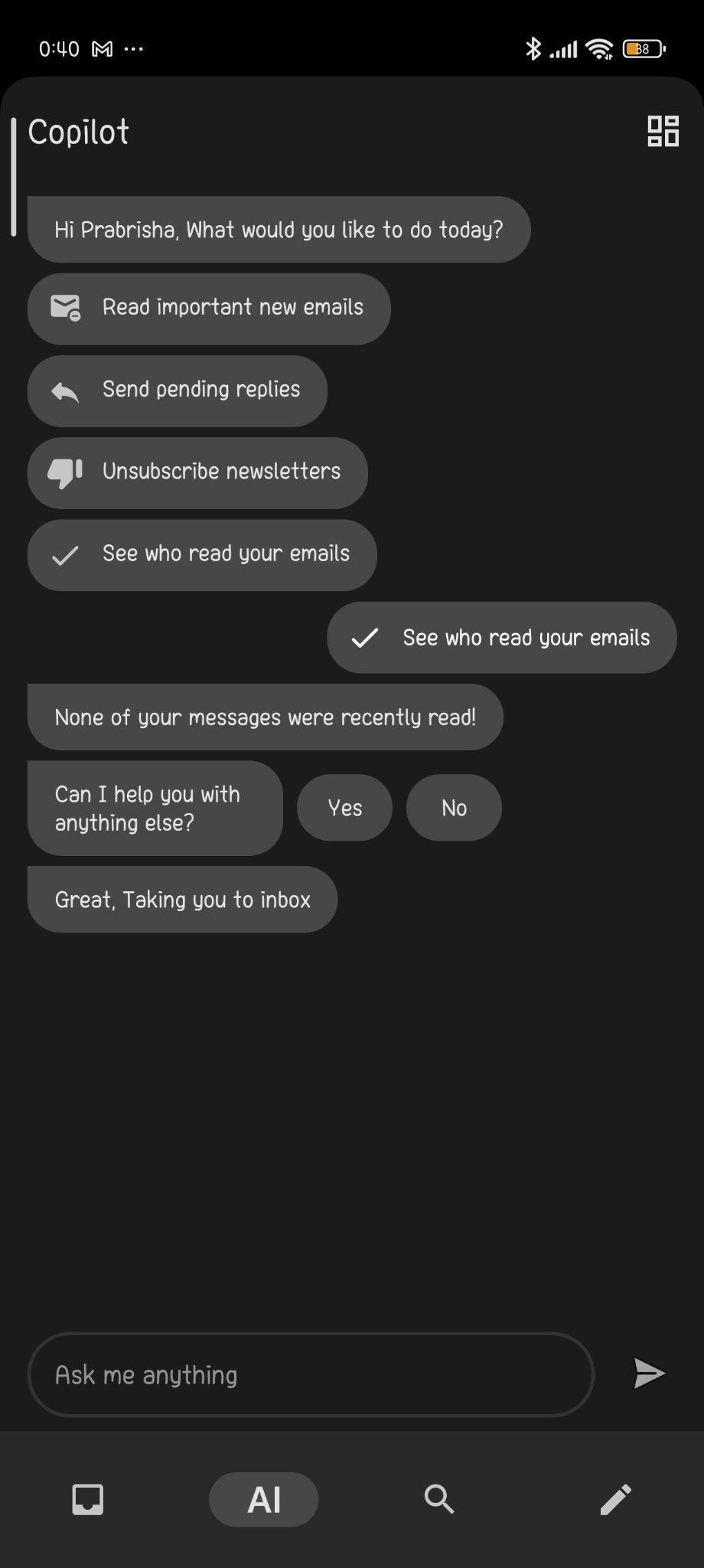
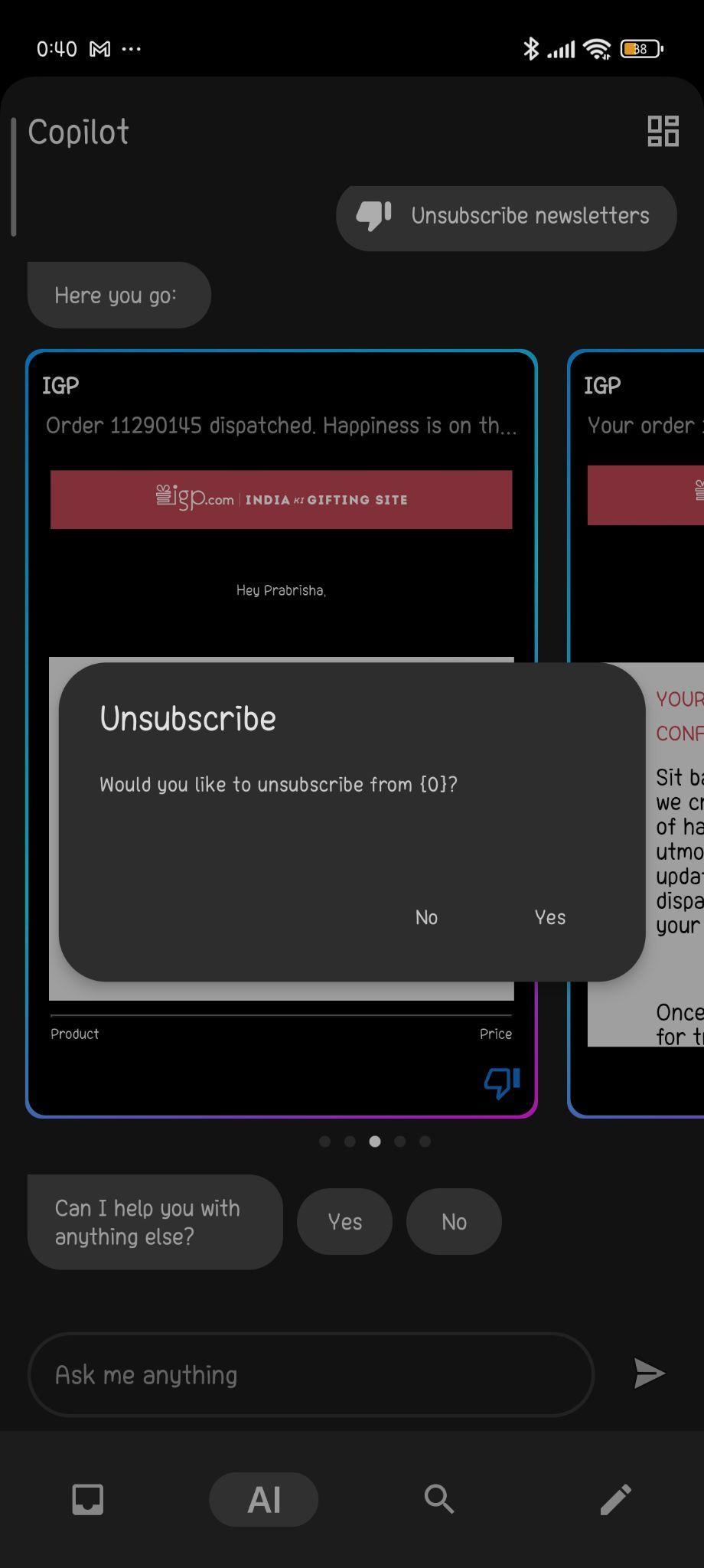

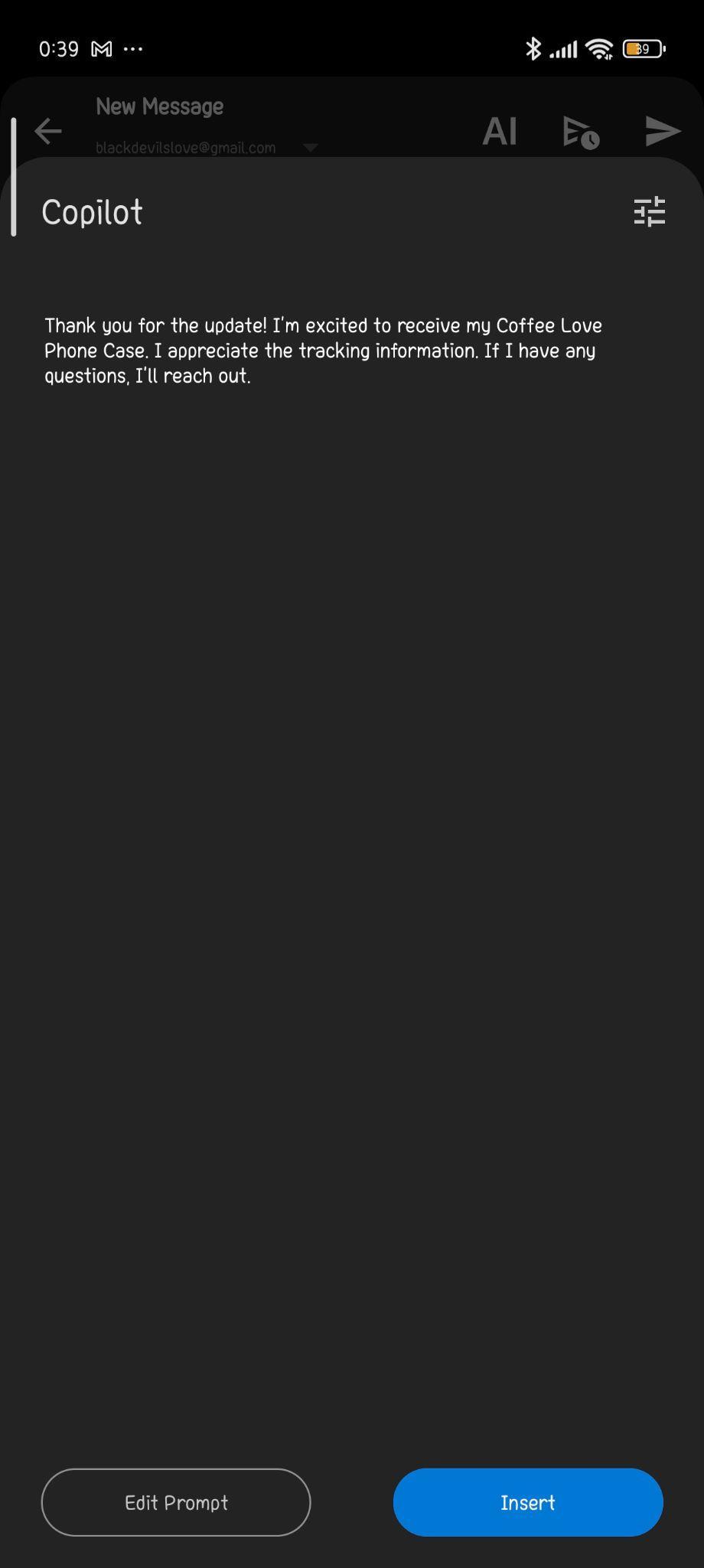

Drafting replies felt more natural than anticipated. Instead of robotic-sounding responses, it enhanced clarity and tone while preserving my voice.
This AI acts as a gentle helper—never controlling, just subtly guiding towards greater efficiency.
Rating: 9 out of 10
Inbox Tools: More Than Just Cleanup—Focus on Prevention

Although Canary Mail isn’t promoted as a cleanup tool, it offers effective methods to prevent inbox clutter from recurring:
- Filter messages by sender, importance, attachments, newsletters, and other criteria
- It also supports bulk deletion. While I didn’t clear my inbox entirely in one go, the feature works smoothly. Grouping messages logically makes bulk actions more manageable.
- Subscription management integrated into Copilot helps keep marketing emails in check
These aren’t as aggressive as one-click cleaners like Mailstrom, but that’s not necessary. Canary focuses on preventing inbox chaos from returning over time.
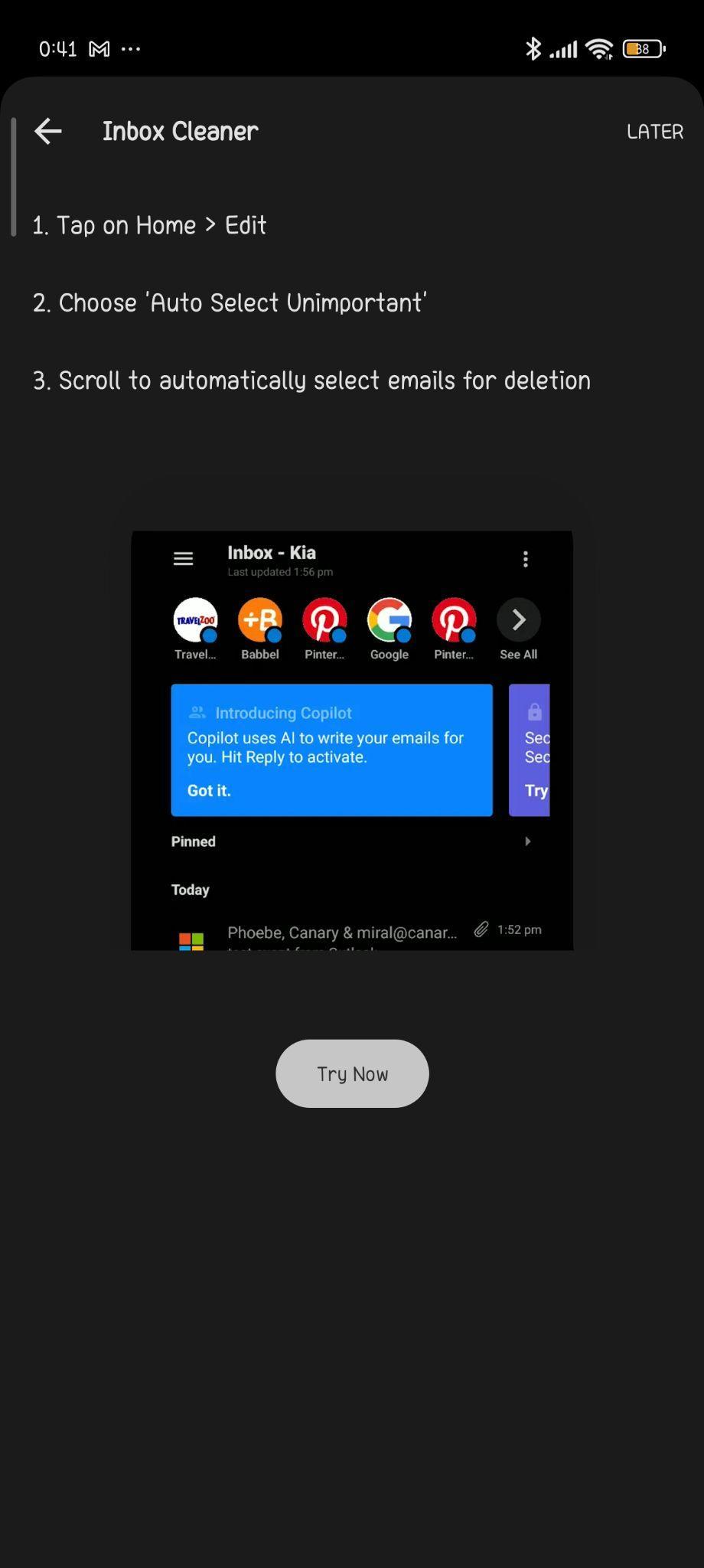
This is more about ongoing maintenance than quick fixes, and in the long run, consistent upkeep preserves sanity.
Rating: 8.9 out of 10
Productivity & Everyday Messaging
Once curiosity faded, the key was how effectively it managed everyday emails—the daily stuff that accumulates.
Features that truly support daily communication include:
- Scheduling and snoozing emails and replies (for tomorrow, later today, or custom times)
- Reminders for unfinished drafts
- Intelligent search supporting content and relevance-based retrieval
- Templates for recurring email types
- Prioritizing emails rather than just sorting by date
- SecureSend feature for encrypted messages
- Browsing attachments independently without scrolling through entire threads


These subtle features support daily workflow and help reduce friction throughout the day.
And honestly, that’s where many productivity apps fall short.
Multi-Account & Sync
Many users juggle multiple inboxes—university, freelance, personal, side projects—and Canary manages all seamlessly without confusion.


- Switching between accounts is instant
- No syncing issues when performing actions across devices
- Drafts and scheduled emails sync correctly across platforms
I didn’t personally use the Unified Inbox, but it appears to be implemented cleanly, without mixing contexts.
This could be one of Canary’s best arguments for replacing Gmail or Outlook on a daily basis.


Canary Mail works on iOS, macOS, Windows, and as a Chrome extension. I tested it on Android, and its cross-platform compatibility makes it easy for most users to integrate with their existing setup or sync across devices. That’s a significant advantage.
Rating: 9.4 out of 10
Performance
Performance often only becomes noticeable when issues arise, but in this case, it was smooth. Even with multiple folders syncing and several actions happening simultaneously, Canary maintained a seamless experience.
During my testing:
- New messages appeared promptly without manual refreshes
- Switching between categories such as Social or Promotions was instant
- Bulk actions executed smoothly, even with large batches
- The inbox remained responsive while AI analysis processed quietly in the background
A few AI summaries took a second or two to generate—expected during real interpretation of lengthy email threads. Importantly, nothing froze, crashed, or disrupted the workflow.
I appreciated how real-time updates were visible; deleting or archiving in bulk immediately reflected in the inbox count, providing reassurance.
It avoids distracting animations or transitions, instead prioritizing maintaining momentum—precisely what fosters a sense of productivity.
Rating: 8.5 out of 10
Pricing & Plans
The free version of Canary Mail is fully functional—sending, receiving, organizing, and switching accounts all work smoothly without cost.

The most impactful features, especially AI-related, are available in paid plans:
- Premium: $19.99 annually
- Pro: $59.99 annually
- Enterprise: Custom pricing
For those seeking a better Gmail alternative, the free version suffices. However, if you aim to enhance response times, prioritize messages, and reduce mental load, the paid plans start to justify themselves.
Canary clearly shows its value, which comes with a price if those benefits are important to you.
Privacy & Trust
Security is a key selling point for Canary Mail:
- Robust data protection measures
- Encryption options for confidential emails
- Explicit stance against inbox trackers
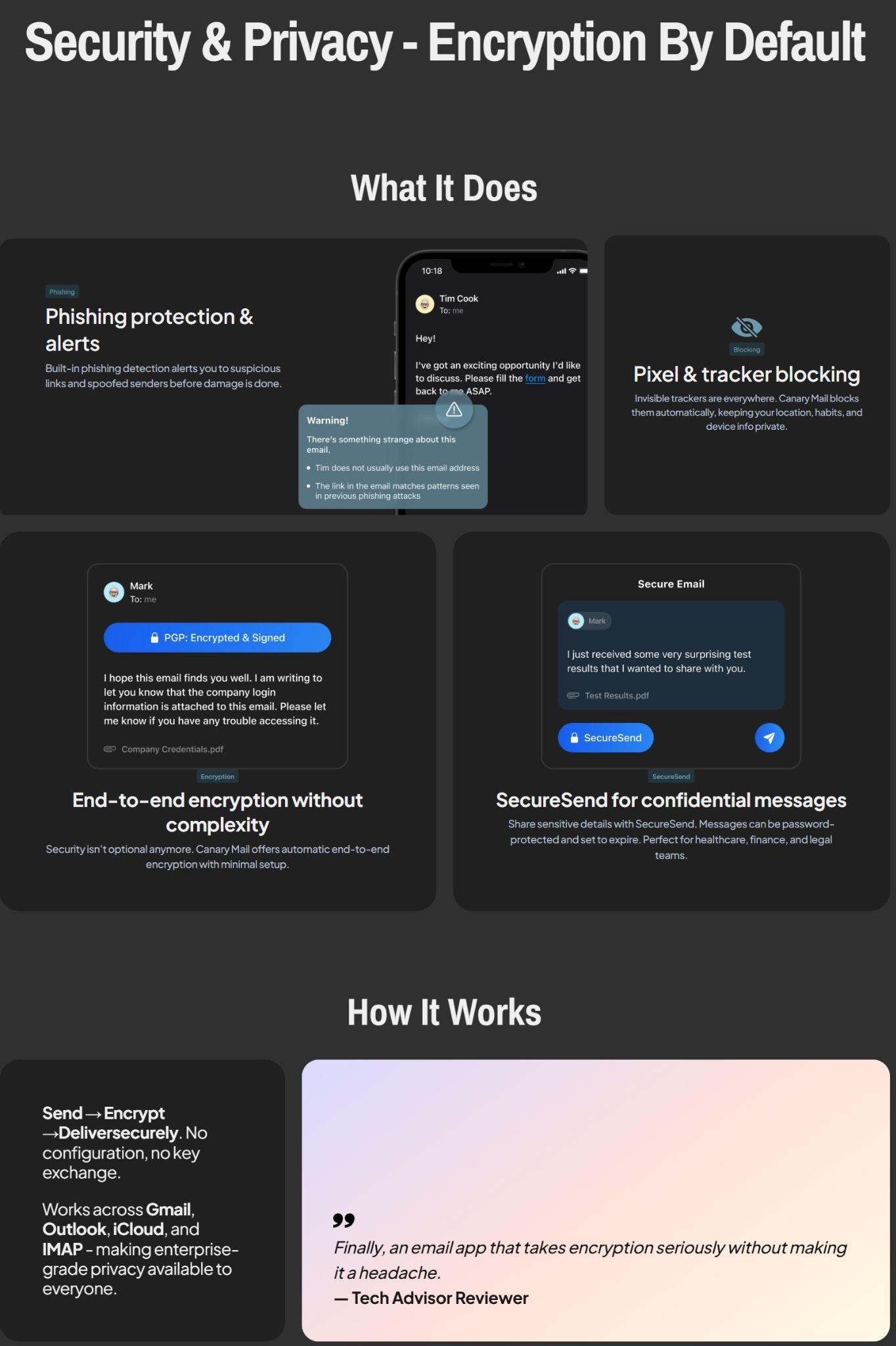
A fair point is that some AI features depend on server-side processing.
While this doesn’t inherently make it unsafe, it does require a degree of trust. I didn’t encounter any issues, and the company seems dedicated to privacy, but for the most security-conscious, this is worth considering.
This is a practical balance—secure, yet with modern compromises.
How It Compares to the Other Tools I’ve Tried
Having tested various inbox tools, I noticed they serve different purposes—some focus on storage, others on privacy. Canary distinguishes itself by viewing email as an ongoing, dynamic workflow.
In practical terms, here’s how it compares:
- Cleanfox
- Excellent for clearing newsletters and bulk unsubscribing in one go
- But once the inbox is cleaned, Cleanfox doesn’t enhance messaging or productivity. Canary aims to improve your workflow moving forward.
- Leave Me Alone
- Emphasizes privacy-first subscription management
- Lacks daily email management features; Canary balances privacy with active email use, not just filtering.
- Clean Email
- Smart automation and inbox organization
- It doesn’t replace Gmail or Outlook but functions more as a maintenance tool. Canary can become your main email app, not just an auxiliary.
- Mailstrom
- Excellent for large inboxes requiring bulk deletions and sorting by sender or date
- However, it offers limited support for daily communication. Canary excels after the initial cleanup.
None of these tools offer AI-assisted writing, seamless cross-device sync, or comprehensive support for daily messaging within a single app. That makes Canary unique.
While previous tools address short-term clutter, Canary Mail presents a sustainable, long-term approach to managing email.
Who Will Benefit Most
From my experience, Canary Mail is best suited for:
- Busy professionals who rely on email constantly
- Students juggling academic and internship communication
- Remote workers managing multiple accounts
- People who appreciate organization but don’t want to overthink it
- Anyone who prefers a calmer UI than Gmail/Outlook
Perhaps less suitable for:
- Someone who wants everything free
- People who hardly send messages and mostly ignore their inbox
- Anyone uncomfortable with server-side AI processing
- Minimalists who want straightforward “email only” tools
It’s designed for active email users, not those who check infrequently.
Final Thoughts: Building a Smarter Relationship with Email
While Canary Mail didn’t revolutionize my email habits instantly, it significantly improved manageability—often more valuable than quick fixes like Inbox Zero.
Overall, I found Canary Mail quite likable. Its INR pricing feels reasonable, and the AI features are genuinely helpful for daily emails. It’s not as feature-rich as Fyxer or Shortwave, but it’s more refined than many other tools I’ve tried. I wouldn’t rank it among my top three, mainly because I prefer solutions that integrate directly into Gmail rather than requiring a switch, but I didn’t encounter any significant flaws.
It functions as a supportive partner in communication:
- Promoting smart decisions over mindless clearing
- Lowering hesitation to reply
- Highlighting what truly needs attention
- Assisting in maintaining a clean inbox without taking control
- Providing a privacy-first approach without sacrificing convenience
The more I used it, the more I appreciated its subtle intelligence.
Final Score: 8.4 out of 10
Inbox Management Tools: A Critical Comparison
Managing an overflowing inbox can feel like a never-ending battle. With the right tool, however, this task can become significantly more manageable. This comparison focuses on four popular inbox management tools: Canary Mail, Cleanfox, Clean.Email, and Leave Me Alone. We will delve into their pricing structures, automation capabilities, and bulk management features. These criteria are crucial for users who need to efficiently handle large volumes of emails without breaking the bank or spending excessive time on manual tasks. Each tool has been evaluated based on its ability to streamline inbox management, offering insights into which tool might best suit different user needs.
🔗 Canary Mail vs Cleanfox | Canary Mail vs Clean.Email | Canary Mail vs Leave Me Alone | Cleanfox vs Clean.Email | Cleanfox vs Leave Me Alone | Clean.Email vs Leave Me Alone
Canary Mail emerges as the overall winner due to its robust automation features, efficient bulk management, and excellent privacy and security measures. Its user interface is clean and intuitive, making it a pleasure to use. While its pricing structure may not be as generous as Cleanfox’s, the comprehensive set of features and the ability to handle multiple accounts seamlessly make it a standout choice for users seeking a powerful and secure inbox management tool.
Frequently Asked Questions
Canary Mail is an email client that focuses on comprehensive email management, including reading, replying, organizing, and tracking tasks. Unlike other email clients that primarily offer cleanup features, Canary Mail integrates AI support and emphasizes security and privacy, making it a practical tool for everyday use.
The AI Copilot in Canary Mail assists users by identifying important unread emails, reminding them of pending replies, facilitating easy unsubscription from newsletters, summarizing received emails, and creating polished draft responses. It acts as a subtle helper, enhancing efficiency without being intrusive.
Yes, Canary Mail supports multiple accounts and maintains synchronization across devices. This makes it ideal for managing personal, work, and side-project inboxes seamlessly. Switching between accounts is instant, and there are no syncing issues when performing actions across devices.
Canary Mail offers a free version with basic functionalities. For advanced features, especially AI-related, there are paid plans: Premium at $19.99 annually, Pro at $59.99 annually, and Enterprise with custom pricing. The paid plans are justified for users seeking enhanced response times and reduced mental load.
Canary Mail emphasizes robust data protection measures, encryption options for confidential emails, and an explicit stance against inbox trackers. While some AI features depend on server-side processing, the company appears dedicated to privacy, balancing security with modern conveniences.
Canary Mail is best suited for busy professionals, students, remote workers, and anyone who appreciates organization and a calmer UI than Gmail or Outlook. It is designed for active email users who need comprehensive support for daily messaging and workflow management.
Canary Mail works on iOS, macOS, Windows, and as a Chrome extension. It also has cross-platform compatibility, making it easy for users to integrate with their existing setup or sync across devices. This broad support enhances its usability for a wide range of users.
Abonneer je op onze nieuwsbrief en ben als eerste op de hoogte van tijd- en geldbesparende AI-tools!
Comments