Conclusion
HeyHelp AI offers a refreshing approach to email management by focusing on simplicity and integration with Gmail. It excels in reducing inbox noise and generating natural, tone-aware responses, making it a valuable tool for those seeking a calmer email experience. However, it falls short in areas like scheduling automation and cross-platform support, which might be dealbreakers for some users. Overall, it delivers on its promises without overcomplicating things, making it a solid choice for individuals and small teams.
Pros
- Seamless integration with Gmail, maintaining a familiar workflow
- Effective inbox noise reduction, learning user preferences over time
- Quick and natural AI-generated drafts that reflect the user’s tone
- Lightweight and fast performance, not bogging down the system
- Simple and affordable pricing structure
Cons
- Lacks advanced features like scheduling automation and file upload training
- No cross-platform support, limited to Gmail
- Occasional missteps in inbox sorting and context understanding
Table of Contents
- Dashboard & Initial Impressions
- Inbox Noise Reduction
- AI Drafting
- The Knowledge Feature
- Polite Declines
- Performance
- Privacy
- Pricing
- Final Verdict
- Use HeyHelp if one:
- Skip HeyHelp if one:
- Overall Score: 8.2/10
- Frequently Asked Questions
For quite some time, I’ve aimed to declutter my inbox, realizing that the real challenge isn’t the emails themselves but the mental load they bring. Excessive newsletters, “reply later” reminders, messages that seem urgent but aren’t. These all add up. That’s why I was interested in HeyHelp AI. It promises a straightforward approach: an assistant integrated with Gmail that drafts responses in my voice, reduces inbox noise, and speeds up communication without disrupting my workflow. After several weeks of consistent use, I’ve developed a clear sense of what it does well, what it doesn’t, and whether it genuinely lightens the email burden.
Dashboard & Initial Impressions

What immediately stood out about HeyHelp is its unobtrusiveness. It doesn’t attempt to replace Gmail or overhaul the inbox layout. Instead, it integrates seamlessly via a small sidebar and a few contextually placed buttons. No need for a new app, no radical changes to habits, and no steep learning curve. It complements the existing Gmail environment, which was a welcome relief—after all, I don’t need another complicated dashboard.

Although it displays draft alternatives, tone preferences and quick actions, the sidebar never comes across as controlling. It was less like a co-pilot trying to steer the entire ship and more of a silent co-partner sitting next to us. The sidebar looks great on a desktop or laptop, but may look a bit limited on smaller display screens. I appreciated that it didn’t try to make things too complicated while also making things much simpler for me; it felt like Gmail with a little more intelligence added on top.
Verdict: An intuitive setup that integrates smoothly with Gmail, requiring no new routines. Easy to use, although the interface can feel a bit cramped on smaller screens.
Inbox Noise Reduction
HeyHelp employs a simple yet effective approach to decluttering the inbox. It automatically identifies and filters out newsletters, marketing emails, repetitive notifications, and non-urgent messages from the primary view. The goal is to maintain a calmer inbox without the need to manage multiple folders or filters, unlike traditional tools.
Opening Gmail each morning revealed a noticeably cleaner inbox, with fewer distractions. Promotional emails and daily deals disappeared into the background, as if someone had tidied up overnight. It’s not flawless—occasionally it moved an important email—but correcting it was simple: just drag the email back to the inbox. After a few days, it learned my preferences.
What’s particularly useful is that it doesn’t merely sort emails by sender; it recognizes the type of message. It can identify transactional emails, gentle reminders, shipping notifications, and newsletters. It’s a subtle but valuable feature.
Verdict: It significantly lightens the inbox once it learns your preferences, though it requires some initial guidance.
AI Drafting
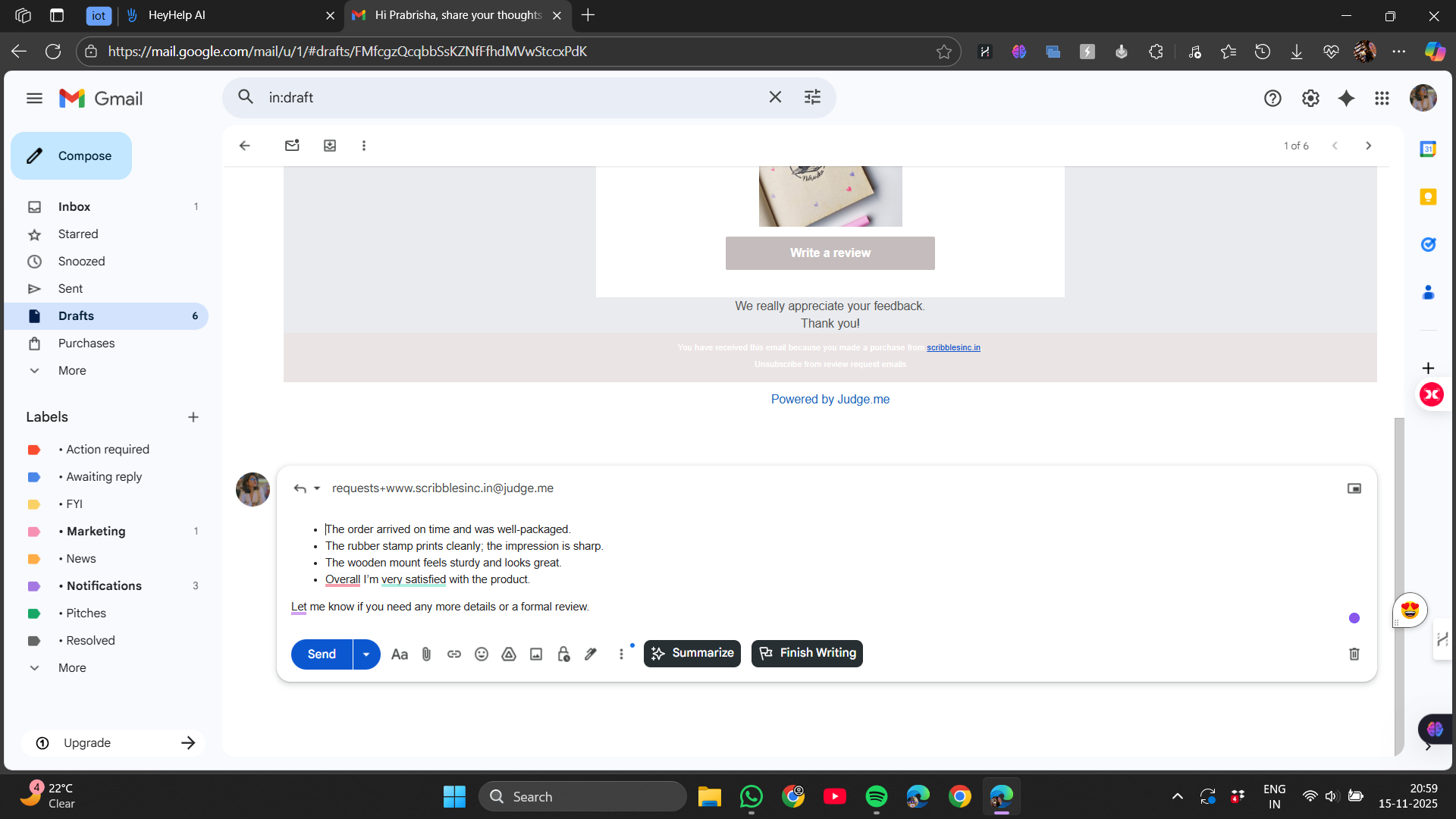
This is where HeyHelp excels. The generated drafts feel personal, considerate, and surprisingly in tune with my style. When I select “Write for me,” it analyzes the email thread and crafts a reply that genuinely reflects how I communicate—short, polite, straightforward, and natural, without sounding overly enthusiastic or robotic. It’s like giving someone my writing style and saying, “Take care of the small replies.”
I primarily used it for:
What impressed me was how clean the tone felt. It didn’t try too hard. It didn’t over-explain. And it didn’t write essays when a two-line reply would do.
It’s still AI, of course, so occasionally it oversimplified or overlooked a small detail in a lengthy thread. However, not having to begin from a blank slate was a huge relief for the majority of regular emails.
Verdict: Quick, natural replies that sound like me on a good day, as long as I give them a final check before sending!
The Knowledge Feature
One of my favourite parts of HeyHelp is the Knowledge panel. This is where the assistant learns:


It’s essentially HeyHelp’s way of understanding my communication identity, not just the words I type.
This meant that over time, its drafts improved noticeably. It started sounding more like “me on a good day” rather than a generic AI. If I tend to be brief, it stayed brief. If I almost always begin with a greeting, it did the same. If I prefer a soft sign-off, it adapted. It even adjusted tone depending on whom I was replying to, colleagues, clients, or strangers.
If one hates tweaking AI-written emails to make them “sound human,” this feature makes a real difference.
Verdict: Surprisingly helpful! It teaches the assistant my tone and style so replies feel more personal and like something I’d say.
Polite Declines
HeyHelp comes with a built-in ability to politely decline cold outreach or unwanted emails, and this turned out to be surprisingly satisfying.
Instead of leaving emails unread and feeling guilty about not responding, HeyHelp can generate a small, respectful decline. Something like:
“Thanks for reaching out. I appreciate the message, but I’m not interested at the moment.”
It’s firm but kind, and it stops future follow-ups from the sender. I used this far more than I expected, especially for:
It doesn’t auto-send anything on its own but when it detects a cold pitch or an obviously irrelevant outreach, it simply drafts a short, respectful decline and suggests it to me. I still have to confirm or hit send, so nothing goes out without my approval.
The difference between this and the normal AI drafting tool is pretty simple: drafting is for emails I actually want to reply to, while the polite-decline option is for messages I’d prefer not to engage with at all. In other words, one helps me communicate, and the other helps me bow out gracefully without ghosting.
The only downside is that sometimes it errs on the side of declining something I maybe should have considered. But that’s more of a training issue than a flaw.
Verdict: A quiet, satisfying way to turn down cold emails politely, and I love that nothing sends without my approval.
Performance
One of the reasons I enjoyed using HeyHelp is that it’s fast. Some AI tools feel heavy, like they’re constantly loading context or syncing data. HeyHelp feels almost instant. Compared to the others I’ve tried, HeyHelp feels noticeably lighter. Fyxer is powerful but a bit heavier, Shortwave feels like a full app on top of Gmail, and SaneBox is fast but only because it doesn’t generate text. HeyHelp hits a nice middle ground. It’s doing real AI work, but everything still feels almost instant.
Drafts appear quickly, noise sorting happens in real time, and the assistant never slows Gmail down. I never experienced freezes, glitches, or annoying loading bars. It’s clear that it’s built specifically for Gmail and not trying to be an all-in-one platform.
This lightweight feeling is a big win. There’s no sense of “another app running in the background.” It just works where it should.
Privacy
No AI that writes emails can avoid accessing our email content, that includes HeyHelp.
The platform states that:
For regular professionals, freelancers, and everyday email use, this feels reasonable. But before onboarding any assistant, not just HeyHelp, we should still carefully consider the sensitivity of our inbox if we work in industries like law, healthcare, HR, or finance.
The key is understanding the trade-off: We get tone-aware AI writing only if the system can actually read our messages.
For me, the benefit outweighed the concern, but everyone’s risk tolerance is different.
Pricing
HeyHelp’s pricing is refreshingly simple. As of now, the Pro plan sits around $12 per month (when billed annually), with team pricing of $80 that lowers the per-user cost depending on how many seats we get with the maximum of 10 users allowed.

Compared to the other tools I’ve tried, HeyHelp actually lands on the more affordable side. Fyxer is easily the most expensive of the bunch, charging closer to full “AI executive assistant” pricing. Shortwave sits in the mid-range and can get pricier if you upgrade for team features. SaneBox is cheaper, but it also does far less in terms of writing or tone-aware replies. So in that context, HeyHelp’s roughly $12/month feels pretty fair, it’s priced below the heavier assistants, above the simple filters, and comfortably in the zone where the value matches the cost.
It’s affordable enough for solo workers and powerful enough for small teams, especially those who want a consistent communication tone across members.
Final Verdict
After using it thoroughly, here’s my honest takeaway:
HeyHelp AI is for people who want a calmer Gmail experience without switching to a new email client or learning a complex productivity tool. It focuses on the fundamentals, writing, decluttering, and tone, and does them well. It doesn’t try to overreach into meetings, scheduling, file management, or advanced integrations. And honestly, that simplicity is refreshing.
Use HeyHelp if one:
Skip HeyHelp if one:
Overall Score: 8.2/10
Although HeyHelp excels at what it does, there are still significant drawbacks. It isn’t as packed with features as the more expensive assistants, but it is quick, easy, and actually helpful. It lacks cross-platform support, file-based training, scheduling, and meeting tools, and some of its inbox selections still require some tweaking in the early going. And while the drafting is strong, it occasionally misses subtle context that requires manual tweaking. None of these are dealbreakers, they’re just the things that keep it from reaching that “near-perfect, all-in-one assistant” category. It’s really good, but not magic. A thoughtful, calm, Gmail-focused assistant that delivers on what it promises, nothing more, nothing less.
Frequently Asked Questions
HeyHelp AI is an assistant integrated with Gmail that drafts responses in your voice, reduces inbox noise, and speeds up communication without disrupting your workflow. It uses a sidebar and contextual buttons to provide draft alternatives and quick actions, making email management simpler and more efficient.
HeyHelp AI integrates seamlessly with Gmail via a small sidebar and contextually placed buttons. It doesn’t attempt to replace Gmail or overhaul the inbox layout, making it a non-intrusive addition to your existing email environment. However, the interface can feel a bit cramped on smaller screens.
Yes, HeyHelp AI effectively reduces inbox noise by automatically identifying and filtering out newsletters, marketing emails, and non-urgent messages. It recognizes different types of messages and sorts them accordingly, although it may occasionally move an important email, which can be easily corrected by dragging it back to the inbox.
The AI-generated drafts in HeyHelp are quite accurate and feel personal and natural. They reflect your communication style, making them suitable for quick confirmations, polite declines, and follow-ups. However, they may occasionally oversimplify or overlook small details in lengthy threads, so a final check before sending is recommended.
The Knowledge feature in HeyHelp AI learns your preferred tone, common topics, frequent contacts, and reply structures. It helps the assistant understand your communication identity, making the drafts more personal and tailored to your style over time. This feature is particularly useful for those who want their emails to sound more human and less robotic.
HeyHelp AI states that no humans read your emails and all processing is automated. You can revoke access at any time, and standard security practices are followed. However, it’s important to consider the sensitivity of your inbox, especially if you work in industries like law, healthcare, HR, or finance.
HeyHelp AI offers a Pro plan at around $12 per month when billed annually. Team pricing is also available at $80, which lowers the per-user cost depending on the number of seats, with a maximum of 10 users allowed. This pricing is competitive and reasonable given the features and benefits it provides.
HeyHelp AI is ideal for people who want a calmer Gmail experience without switching to a new email client or learning a complex productivity tool. It’s suitable for those who want fast, clean replies in their tone, fewer distractions in their inbox, and a lightweight tool that fits into their existing workflow. However, it may not be suitable for those who need scheduling automation, file upload training, or multi-account setups.
Abonneer je op onze nieuwsbrief en ben als eerste op de hoogte van tijd- en geldbesparende AI-tools!
Comments