Conclusion
Clean.Email offers a refreshing and focused approach to managing an overwhelming inbox. Its well-organized interface and powerful features like Quick Clean and Smart Folders make it a standout tool for those looking to regain control over their email clutter. While the free version provides substantial manual cleaning capabilities, the true magic lies in the paid subscription, which unlocks automation and continuous maintenance. It may not be the perfect fit for everyone, especially those needing AI writing assistance or handling highly sensitive data, but for most users, it delivers on its promise of reducing email stress and bringing order to chaos.
Pros
- Well-organized and user-friendly interface
- Powerful cleaning and organizing features like Quick Clean and Smart Folders
- Fast performance even with large volumes of emails
- Effective filters and automation rules for ongoing maintenance
- Ability to unsubscribe, block, and mute senders directly from the tool
Cons
- Full automation and advanced features require a paid subscription
- Not ideal for users needing AI writing or scheduling assistance
- May not be suitable for highly sensitive data environments
Table of Contents
- Dashboard & UI
- Cleaning Suggestions & Quick Clean
- Unsubscribe, Block, Mute & Sending Email
- Mail Filters
- Automation & Rules
- Performance & Stability
- Pricing & Value
- Features that require a paid plan
- Free-plan capabilities
- Privacy & Security
- Final Thoughts On Clean.Email
- Frequently Asked Questions
Before Clean.Email I got to the point where checking my inbox no longer felt like communication; instead, it was a source of everyday guilt, clutter, and noise. I wasn’t getting lost because of the important discussions; instead I was drowning due to every single thing that sat alongside it with equal weight. One unread newsletter felt as loud as a message from someone who actually mattered.
That’s when I decided to try Clean.Email not because I needed an AI writing assistant or a meeting bot, but because I wanted something simple: a way to clean, organise, and maintain my inbox without spending hours doing it manually.
Over a couple of days of using it regularly, here’s how it actually went.
Dashboard & UI
I was immediately struck by Clean.Email’s well-organized and approachable interface. It displays a broad overview, including categories, totals, folders, email age, cleanup recommendations, and suggested actions, rather than bombarding me with thousands of individual emails as Gmail typically does. For once, my inbox didn’t look chaotic, it looked manageable.
The main layout divides features into clear sections like:
- Quick Clean
- Smart Folders
- Filters
- Automations
- Email History & Actions
Everything stays inside one neat dashboard and doesn’t require switching between tabs. It’s structured more like a cleaning control panel than a messaging inbox, which immediately lessened my decision fatigue.
In terms of design, Clean.Email feels more “visual and friendly” compared to SaneBox (which mostly works silently in the background). HeyHelp stays inside Gmail and focuses more on drafting replies, so its layout never gave me this wider clarity the way Clean.Email did.
Verdict: A clean, organised interface that helps me see my inbox better rather than panic about it.Score: 9/10
Cleaning Suggestions & Quick Clean
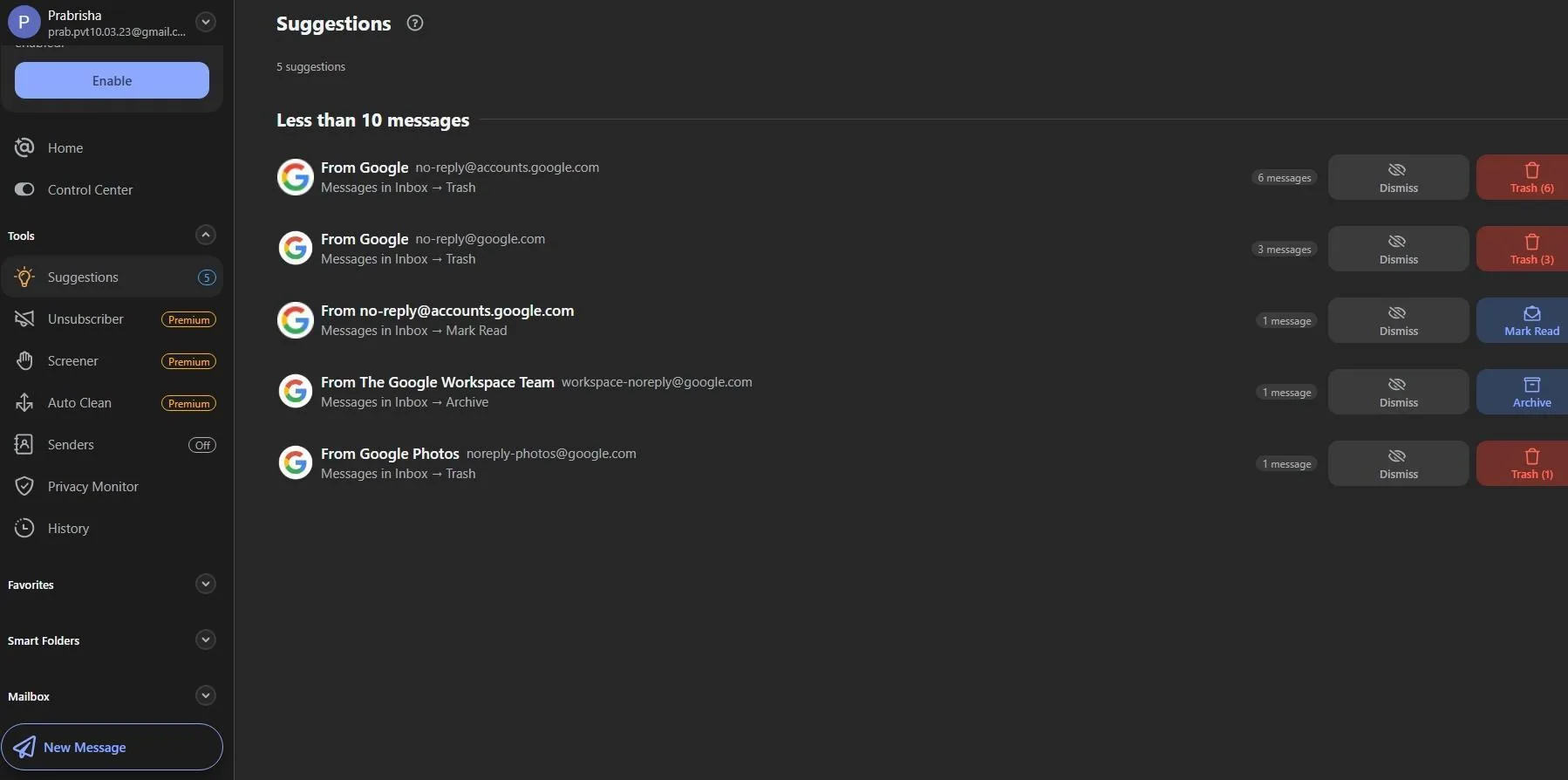
One of the reasons I tend to ignore inbox cleaning is simply not knowing where to begin. Clean.Email fixes that instantly with Quick Clean, which groups emails into logical piles and gives recommended next actions instead of waiting for me to decide.
Examples from my own inbox included:
- “8 promotional emails”
- “13 social notifications”
- “7 automated messages older than 6 months”
- “Files-heavy threads”
Instead of scrolling endlessly, I could review, select, and bulk clean dozens, hundreds, or thousands of emails at once.
The View & Clean was my favourite because I could preview groups before acting, which eliminated the fear of accidentally deleting something important.
A key point, though full automatic cleanup requires a paid subscription, so with the free version, cleaning is more hands-on. I was still able to make huge progress, but real maintenance automation unlocks only after upgrading.
Verdict: A thoughtful, anxiety-reducing cleanup experience; real automation only unlocks with paid access.Score: 8.7/10
Unsubscribe, Block, Mute & Sending Email
Clean.Email includes multiple ways to permanently reduce future clutter, not just delete what’s already there.
Here’s how I ended up using these features in real life:
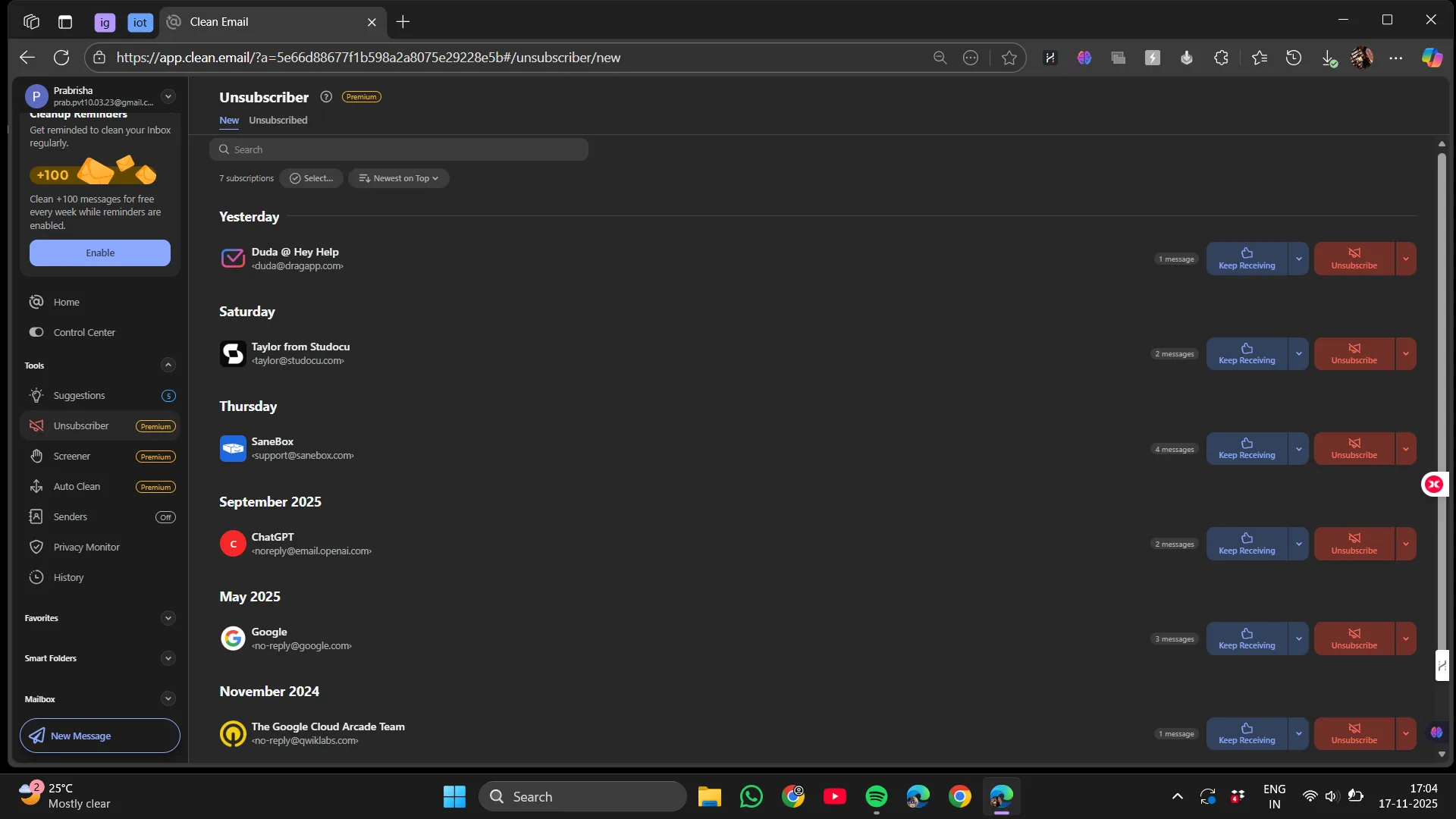
- Unsubscribe helped remove me from mailing lists directly inside the tool
- Block instantly prevented future emails from specific senders. (For stubborn senders who ignore unsubscribe requests, block felt gloriously final)
- Mute silenced threads that weren’t harmful but were constantly active
But the minor hiccup is that to unlock the Unsubscribe feature fully, though it has a free trial, we have to upgrade to the paid subscription.
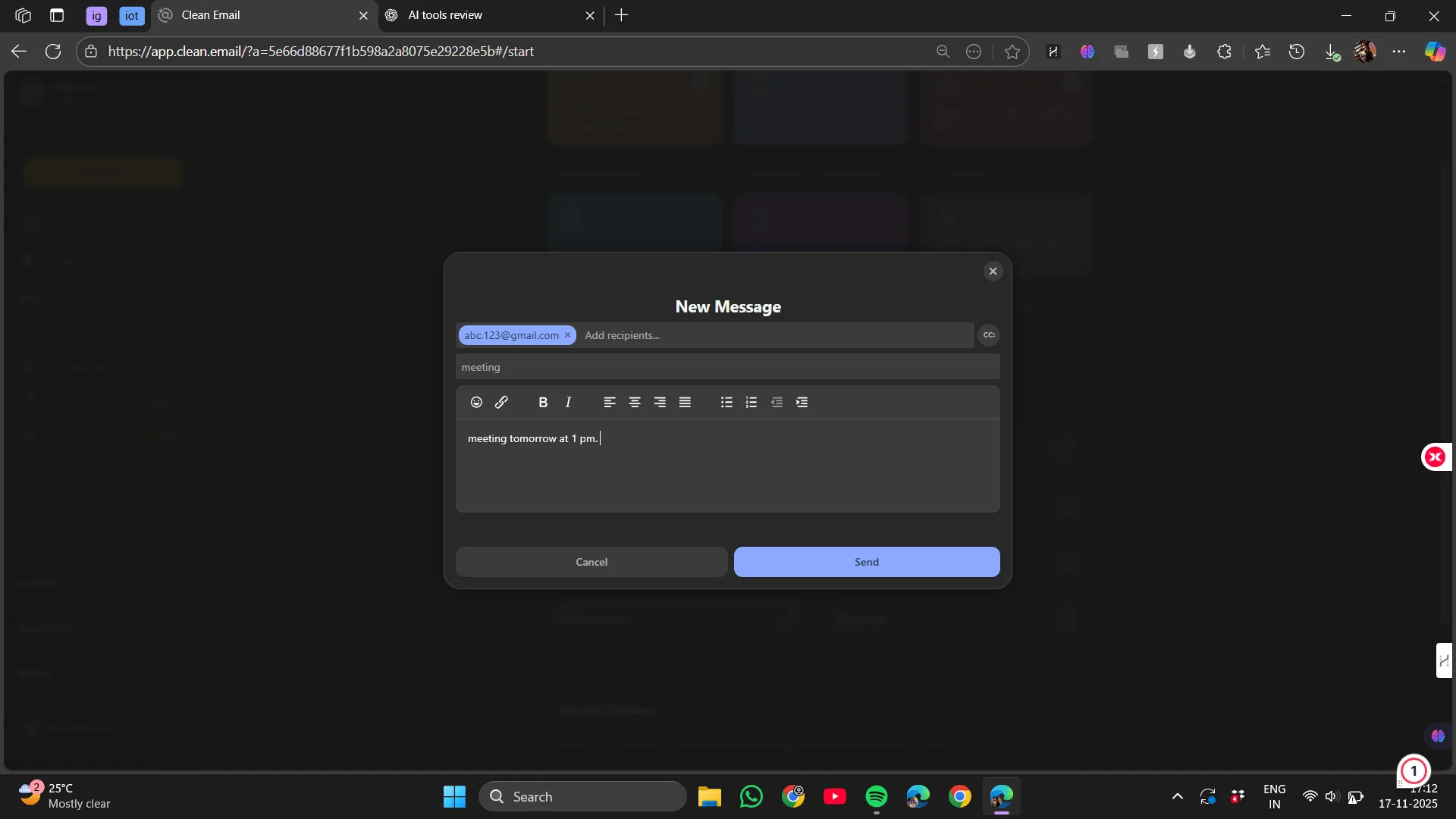
The capacity to send emails straight from the Clean.Email page while cleaning was another minor but surprisingly helpful feature that I found appealing.I could swiftly reply, forward, or confirm something during an organizing session all from within the same user interface without needing to toggle tabs or return to Gmail. I wouldn’t write lengthy or crucial messages in it, and it’s not intended to substitute for a full email client, but it saved me a couple of mouse presses and engaged me in the cleaning flow for quick, task-based responses that inevitably arise when going over old or grouped emails.
It was a small and thoughtful convenience, where while cleaning, if I noticed an email that warranted a reply from me I could do it directly inside the Clean.Email’s interface without needing to switch tabs. I could also draft unrelated messages through this function, but since Clean.Email does not have an AI powered message drafter like HeyHelp, it can be considered a minor help, because it would be the same as opening my gmail and writing the message myself.
However, automatically blocking all unwanted emails and background cleaning still sit behind the paid subscription.
Verdict: A powerful, satisfying set of decluttering actions, with the bonus ability to send emails directly. But heavier automation that blocks, unsubscribes or cleans inbox requires paid upgrading.Score: 8.5/10
Smart Folders
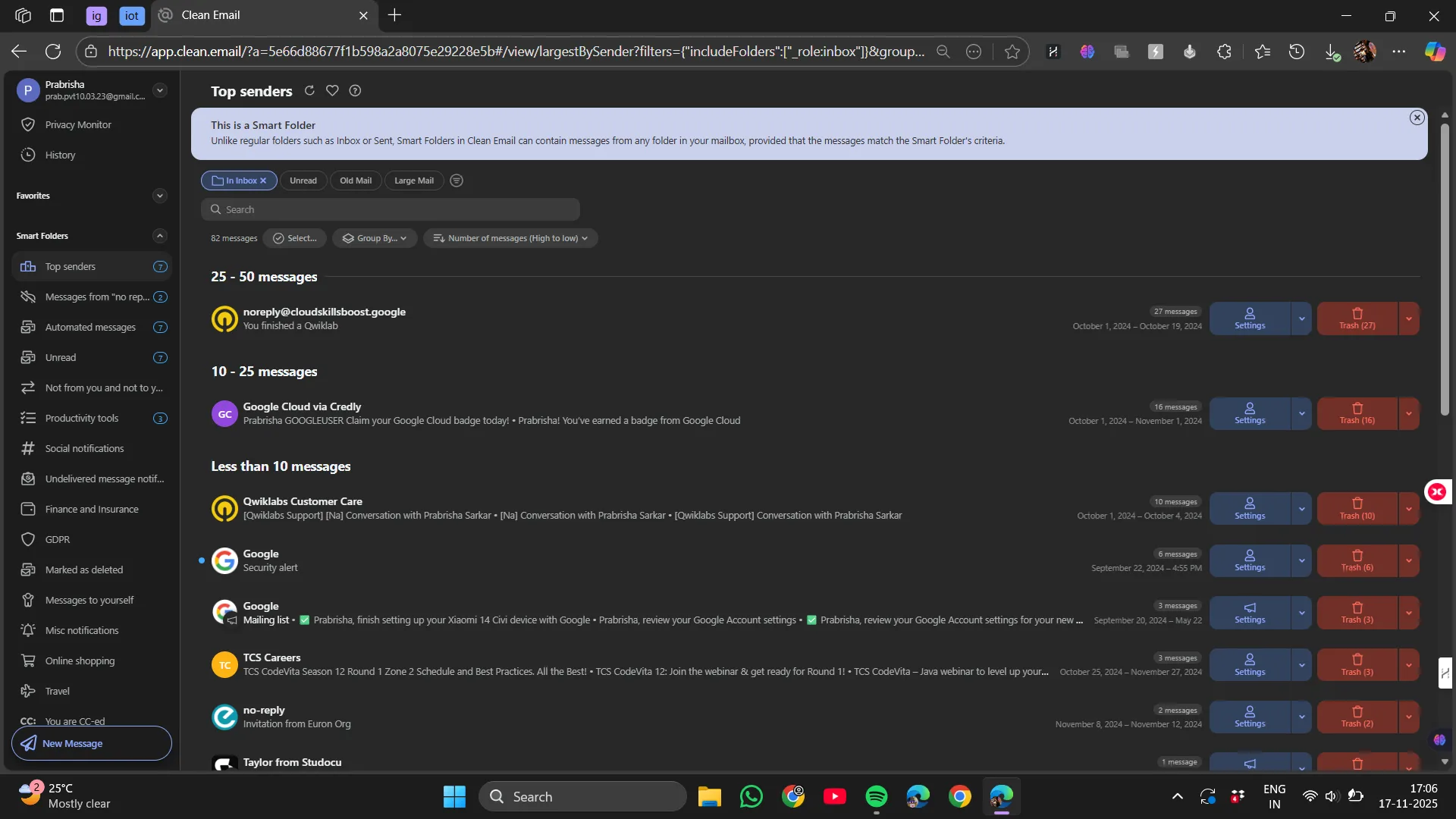
Smart Folders became my personal favourite feature because they organise based on meaning, not sender. Instead of manually labeling, Clean.Email automatically sorts messages into life-based categories such as:
- Top Senders
- Messages with “no reply”
- Where I’m CC’d
- Finance & Bills
- Travel & Bookings
- Health & Wellness
- Shopping & Deliveries
- Entertainment & Subscriptions
- Work & Productivity
- Receipts & Orders
- Educational Emails
and many more…
This finally solved the problem of hunting for things like boarding passes, tax-related receipts, or doctor communications across thousands of emails. Instead of remembering when something arrived, I could jump straight to what kind of email it was.
Compared to HeyHelp and Fyxer, which focus more on writing assistance and daily workflow, Smart Folders felt like the email version of organising my closet by outfits instead of brands.SaneBox has “SaneNews” and “SaneLater,” but Clean.Email goes deeper into topic-intelligent sorting, not just priority levels. SaneBox offers more functionalities compared to Clean.Email, but Clean.Email is quicker and rather than confusing us with many functions does the one thing it offers very well. For someone whose requirement is only cleaning and organising their inbox, I believe Clean.Email is more suitable.
Verdict: A genuinely helpful, real-world organisation system that makes finding things dramatically easier.Score: 9/10
Mail Filters
Clean.Email also includes Filters, which helped me instantly surface emails that matched practical categories such as:
- Unread emails
- Large emails
- Old messages
- Entertainment
- Ride-sharing
- Food delivery
Unlike automation rules, filters are there for instant viewing and selective cleaning, not automatic background actions. This made it much easier for me to track down forgotten important emails especially travel-related or financial ones without needing to remember search operators. It’s slightly similar to Smart Folders but differs in the “what” we are accessing rather than the “how”.
Verdict: A simple but powerful way to instantly find specific types of messages that matter during cleanup.Score: 8.8/10
Automation & Rules
Clean.Email includes the ability to create rules such as:
- Auto-archive messages older than X days
- Block newsletters from specific domains
- Always move finance-related emails to a specific folder
- Tag or label emails with attachments
However, the automatic, continuous background execution of rules only comes with the paid subscription. In the free version, I could manually select which mails to trash, which senders to block or unsubscribe from, but I could not automatically block or delete the continuously incoming new emails.
That means the true maintenance magic unlocks only when upgrading.
Verdict: Strong rule features, but the free version is more manual than autonomous.Score: 7.8/10
Performance & Stability
One of Clean.Emails’s most striking features is the speed at which email could handle thousands of messages without lagging or freezing was its main feature. Even with more than 10,000 messages in the inbox, operations like delete and archive felt nearly instantaneous which was one of it’s most impressive points for me.
Compared to the other services I’ve tried:
- SaneBox is equally fast because it works in the background
- HeyHelp feels fastest for drafting, not cleaning
- Fyxer can feel slower because it analyses multi-layer context
Clean.Email is optimised for speed over complexity, which fits its purpose perfectly.
Pricing & Value
Clean.Email’s pricing varies slightly based on region and promotions, but the usual range is:
- 1 account: ~ INR 2,181.82 per year
- 5 accounts: ~ INR 3,538.82 per year
- 10 accounts: ~ INR 7,267.62 per year
I personally felt that if someone has thousands of emails and zero time to maintain them, the subscription offers long-term peace of mind especially because automation becomes hands-off.
For lighter users who only want occasional cleaning, the free version may be enough, though slower and more manual.
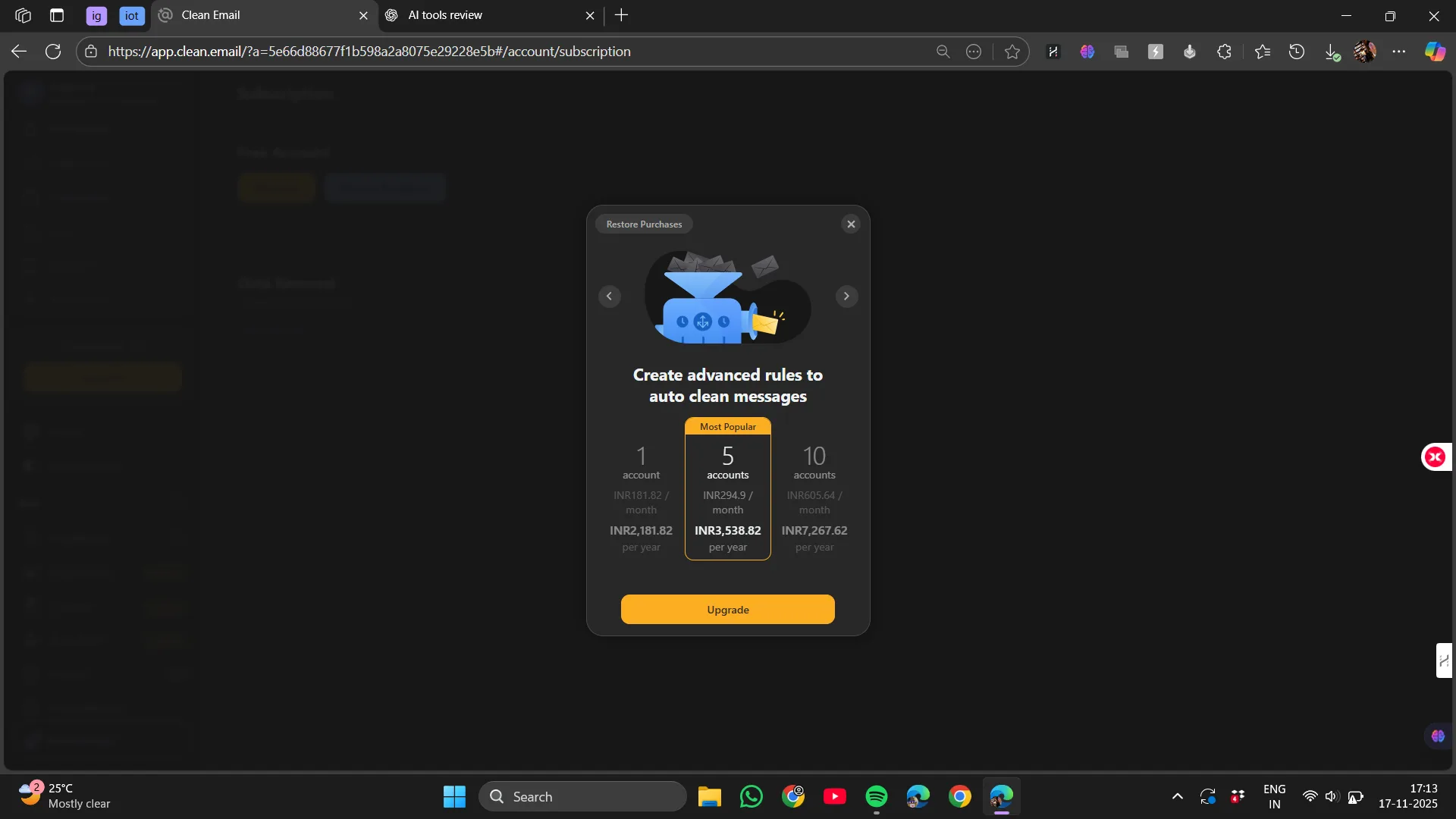
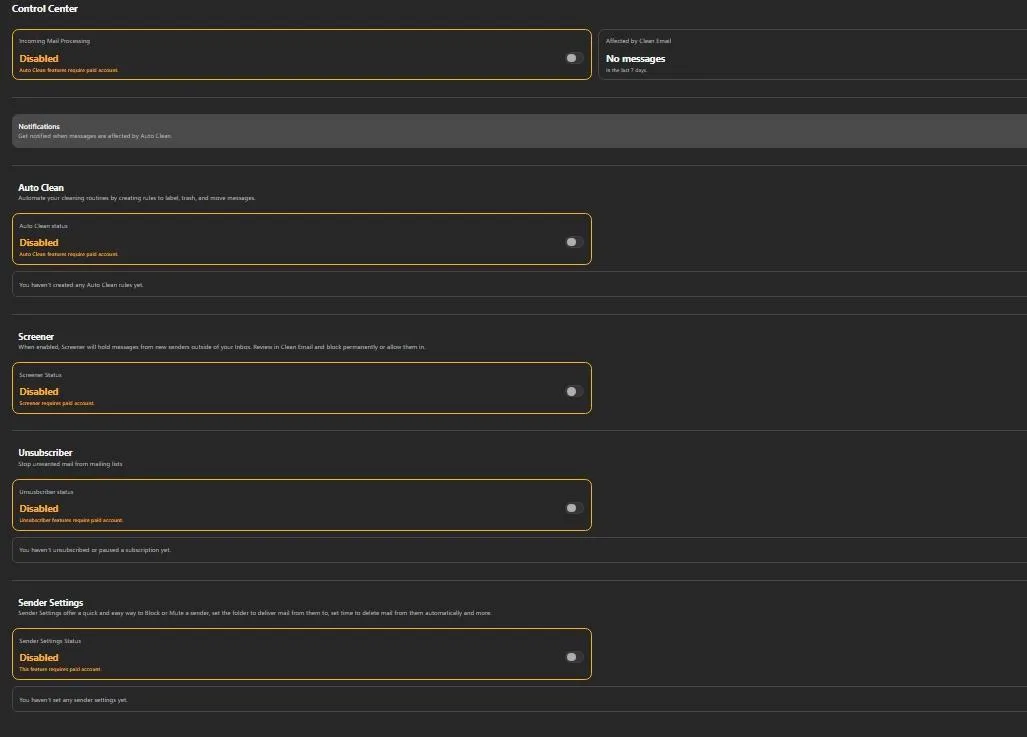
From what I observed inside the settings panel, several features in Clean.Email are visible but locked behind the paid subscription, which explains why the free version feels more like a powerful manual cleanup tool rather than a fully automated inbox manager. The free plan still lets me explore most areas, view suggestions, and perform manual cleaning, but anything related to automation, background filtering, or proactive blocking requires upgrading. Here’s how it breaks down in practice:
Features that require a paid plan
- Auto Clean (full automation) : the ability to create rules that automatically clean, label, move, or archive emails in the background
- Incoming mail processing : ongoing cleaning for new messages as they arrive, not just old ones
- Screener : holds messages from unknown senders until I approve or permanently block them
- Unsubscriber (the built-in automated unsubscribe system)
- Advanced sender settings : long-term rules for specific senders, like auto-delete after X days, always move to a folder, or permanently mute
- Notifications about automated actions : since automation is premium-only, the notifications tied to it are also paid
Free-plan capabilities
- Manual “View & Clean” and bulk clean actions
- Smart Folders and content-based grouping
- Mail Filters (e.g., unread, large, old, shopping, travel, delivery, etc.)
- Sending mail directly from the Clean.Email dashboard
- Occasional manual unsubscribe via email footer links
- Limited one-time cleanup without continuous automation
In summary, the paid version is for people who want their mail folder to clear itself proactively in the background without any further work, while the free plan aids in awareness, organization, and manual decluttering.
Privacy & Security
Since Clean.Email interacts with inbox data, privacy matters. Their claims include:
- No data selling
- No message content sharing
- Ability to disconnect anytime
- Automated processing focus
For normal personal and professional usage, that gives enough reassurance. However, for sensitive fields like legal, medical, or confidential corporate or enterprise work, I would still recommend reviewing policies carefully.
Final Thoughts On Clean.Email
Clean.Email didn’t magically erase my email stress overnight but it gave me control back. Instead of feeling like I had to battle thousands of messages, I finally had tools to clean them, categorise them, prevent future clutter, and maintain order without starting over each month.
It isn’t designed to write emails, schedule meetings, or act like a personal AI assistant and honestly, that’s what made it refreshing. It focuses on one job and does it well: cleaning, organising, and maintaining inbox hygiene.
Best suited for:
- People with long-ignored inboxes
- Those who like visual organisation
- Anyone wanting ongoing maintenance
- Multi-inbox managers
Not ideal for:
- People wanting AI writing or scheduling
- Those who prefer free permanent tools
- Hyper-sensitive data environments
Final Overall Score: 8.4/10
A focused, practical inbox-cleaning solution that genuinely reduces clutter and stress, especially for those who’ve let things pile up for years.
Frequently Asked Questions
Clean.Email is an inbox management tool designed to help users clean, organize, and maintain their email inboxes efficiently. It offers features like Quick Clean, Smart Folders, Filters, and Automations to group emails, suggest cleanup actions, and reduce clutter. It works by providing a well-organized dashboard that displays categories, totals, folders, and cleanup recommendations, making it easier to manage emails without spending hours doing it manually.
Clean.Email stands out with its visual and friendly interface, which provides a broader overview of your inbox compared to SaneBox, which works silently in the background. Unlike HeyHelp, which focuses on drafting replies within Gmail, Clean.Email offers a more comprehensive cleaning control panel. It is optimized for speed and simplicity, making it ideal for users who primarily need to clean and organize their inboxes.
Clean.Email offers several key features including Quick Clean, which groups emails into logical piles for easy cleanup; Smart Folders, which automatically sorts messages into life-based categories; Filters, which help surface specific types of emails; and Automations, which allow for rule-based actions like auto-archiving or blocking emails. Additionally, it provides the ability to unsubscribe, block, and mute senders directly from the tool.
Clean.Email offers a free version with manual cleanup capabilities, but many of its advanced features, such as full automation, background filtering, and proactive blocking, require a paid subscription. The free plan allows users to explore most areas, view suggestions, and perform manual cleaning, but continuous automation and advanced sender settings are only available with a paid upgrade.
Clean.Email’s pricing varies based on region and promotions, but the usual range is approximately INR 2,181.82 per year for one account, INR 3,538.82 per year for five accounts, and INR 7,267.62 per year for ten accounts. The paid subscription offers long-term peace of mind with hands-off automation, making it a valuable investment for users with thousands of emails and limited time to maintain them.
Clean.Email claims to prioritize privacy and security, stating that they do not sell data or share message content. They also offer the ability to disconnect at any time and focus on automated processing. While this provides enough reassurance for normal personal and professional usage, users in sensitive fields like legal, medical, or confidential corporate environments should review their policies carefully.
Clean.Email is best suited for people with long-ignored inboxes, those who like visual organization, anyone wanting ongoing maintenance, and multi-inbox managers. It is particularly useful for users who need to clean and organize their inboxes efficiently. However, it is not ideal for those who want AI writing or scheduling features, prefer free permanent tools, or work in hyper-sensitive data environments.
Subscribe to our email newsletter to get the latest posts delivered right to your email.
Comments