Conclusion
Xemail proves to be a valuable tool for those who frequently write business emails and seek a structured, efficient way to streamline their email composition process. Its standout features include a comprehensive library of ready-made templates that don’t feel robotic, profile-based signatures that reduce repetitive tasks, and intuitive writing controls. While it doesn’t eliminate the need for manual editing entirely, it significantly lowers the barrier to starting an email, which is a crucial aspect of efficient communication. However, the steep pricing and limited free usage might deter some potential users.
Pros
- Comprehensive library of ready-made templates
- Profile-based signatures reduce repetitive tasks
- Intuitive writing controls and customization
- Responsive performance and seamless navigation
- Transparent privacy and data handling practices
Cons
- Steep pricing for casual users
- Limited free usage with only two free generations
- Longer or emotionally nuanced emails still need manual polishing
Table of Contents
- The Problem Xemail Aims to Address
- The Ready-Made Templates: Where Xemail Really Shines
- Profile-Based Signatures: A Small but Significant Detail
- Writing Controls and Customization
- Performance: The User Experience in Daily Use
- Pricing and Value
- Privacy and Data Handling
- Comparison with Other Email Writing Tools
- Limitations
- Ideal Users for Xemail
- Conclusion
- Frequently Asked Questions
We rely on email daily without much thought. For many, Gmail is the primary platform they use. It has become almost like a second workspace. Over time, Gmail has introduced numerous features such as filters, labels, categories, scheduling, and even AI-powered writing tools. However, I began to question which additional Gmail tools genuinely add value and which ones merely complicate our workflow.
This curiosity prompted me to explore various tools focused specifically on email composition and writing. I wasn’t aiming to replace Gmail, but to assess whether external writing tools truly ease the process or just introduce another layer of complexity. During this exploration, I discovered Xemail, a tool designed specifically for writing, replying to, and organizing emails.
Xemail is available as an app on both the Google Play Store and the Apple App Store, alongside a web version. My hands-on experience primarily comes from the Android app, which forms the basis of this review.
The Problem Xemail Aims to Address
Xemail isn’t an inbox organizer; it doesn’t attempt to manage emails, clean up subscriptions, or automate workflows. Its focus is more targeted: assisting us in writing better emails more quickly.
This distinction is important, as many email tools tend to try and do too many things. Xemail remains dedicated to writing, making the user experience focused rather than cluttered.
The app opens with a straightforward interface that clearly highlights its main functions. With just one or two taps, you can compose a new email, reply to an existing one, or choose from ready-made templates. Getting started was easy and hassle-free, with minimal setup required.



The Ready-Made Templates: Where Xemail Really Shines
The most impressive feature of Xemail, in my opinion, is its library of ready-made templates.
Rather than vague prompts or generic suggestions, Xemail provides structured templates sorted by categories. These categories include Work, Marketing, Sales, and Others, each featuring practical, real-world email examples.
Among the templates I tested were:
- Follow-up messages
- Leave requests
- Formal complaints and feedback
- Invitations
- Proposal messages
- Resignation notices
- Thank-you messages
- Urgent alerts


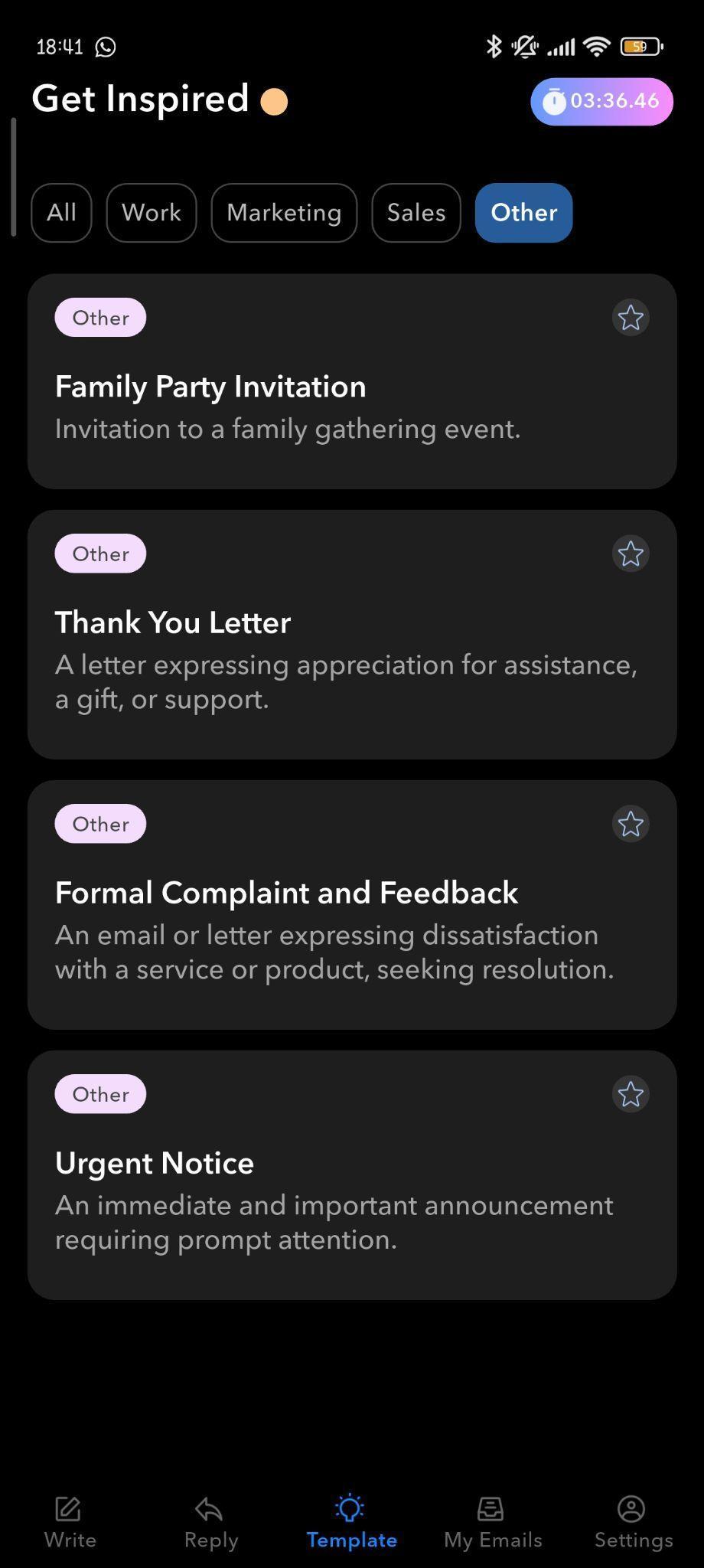

A key strength is that these templates don’t come across as robotic. They act as well-structured starting points rather than finished messages. Before sending, you can refine the content, adjust the tone, and control the length.
This alone makes Xemail valuable for those who often write business emails but prefer not to start from scratch each time.
Rating: 8 out of 10
Profile-Based Signatures: A Small but Significant Detail
Another subtle enhancement is how Xemail manages email signatures.
Once we input our name, role, and company into the profile, Xemail automatically inserts this information as a signature in emails. While simple, this feature significantly reduces repetitive tasks.


It is particularly useful for:
- Formal correspondence
- Academic communication
- Job-related messages
- Requests and applications
Instead of copying and pasting or retyping details repeatedly, the tool manages it consistently. It maintains a professional tone without feeling overly templated. Although similar customization is possible within Gmail and Outlook, this remains a useful feature.
Rating: 7.8 out of 10
Writing Controls and Customization
Xemail provides straightforward controls for:
- Email length (short, medium, long)
- Tone of writing (formal, professional, friendly, confident, etc.)
- Emoji usage (none, some, or many)
- Support for multiple languages




These options are intuitive and keep the interface uncluttered. I primarily used the length and tone controls, as they help adapt messages to various contexts without starting over.
The generated content generally meets expectations, though some editing remains necessary, particularly for delicate or nuanced messages. Overall, the tool lowers the barrier to starting but doesn’t replace judgment.
Rating: 7.7 out of 10
Performance: The User Experience in Daily Use
Performance-wise, Xemail is responsive. Drafts appear within seconds, and toggling between templates or tone settings is seamless. The Android app’s navigation feels smooth and reliable.
The writing quality remains consistent for:
- Short to medium-length emails
- Clear, goal-oriented communication
- Professional and academic contexts
Longer or emotionally nuanced emails still need manual polishing, but Xemail handles most of the structural work upfront. It shifts the effort from creation to editing, saving time.


A feature I appreciated is how effortlessly the app handles subject lines—automatically filling in relevant ones, which removes a minor but annoying step. After generating an email, I could send it directly via Gmail without formatting issues or extra cleanup. This small detail enhances real-world usability.
Rating: 8 out of 10
Pricing and Value
Xemail’s pricing structure is straightforward but somewhat steep considering the limited free usage. After two free generations, a subscription is required. The service offers both short-term and lifetime options, making it easier to evaluate without immediate commitment.
During testing:
- Weekly plan costs ₹390, discounted from ₹690
- Approximately $4.70 USD weekly
- Lifetime access costs ₹6,700 as a one-time fee, down from ₹8,800
- About $80–82 USD


The weekly rate may seem high for casual users. The lifetime plan is more suitable for frequent email writers seeking a long-term solution. The one-time payment option is a notable advantage over subscription-only services.
Rating: 6.8 out of 10
Privacy and Data Handling
Given its role in assisting with email content, I scrutinized how Xemail manages data. Its privacy policy is detailed and transparent about what data is collected, why, and how it’s used. Like other AI tools, it’s not entirely intrusive but does depend on a degree of trust.
As outlined in their guidelines:
- Xemail gathers basic account info such as name, email, and optional profile details like role or company, primarily for personalization and signatures.
- Email content is processed only when actively used; it does not automatically scan the inbox.
- AI-generated content is managed via OpenAI, with full disclosure.
- Usage data and device info are collected to enhance app performance and stability.
- Payments and support are managed by third-party providers.
- The company adheres to GDPR and CCPA regulations, including data access, correction, and deletion rights.
Overall, the approach is standard yet transparent. While not a privacy-first minimalist, its data practices for an AI email assistant are reasonable and well-communicated.
Rating: 7.5 out of 10
Comparison with Other Email Writing Tools
Xemail vs Gemini (within Gmail)
Gemini excels at providing lightweight assistance directly within Gmail, such as drafting, summarizing threads, and refining language. Xemail, however, is more focused on creating emails from scratch.
Gemini integrates seamlessly with Gmail, while Xemail offers structured templates and enhanced writing controls. Their functions overlap but are not identical.
- Gemini: Free tier plus Google One AI plans (~$20/month, with higher tiers available)
- Strong in summaries and contextual assistance
- Xemail is better for templates and mobile-focused writing
- Gemini has an edge in native Gmail integration
Xemail vs WriteMail.ai
- WriteMail pricing ranges from approximately $6.95 to $19.95 per month
- WriteMail offers the most advanced contextual reply features
- It also includes a voice-to-email feature, which I found very useful
- However, WriteMail only integrates with Gmail
- Xemail is more affordable and supports multiple platforms (including Outlook), though it is less advanced in AI capabilities
Xemail vs Friday Email AI
- Friday AI costs around $6.99 weekly, $29.99 monthly, or $59.99 for a 12-week plan
- Friday AI offers very limited free access
- It has limited understanding of email threads
- Xemail is positioned as more user-friendly and offering better value
- Frankly, Friday AI doesn’t justify its price; Xemail remains a professional choice
Overall winner in the email writing tools category: Xemail
Limitations
The main drawback of Xemail is its restrictive free tier. Users only receive two free generations before being prompted to subscribe or start a short free trial at ₹390 per week (about $4.50–$5). This short window makes it difficult to properly evaluate the tool, especially since it markets itself as lightweight and straightforward. Although a free trial exists, I chose not to use it, as the app’s simplicity made its capabilities clear early on. A longer trial period, like a week, would be more reasonable considering the pricing. The quick paywall could deter cautious users who want to test thoroughly before subscribing.
Ideal Users for Xemail
Xemail is most suitable for:
- Students composing academic or formal emails
- Professionals managing routine workplace correspondence
- Freelancers dealing with proposals, follow-ups, and requests
- Anyone tired of repeatedly rewriting similar email formats
It’s less suited for very casual email users or those who prefer manual writing without assistance.
Conclusion
Xemail integrates smoothly into your email workflow, focusing on writing, structure, and efficiency without attempting to replace Gmail or add unnecessary complexity.
The most noticeable aspect was the practicality of the experience. The templates are genuinely helpful, the profile-based signature reduces repetitive effort, and the controls are intuitive without cluttering the interface.
While Xemail doesn’t eliminate the effort entirely, it significantly lowers the barrier to starting, which is crucial for efficient email communication.
Score: 7.8/10
Email Writing Tools: Xemail vs. FridayEmail vs. WriteMail.AI
In the realm of email writing tools, Xemail, FridayEmail, and WriteMail.AI each promise to streamline and enhance the email composition process. These tools are designed to integrate with popular email platforms, offering features like templates, AI-generated content, and customization options. The comparison focuses on pricing, automation, and bulk management, as these aspects are crucial for users who handle a high volume of emails daily. We evaluated each tool based on their pricing structures, the level of automation they provide, and their capabilities in managing bulk email tasks efficiently. Additionally, we considered their unique selling points and overall performance to determine which tool offers the best value and functionality.
🔗 Xemail vs FridayEmail | Xemail vs WriteMail.AI | FridayEmail vs WriteMail.AI
Xemail wins overall due to its comprehensive library of ready-made templates and strong automation capabilities, which significantly streamline the email composition process. Despite its steep pricing, the value it offers in terms of performance, customization, and privacy makes it a standout tool. Its seamless integration with multiple platforms and responsive performance further solidify its position as the best tool among the three.
Frequently Asked Questions
Xemail is a tool designed specifically for writing, replying to, and organizing emails. Unlike other email tools that try to manage your inbox or automate workflows, Xemail focuses solely on assisting users in writing better emails more quickly. It offers ready-made templates, profile-based signatures, and writing controls to enhance the email composition process.
Xemail’s key features include a library of ready-made templates for various email types, profile-based signatures for consistent professional communication, and writing controls for adjusting email length, tone, and emoji usage. It also supports multiple languages and integrates smoothly with Gmail.
Xemail offers a limited free tier with two free generations. After that, a subscription is required. The weekly plan costs approximately $4.70 USD, and there is also a lifetime access option for around $80–82 USD. While there is a short free trial, it may not be sufficient for thorough evaluation.
Xemail is ideal for students composing academic or formal emails, professionals managing routine workplace correspondence, freelancers dealing with proposals and follow-ups, and anyone tired of repeatedly rewriting similar email formats. It is less suited for casual email users or those who prefer manual writing without assistance.
Xemail’s privacy policy is transparent about data collection and usage. It gathers basic account info for personalization and signatures, processes email content only when actively used, and adheres to GDPR and CCPA regulations. While not a privacy-first minimalist, its data practices are reasonable and well-communicated for an AI email assistant.
Xemail is not designed to replace Gmail. Instead, it integrates smoothly into your existing Gmail workflow, focusing on writing, structure, and efficiency. It complements Gmail by providing templates and writing assistance, making the email composition process more efficient.
The main limitation of Xemail is its restrictive free tier, which only allows two free generations before requiring a subscription. This short window makes it difficult to properly evaluate the tool. Additionally, while Xemail handles most structural work, longer or emotionally nuanced emails still need manual polishing.
Abonneer je op onze nieuwsbrief en ben als eerste op de hoogte van tijd- en geldbesparende AI-tools!
Comments