Conclusion
Spinbot presents itself as a free, accessible tool for basic paraphrasing and grammar checking, but it ultimately falls short in several key areas. While it performs adequately for quick, simple text rewriting without the need for an account, its redundancy and lack of distinct features make it a confusing and less reliable option. The constant redirections to QuillBot and the unreliable AI detection tool further undermine its standalone utility. In the end, Spinbot feels more like a lightweight, less capable version of QuillBot rather than a unique, comprehensive writing assistant.
Pros
- Free to use with no account required
- Basic text spinner performs adequately
- Quick and easy to navigate
- No usage restrictions or paywalls
Cons
- Redundant tools with identical functionalities
- Unreliable AI content detection
- Constant redirections to QuillBot
- Lack of distinct, advanced features
Table of Contents
- First Impressions and Dashboard Experience
- Main Features
- Performance and Output Consistency
- Pricing and Limitations
- Privacy and Data Policy
- Spinbot Compared to QuillBot and Grammarly
- Final Verdict and Overall Assessment
Spinbot is one of those tools I approached with an open mind and left with a clear sense of frustration. Not because something is broken or unreliable, but because it raises the question: what exactly is its purpose? The platform claims to be a free online paraphrasing and grammar checking tool, and technically, it offers these features. However, as I used it more, it became increasingly unclear what Spinbot truly is as a standalone product, since much of what it offers redirects elsewhere or seems like a rebranded version of another tool.
Spinbot is suitable for users who need very basic text rewriting or grammar checks at no cost and without creating an account. If your goal is to quickly spin a short paragraph without logging in or paying, its core functionality is available and somewhat functional.
It is not suitable for anyone requiring reliable AI detection, a distinctly varied set of tools, or assurance that each feature offers something genuinely different. Additionally, users seeking clarity about the tools’ functionalities will find the Spinbot experience confusing, seemingly by design rather than by accident.
First Impressions and Dashboard Experience
The main navigation is straightforward: Text Spinner (Paraphrasing), Paraphrasing Tool, Grammar Checker, Summarizer. These constitute the entire platform, arranged across the top of the page. There is no dashboard, workspace, or document environment—each feature exists as a separate, standalone web page.
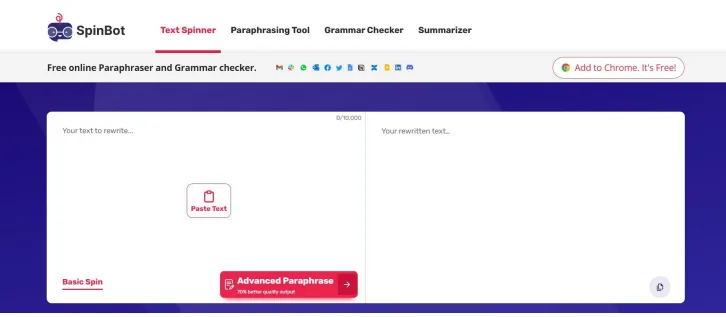
The color scheme of deep navy and white is clean and unobtrusive. The interface appears modern and easy to navigate, with only four main options. However, it quickly becomes apparent that there is significant repetition: switching between the Grammar Checker and Sentence Checker, for example, opens essentially the same interface, same input box, same layout, same functionality, only with different labels in the navigation trail.
Early on, I noticed a footnote at the bottom of the Grammar Checker referencing QuillBot’s Privacy Policy and Terms of Service. This detail is significant; such disclosures are uncommon in truly independent tools and set a clear tone for the platform’s underlying connections.
Main Features
Text Spinner
The Text Spinner stands out as the most recognizable feature and makes sense as a free, standalone utility. Its interface presents two panels side by side: input on the left and the paraphrased output on the right. The character limit is shown as 0/10,000, allowing up to 10,000 characters per run.
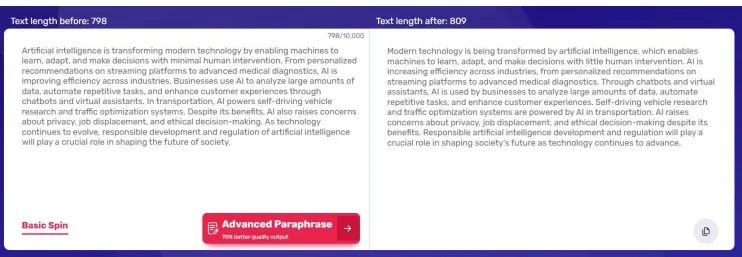
There are two modes: Basic Spin and Advanced Paraphrase. Basic Spin operates entirely within Spinbot and is free to use. I tested it with a paragraph about AI, and the results were reasonably acceptable. It rearranged sentence structures, swapped out vocabulary, and kept the original meaning mostly intact. While not highly sophisticated, it performs adequately for basic content spinning.
The Advanced Paraphrase mode is where things get strange. Clicking it does not run a different, more powerful version of the same tool. It redirects the user entirely to QuillBot. There is a banner on the button that reads “70% better quality output,” which is technically a true statement in the sense that QuillBot is a more capable tool, but what it really is, is Spinbot telling me to use a different product. That is an unusual design choice for a tool that is supposed to stand on its own.
Paraphrasing Tool
The Paraphrasing Tool features a different interface from the Text Spinner and offers modes like Standard, Fluency, and a synonyms slider. The output highlights changed words, helping users see what has been altered. I tested it with a paragraph, and the results were fairly coherent: sentence structures shifted, different words appeared, and the output was understandable.
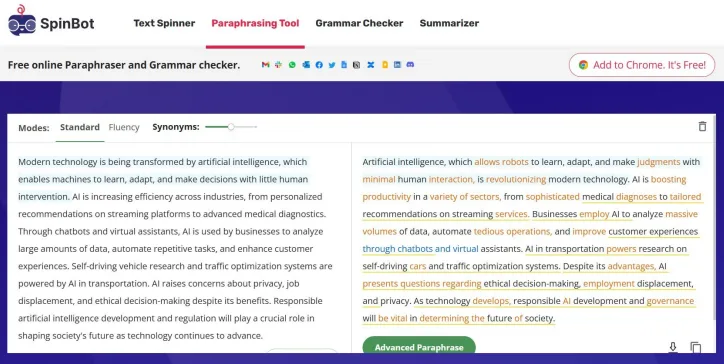
What stands out here is the design. It looks exactly like QuillBot’s paraphraser, down to the layout and the way synonyms are shown in the output. The “Advanced Paraphrase” button at the bottom again redirects to QuillBot. Whether Spinbot is using QuillBot’s API, has a licensing arrangement, or something else entirely is not something the platform explains anywhere, and I genuinely could not find a clear answer. What I can say is that the visual similarity and the constant redirections make it very difficult to treat this as an independent product.
Grammar Enhancement Tools
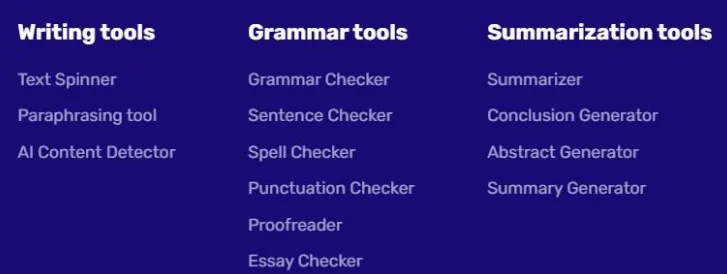
Under the Grammar Checker tab, six tools are listed: Grammar Checker, Sentence Checker, Spell Checker, Punctuation Checker, Proofreader, and Essay Checker. Each has a different name suggesting a unique purpose.
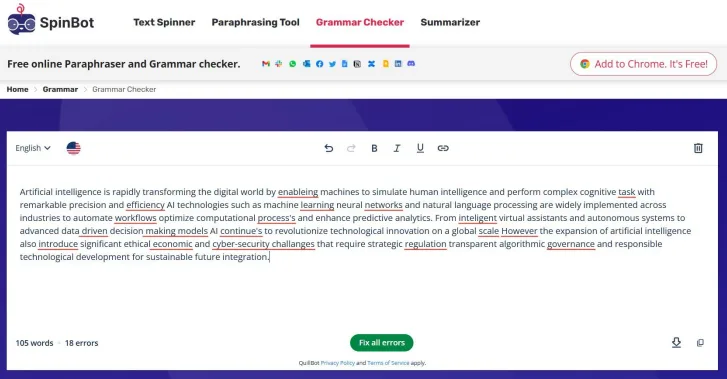
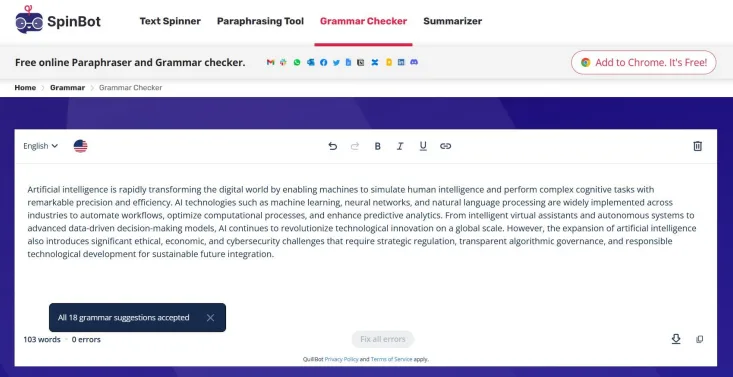
I tested all six tools, and they all produced identical results. Each opened the same interface—mirroring QuillBot’s layout—highlighted the same errors on the same test text, and behaved identically. There is no functional difference between the Punctuation Checker and the Essay Checker; they are essentially the same tool listed multiple times under different names.
The grammar checker functions adequately. When I inputted a deliberately error-ridden article, it identified 18 issues, underlined them, and suggested corrections. The errors detected included comma placement, hyphenation, and some agreement issues. While not suitable for deep editing, it performs well for basic cleanup.
The main issue is redundancy. Listing six different names for essentially the same tool is confusing and potentially misleading. A new user might reasonably assume that each tool performs a distinct function, which is not the case.
Summarization Features
The same redundancy occurs with the Summarization tools. Four options are listed: Summarizer, Conclusion Generator, Abstract Generator, and Summary Generator. These are genuinely different in writing: a conclusion wraps up an argument, an abstract previews content, and a summary condenses information. They are not interchangeable.
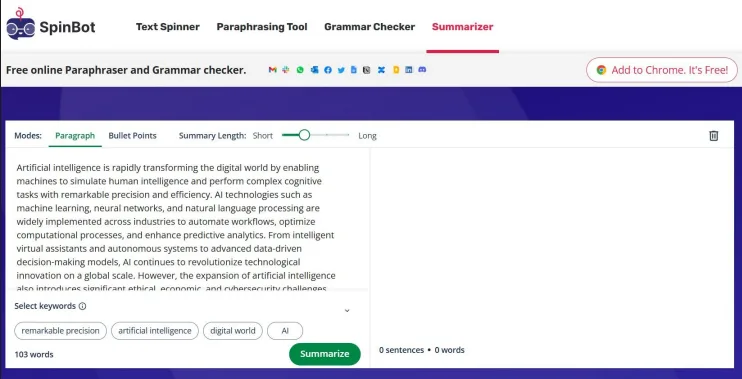
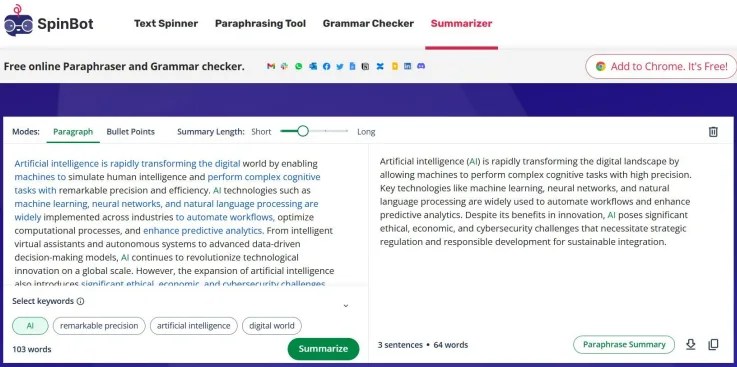
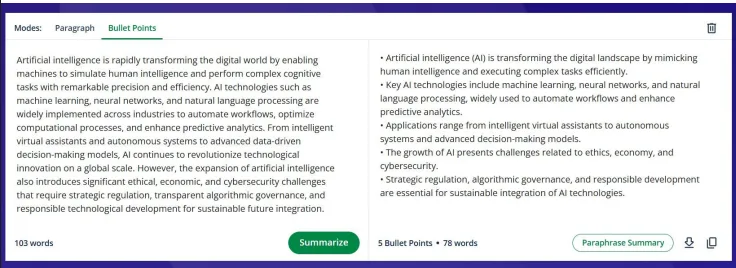
In practice, all four tools opened the same QuillBot interface, offering the same two modes (Paragraph or Bullet Points) and a length slider. I tested the Summarizer, which produced a clear three-sentence summary. The bullet point mode generated five key points. The output was acceptable, preserving meaning and structure.
Using the Conclusion Generator with the same input yielded a similar summary, as did the Abstract and Summary Generators. Despite different labels, they all produced the same output, effectively making them one tool with multiple names.
AI Content Detection Tool
This one I found genuinely unreliable and I want to be direct about that. I ran two tests. First, a paraphrased paragraph that had been humanized and was clearly not machine-generated in its current form. The detector returned 0% AI, which is the correct result. Second, I pasted in a paragraph that was 100% AI-generated, written directly by an AI without any modification. The detector returned 26%, labeling it as “Medium percentage of AI content.”
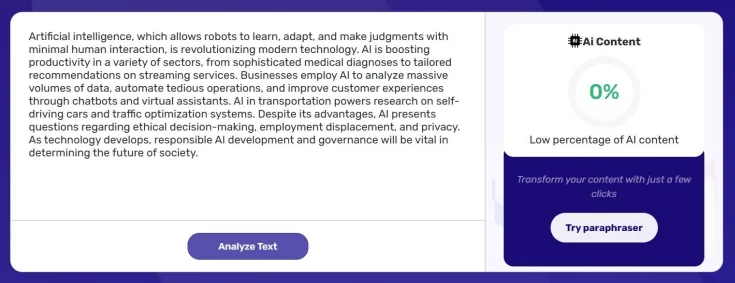

A fully AI-generated paragraph should not be marked as only 26% AI. This indicates a fundamental flaw in the detection model, undermining its reliability. Users relying on this tool for AI detection risk false reassurance, which could be more harmful than having no detector.
Performance and Output Consistency
Technically, Spinbot performs well: it loads quickly, never crashed during testing, and responses are near-instant. Its lightweight pages and smooth performance are suitable for a free, no-account tool.
The main issues lie with output quality, not performance. Basic Spin provides acceptable results for simple rewrites. The Paraphrasing Tool works as intended, and the grammar checker detects real issues. However, the AI detector is unreliable, the duplicated tools are confusing, and the redirects to QuillBot undermine the impression of a standalone platform.
The summarization feature performs adequately for basic summaries. The bullet point mode, in particular, generated clear and concise points that captured the main ideas without losing key information. This is arguably Spinbot’s most effective standalone function.
Pricing and Limitations
Spinbot is completely free. There are no paid plans, subscriptions, or paywalls for the tools tested. The main limitation is the 10,000-character cap on the Text Spinner, which is sufficient for most single-use needs. It also offers integrations with Word, documents, and other apps, which is a useful feature.
The lack of a paid plan indicates Spinbot’s business model relies on advertising and interest-based tracking, as outlined in its privacy policy. The platform displays ads and tracks user behavior to generate revenue, which is common for free tools.
Aside from the character limit in the Text Spinner, there are no other usage restrictions. No account is needed for any feature, making it highly accessible. If your only requirement is a quick, free paraphrase of a short paragraph without logging in, the free version suffices.
Privacy and Data Policy
Spinbot is operated by Learneo, Inc., the same company behind QuillBot, which accounts for the interface similarities and the QuillBot attribution in the grammar tools. Its privacy policy covers standard data collection practices, including account details (if provided), usage data, cookies, tracking technologies, and targeted advertising.
- The platform collects usage patterns, device info, IP addresses, and browsing behavior via cookies and tracking technologies.
- Data is used for service operation, personalization, product development, and targeted advertising.
- Advertising partners may receive behavioral data for targeted ads, including retargeting after users leave the site.
- The privacy policy does not explicitly prohibit using submitted text for AI training, unlike some competitors such as Type.ai or Paperpal that specify this.
While typical for an ad-supported free tool, the privacy approach is not minimal or highly protective. The data sharing and tracking for advertising purposes should be considered carefully if submitting sensitive or proprietary content.
Spinbot Compared to QuillBot and Grammarly
|
Feature |
Spinbot |
QuillBot |
Grammarly |
|
Paraphrasing |
Basic free spin up to 10,000 chars; advanced redirects to QuillBot |
Strong paraphraser with multiple modes; tone locked behind paywall |
Good rewriting tools; full rewrites paywalled |
|
Quality of Output |
Decent |
Good |
Good |
|
Grammar Checker |
Functional but all six listed tools are identical |
Surface-level, reliable, calm suggestions |
Strong, industry standard with detailed corrections |
|
Summarizer |
Works for basic summarization; all four listed tools are identical |
Clean summarizer, bullet and paragraph modes |
Not a core feature |
|
AI Detector |
Unreliable; returned 26% on 100% AI text |
Functional with reasonable accuracy |
Paywalled |
|
AI Humanizer |
No |
Yes, brought AI score down 60-70% in testing |
Yes, Humanizer feature available |
|
Plagiarism Checker |
No |
Fully paywalled |
Paywalled |
|
Pricing |
Free |
$14.95/month or $79.95/year |
$12/month (annual) |
|
No account required |
Yes |
Yes for basic tools |
No |
Among these, QuillBot clearly outperforms Spinbot in nearly every aspect. Its paraphraser is more effective, the grammar checker is more nuanced, and its humanizer feature actually functions. The toolset is authentic rather than a series of identical tools with different names. The only advantage Spinbot has is the ability to use it without an account, but QuillBot also offers free access to its basic features without login, making this difference minor.
Grammarly operates in a different league altogether. It is not a direct competitor at Spinbot’s level, as its correction quality, tone detection, and editing depth far surpass Spinbot’s offerings. Its paid plans unlock significantly more advanced features.
If I had to pick one, I would use QuillBot over Spinbot without hesitation. Spinbot feels, more than anything else, like a lighter version of QuillBot hosted on a different domain, and not a more capable or more interesting one.
Final Verdict and Overall Assessment
Spinbot is free, loads quickly, and its basic text spinner performs as expected. Beyond that, its grammar tools are identical, as are its summarization features. The AI detector, however, is unreliable and could give false confidence. Additionally, the Advanced Paraphrase button redirects to an entirely different platform, which is confusing.
The recurring question during testing was: why choose Spinbot over QuillBot? I struggled to find a convincing reason. Spinbot offers no advantages and feels more like a spin-off of QuillBot. It performs worse in several areas. The only niche might be for quick, short paraphrasing without login or navigation, but that’s a very limited justification for a tool claiming to be a comprehensive writing assistant with multiple features.
For casual, infrequent use without any cost, Spinbot is harmless. However, for serious writing workflows, it falls short and is not a viable option.
Overall Score: 2/10
Frequently Asked Questions
Spinbot is a free online tool that provides basic paraphrasing and grammar checking services. It offers features like a Text Spinner, Paraphrasing Tool, Grammar Checker, and Summarizer. However, many of its advanced features redirect to QuillBot, raising questions about its standalone utility.
Spinbot is not ideal for professional writing tasks. While it offers basic text rewriting and grammar checks, its features are limited and often redundant. The AI detection tool is unreliable, and many advanced features simply redirect to QuillBot, making it less suitable for serious writing workflows.
Spinbot falls short compared to QuillBot. While Spinbot offers basic paraphrasing and grammar checking, QuillBot provides more sophisticated tools and better output quality. Spinbot’s advanced features often redirect to QuillBot, making it feel more like a lighter version of QuillBot rather than a standalone tool.
The main issue with Spinbot’s grammar checker is redundancy. It lists six different tools (Grammar Checker, Sentence Checker, etc.), but they all perform the same function and produce identical results. This can be confusing and misleading for users expecting distinct functionalities.
No, Spinbot’s AI content detection tool is not reliable. In testing, it returned a 26% AI score for a fully AI-generated paragraph, which indicates a fundamental flaw in the detection model. Users relying on this tool risk false reassurance about the originality of their content.
No, Spinbot does not require an account or subscription. It is completely free to use, with no paid plans or paywalls. This makes it accessible for quick, short paraphrasing tasks without the need for login or navigation.
Spinbot’s privacy policy outlines standard data collection practices, including usage data, cookies, and tracking technologies for targeted advertising. It does not explicitly prohibit using submitted text for AI training, which could be a concern for users submitting sensitive or proprietary content.
Subscribe to our email newsletter to get the latest posts delivered right to your email.
Comments