SaneBox AI – the inbox sidekick you didn’t know you needed
Conclusion
SaneBox proves to be a highly effective tool for managing email chaos, offering a seamless integration with existing email clients and a range of features that genuinely simplify inbox management. Its ability to accurately sort emails, track replies, and manage attachments without intruding on the user experience is commendable. While it may not be perfect for everyone, especially those with stringent privacy concerns, its overall performance and affordability make it a worthwhile investment for most users.
Pros
- Seamlessly integrates with existing email clients
- Accurately sorts emails with minimal effort
- Effective reply tracking and reminder system
- Manages attachments efficiently, saving space and time
- Offers a 14-day free trial to test the service
Cons
- Privacy concerns may arise for users handling sensitive emails
- Some features may require a learning curve for optimal use
Inhoudsopgave
- The User Interface
- SaneLater
- Reply Tracking & Reminders
- Do Not Disturb
- Folders & Training
- Attachment Management
- Deep Clean – decluttering years of email buildup
- Performance – does everything feel faster?
- Privacy – the question everyone asks
- Pricing – worth it for the time saved
- Final Verdict – does SaneBox live up to the hype?
- Frequently Asked Questions
Anyone who has ever looked at their inbox and felt overwhelmed by unread messages is not alone. My inbox has always been a chaotic space where newsletters, promotions, important emails, and that one message I keep delaying all arrive at once.
I initially tried SaneBox out of frustration, but I stayed with it because it actually made managing email easier. It does not replace our email client; instead, it quietly works in the background to organize the chaos. After weeks of use, here is my straightforward overview of how SaneBox functions, what I appreciated, what was just okay, and what caught me off guard.
The User Interface

SaneBox features a very subtle user interface. It avoids overwhelming users with dashboards and flashy charts. Instead, it seamlessly integrates with any existing email client—Gmail, Outlook, Yahoo, Fastmail, and others. The folders it generates—SaneLater, SaneNews, SaneBlackHole, SaneAttachments, and a few more depending on what we enable—are the “interface” we experience the most.
The web dashboard functions more like a control panel rather than a separate app, and it’s straightforward and easy to navigate. It only takes a few minutes to get familiar with, as it mainly uses toggles and preferences instead of a complex new system.
In summary, it’s simple, clear, and unobtrusive. I’d rate it 8 out of 10.
SaneLater
This is SaneBox’s hallmark feature. SaneLater automatically filters out low-priority emails—newsletters, promotions, automated updates—and moves them out of the main inbox, leaving only the important messages.
I was impressed by how fast it learned. After a week, I could almost predict which emails would go to SaneLater. It made very few errors, and correcting a misclassification instantly trains it further.

This automation doesn’t feel intimidating; it’s like having someone tidy up the room while you focus on your work.
Verdict: Shockingly accurate sorting with minimal effort from us. Score: 9/10
Reply Tracking & Reminders

SaneBox quietly watches our conversations so we don’t have to. If we’re waiting for someone to reply, or if we need to remember a follow-up, it nudges us at the exact time we ask it to.
The “if no reply, remind me in 3 days” feature has honestly saved me from awkward professional moments. It turns email anxiety into automated responsibility. And instead of building a reminder app inside email, SaneBox works with the threads we already have.

Verdict: One of the features that makes SaneBox feel like a real assistant. Score: 8.5/10
Do Not Disturb

This feature is for people who get tempted to check email constantly. We can silence incoming low-priority email for specific hours. Important emails still come through, but newsletters and noise wait patiently.
For me, this made mornings way more focused. No newsletter ambushes. No 7 a.m. “Sale ends today!” notifications.
Verdict: Simple but surprisingly powerful for mental clarity. Score: 8/10
Folders & Training
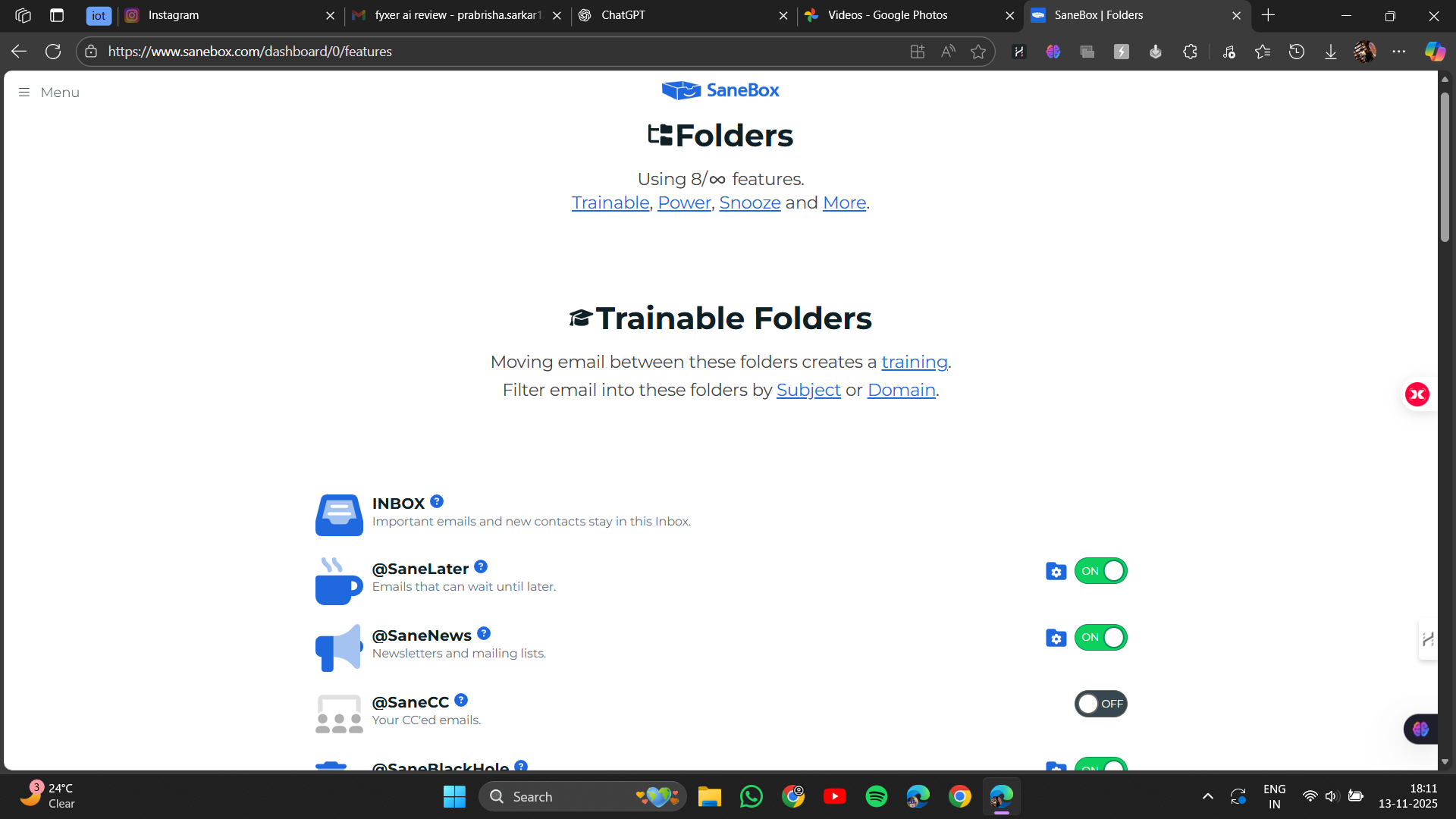
We’re not locked out of the system. SaneBox lets us take control anytime. When we move an email between SaneBox folders – like moving a sender into SaneBlackHole (bye forever!) or into SaneInbox – the AI immediately learns our preference.
This balance between automation and control is exactly what makes it feel trustworthy. It adapts, but it always listens.
Verdict: Smart, flexible, and never intrusive. Score: 8/10
Attachment Management

One of the features that surprised me the most is SaneAttachments. Instead of letting attachments clog up our storage, SaneBox automatically sends them to our connected cloud storage – Dropbox, Google Drive, or others – and leaves a neat link inside the email.
Inbox loads faster. Storage limits stretch further. And we don’t have to search through messy threads for files.
This is one of those features that we don’t realize is brilliant until we use it.
Verdict: Saves space, saves time, and works flawlessly. Score: 9/10
Deep Clean – decluttering years of email buildup

Deep Clean is exactly what it sounds like: a giant vacuum for our inbox history. SaneBox groups old emails, newsletters, promos, and forgotten threads so we can archive or delete thousands of emails in minutes.
I ran it once and found emails from college that I didn’t even know still existed. With a few clicks, they’re gone or archived neatly.
It feels like cleaning out a digital attic, oddly satisfying.
Verdict: Perfect for hoarders and people who haven’t cleaned their inbox since 2015. Score: 8/10
Performance – does everything feel faster?
Despite all its background processing, SaneBox doesn’t slow down our inbox. Incoming messages get sorted almost instantly. Reminders trigger right on schedule. Attachments upload quietly without lag.
Because it doesn’t replace our email app, it feels like a lightweight upgrade rather than a heavy system.
Verdict: Smooth, fast, and steady – no delays in daily use. Score: 8.5/10
Privacy – the question everyone asks
When we give anything access to our email, we worry. SaneBox handles that concern fairly well.
They don’t read our email. They don’t store bodies of messages. They work mainly with metadata – sender, subject line, and basic routing details. Attachments and sensitive details remain in our email provider’s storage, not in SaneBox’s system.
We can revoke access anytime, and their privacy policy is surprisingly transparent.
Still, privacy is a personal comfort level. If one handles legal or medical emails, they might want to read their security page closely before deciding.
Verdict: Transparent, metadata-only approach, and feels trustworthy enough for most people. Score: 8/10
Pricing – worth it for the time saved
For a tool that clears up so much mess, SaneBox’s price is actually more affordable than I had anticipated. They offer three basic plans: the Snack plan, which costs roughly $4.13 per month for one inbox, the Lunch plan, which costs roughly $7.04 per month for two inboxes, and the Dinner plan, which costs roughly $20.79 per month for four inboxes. The names are adorable, the structure is simple, and the 14-day free trial makes it simple to determine what level we actually need before committing. The price seems reasonable and not at all excessive given the total amount of time and intellectual clarity it restores. Conclusion: reasonable prices with adaptable choices. Rating: 7.5 out of 10.
Final Verdict – does SaneBox live up to the hype?
For me: absolutely, yes.SaneBox does exactly what it promises – clears clutter, highlights important emails, remembers things for us, and turns our inbox into a much calmer place. It blends into our current email setup so well that after a while, we forget it’s even there… until we realize we’re no longer drowning in newsletters and missed replies.
Overall Score: 8.4/10
Frequently Asked Questions
SaneBox is an AI-powered tool that organizes your inbox by filtering low-priority emails into separate folders, leaving only important messages in your main inbox. It integrates seamlessly with existing email clients like Gmail and Outlook, working quietly in the background to sort and manage emails based on learned preferences.
SaneBox’s email sorting feature, particularly SaneLater, is impressively accurate. It quickly learns user preferences and makes very few errors. Users can easily correct misclassifications, which further trains the AI to improve its accuracy.
Yes, SaneBox offers a 14-day free trial. This allows users to test out the service and determine which plan best suits their needs before committing to a paid subscription.
SaneBox takes privacy seriously by primarily working with metadata such as sender information and subject lines, rather than storing the content of emails. Attachments and sensitive details remain within the user’s email provider’s storage. Users can revoke access at any time, and SaneBox’s privacy policy is transparent.
SaneBox offers three main pricing plans: the Snack plan at approximately $4.13 per month for one inbox, the Lunch plan at roughly $7.04 per month for two inboxes, and the Dinner plan at around $20.79 per month for four inboxes. Each plan is designed to cater to different user needs and budgets.
Yes, SaneBox includes a feature for tracking replies and setting reminders. It can notify users if a reply is not received within a specified time frame, helping to manage follow-ups and reducing the chance of missing important responses.
No, SaneBox does not slow down email performance. Despite its background processing, it operates smoothly and quickly. Emails are sorted almost instantly, and reminders are triggered on schedule without any noticeable lag.
Abonneer je op onze nieuwsbrief en ben als eerste op de hoogte van tijd- en geldbesparende AI-tools!
Comments