Is it worth the $12 per month?
Email is essential, but it is also exhausting. It is still the main way we communicate professionally, yet for most people it is also a constant stream of distraction. Newsletters, promotions, reminders, and messages that could have been a single line all compete for attention in the same inbox.
That is where Shortwave comes in.
Shortwave was built by a team of former Google engineers with one clear mission: bring more overview, speed, and calm to Gmail. It does not try to reinvent the wheel; it adds a smarter layer on top of the inbox people already use. The question is whether that layer genuinely helps, or simply adds another interface to manage.
In this review I look closely at what Shortwave does well, where it falls short, and above all whether it helps you get a real grip on your inbox. I tested the web app and the mobile apps alongside my normal Gmail account, in everyday situations rather than in a demo account.
I cover six areas that shape the experience: inbox organisation, unsubscribing from newsletters, search, replies, composing emails, and scheduling. I also look at the interface, performance, pricing, and privacy, because those determine whether Shortwave is worth switching to.
I used Shortwave for several days next to my regular Gmail account to see how it performs in daily use. Below you can read my experiences, from installation and ease of use to the features that ultimately matter.
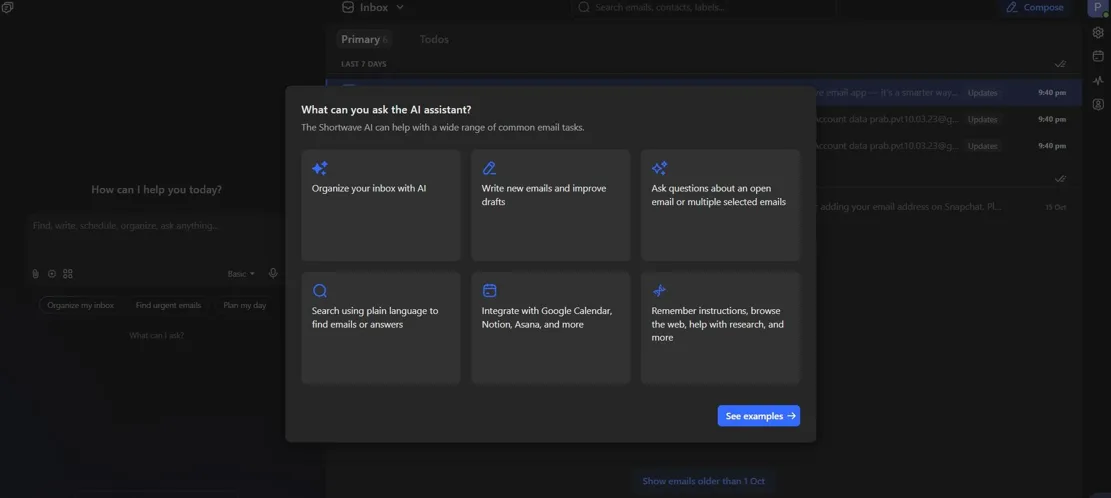
What is Shortwave?
Shortwave is a Gmail client that works directly on top of your Google account. It does not replace Gmail; your messages stay in Gmail while Shortwave adds extra layers such as AI features and a calmer interface. That means there is no migration and no second mailbox to maintain, which is a major advantage over standalone email apps.
Shortwave is available on the web, iOS, and Android and syncs smoothly between devices. Because it works exclusively with Gmail and Google Workspace, setup is simple: sign in with your Google account, grant the requested permissions, and start working. There is no lengthy import process and no need to forward mail from another provider.
The team behind Shortwave previously worked on Inbox by Gmail, a predecessor to the current Gmail, and that experience shows. As with Inbox, the focus is less on reading every message and more on processing mail efficiently. Shortwave is designed around triage, batching, and getting to inbox zero without losing important conversations.
The user interface
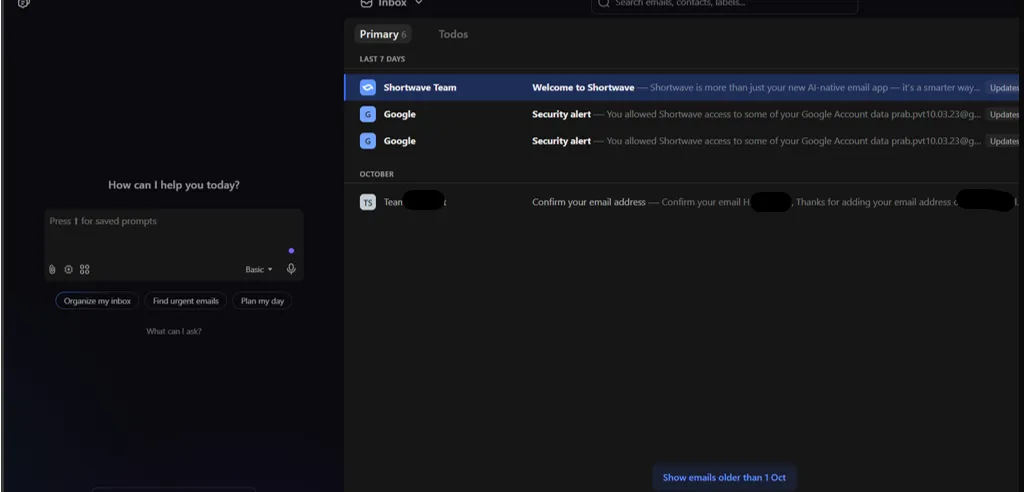
Before you even explore the features, one thing stands out: the interface. That matters, because this is exactly where Shortwave distinguishes itself from Gmail. The first impression is one of space and calm rather than feature overload.
Where Gmail quickly feels busy and crowded, Shortwave looks quiet and minimalist. Messages are grouped neatly, there is plenty of white space, and the colour accents are subtle. The overall effect is clear and pleasant, even in a crowded inbox.
The layout follows modern productivity tools, with a strong emphasis on flow and clarity. Actions such as Pin, Done, and Snooze are placed logically and are immediately recognisable. The navigation is consistent, so you do not have to relearn basic actions on every screen.
The mobile apps work in roughly the same way, although the web version feels the most polished. The Android app works fine, but can feel a little slow with very large inboxes. That is why I mostly used the web version during testing; it is faster and makes better use of the available screen space.
1. Organising your inbox
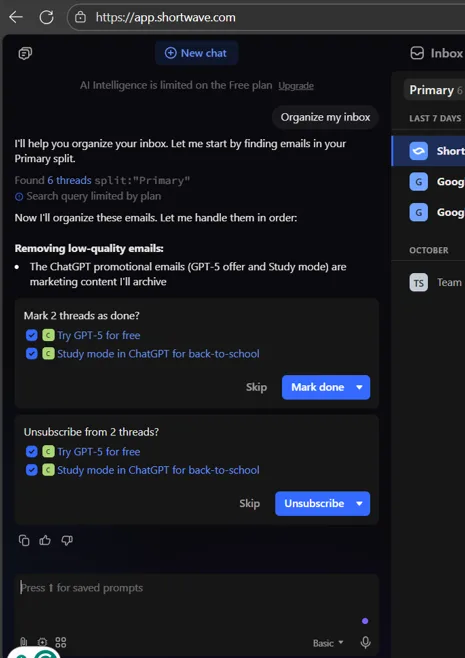
This is without doubt Shortwave’s strongest feature. Incoming mail is automatically bundled into categories such as Personal, Updates, Promotions, and Newsletters. In my inbox that worked surprisingly well, with very few important messages ending up in the wrong bundle. The result is an inbox that feels smaller and easier to scan.
A nice touch is the timing feature, which lets you choose when certain bundles arrive. You can, for example, have newsletters delivered only in the evening and promotions at the end of the day, so they do not interrupt focused work. This is a simple idea, but it changes how the inbox feels.
There is also a Done button as an alternative to archiving. It works surprisingly well and makes email feel more like a checklist and less like an endless pile of messages that never seems to shrink. The difference is psychological, but that is often exactly what an inbox needs.
Score 9/10: Shortwave’s inbox organiser is a strong feature that brings real calm and order to your inbox. It is the main reason to try the app.
2. Unsubscribing from marketing emails
We often spend more time deleting advertising than reading it. Shortwave handles this smartly. Marketing emails and promotions are recognised automatically and get a clear unsubscribe button next to the message. That turns a tedious chore into a single click.
With one click you can unsubscribe or block the sender entirely. The app also learns from your behaviour: after a while, similar messages are bundled or muted automatically. It is not perfect, but it reduces the daily clutter without requiring a separate cleanup routine.
Another useful option is selecting multiple marketing emails at once and unsubscribing in one go. Gmail still does not support this by default, and anyone who has ever tried to clean up a newsletter habit will appreciate it.
In practice, Shortwave recognised most newsletters and marketing emails. Some senders hide their unsubscribe links, so the occasional message slips through. Over time, however, the amount of mailbox clutter decreases noticeably.
Score: 8.5/10. Practical, effective, and close to indispensable for anyone with a busy inbox.
3. Finding emails
Everyone knows the feeling: you know you received an email, but you cannot remember who sent it or what the subject line was. Shortwave uses AI to make search considerably easier, and it does so without forcing you to learn a complex query language.
Instead of exact keywords, you can type what you mean, such as “emails from HR last week”, “invoices from July”, or “messages where John mentions the budget”. Shortwave understands context and natural language and returns relevant results quickly. Long conversations can even be summarised automatically, so you can see whether you have the right thread before opening it.
The search interface is clean and intelligent. Relevant filters for date, sender, or attachments appear when they are needed, rather than cluttering the screen from the start. That makes the feature approachable for casual users while still being useful for power users.
Performance is good on both desktop and mobile. Very large mailboxes can occasionally stutter, but in normal use the search feels fast and responsive. It is one of the areas where the AI layer adds genuine value rather than novelty.
Score: 9.5/10. Search feels faster, smarter, and more intuitive than in Gmail.
4. Replying to emails
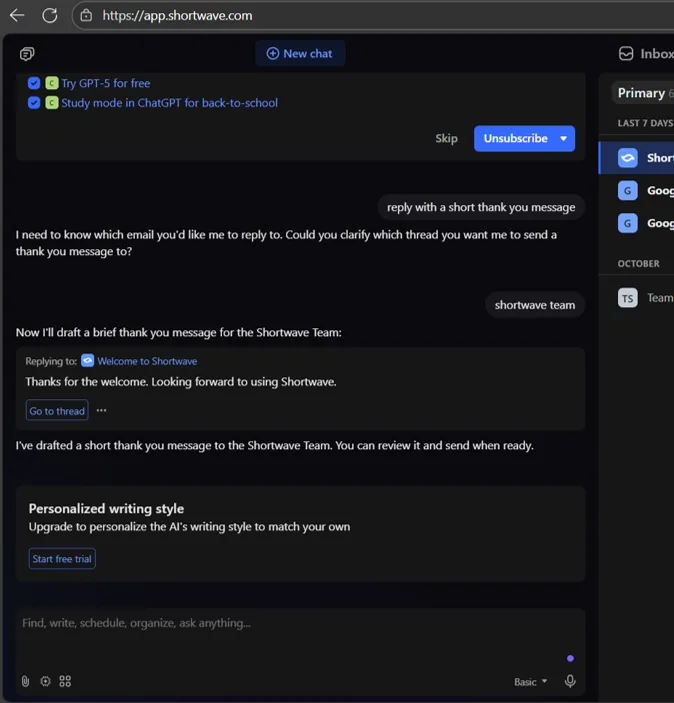
Replying to email takes time and energy. Shortwave helps with context-aware replies and AI-generated drafts. The suggestions are based on the conversation, not just the last message, which makes them more useful than generic templates.
When you open an email, you get short suggestions such as “Thanks for the update” or “Sounds good”. For longer replies, you can generate a response based on the whole thread. You can then adjust the tone with simple instructions such as “a bit more formal” or “keep it light”.
In many cases the AI gets surprisingly close to the right tone. Even so, proofreading remains important. Simple project updates worked well; complex negotiations still needed substantial editing before I was comfortable sending them.
Score: 8/10. Ideal for everyday communication, less suitable for long emails with a lot of context.
5. Composing emails
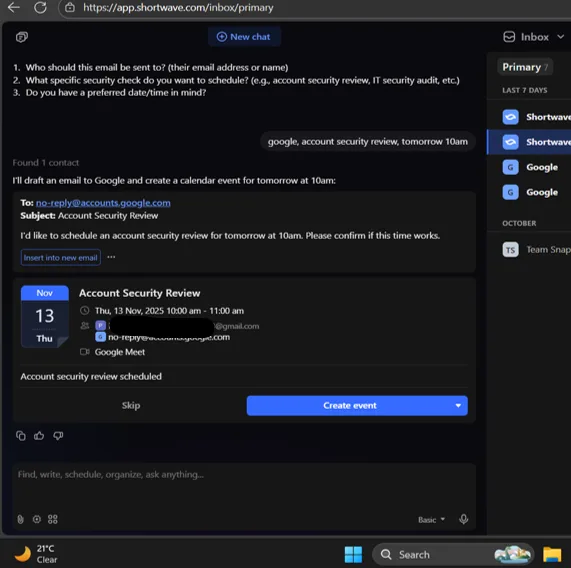
Writing an email in Shortwave works well. The compose window is minimalist, so you are not easily distracted. There are no overcrowded toolbars, just your text and a few clear options for formatting, attachments, and scheduling. It feels closer to a writing app than to a traditional email client.
AI can also help when you start from scratch. With a short prompt such as “write an introduction email for a new client”, you get a clean first version that you can edit. The output is not always perfect, but it is a useful starting point that saves time on routine messages.
What stands out most is how subtle everything works. Suggestions appear without getting in the way, and the editor feels light but capable. It is clear that the team thought about the writing experience, not just the inbox.
The only real omission is the lack of advanced templates or canned responses. For heavy users, that would be a valuable addition, especially for support or sales teams that send similar messages every day.
Score: 7.5/10. Pleasant to work with, but there is room for more depth.
6. Scheduling appointments
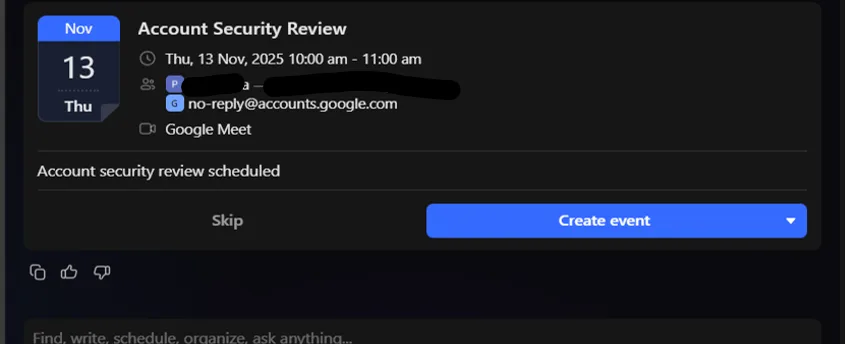
Scheduling appointments often means switching between your inbox and calendar. Shortwave has found a way to reduce that back-and-forth. When a date or time is mentioned in an email, Shortwave recognises it and immediately suggests creating an appointment. With one click you can add it to Google Calendar.
You can also schedule appointments manually while writing or replying, including participants, location, and notes. That keeps the context in one place and avoids the usual copy-paste between tools.
This feature surprised me positively. It saves small but constant interruptions. Sometimes Shortwave misses vague time references such as “later today”, but in most cases it works smoothly.
Score: 8/10. Useful and time-saving, although recognition can still improve.
Performance, price, and privacy
Performance Shortwave feels fast and stable. The web interface is smooth, synchronisation is reliable, and emails load almost instantly. Even with a large inbox, the app remained responsive during my tests.
Price There is a free version with 90 days of search history and limited AI features. The paid subscription costs around $12 per month and offers full search history, unlimited AI, and removes the Shortwave branding. For business users who live in Gmail, that is a reasonable price if the features genuinely save time.
Privacy Shortwave states clearly that email data is not used to train AI models. Everything is processed encrypted through Google’s infrastructure. That is a plus for privacy-conscious users, although businesses should still review the provider’s data processing terms before rolling it out.
Strengths and weaknesses at a glance
Strengths:
- Calm, clear interface
- Smart inbox organisation with bundles
- Strong AI features for search and writing
- Simple unsubscribe flow
- Seamless Gmail integration
Weaknesses:
- Android app is less smooth
- No advanced templates
- AI always needs human review
- Important features sit behind the paywall
Final verdict
Shortwave does not try to reinvent email; it tries to improve it. With a modern interface, intelligent AI, and thoughtful automation, your inbox suddenly feels much more manageable. The focus on processing mail rather than merely reading it is what makes the app stand out.
It is not perfect, but it is clearly on the right track. For professionals who live in Gmail every day and want more calm, Shortwave is a serious upgrade. The main caveat is that the best features require a subscription, so the value depends on how much time you spend in email.
At around $12 per month, this is close to a no-brainer for business Gmail users who want to regain control of their inbox. Try the free version first, then decide whether the paid tier earns its place in your workflow.
Subscribe to our email newsletter to get the latest posts delivered right to your email.
Comments