Conclusion
Fyxer AI presents itself as a robust and practical tool for professionals drowning in emails and meetings. It excels in organizing your inbox, drafting natural-sounding replies, and providing valuable meeting summaries. While it may not be perfect for highly sensitive or complex communications, its integration with existing platforms and thoughtful design make it a standout choice. The pricing might be a bit steep for casual users, but for those who can leverage its full potential, Fyxer AI is a worthwhile investment.
Pros
- Seamlessly integrates with existing email and calendar platforms
- Effectively categorizes emails and drafts natural-sounding replies
- Provides valuable meeting summaries and action items
- Operates discreetly without overwhelming the user
- Strong privacy policies and data encryption
Cons
- Pricing may be high for individual professionals
- Less suitable for sensitive or complex email responses
- Document chatbot can be somewhat basic
Table of Contents
- What Is Fyxer AI?
- User Interface
- Email Categorization
- Replying to Emails
- Creating Events
- Recording Meetings & Transcribing Notes
- Document Uploads & AI Chatbot
- Performance
- Pricing
- Privacy
- Final Verdict: A Practical, Helpful AI Assistant That’s Actually Useful
- Frequently Asked Questions
Email used to be a tool, but over time it became a burden. Between the messages we need to respond to, the ones we need to read, the ones we should’ve read three days ago, the newsletters we don’t remember signing up for, and the meeting invites that multiply by themselves – it’s no surprise that many of us open our laptops already feeling overwhelmed.
Of the more recent tools that promises to tidy up the mess is Fyxer AI. It presents itself as an AI-powered virtual assistant that operates in the background within Gmail or Outlook, organizing inboxes, helping with replies, scheduling events, joining meetings to take notes, and even answering questions about uploaded documents. It essentially promises to free up an hour each day. A bold claim.
I tested Fyxer AI in my daily routine — nothing out of the ordinary, just my regular emails and meetings — and in this review, I’ll share my experience. What worked well, what showed promise, and what still requires improvement.
What Is Fyxer AI?
Fyxer AI is a personal AI assistant designed to integrate with existing calendar and email platforms. It leverages the tools we already use instead of requiring a new platform. After a straightforward setup—logging in with Microsoft or Google and granting permissions—Fyxer quietly starts operating in the background.
This is important, as some AI tools feel like just adding another app to our workload. Fyxer seems to do the opposite: it aims to reduce our workload rather than add more complexity.
1. User Interface
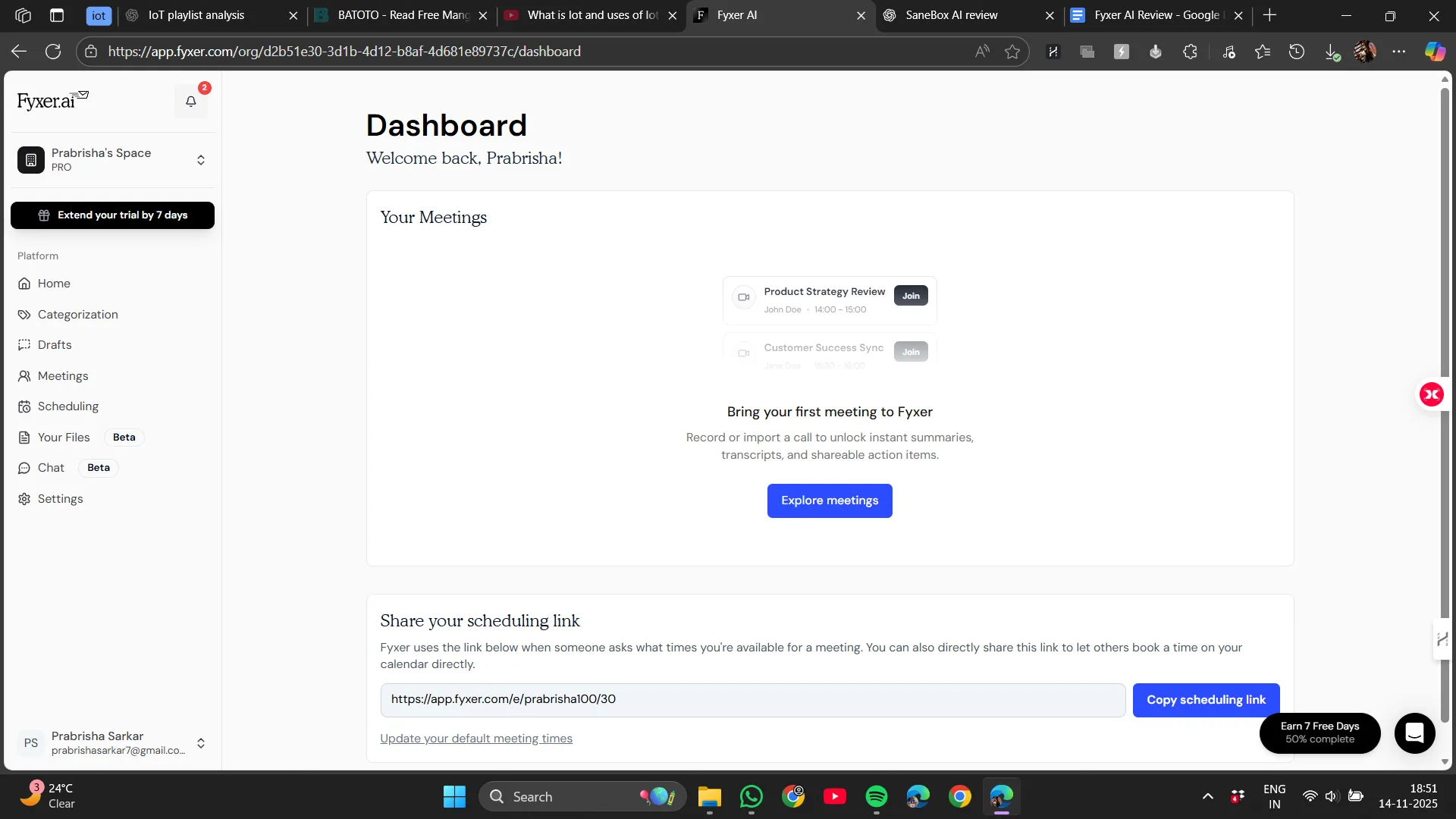
Many productivity tools falter because they attempt to overhaul everything. Fyxer does not. It maintains a clean and simple interface. Its interface integrates seamlessly into our existing inbox rather than creating a separate environment. Fyxer works smoothly over our current email platforms, whether Outlook or Gmail, without making the inbox feel cluttered.
There’s no need to learn a new dashboard or search for features. Suggestions appear where we expect: above an email, next to a meeting invite, or as a discreet categorization label.
The interface felt unobtrusive. It didn’t bother me with pop-ups or unnecessary tips. It was simply present when needed and unobtrusive when not.
The only occasionally less intuitive part was adjusting preferences like categorizing emails as FYI or awaiting reply, but I only needed to do that once.
Verdict: Clean, reassuring, and user-friendly Score: 8/10
2. Email Categorization
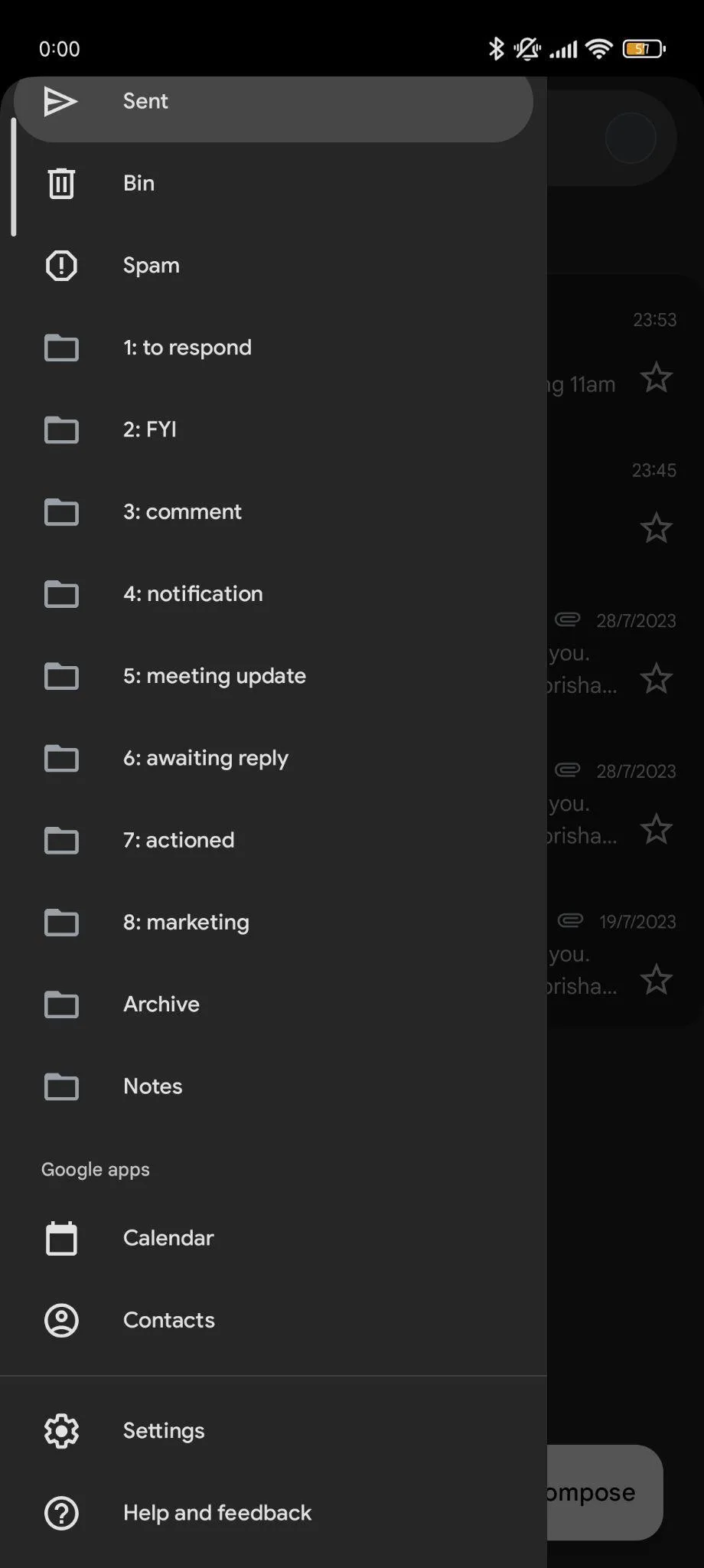
One of Fyxer’s first actions is to reorganize the inbox into meaningful categories, not just folders but actual priorities.
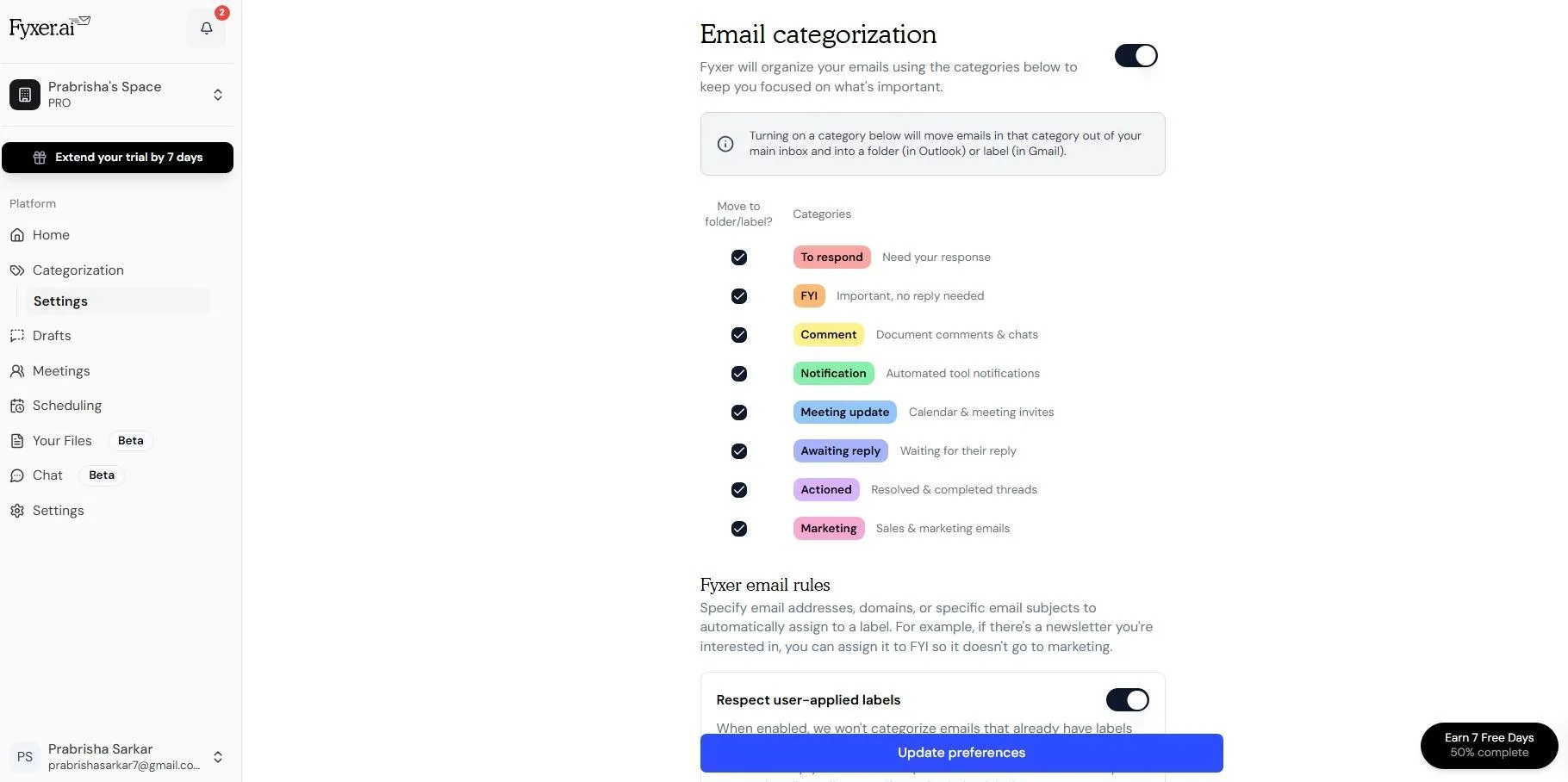
Emails are categorized into:
- To Respond
- FYI
- Meetings
- Newsletters / Marketing
- Low Priority
It may not seem extraordinary at first, but the effect is significant. Beginning the day with a clear ‘to respond’ list rather than a jumble of emails feels much lighter.
Compared to SaneBox’s SaneLater, Fyxer’s categories seem more AI-driven, analyzing content to infer intent rather than relying solely on headers, leading to different decisions.It sometimes captures context SaneBox misses, but can also misclassify complex topics like event planning or contract negotiations that need human oversight. Initially, some corrections will be needed, but these mistakes are fixable and the system learns effectively.
Verdict: Among its most valuable features Score: 9/10
3. Replying to Emails
Fyxer composes emails in our style, referencing our past writing. Replies show above the email thread and can be sent as-is or edited.
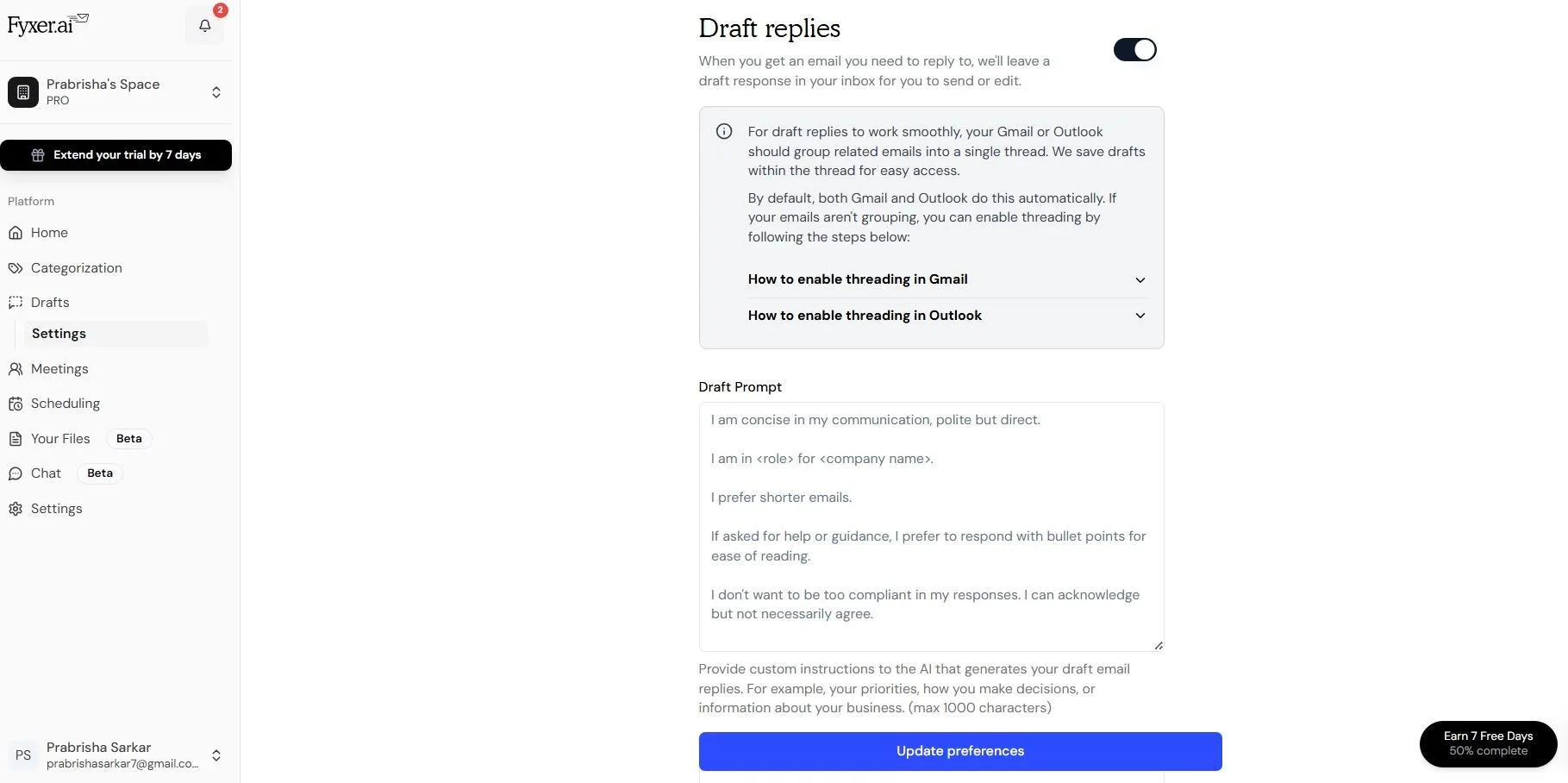
For routine responses, the drafts felt natural—neither robotic nor overly formal. The tone was convincing enough that I sometimes forgot it was AI-generated.
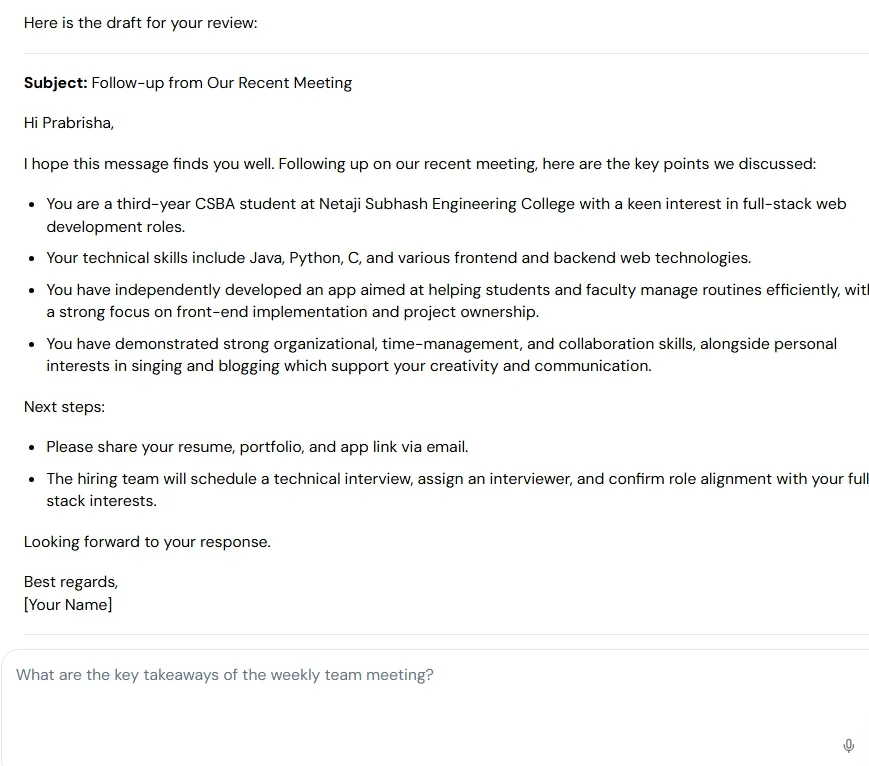
Examples include:
- confirming availability
- acknowledging updates
- sending files
- giving a short status
were handled nicely.
Compared to Shortwave, which offers sharp drafting, Fyxer’s tone felt a bit more human but slightly less cautious about factual accuracy. I’d rely on Fyxer for quick replies, but not for precise legal or financial language without review.
Verdict: Great for routine emails, nothing revolutionary for complex threads Score: 8/10
4. Creating Events
Fyxer not only manages email but also integrates with our calendar, functioning as a scheduling assistant. It suggests meeting times, sends invites, and manages time zones across teams.
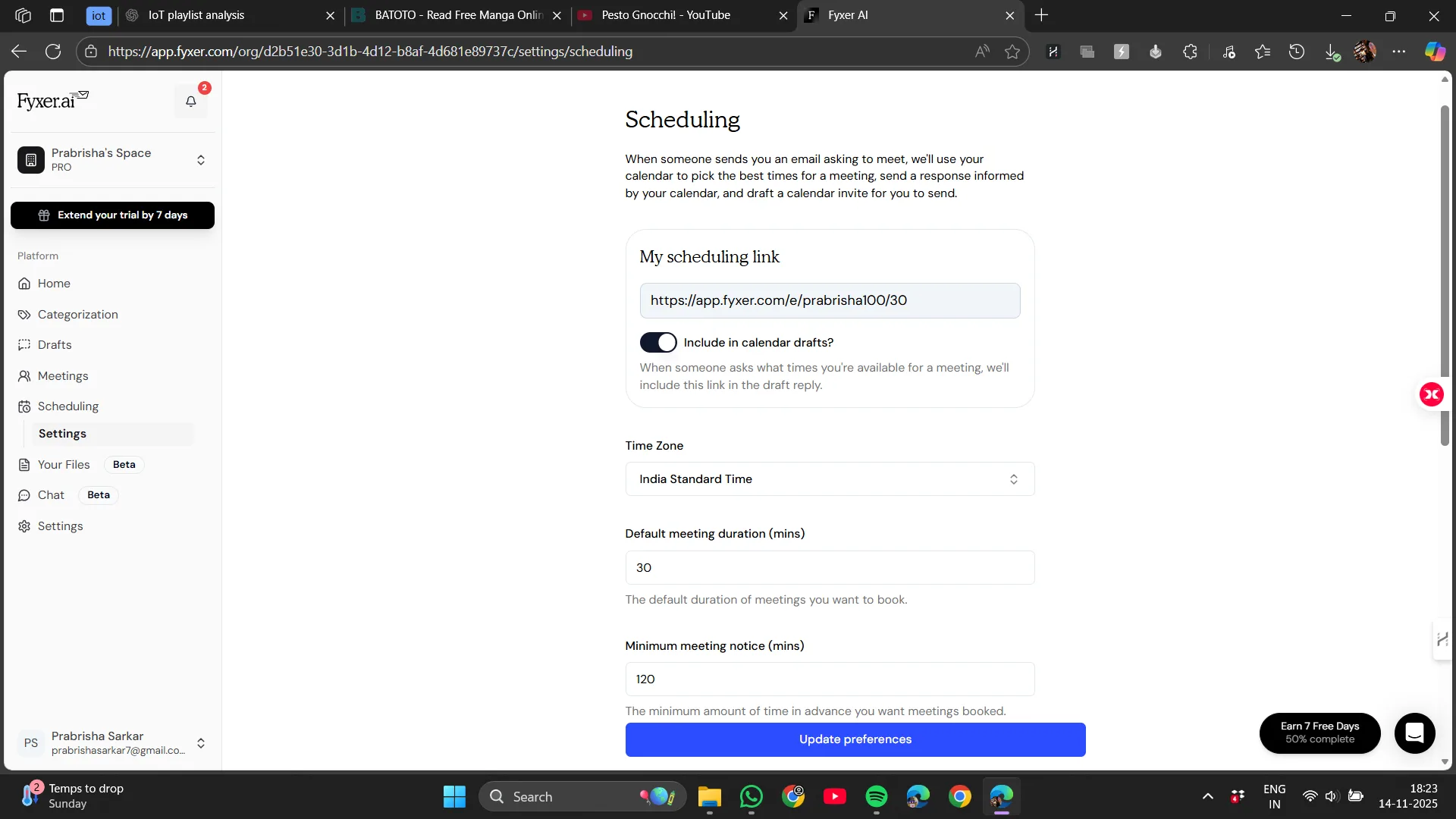
Not having to copy and paste was pleasant. When Fyxer notices that an email is about setting up a meeting, such as when someone says, “Let’s meet next week,” or “Can we talk on Thursday?,” it suggests times for meetings and creates events. In such cases, it offers options to suggest times, set up an event, or send an invite, saving us from manual back-and-forth. “Creating Events” basically means Fyxer takes that meeting intention from the email, helps us pick a time, and then builds the actual calendar invite for everyone involved. It’s not mind-reading. It just reacts when the conversation clearly points toward scheduling.
It’s not a complete scheduling tool like Calendly or Motion. It won’t negotiate times or coordinate busy schedules, but it provides helpful prompts that save small amounts of time, which accumulate.
Verdict: Useful but not life-changing Score: 7.5/10
5. Recording Meetings & Transcribing Notes
This could be where Fyxer truly excels.
Fyxer can also join meetings independently—Google Meet, Zoom, Teams, and others. While not flawless every time, it generally joins, records, and takes notes, then generates:
- A summary
- Key decisions
- Action items
- A follow-up email we can send
All of which arrives shortly after the meeting concludes.
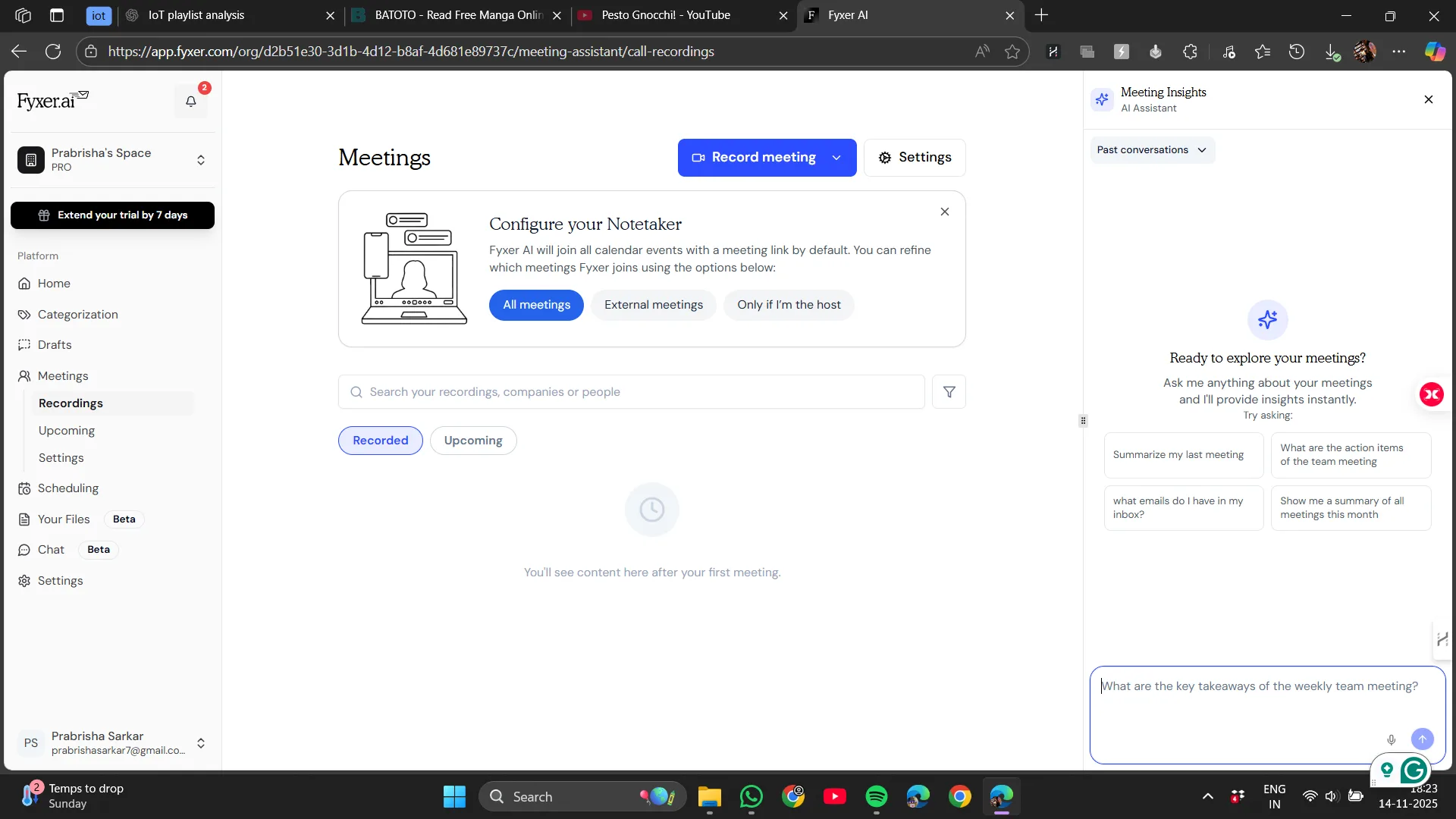
It genuinely felt like having an assistant. Even in casual use, I valued having a clear summary without sifting through handwritten notes or replaying recordings.
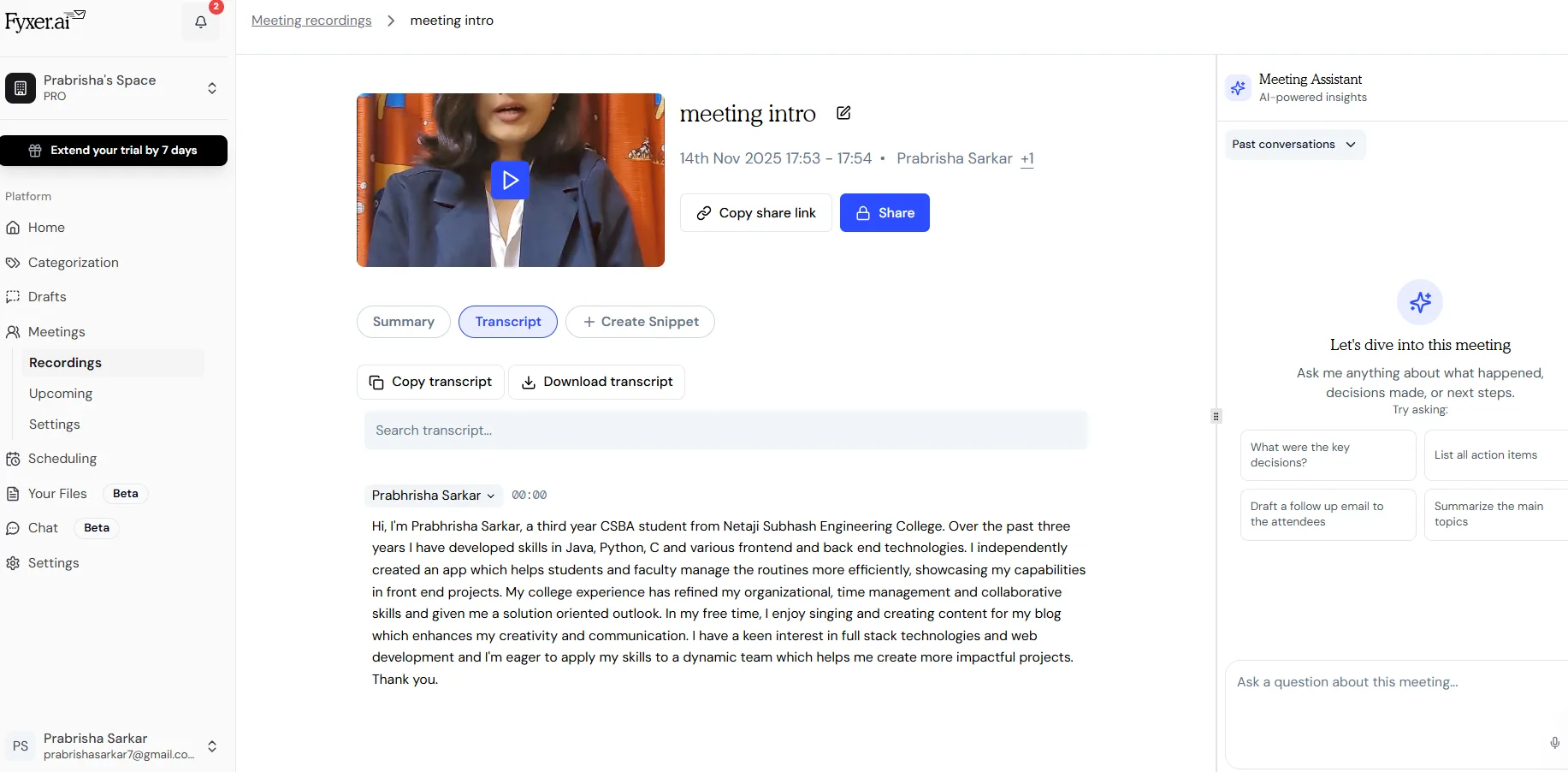
The transcription was quite accurate under normal conditions. When conversations were overlapping or microphones were poor, it struggled a little, which is typical for AI transcription.
Verdict: A truly impressive feature Score: 9/10
6. Document Uploads & AI Chatbot
Fyxer enables document uploads (PDFs, notes, proposals) so the AI can reference them for context. We can then ask the chatbot questions about our inbox, meetings, or files.
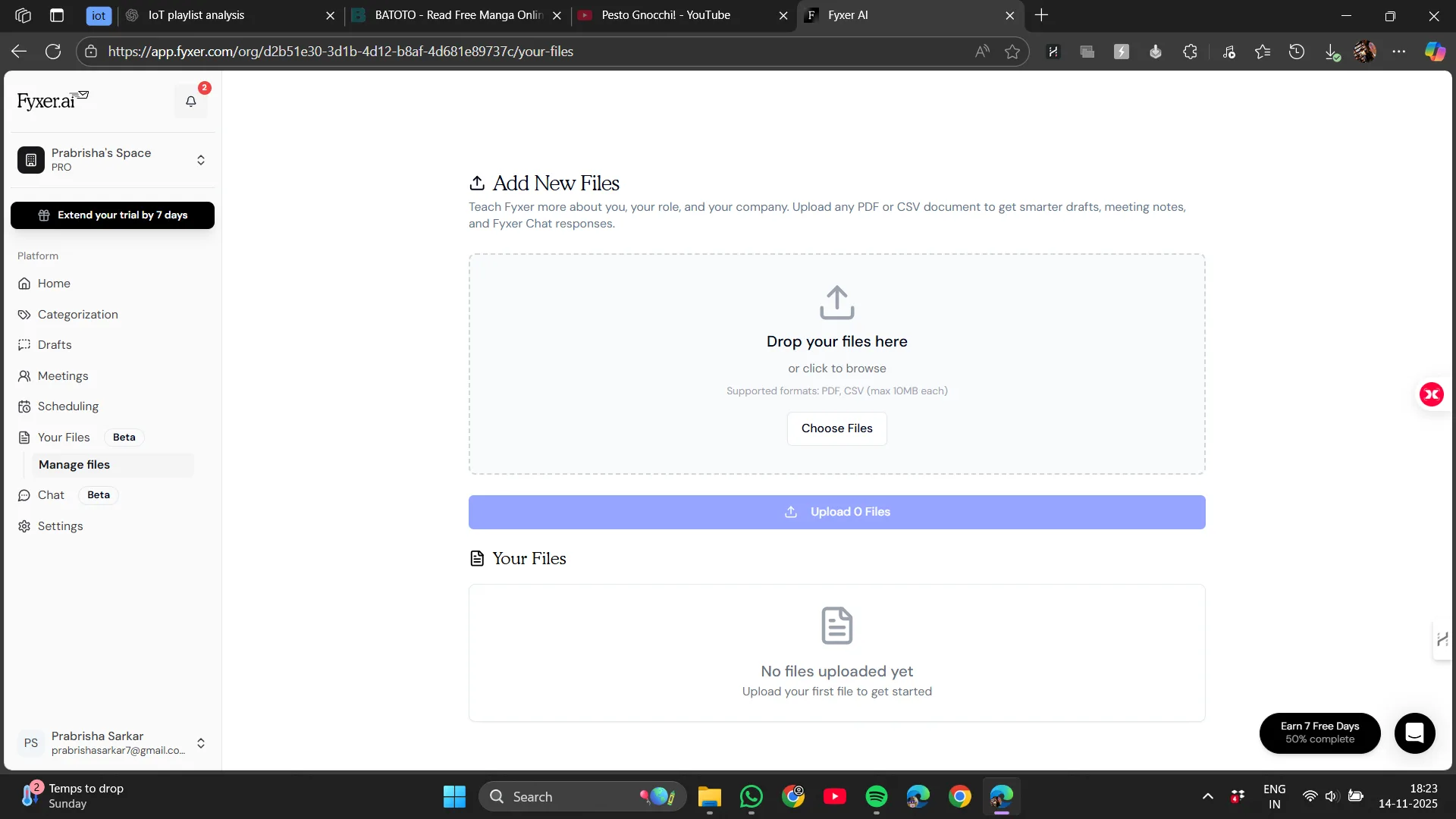
It proved useful for quick clarifications, such as:
- “What did we agree to in that last meeting?”
- “Summarize the project scope from that PDF.”
Fyxer’s PDF upload and summarization are different from just importing a document into ChatGPT. While ChatGPT offers a general overview, it cannot understand context, sender intent, or relevance. Fyxer reads the attachment in context, allowing it to summarize, relate to ongoing conversations, extract key points, and generate responses referencing specific sections.
It’s not flawless; some summaries are surface-level and lack deep cross-referencing. Still, its value lies in speed and context, not detailed analysis. It saves us from opening each attachment manually and helps us focus on what to say or do next, making daily email tasks more efficient.
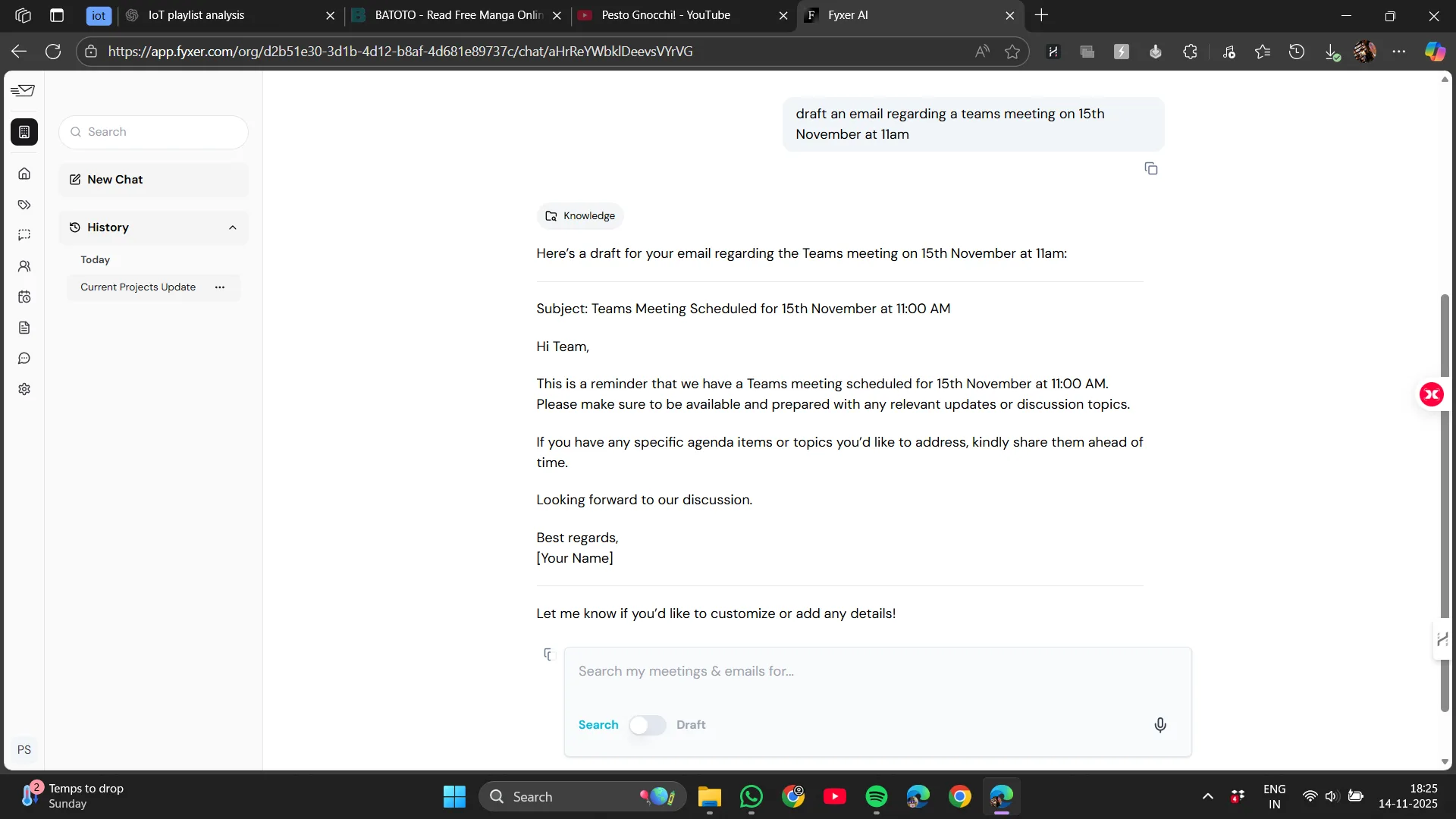
Fyxer Chat is a conversational sidebar allowing us to ask questions like ‘Find the latest invoice from Acme’ or ‘Draft a reschedule request.’ It searches our inbox and meeting notes to respond quickly. When it works, it feels like a magic search-and-reply tool that can find emails, draft responses, and place them in Drafts, but it doesn’t send emails automatically. We still need to click send, which is slightly less convenient but safer.
Search accuracy, especially in cluttered or old inboxes, and the quality of drafts still require human review for nuances and factual correctness. Nonetheless, having a chat interface that understands your inbox and generates usable drafts is highly productive.
Verdict: A feature with significant potential Score: 8/10
Performance
AI tools can sometimes create friction, but Fyxer felt lightweight. Moving between emails, opening drafts, or reviewing notes was smooth—no lag or delays.
Meeting summaries appeared quickly, and categorization updates happened in real time.
On occasion, interactions with the chatbot felt a bit slow, but it did not significantly disrupt workflow.
Verdict: Overall solid performance Score: 8.5/10
Pricing
Fyxer AI is not a cheap tool, but it’s reasonably priced compared to similar services. The Starter plan costs around $30 per user per month (about $22.50/month if billed annually) and connects one inbox and calendar. The Professional tier, supporting multiple inboxes and team features, costs about $50 per user per month, with enterprise options priced higher. They offer a 14-day free trial. For individual professionals, $30/month is a significant expense; for teams, the time savings can easily justify the cost. The limit of one inbox on the basic plan is worth noting if you manage multiple email accounts.
My take
This isn’t a tool to subscribe to casually. However, if you deal with many emails or meetings, the time saved can justify the expense.
Verdict: Fair value, but not an impulse buy Score: 7/10
Privacy
Privacy is a key concern whenever an AI tool accesses emails or joins meetings.
Fyxer clearly states that:
- It does not use our data to train public AI models.
- Our data is encrypted.
- Our data remains within our account unless we explicitly grant access.
These claims are reassuring, especially compared to many consumer AI products.
My perspective
I appreciate the transparency. Still, it’s wise to review policies carefully if handling sensitive data or working in regulated industries. Overall, the privacy approach seems solid for typical business emails.
Verdict: Strong in theory, reasonable in practice Score: 8/10
Final Verdict: A Practical, Helpful AI Assistant That’s Actually Useful
I am genuinely impressed with Fyxer’s scope. It’s more than an email filter — it schedules, summarizes, and drafts in one integrated platform. If your work involves many meetings, scheduling, or you want drafts that sound like you, Fyxer can save hours each week. Unlike SaneBox, which focuses on background inbox cleaning, Fyxer is more proactive and generative. Compared to Shortwave, which is great for Gmail-centric AI writing and quick triage, Fyxer excels in cross-platform calendar integration and meeting note-taking.
A honest critique is that Fyxer requires deeper access to your messages to perform its best, so privacy-minded users should consider this trade-off. Overall, it’s one of the most capable all-in-one AI inbox assistants I’ve tested: feature-rich, human-like in drafts, and effective at automating small, repetitive tasks.
Here’s a quick summary:
Strengths of Fyxer
- Creates a calmer, more organized inbox
- Drafts effective replies that save time
- Joins meetings and provides clear summaries
- Operates discreetly without overwhelming
- Feels dependable and thoughtfully designed
- Integrates seamlessly with current tools
Areas for improvement
- Less suitable for sensitive or complex email responses
- Document chatbot can seem somewhat basic
- Scheduling remains semi-automated
- Pricing might seem high if email and meetings are infrequent
Overall rating: 8.5/10
While not perfect, it is refreshingly practical and among the best AI assistants for professionals.
For those overwhelmed by email and meetings, Fyxer AI is definitely worth exploring.
Frequently Asked Questions
Fyxer AI is an AI-powered virtual assistant that integrates with Gmail or Outlook to organize inboxes, assist with email replies, schedule events, join meetings to take notes, and answer questions about uploaded documents. It operates in the background after a straightforward setup, aiming to reduce workload rather than add complexity.
Fyxer AI reorganizes the inbox into meaningful categories such as To Respond, FYI, Meetings, Newsletters / Marketing, and Low Priority. It uses AI to analyze content and infer intent, which can be more accurate than tools relying solely on headers. Some initial corrections may be needed, but the system learns effectively over time.
Yes, Fyxer AI can join meetings on platforms like Google Meet, Zoom, and Teams. It records the meetings, takes notes, and generates a summary, key decisions, action items, and a follow-up email. The transcription is quite accurate under normal conditions but may struggle with overlapping conversations or poor microphones.
Fyxer AI allows users to upload documents like PDFs, notes, and proposals. The AI can then reference these documents to provide context and answer questions about the inbox, meetings, or files. This feature is useful for quick clarifications and summaries, although some summaries may be surface-level and lack deep cross-referencing.
Fyxer AI is not cheap, with the Starter plan costing around $30 per user per month. However, for professionals dealing with many emails and meetings, the time saved can justify the expense. It offers a 14-day free trial, allowing users to test its features before committing.
Fyxer AI states that it does not use user data to train public AI models, encrypts data, and keeps data within the user’s account unless explicit access is granted. While these claims are reassuring, users handling sensitive data or working in regulated industries should review the privacy policies carefully.
Compared to tools like SaneBox and Shortwave, Fyxer AI offers more proactive and generative features. It excels in cross-platform calendar integration and meeting note-taking, making it one of the most capable all-in-one AI inbox assistants. However, it may be less suitable for sensitive or complex email responses.
Subscribe to our email newsletter to get the latest posts delivered right to your email.
Comments