Conclusion
GravityWrite stands out as a robust and reliable tool for serious writers and content creators. Its extensive range of features, particularly for long-form and SEO-focused writing, delivers consistent and high-quality output. While the free plan is quite restrictive and may feel overwhelming at first, the tool’s performance and structured workflows make it a valuable asset for those willing to invest in a subscription. It’s not perfect, but it certainly excels in providing dependable writing assistance.
Pros
- Offers a vast array of tools for various content formats
- Provides consistent and high-quality writing output
- Structured workflows enhance productivity
- Powerful search function and well-organized dashboard
- Transparent privacy and data handling policies
Cons
- Free plan is very restrictive
- Initial dashboard experience can be overwhelming
- Paywall appears early for serious work
Table of Contents
- Introduction
- First Impression & Dashboard Experience
- Core Features
- Performance & Output Reliability
- Pricing Breakdown
- Privacy & Data Handling
- Final Verdict
- Frequently Asked Questions
Introduction
I went into GravityWrite knowing one thing very clearly, this tool is extensive.. Not just feature-rich, but genuinely packed with functions in a way that already sets a certain expectation. I didn’t open it thinking I’d test everything, because that would honestly be unrealistic. Instead, I focused on how it feels to use and whether the writing-related parts actually hold up when put under a bit of pressure.
After going through the dashboard, the workflows, and the way tools are structured, I got a pretty solid idea of where GravityWrite fits and where it might feel overwhelming.
Who GravityWrite is best suited for
- People working across multiple content formats who prefer an all-in-one tool
- Writers needing SEO titles, meta descriptions, long-form blogs, and structured outlines in one platform
- Users who prefer guided workflows over starting from a blank page
- Anyone willing to familiarize themselves with the interface for quicker results
- Teams or individuals intending to subscribe rather than relying on free usage
Who it’s not ideal for
- People seeking a minimal, distraction-free writing environment
- Users expecting unlimited long-form writing on the free plan
- Those only needing quick sentence rewrites or grammar corrections
- Anyone overwhelmed by numerous options on a single screen
It’s clearly designed with a specific user base in mind, which makes its purpose more understandable.
First Impression & Dashboard Experience
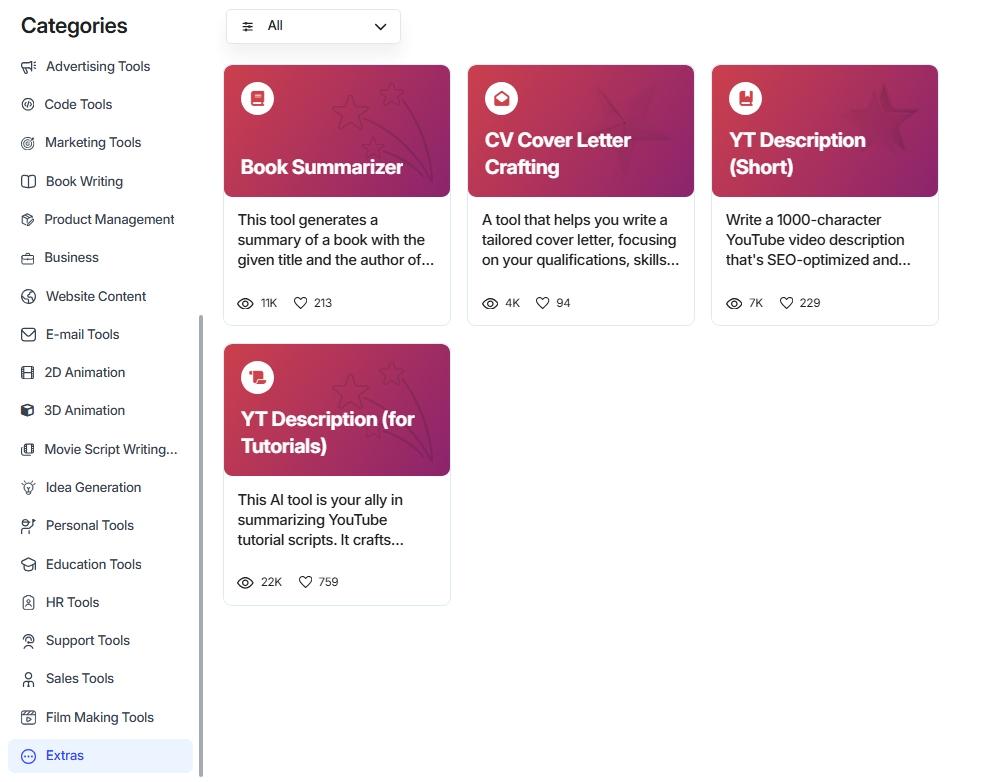
The dashboard is… quite extensive. Not negatively, but it initially feels quite overwhelming. The moment everything loads, I’m looking at rows of tools spanning categories such as SEO, blogs, social media, advertising, business, HR, and even animation and image prompts. It seems almost endless. Initially, it can be overwhelming, requiring a moment to absorb everything.
However, the structure is what makes it manageable. Categories are well-defined, nothing appears misplaced, and the apparent chaos seems deliberate. The search function is quite powerful, especially when scrolling isn’t feasible.

The user interface is sleek and modern, without overdoing it. Color-coded cards organize tools effectively, even if it feels busy at times, which is better than hidden menus. Pro features are distinctly marked, reducing unnecessary clicks and frustration.
Overall, it’s designed for power users: not minimalistic or cozy, but robust and dependable. Once past the initial overload, it begins to resemble a workspace capable of handling extensive tasks.
Rating: 7.8 out of 10
Core Features
GravityWrite genuinely offers a vast array of tools. Opening the dashboard the first time already makes that clear. There are tools for almost everything, writing, SEO, emails, ads, scripts, even things I would never personally touch. Therefore, I was selective about what I chose to test. I aimed to avoid superficial clicking. So I focused only on writing related tools, and within that, only those relevant to long-form or semi-long-form writing.


I tested fewer tools, but I tested them properly.
SEO titles and meta descriptions
This was the easiest place to start and also one of the easiest places to spot bad AI output. I gave GravityWrite a main keyword and also tried once with just a rough blog title. In both cases, it generated multiple suggestions for titles and meta descriptions, usually around five each.

What stood out was that the suggestions were not just keyword reshuffles. Each title had a slightly different angle, some more click-focused, some more informational. Same with meta descriptions, they were concise but not robotic.
- Titles did not feel stuffed with keywords
- Meta descriptions actually sounded like something a human would write
- Variations felt intentional, not filler
I could see myself using these as a base without rewriting everything from scratch, which is usually not the case with SEO tools.
Score: 8/10
AI Blog writer
This part felt more thought-out than expected. After entering a blog title, GravityWrite does not immediately dump a full article. Instead, it takes you to an outline generation step. That alone already made it feel less rushed than most tools.


The outline was decent initially. Not perfect, but organized. I could tweak a few things, rearrange sections slightly. Many controls such as tone, word count, and stylistic options were behind a paywall, which was frustrating but not entirely restrictive.
- Outline-first flow made the process feel more controlled
- Approval step forced me to actually read the structure
- Option to generate sections one by one felt useful
When I proceeded to generate the full article, the quality remained consistent throughout. It didn’t falter midway, maintaining a stable tone and staying on topic.
Rating: 8.2 out of 10
Humanized blog writer
This feature initially made me skeptical but ultimately impressed me the most. I gave it a title and expected either overly polished nonsense or extremely generic content. Instead, it generated a full blog of roughly 1500 words that felt surprisingly human.
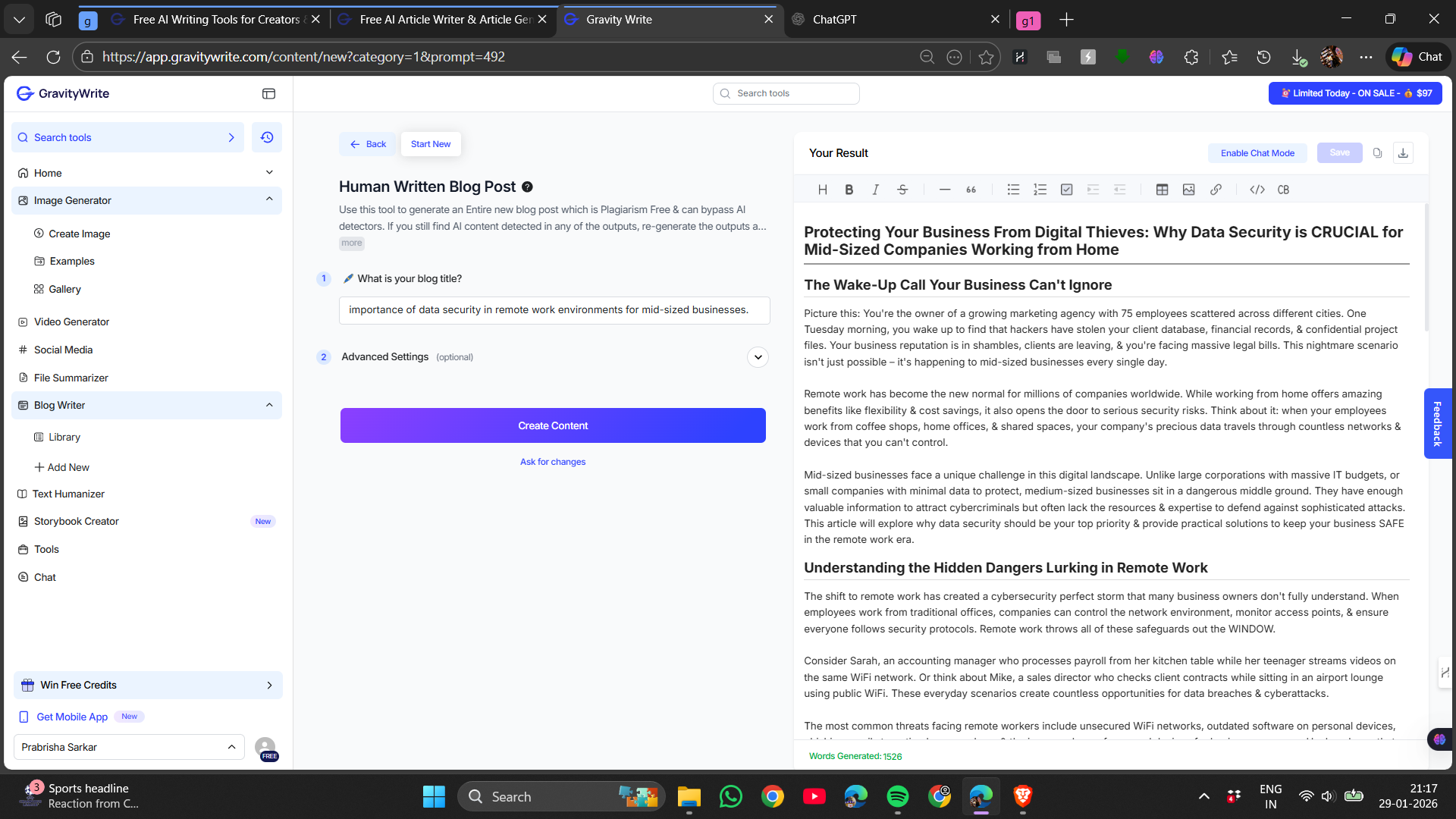
Minor flow issues existed, with some sentences overly long and ideas needing tightening. However, this helped, making it feel more natural than a textbook or marketing copy.
- Content was easily readable and not overly scripted
- No noticeable repetitive patterns
- Editing was optional rather than necessary
This marked the moment GravityWrite transitioned from a mere AI writer to a genuine writing assistant.
The main drawback became evident after producing a single long blog: the free word limit was quickly exhausted. A single blog nearly used up the entire quota, similarly for features like image creation and website tools, which are limited to one use.

This rendered experimentation stressful rather than relaxed.
- Free tier is not friendly for long-form writers
- Limits were reached sooner than expected
- A strong encouragement to upgrade
That said, because the output quality was good, the paywall didn’t feel completely unjustified. It felt restrictive, yes, but also logical given what was delivered.
Overall, the features I tested felt dependable. Not flashy, not trying too hard. Just consistent. And honestly, that consistent quality mattered more than access to hundreds of seldom-used tools.
Score: 9/10
Performance & Output Reliability
After trying various writing tools within GravityWrite, one thing quickly became apparent. Performance is steady. Not flawless, but reliable enough for productive work.
There were no abrupt quality drops when switching tools. SEO titles, the standard article generator, and the humanized blog writer all maintained consistent quality. This alone fosters trust. Typically, one feature performs well while others feel incomplete; that was not the case here.
- Writing outputs felt usable, not filler
- No sudden nonsense paragraphs halfway through
- Tone stayed stable across longer content
Most importantly, the output did not resemble low-quality AI-generated content. I could read entire sections comfortably. Editing was still necessary, but it resembled refining a draft rather than fixing a broken piece.
The restriction begins not with the writing quality but with the imposed limits. While the output was reliable, it also created a sense of urgency, knowing one long piece would consume all available resources. That pressure takes away from the experience. GravityWrite is dependable when ample space is available; it becomes restrictive when constantly monitoring usage hampers focus.
Pricing Breakdown
The pricing model reveals much about the intended use of GravityWrite. The free plan serves more as a preview than a fully functional workspace.


Free plan
The free plan lets me test things, not build things.
- One long blog can exhaust the limit
- About 1000 words for blogs
- One image generation
- One website generation
- Many controls locked
It provides a sense of quality but isn’t sufficient for ongoing use.
Plus plan
The Plus plan is mid-tier, suited for moderate use.
- Around $19 per month
- Higher word limits and credits
- Access to more writing controls
- Better flexibility for regular content
This plan is suitable if writing is occasional but still significant.
Pro plan
The Pro plan is where GravityWrite truly becomes a long-term solution.
- Around $79 per month
- Much higher credit limits
- Access to all writing tools and customization
- Ideal for frequent long-form content
Yearly billing reduces the monthly cost a bit, but it’s still an investment.
The pricing aligns with serious use; it’s less suitable for casual testing. It’s priced appropriately given its capabilities.
Privacy & Data Handling
I reviewed GravityWrite’s privacy settings carefully, given its broad scope. Writing, SEO, images, even YouTube workflows. That always makes me a little cautious.
GravityWrite is operated by Website Learners Private Limited, based in Chennai, India. Using the platform automatically means agreeing to their terms and privacy rules, which is expected but still worth being aware of.
They gather typical account-related information.
- Profile and account information
- Content I generate or upload
- Communications inside the platform
- Billing and payment details through third party processors
- Usage and metadata
Google OAuth is used solely when I choose to connect it. Access is limited to basic profile or channel permissions and uploads. Tokens are revocable at any time, and uploaded videos are not stored permanently, which was reassuring.
Third-party AI services are integrated, and GravityWrite clearly states users should verify outputs for accuracy, plagiarism, or legal concerns. It’s explicitly stated that Google data isn’t used to train generalized AI models, which I appreciated.
Data remains linked to an active account and is deleted upon account removal. Security measures are described as adequate, not flawless, which felt honest. Users retain rights to their content, while GravityWrite owns the platform.
Overall, the privacy approach feels practical and transparent. Nothing felt hidden, and expectations are set clearly.
GravityWrite vs Rytr
|
Aspect |
GravityWrite |
Rytr |
|
Core focus |
Long-form writing, SEO blogs, Multiple functions |
Short-form writing and general AI assistant use |
|
Writing quality |
Surprisingly strong, readable, not obvious AI |
Repetitive at times, AI tone shows up quickly |
|
SEO support |
Built-in SEO titles, meta descriptions, blog workflows |
No real SEO or SERP analysis |
|
Output reliability |
Consistent across tools I tested |
Inconsistent once prompts get longer |
|
Creative flexibility |
Huge, and with consistent good quality |
More creative options, but quality drops |
|
Free tier limits |
Very tight, 1000 words for blogs |
Very tight, daily and monthly character caps |
|
Starting price |
Around $19/month (Plus plan) |
Around $9/month (Saver plan) |
|
Best suited for |
Bloggers, content marketers, SEO writers |
Casual users, short copy, quick ideas |
Among the two, GravityWrite clearly comes out on top for me. Trust was the key factor, not the sheer number of tools. GravityWrite provided drafts that I could read, modify, and publish confidently. Rytr felt more suited for small tasks. Useful occasionally, but not reliable for serious writing.
Rytr tries to do a lot, but the output starts feeling thin once I push it beyond quick snippets. GravityWrite, even with its strict limits, showed me what it’s capable of. Its writing felt more grounded, deliberate, and genuinely respectful of the reader.
For prioritizing writing quality over speed or cost, I would choose GravityWrite.
Final Verdict
GravityWrite genuinely surprised me. I anticipated a jack-of-all-trades tool that would lack depth, but that wasn’t the case. That wasn’t the case here. The quality of writing, particularly for long-form and humanized blogs, proved to be dependable and clear. I wasn’t fighting the output or deleting everything it gave me. Most of the time, I was simply refining the output.
The main limitation isn’t the writing itself, but the imposed restrictions. The free plan depletes quickly, and the paywall appears early when attempting serious work. Nevertheless, beyond those limits, the tool feels robust and thoughtfully designed.
It’s not flawless, nor suited for casual exploration. However, for those seeking practical writing and structured workflows, it performs well.
Overall rating: 8.5 out of 10
Frequently Asked Questions
GravityWrite is best suited for people working across multiple content formats who prefer an all-in-one tool. It is ideal for writers needing SEO titles, meta descriptions, long-form blogs, and structured outlines in one platform. It is designed for users who prefer guided workflows over starting from a blank page and teams or individuals intending to subscribe rather than relying on free usage.
People seeking a minimal, distraction-free writing environment should avoid GravityWrite. It is also not ideal for users expecting unlimited long-form writing on the free plan, those only needing quick sentence rewrites or grammar corrections, and anyone overwhelmed by numerous options on a single screen.
GravityWrite’s dashboard is extensive and initially feels overwhelming due to the vast array of tools. However, the structure is well-defined, and the search function is powerful, making it manageable. The user interface is sleek and modern, designed for power users who need a robust and dependable workspace.
GravityWrite offers a vast array of tools for writing, SEO, emails, ads, scripts, and more. Key features include SEO titles and meta descriptions, AI blog writer with an outline-first flow, and a humanized blog writer that generates surprisingly human-like content. The tool is designed to be consistent and reliable for productive work.
GravityWrite offers a free plan that serves as a preview with limited usage. The Plus plan, around $19 per month, is suited for moderate use with higher word limits and credits. The Pro plan, around $79 per month, is ideal for frequent long-form content creation with much higher credit limits and access to all writing tools and customization.
GravityWrite, operated by Website Learners Private Limited, gathers typical account-related information such as profile details, generated content, communications, and usage data. They use Google OAuth with limited access and do not store uploaded videos permanently. Data is deleted upon account removal, and users retain rights to their content.
GravityWrite comes out on top compared to Rytr due to its reliable writing quality and structured workflows. GravityWrite provides drafts that are readable and usable, making it suitable for serious writing. Rytr, on the other hand, is more suited for small tasks and quick snippets but feels less reliable for longer content.
GravityWrite is a robust and thoughtfully designed tool that offers dependable and clear writing quality, particularly for long-form and humanized blogs. The main limitation is the imposed restrictions on the free plan, but beyond those limits, it performs well for practical writing and structured workflows. It is not flawless but is well-suited for bloggers, content marketers, and SEO writers.
Abonneer je op onze nieuwsbrief en ben als eerste op de hoogte van tijd- en geldbesparende AI-tools!
Comments