Conclusion
Paperpal proves to be a surprisingly robust writing assistant, particularly for professionals who need a reliable tool for editing and refining their work. Its strengths lie in its detailed grammar and language corrections, thorough AI review function, and the uniquely useful Chat PDF feature. While it may not be the most comprehensive tool on the market, lacking features like an AI humanizer and having tight restrictions on its free plan, it excels in its core functionalities. The privacy protections and affordable pricing make it a strong contender in its category, especially for those handling sensitive documents.
Pros
- Detailed grammar and language corrections
- Thorough AI review function for long documents
- Useful Chat PDF feature
- Strong privacy protections and data security
- Affordable pricing
Cons
- Lacks an AI humanizer
- Tight restrictions on the free plan
- Limited feature set compared to some competitors
Table of Contents
- First Impressions and Dashboard Experience
- Main Features
- Performance and Output Reliability
- Pricing Breakdown and Limitations
- Privacy and Data Handling
- Paperpal vs QuillBot vs Grammarly
- Final Verdict and Overall Score
- Frequently Asked Questions
I initially approached Paperpal with modest expectations. Its name is less prominent compared to Grammarly or QuillBot in discussions about writing tools, and at first glance, the interface seemed tailored to a more specific audience. However, as I used it more, I began to appreciate its strengths. While it isn’t the most comprehensive tool and lacks some features I would like, its core strengths are well implemented.
Paperpal is ideal for professionals who frequently produce written content and seek a dependable assistant for editing, refining, and organizing their work. Report writers, content managers, communication specialists, academics, and those handling substantial formal documents will find its core features especially useful. It also benefits those working with lengthy documents who want to analyze source material via the Chat PDF feature without switching contexts.
However, it is not suitable for users seeking an all-in-one platform with content creation, humanization, SEO, or creative writing tools. The absence of an AI humanizer is a notable gap, and its content generation capabilities are somewhat restricted. For those prioritizing AI detection evasion, Paperpal may not be the best choice.
First Impressions and Dashboard Experience
My first impression of Paperpal was its restrained, minimalist design. The editor opens smoothly, offering a spacious, clutter-free writing space, with a compact sidebar on the right for tools. Nothing is overly flashy or distracting. Its calm color palette of white and blue, along with straightforward navigation, helped me get familiar quickly without guidance.
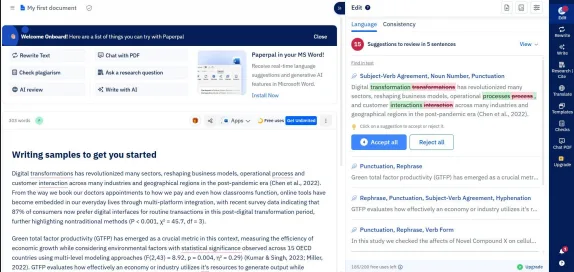
I appreciated that it opens directly into a document workspace instead of a cluttered dashboard with feature tiles. Upon opening, I was immediately in a writing environment—an ideal approach for a tool focused on editing. The left side displays a clean document editor, while the right sidebar provides quick access to core functions via icon tabs: Edit, Rewrite, Write, Research/Cite, Translate, Templates, Checks, Chat PDF, and Upgrade. All features are accessible within a click, maintaining a clutter-free experience.
The feature set is intentionally limited, which I consider a wise choice. Instead of overloading with features, Paperpal has focused on a streamlined set of tools centered on editing and writing. Having tested tools like Undetectable AI with over 40 features, I found this restrained approach quite refreshing.
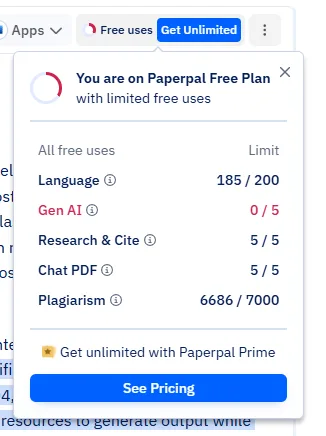
A point to note is that the limitations of the free plan become quite apparent rather quickly. The usage tracker shows remaining allowances per feature, revealing the free plan’s limits—though these are generally lenient, except maybe for Chat PDF. Further details are available in the pricing section.
Main Features
Grammar and Language Correction
This core feature is quite robust. After pasting a sample paragraph, Paperpal generated 15 suggestions spanning five sentences, addressing issues like subject-verb agreement, noun plurality, punctuation, hyphenation, and phrasing improvements. Suggestions are well-categorized, with clear explanations, and can be accepted or rejected individually. While an ‘Accept All’ option exists, I recommend caution, as some rephrasing suggestions are stylistic rather than incorrect.
What stands out about the grammar checker is its ability to go beyond superficial fixes. It detects inconsistencies in compound words, flags ambiguous language, and highlights areas where the writing is correct but structurally fragile. This level of detail makes it more akin to Grammarly than basic grammar checkers, which was a pleasant surprise.
The Edit tab includes a ‘Consistency’ check alongside the ‘Language’ check, examining formatting, terminology, and abbreviation consistency throughout the document. This meticulous feature will be especially valued by those managing lengthy professional documents.
Rewrite and Paraphrase
The Rewrite tab offers four options: Paraphrase, Improve Fluency, Make Academic, and Simplify. I tried the Paraphrase feature on a dense, somewhat convoluted paragraph, and the results were satisfactory. It rephrased sentences, replaced vocabulary as needed, resulting in clearer text that kept the original meaning. The ‘Improve Fluency’ option produced a slightly different version, emphasizing natural flow over mere restructuring.
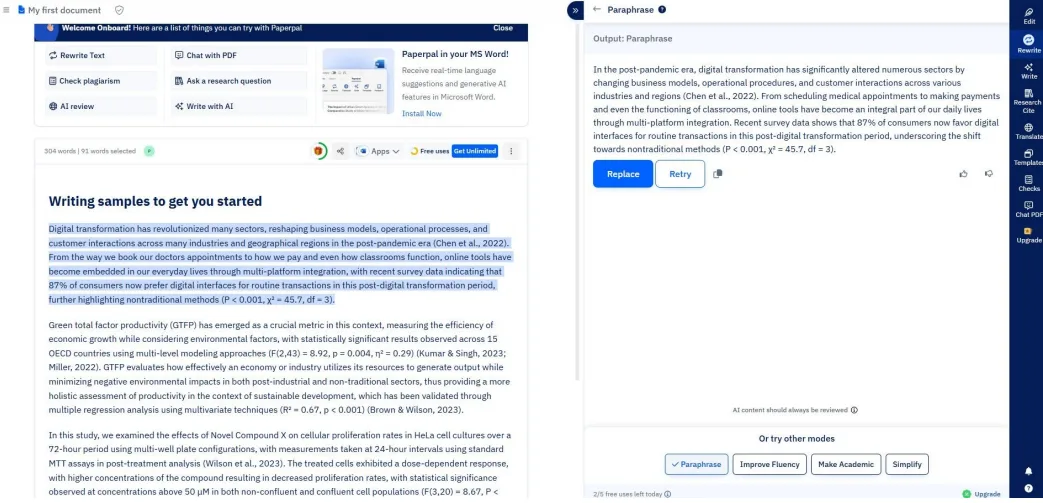
The ‘Simplify’ feature was helpful for overly complex writing. It shortened sentences and made the content more straightforward. This is a practical tool for editing reports or internal documents intended for diverse seniority levels.
Write (AI Writing Assistant)
The Write tab functions as an in-context AI assistant integrated within the document. I selected a dense paragraph describing a complex statistical result and asked for a simpler explanation; it provided a clear, plain-language version that kept the main point without jargon. Additional options like expand, shorten, and follow-up are available within the same interface.
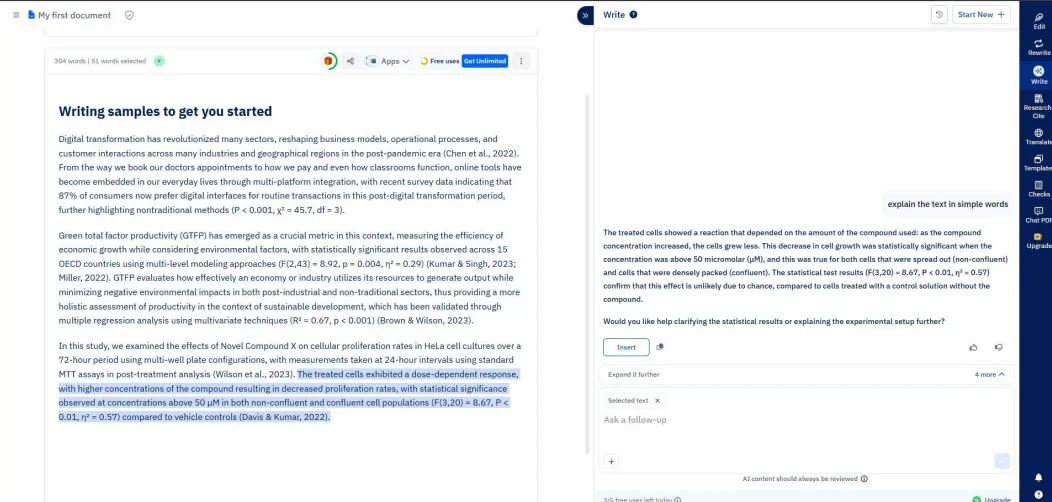
The free plan limits usage to 5 times per day, which I quickly reached during testing. Full AI-generated content (from scratch) is limited to 5 instances per day on the free plan, serving more as a taste than a practical quota. Despite the restrictions, the quality of outputs within those limits was quite satisfactory.
AI Review
I was pleasantly surprised by its thoroughness. Running the Technical Consistency Audit on a sample document produced a detailed report, covering abbreviation definitions, terminology consistency, citation order, statistical style, and more. Each section displayed a status (e.g., Partially Consistent), specific findings with paragraph references, and recommendations.
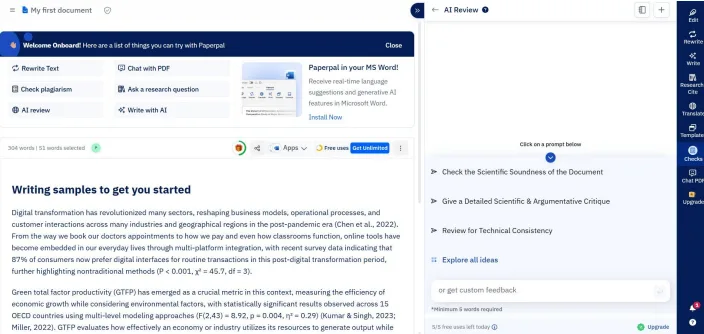
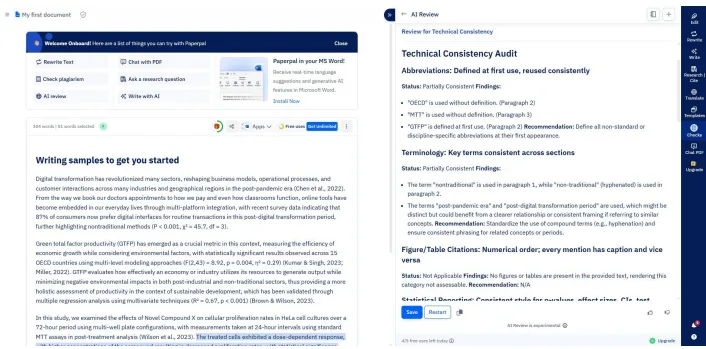
This feature is truly valuable for anyone editing lengthy documents before submission or circulation, like reports, proposals, or formal papers. It performs tasks that would typically require several manual reviews. Additional prompts include a Detailed Scientific and Argumentative Critique and a Scientific Soundness Check, indicating the depth of the AI Review, though I did not test these.
Plagiarism Checker
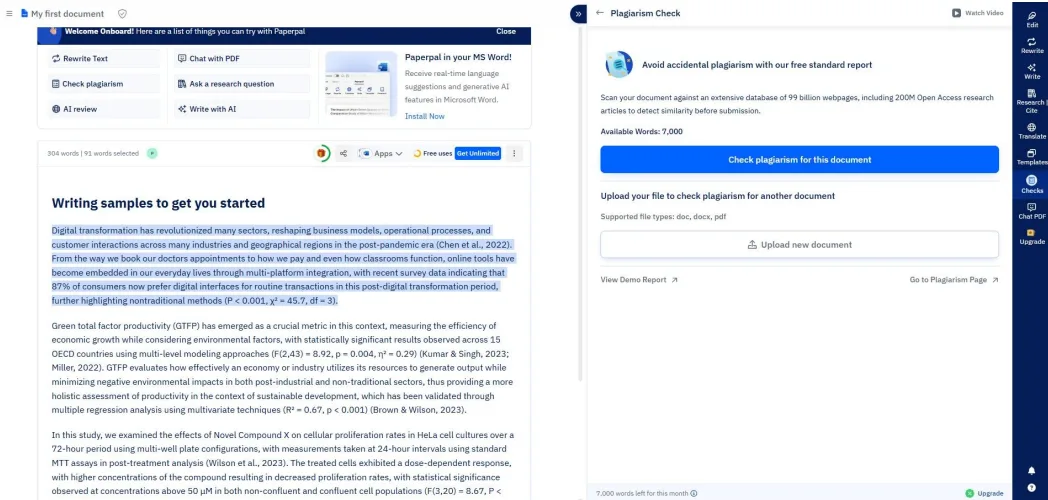
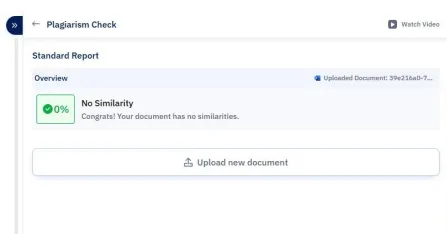
The plagiarism checker compares content against around 99 billion web pages, including extensive Open Access sources. The free plan allows for up to 7,000 words per month for standard plagiarism checks. Testing it on the sample content resulted in 0% similarity, as expected since the content was created for testing. The results page was straightforward, showing an overview and options to upload more documents.
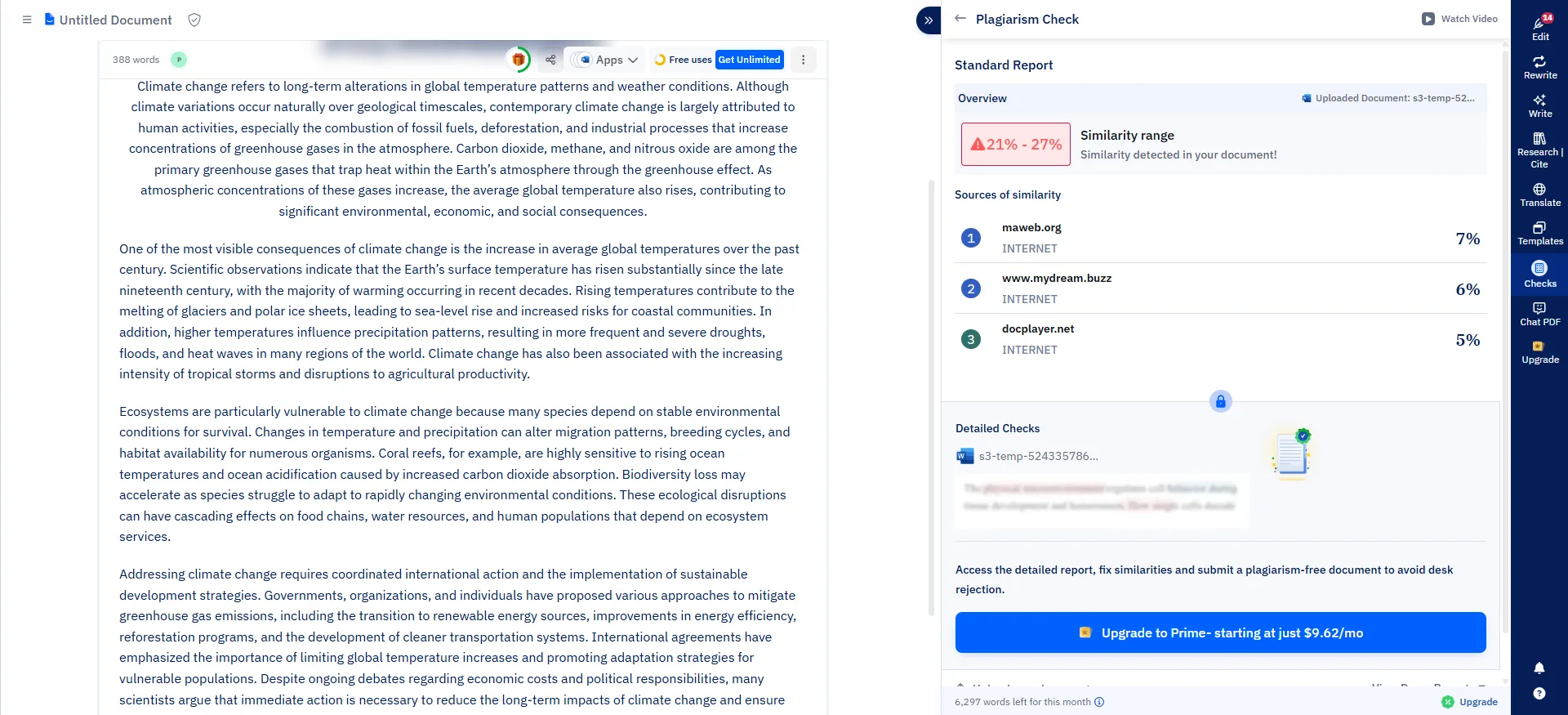
The important distinction here compared to Undetectable AI’s plagiarism checker is that this one is actually a plagiarism checker. It searches for similarities with external sources and provides a clear result along with a downloadable report. Undetectable AI’s equivalent essentially runs an AI detection check and calls it a plagiarism check, which is a completely different thing. Paperpal’s version does what it claims to do.
AI Detector
The AI detector is easy to use. Testing it with a known AI-generated paragraph resulted in a 99% AI score, indicating it is probably fully AI-written. The detailed breakdown displayed percentages for AI, human, and mixed patterns at the word level, with color highlights on the text. The outcomes aligned with expectations, and the visual cues made it easy to identify flagged sections.
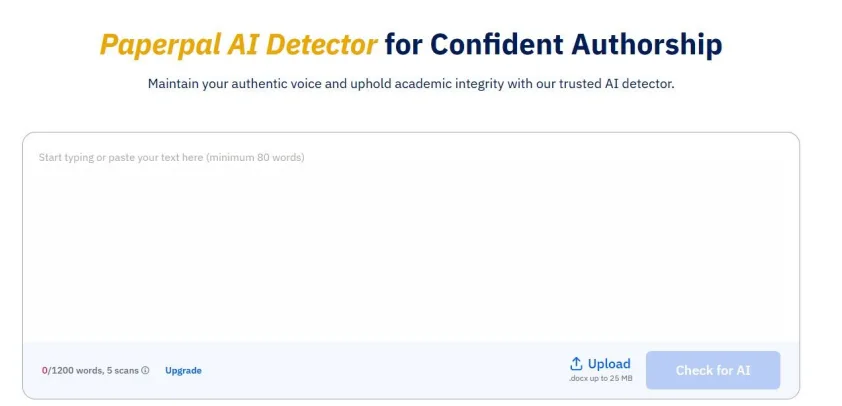
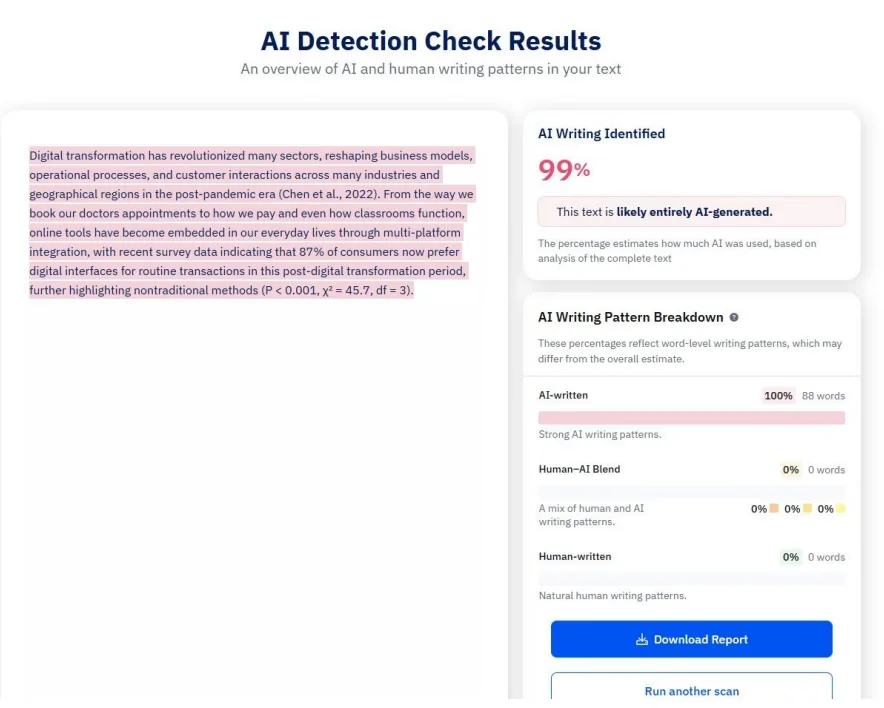
The main limitation here is the same one that appears across most of Paperpal’s tools: the free plan allows 5 scans per day up to 1,200 words per scan. That is tight for anyone dealing with longer documents.
It is worth noting that Paperpal lacks an AI humanizer, so while it can flag AI-generated content, it cannot help make it more human-like. It also flagged its own outputs as AI, highlighting a gap: it can generate plagiarism-free content but cannot pass AI detection, due to the absence of a humanizer. For users primarily concerned with avoiding AI detection, this is a significant drawback. However, if the goal is simply to identify AI-generated parts before finalizing, the detector remains useful.
Chat PDF
Among its features, Chat PDF was particularly compelling. The free tier permits five PDF uploads monthly, each up to 100 pages, with a daily limit of 1,200 AI words. I uploaded five climate change-related documents, and Paperpal produced detailed summaries with section breakdowns, key points, and page citations. The summaries were thorough and precise, citing exact pages for each finding, simplifying verification.
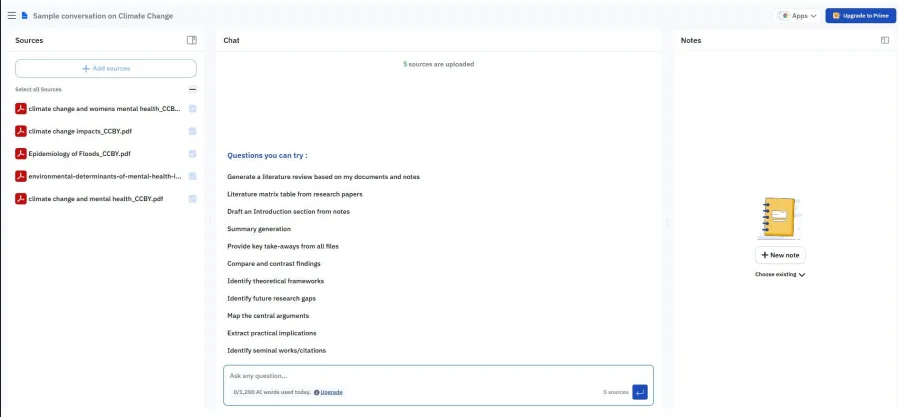
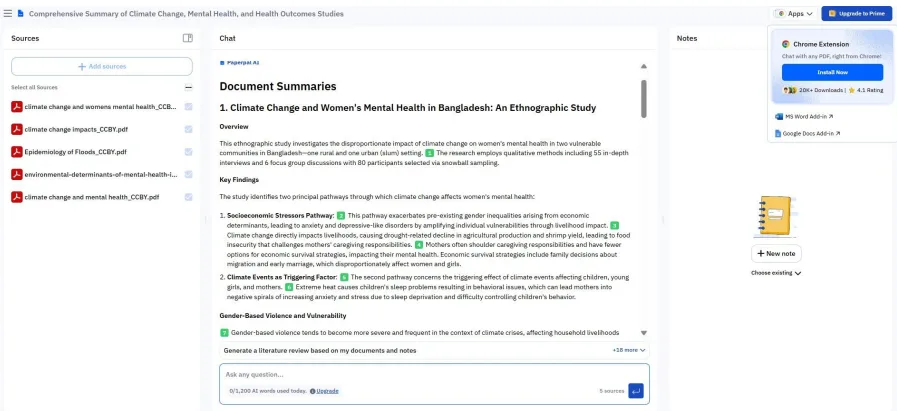
The prompts in Chat PDF are practical: they include generating literature reviews, identifying frameworks, comparing findings, spotting research gaps, and mapping arguments. For those frequently extracting and synthesizing information from multiple sources, this feature alone makes Paperpal worth considering. Though understated, it is a quietly powerful feature.
Templates
The templates menu includes options like Outlines, AI Disclosure, Manuscript sections (Title, Abstract, Keywords, Summary, Highlights), Brainstorm, Email, and emailing the journal. I tried the Email template, which generated a well-structured, polite email tailored to the provided context. The tone was suitable, though it had the typical feel of generic AI-generated text.
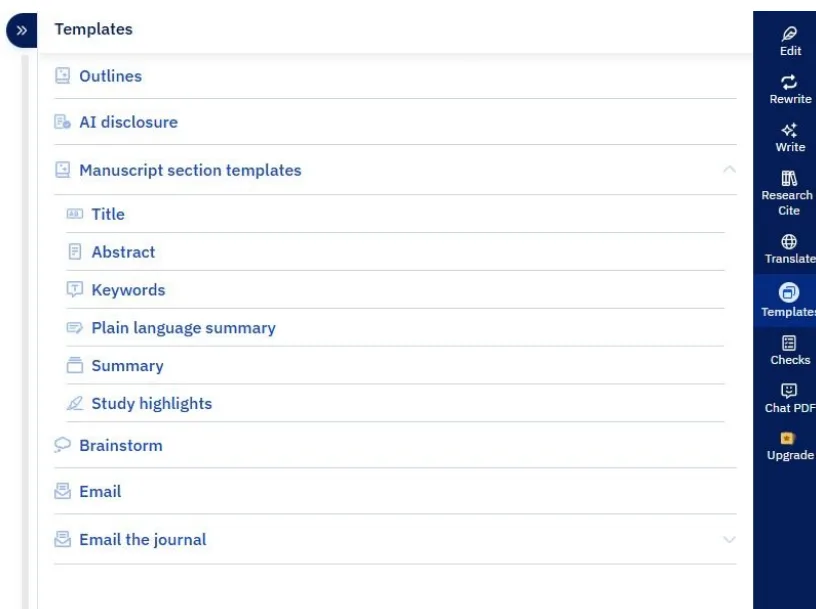
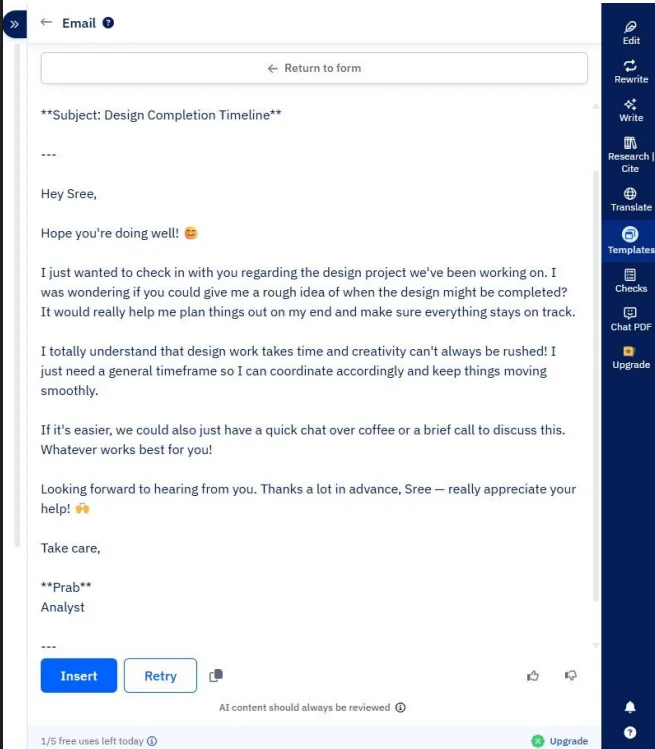
Although limited, the template options are practical. The Email template has broad utility for professionals, and the Brainstorm template is useful for organizing ideas pre-writing.
Integrations
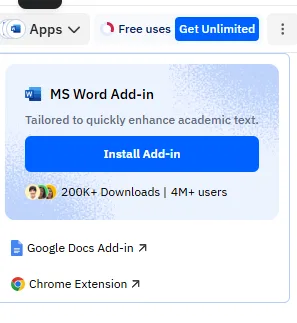
Paperpal can be added as extensions to MS Word (over 200K downloads, 4M+ users), Google Docs, and Chrome. The MS Word add-in is especially beneficial for users who prefer working directly within Word, avoiding constant copy-pasting. Running grammar, rewrite, and AI review functions directly within Word reduces workflow friction.
Performance and Output Reliability
Grammar and language corrections are consistently reliable, offering high-quality suggestions. Outputs from Rewrite and Paraphrase are natural and keep the original meaning. The AI Review audit was detailed, providing specific findings rather than vague ones. The plagiarism check was clean, and the AI detector flagged accurately, though it felt somewhat slow.
Chat PDF handled multiple documents effectively, delivering reliable, well-structured summaries. The AI Writing Assistant generated practical output within the free usage limits. No errors, crashes, or obviously incorrect suggestions occurred during my testing.
The main performance limitation comes from the free plan’s structure. Because of caps on nearly all features, prolonged testing required careful management of usage. This is more a business model limitation than a performance issue, but it does affect usability.
Pricing Breakdown and Limitations
The free plan includes 200 language editing suggestions per month, 5 uses per day of writing features including Rewrite, Write, Translate, and AI Review, 5 uses per day of Research Q&A, unlimited citation generation, 5 AI scans per day up to 1,200 words per scan, Chat PDF with 5 uploads per month up to 100 pages per file and 1,200 AI words per day, and 7,000 words per month of plagiarism checking via standard report.
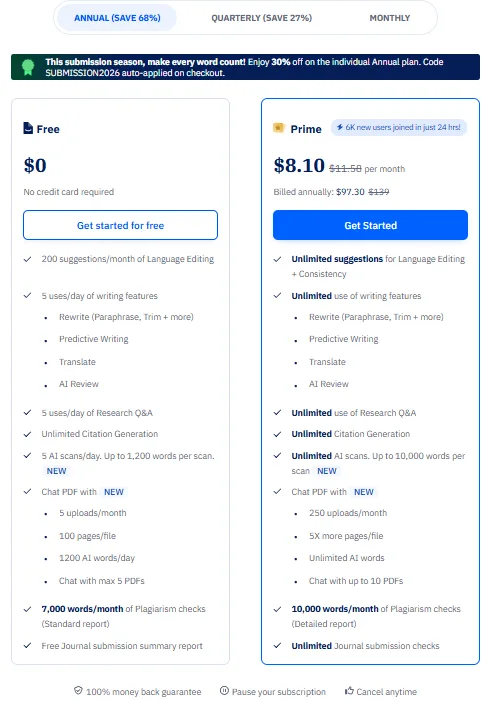
The Prime plan costs $8.10 per month billed annually ($97.30 per year), discounted from the regular $11.50 per month. This unlocks unlimited language editing suggestions, unlimited use of all writing features, unlimited AI scans up to 10,000 words per scan, Chat PDF with 250 uploads per month, unlimited AI words, and 10,000 words per month of plagiarism checking with detailed reports.
At $8.10 per month on the annual plan, it is one of the more affordable tools in this category. Grammarly’s Pro plan runs at $12 per month billed annually. QuillBot Premium is $79.95 per year, which works out to around $6.66 per month but with a narrower feature set. Paperpal’s Prime plan sits in a competitive spot and the free plan is genuinely generous compared to some competitors, with 200 language suggestions per month being a real usable allowance rather than a token gesture.
Privacy and Data Handling
Paperpal’s privacy stance is one of the strongest in this space and worth highlighting clearly. Paperpal does not use content or data for training its AI models, which are trained on independent datasets under a strict privacy policy. Only registered users can access their own content on the platform at any point in time.
- The platform is ISO/IEC 27001:2022 certified, GDPR compliant, and listed in the Cloud Security Alliance’s STAR Registry. Data is protected by encryption and a policy of never using content to train its AI, regardless of whether a user is on the free or paid plan.
- Files are automatically deleted after 90 days as part of the platform’s data retention policy, and employees are bound by strict non-disclosure agreements. Paperpal’s privacy policy explicitly prohibits the sale or sharing of personal information with third parties.
For professionals handling sensitive internal documents, client work, or confidential reports, this is a meaningfully better privacy posture than many competing tools offer. The combination of ISO certification, GDPR compliance, no-training-on-user-data policy, and automatic file deletion gives Paperpal a stronger data security story than most tools in this category can match.
Paperpal vs QuillBot vs Grammarly
|
Feature |
Paperpal |
QuillBot |
Grammarly |
|
Grammar and Language Editing |
Strong, detailed with consistency checks |
Surface level, reliable |
Strong, industry standard |
|
Paraphrase / Rewrite |
Good, multiple modes including Simplify |
Strong paraphraser, tone locked behind paywall |
Good, works best on functional text |
|
Quality of Output |
Good, but AI sounding |
Good, especially paired with humanizer |
Great with tone control and humanising |
|
AI Writing Assistant |
Yes, context-aware within document |
Basic AI chat |
Yes, contextual AI chat in editor |
|
AI Detector |
Yes, 5 scans/day free, detailed breakdown |
Yes, functional |
Yes, paywalled |
|
AI Humanizer |
No |
Yes, 60-70% reduction tested |
Yes, Humanizer feature available |
|
Plagiarism Checker |
Yes, 7K words/month free, source-based |
Fully paywalled |
Paywalled |
|
Chat PDF |
Yes, up to 5 PDFs/month free |
No |
No |
|
Templates |
Yes, limited set |
No |
No |
|
MS Word Integration |
Yes, 4M+ users |
No |
Yes, add-in available |
|
Translator |
Yes, in-editor |
Yes, standalone |
Limited |
|
AI Review / Document Audit |
Yes, detailed with findings and recommendations |
Basic, beta stage |
Yes, more comprehensive |
|
Free Plan Generosity |
Good, 200 suggestions + 5 uses/day most features |
Limited, caps hit quickly |
Limited, core features paywalled |
|
Paid Plan Entry Price |
$8.10/month (annual) |
$6.66/month (annual) |
$12/month (annual) |
Among these three, my personal choice depends on the use case. For pure grammar and polish, Grammarly still sets the standard and the tone detection is hard to beat. For paraphrasing and rewriting volume, QuillBot is more focused and its free paraphraser gets more done before hitting a wall. But for a professional workflow where I need editing, document review, plagiarism checking, and the ability to interrogate uploaded documents, all in one place and at a price that does not sting, Paperpal wins. The privacy posture alone pushes it ahead of both competitors for anyone handling work that needs to stay confidential, and the Chat PDF feature is something neither Grammarly nor QuillBot offers at this price point. The missing humanizer is a genuine gap, but for a tool that is not positioning itself around AI bypassing, it is forgivable.
Final Verdict and Overall Score
Paperpal is better than it looks on paper, and I say that having come in somewhat skeptical. The grammar and language editing is detailed and accurate, the AI Review function is impressively thorough for long documents, the plagiarism checker actually works as a plagiarism checker, and the Chat PDF feature is the kind of quiet utility that becomes hard to give up once I have used it. The MS Word integration is a practical advantage for professionals, and the privacy commitment is genuinely stronger than most competitors in this space.
The weaknesses are genuine and worth acknowledging. There is no AI humanizer, which is a notable absence. The Gen AI writing cap on the free plan is very tight at 5 total uses. The free plan in general requires careful use management rather than just getting on with work. And while the tool suite is well-designed, it is narrow enough that anyone wanting a single platform for detection, humanization, SEO, and content generation will hit its limits fast.
Overall, for its intended purpose, Paperpal is a solid and thoughtfully crafted tool. The $8.10 per month Prime plan is fair value and the free plan is usable in a way that some competitors’ free tiers are not.
Final score: 7.8 out of 10.
Frequently Asked Questions
Paperpal is a writing assistant tool designed for professionals who frequently produce written content. It is best suited for report writers, content managers, communication specialists, academics, and those handling substantial formal documents. Its core features are particularly useful for editing, refining, and organizing work, as well as analyzing source material via the Chat PDF feature.
Paperpal offers a more focused and streamlined set of tools centered on editing and writing, with a strong privacy posture. While Grammarly excels in grammar and tone detection, and QuillBot is strong in paraphrasing, Paperpal stands out with its AI Review function, plagiarism checker, and Chat PDF feature. It is also more affordable than Grammarly and offers better privacy protections.
Paperpal’s main features include grammar and language correction, rewrite and paraphrase tools, an AI writing assistant, AI review, plagiarism checker, AI detector, Chat PDF, templates, and integrations with MS Word, Google Docs, and Chrome. These features are designed to assist with editing, refining, and organizing written content.
Yes, Paperpal offers a free plan with limitations. The free plan includes 200 language editing suggestions per month, 5 uses per day of writing features, 5 AI scans per day up to 1,200 words per scan, Chat PDF with 5 uploads per month, and 7,000 words per month of plagiarism checking. These limits can be restrictive for users dealing with longer documents.
Paperpal’s Prime plan costs $8.10 per month when billed annually, which amounts to $97.30 per year. This plan unlocks unlimited language editing suggestions, unlimited use of all writing features, unlimited AI scans up to 10,000 words per scan, Chat PDF with 250 uploads per month, unlimited AI words, and 10,000 words per month of plagiarism checking with detailed reports.
No, Paperpal does not have an AI humanizer feature. This means that while it can generate plagiarism-free content, it cannot help make AI-generated content sound more human-like. This is a notable gap for users primarily concerned with avoiding AI detection.
Paperpal has a strong privacy stance. It is ISO/IEC 27001:2022 certified, GDPR compliant, and listed in the Cloud Security Alliance’s STAR Registry. The platform does not use content or data for training its AI models, and files are automatically deleted after 90 days. This makes it a secure choice for professionals handling sensitive documents.
Subscribe to our email newsletter to get the latest posts delivered right to your email.
Comments