Conclusion
Smallpdf positions itself as a reliable PDF management tool with added AI features, and it delivers on that promise to a certain extent. The interface is clean and user-friendly, making it easy to navigate through the various tools. The AI features, such as Chat with PDF and the AI Question Generator, are competent and functional, though they lack the depth and insight that more specialized AI tools might offer. The free plan is quite restrictive, which can be a significant drawback for users looking to test the tool thoroughly before committing to a subscription. Overall, Smallpdf is a solid choice for those needing a comprehensive PDF toolkit, but it may not be the best option for users seeking advanced AI capabilities.
Pros
- Clean and user-friendly interface
- Reliable PDF management tools
- Accurate AI Question Generator
- Strong privacy and data security measures
- Good value for the Pro plan
Cons
- Free plan is very restrictive
- AI features lack depth and interpretive insight
- Not suitable for advanced AI analysis
Table of Contents
- Initial Impressions and User Experience
- Main Features
- Performance, Reliability, and Daily Usability
- Pricing, Subscription Tiers, and Limitations
- Privacy, Data Security, and Trust
- Smallpdf versus PDF.ai
- Final Assessment
Some tools aim to be allencompassing, while others excel at a single function that keeps users returning. Smallpdf positions itself somewhere in the middle, though it might contest that. Primarily, it is a PDF management platform, and it performs this role reliably. However, since my focus in reviews is on the AI capabilities, that is where I dedicated my testing efforts, and where this review will concentrate.
Smallpdf is well-suited for office professionals and individuals who handle PDFs frequently, offering a clean, fast, and no-install solution. It also appeals to users seeking lightweight AI-assisted reading and question generation without the complexity of more advanced tools. However, it falls short for those needing in-depth AI analysis, comprehensive summaries, or a genuinely intelligent experience rather than just functional features. Additionally, the free tier’s limit of two PDFs per month is quite restrictive, making it more of a demo than a fully functional free plan.
Initial Impressions and User Experience
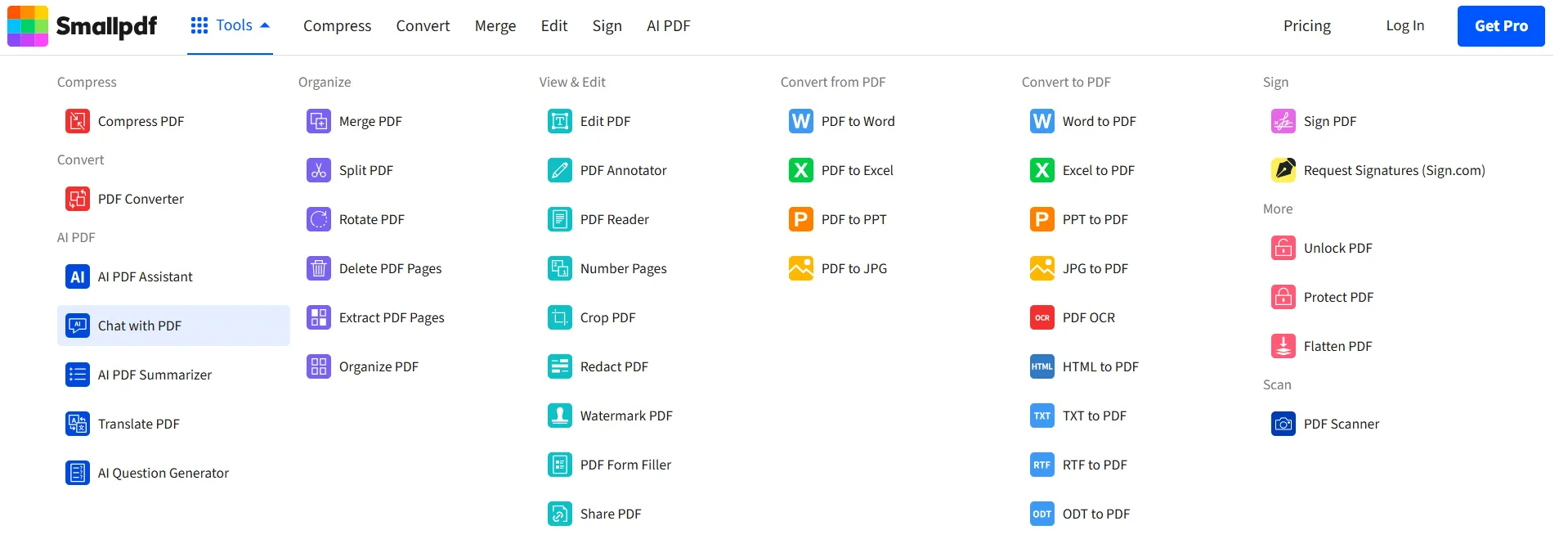
The Smallpdf interface is bright, clean, and immediately approachable. The first time the homepage loads, it feels like a well-organized toolbox. The top navigation splits neatly into Compress, Convert, Merge, Edit, Sign, and AI PDF, and the tools dropdown under the AI PDF section shows five distinct options right away. Everything is light mode, white and blue, which is a contrast to the darker interfaces of tools like NoteGPT. There is nothing confusing about where things are, and that simplicity is probably Smallpdf’s strongest design quality.
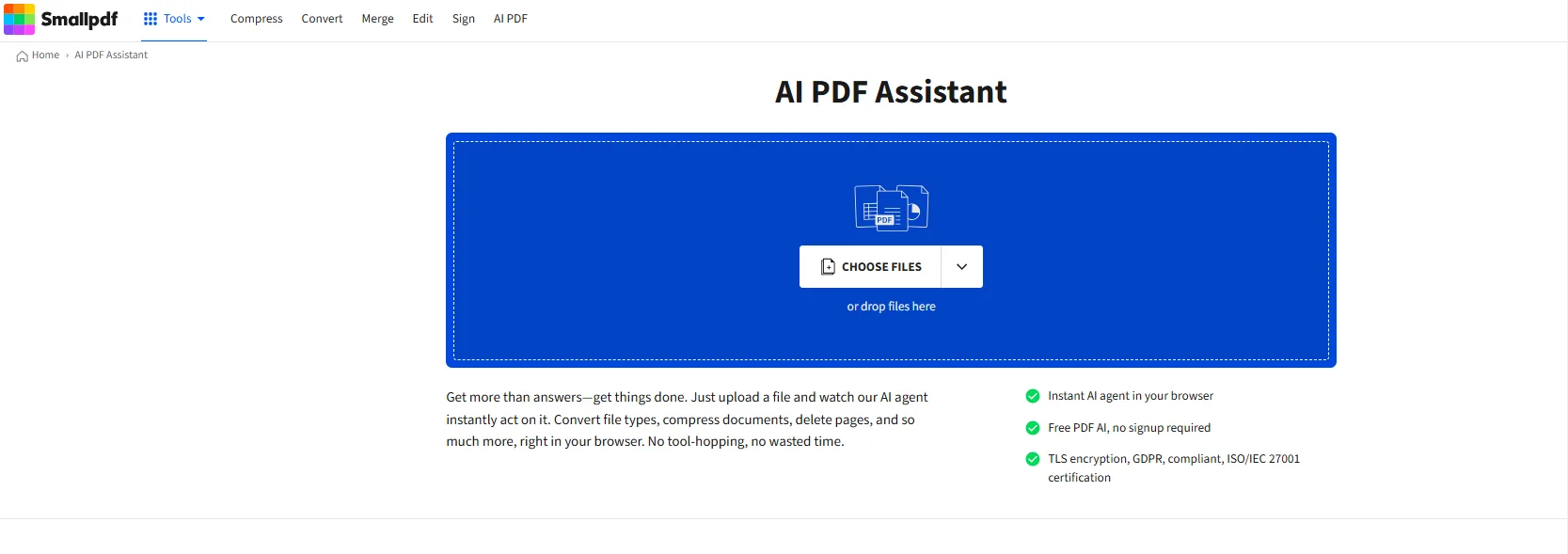
The AI PDF section is where I dedicated most of my attention, and it is clearly labeled in the sidebar once accessed. The five tools listed are AI PDF Assistant, Chat with PDF, AI PDF Summarizer, Translate PDF, and AI Question Generator This is a concise, targeted set—appropriate for a tool primarily focused on PDF management with added AI features. This deliberate limitation feels well thought out rather than hurried.
Onboarding is smooth with no significant hurdles. There is no lengthy sign-up process to begin testing. The tool quickly becomes unobtrusive, which I appreciated.
Main Features
Smallpdf’s AI features are more limited compared to dedicated document chat tools, but what is available functions reliably.
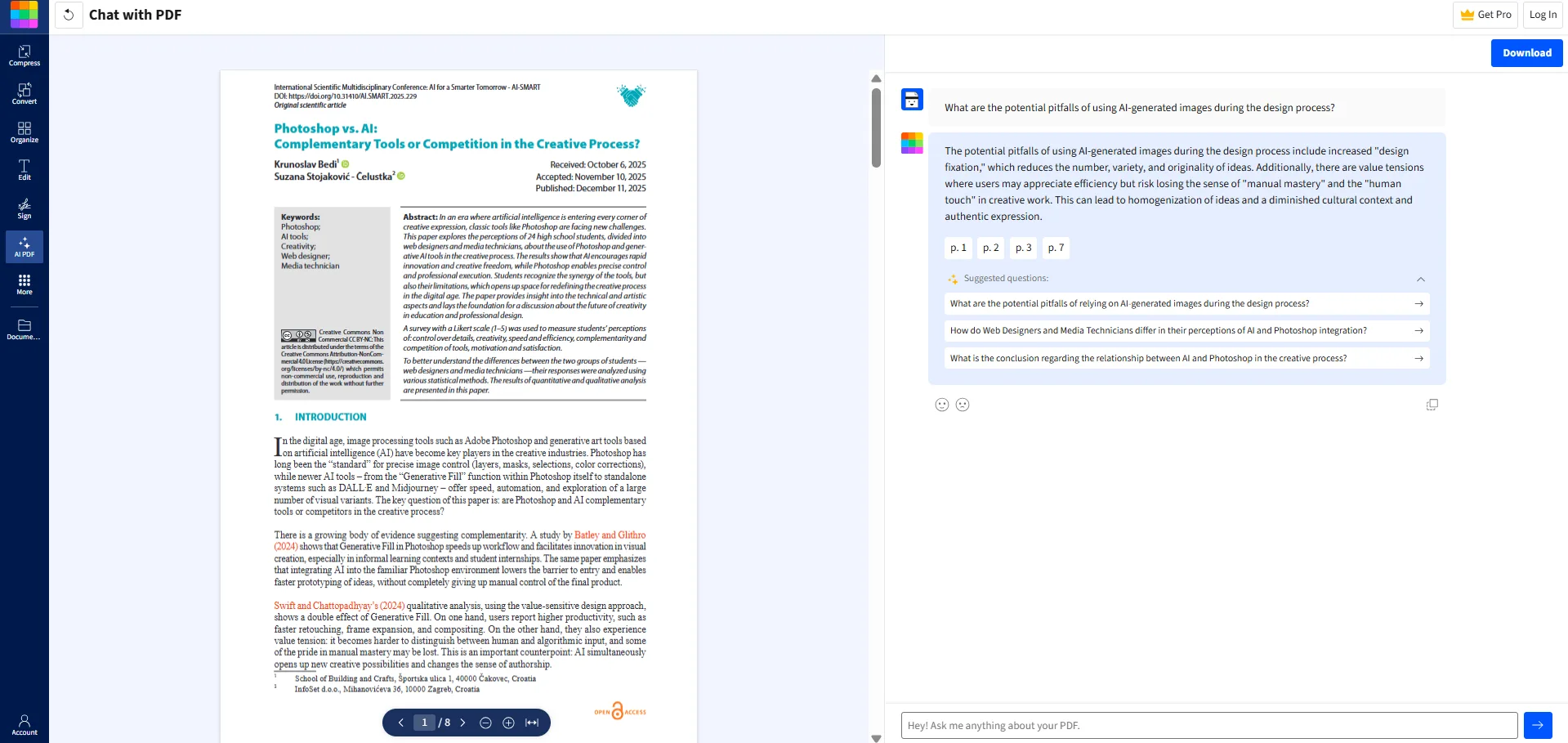
- Chat with PDF. This is the most straightforward AI feature. Upload a document, ask questions, and receive answers with page citations. My tests showed accurate responses, with references to specific pages and suggested follow-up questions. The citation feature is particularly useful, as it allows easy verification against the original document. The split-screen layout, with the PDF on the left and chat on the right, facilitates smooth back-and-forth reading.
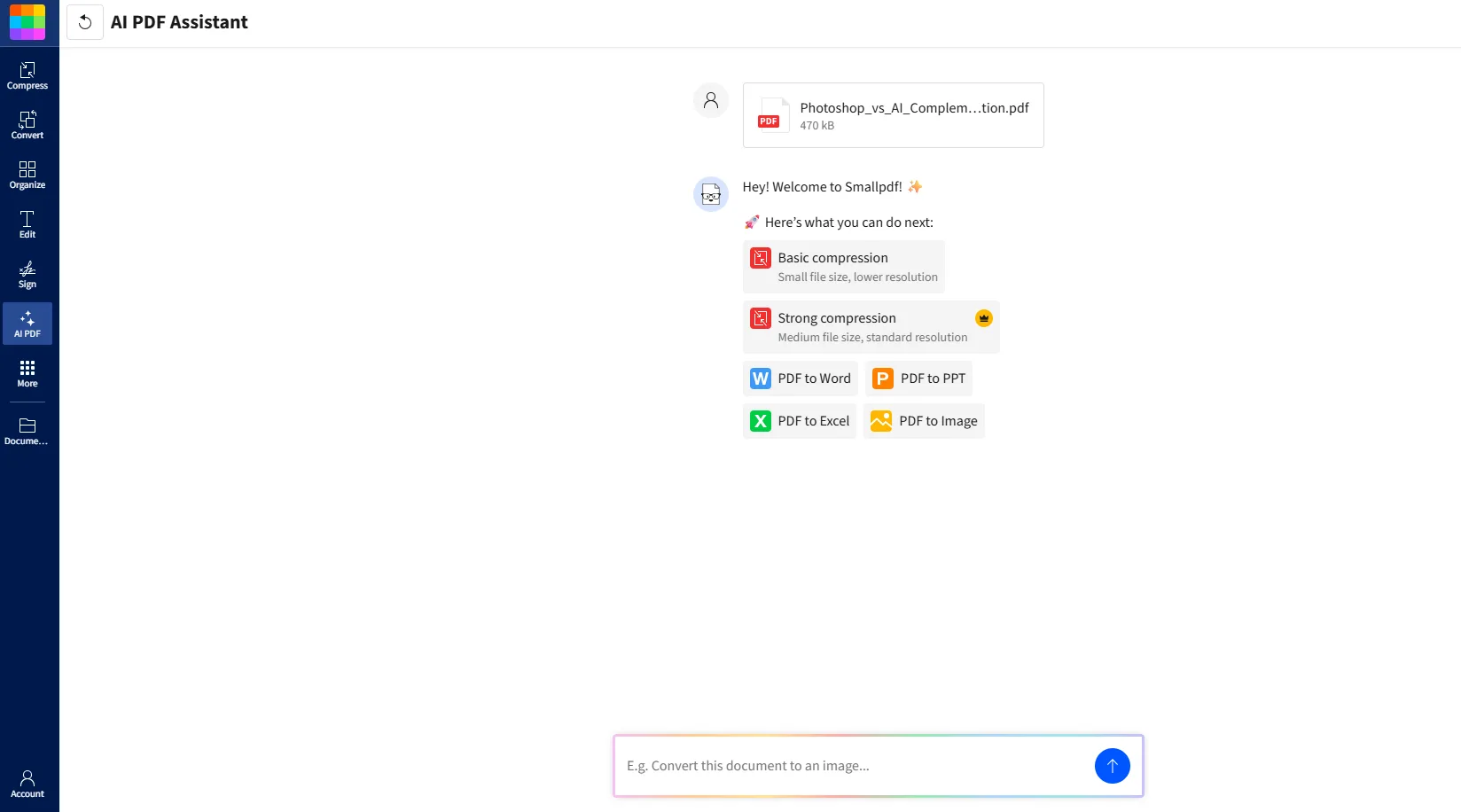
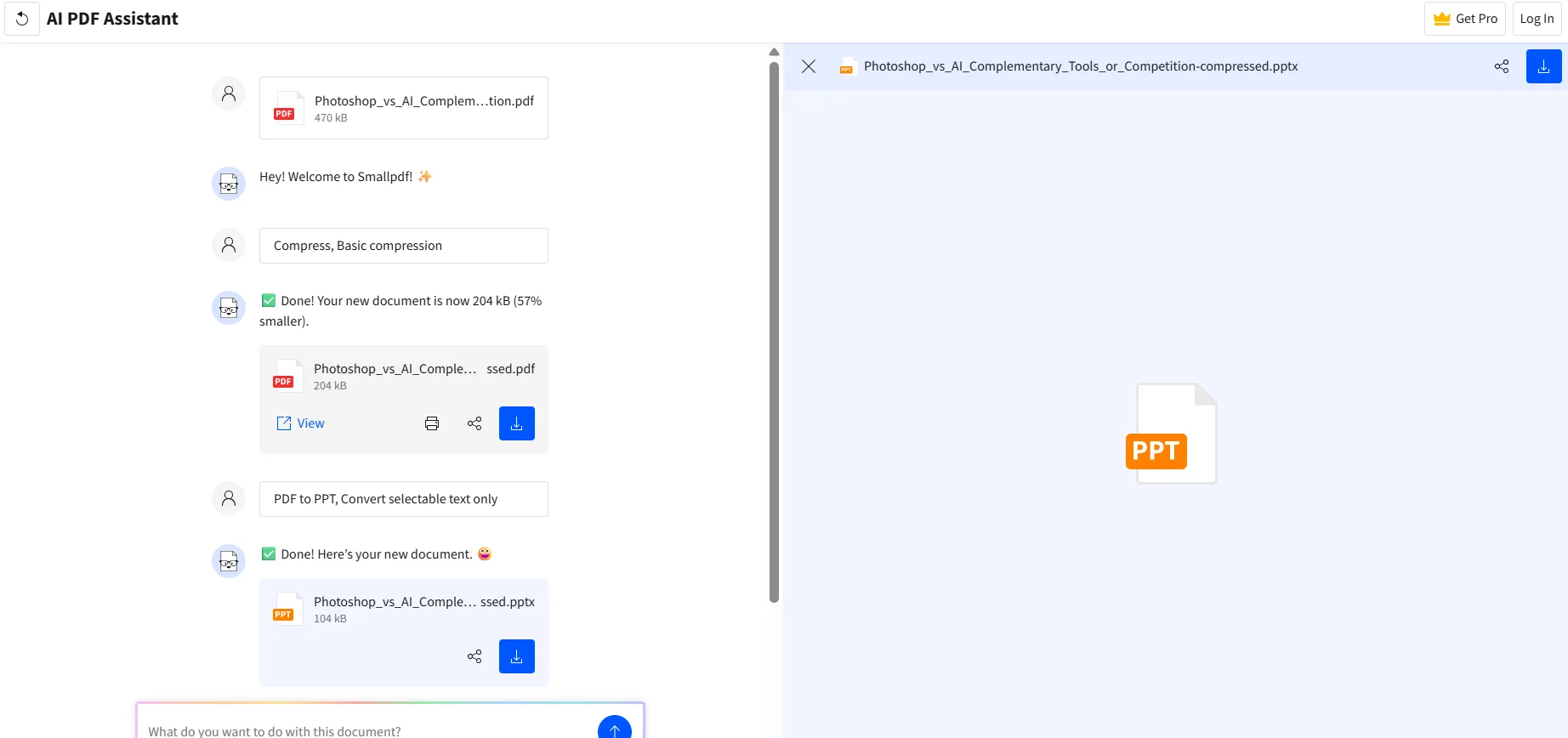
- AI PDF Assistant This feature was a pleasant surprise because it is not what I initially expected. I thought it would be similar to Chat with PDF, mainly a Q&A interface. Instead, it functions more as a task executor. After uploading a file, it presents options like basic and strong compression, PDF to Word, PPT, Excel, and image conversions. It uses AI to perform these operations within a single chat, avoiding the need to switch between different tools. I tested it by compressing a PDF and converting it to PPT, and both tasks were completed successfully. The resulting PPT was a simple conversion, not a polished presentation, but it worked as intended. Some advanced options are behind a paywall.
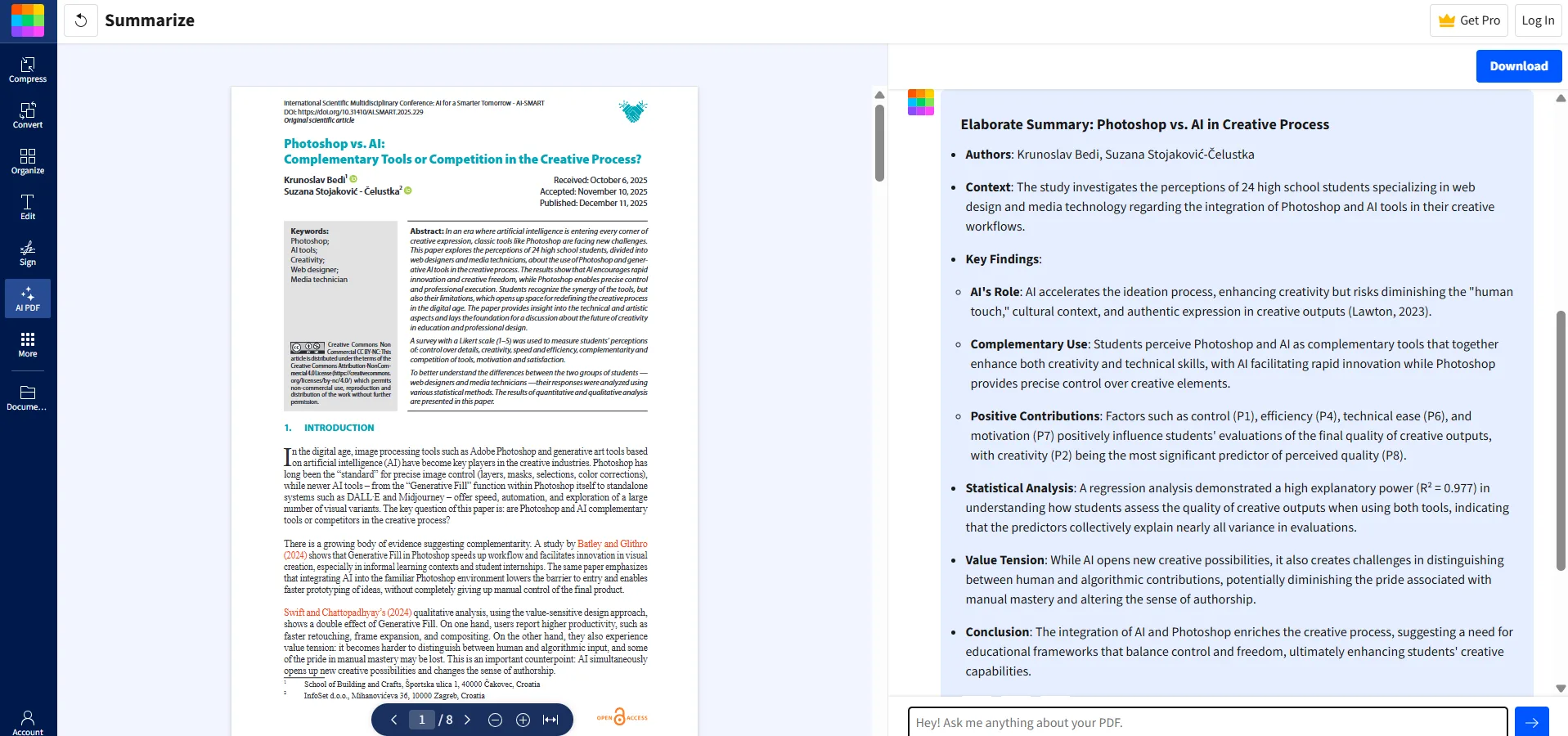
- AI PDF Summarizer It is straightforward and effective. Upload a document to receive a structured summary highlighting key points and findings. I tested it with a research paper, and the output was a clear, organized overview with bullet points, methodology notes, and a conclusion. It performs as expected without any notable flaws.
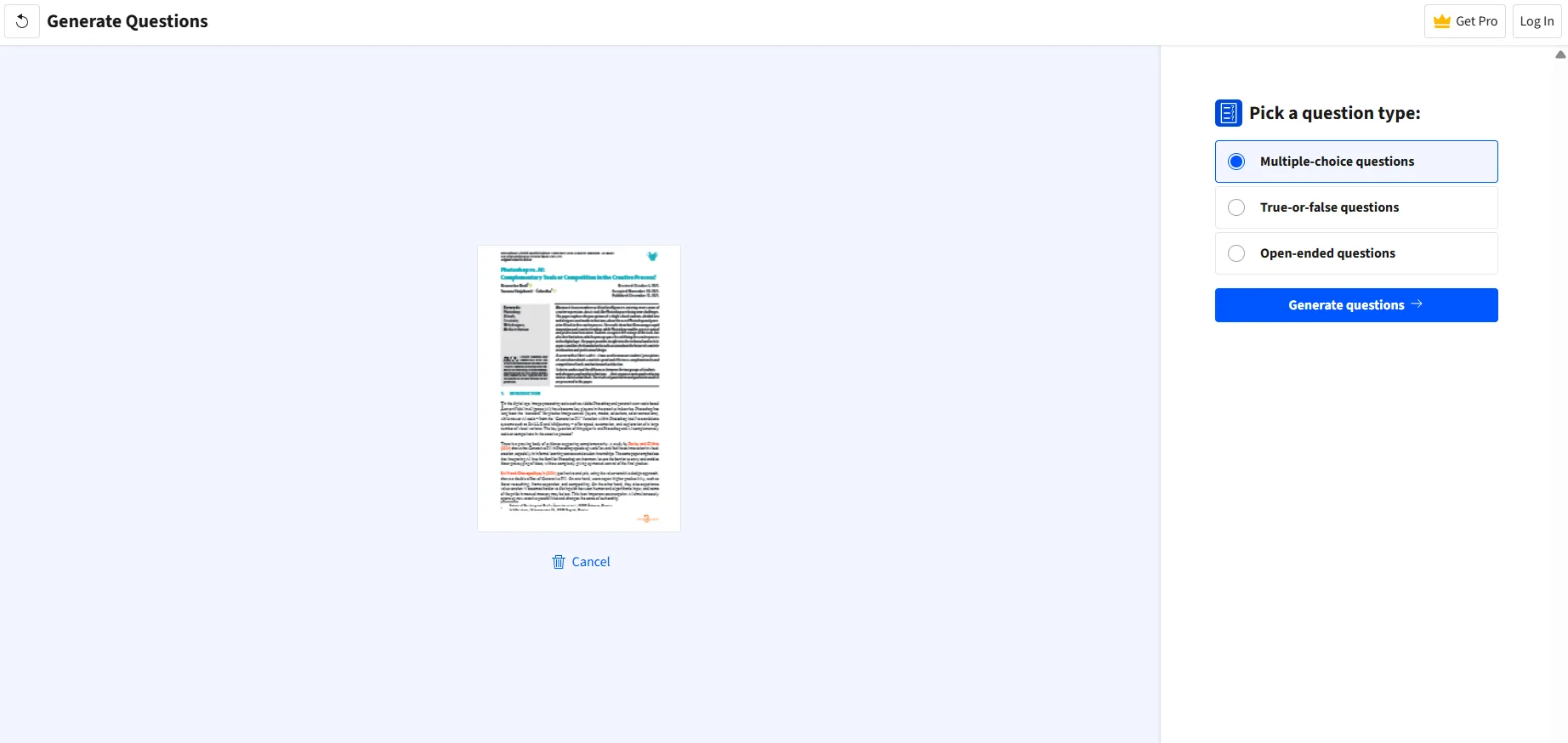
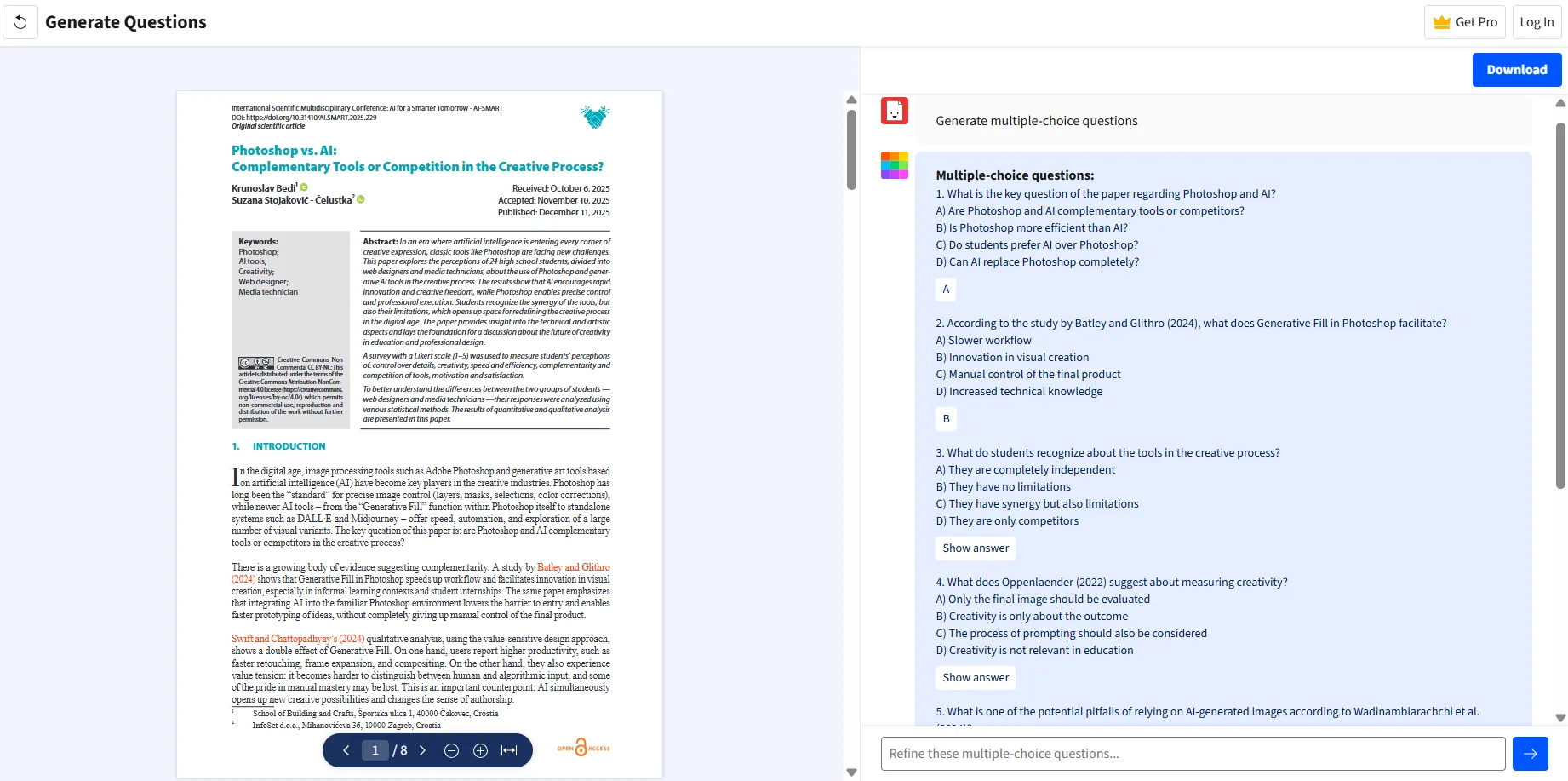
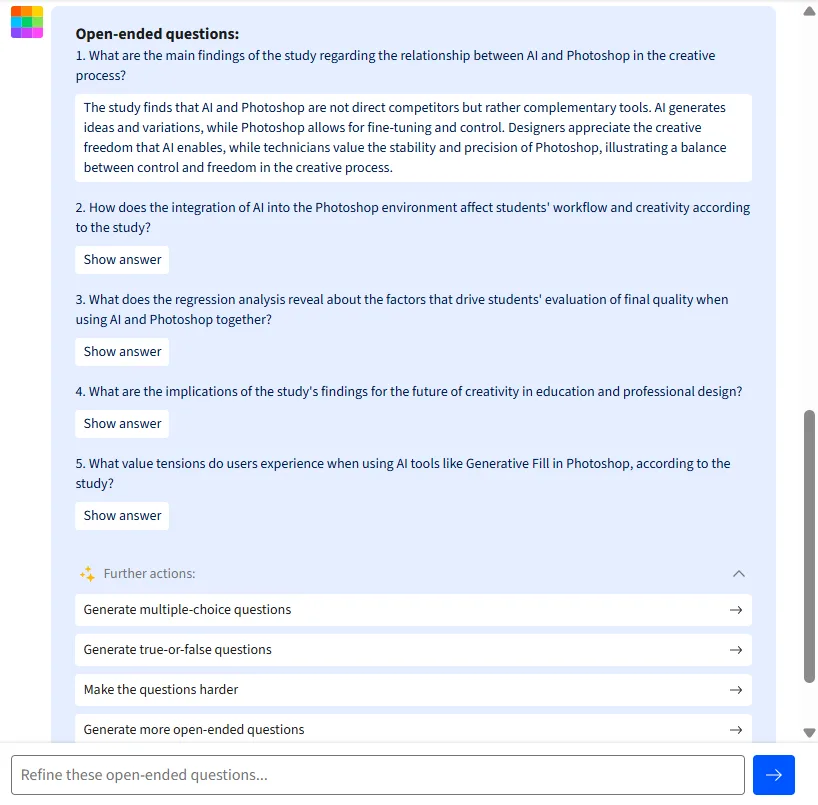
- AI Question Generator. This feature is quite versatile. It supports three question formats: multiple choice, true/false, and open-ended, generating five questions from the uploaded document each time. While there is no option to adjust the number of questions, the follow-up options—such as generating more questions, increasing difficulty, or changing question types—are helpful. I tested various question types, and the generated questions were relevant and engaging. The open-ended questions, in particular, were well-crafted, requiring thoughtful responses. Multiple-choice options included plausible distractors, indicating genuine effort in question generation.
- Translate PDF. I did not test this feature myself, but it is available in the AI section and supports translating uploaded PDFs into different languages. Useful for those working with multilingual documents.
The non-AI features of Smallpdf include a wide range of tools such as compression, merging, splitting, page extraction, deletion, rotation, watermarking, form filling, signing, OCR, and format conversions in both directions. I did not evaluate these tools in detail, as they are outside the focus of this review, but their extensive presence is evident for users with broader PDF needs.
Performance, Reliability, and Daily Usability
All tested features operated quickly and reliably. There were no loading errors, broken outputs, or interface glitches. The split-screen layout in Chat with PDF remained responsive during scrolling. The AI PDF Assistant managed consecutive tasks smoothly.
Quality-wise, my take is that Smallpdf’s AI features are competent but not impressive. The Chat with PDF answers were accurate and well-cited, but the responses felt template-like. There was not a sense of depth or synthesis, more a sense of retrieval. Ask it a direct factual question from the paper and it will find the answer. Ask it something that requires connecting two ideas from different sections and it does well enough, but the response rarely adds insight beyond what is already there.
The summarizer offers a straightforward, clean overview that highlights main points, but it lacks interpretive depth. It’s suitable for a quick summary, but for deeper understanding, it doesn’t provide additional insights beyond a surface skim.
The question generator proved to be the most genuinely useful feature, particularly in open-ended mode. The questions generated from research papers were substantial enough that answering them demands real engagement with the material—more than many similar tools can produce.
The main practical drawback is the free plan. Allowing only two PDF uploads per session is a significant limitation—more of a session cap than a monthly quota—and makes thorough testing under real-world conditions difficult without subscribing. This restriction significantly impacts the free experience, beyond just being a minor inconvenience.
Pricing, Subscription Tiers, and Limitations
- Free plan: Provides access to over 30 document management tools, with restrictions on downloads, limited mobile app usage, and a Sign.com free account capped at two documents per month. No credit card is needed, but the limitations are substantial enough that it feels more like a demo than a fully functional free tier.
- Pro plan: Costs $10 per month when billed annually ($108/year), or $15 per month on a monthly basis. It offers unlimited use of all over 30 tools, unlimited downloads, text editing, OCR, high compression, unlimited AI features, mobile access, and full Sign.com premium. A seven-day free trial is available.
- Pro for Teams: $8 per user per month billed annually, or $12 per user per month if billed monthly. Includes all Pro features plus shared folders, team branding, centralized billing, and admin controls. Minimum of two users.
- Business plan: Custom pricing for organizations with 20+ users, offering dedicated support and flexible payment options.
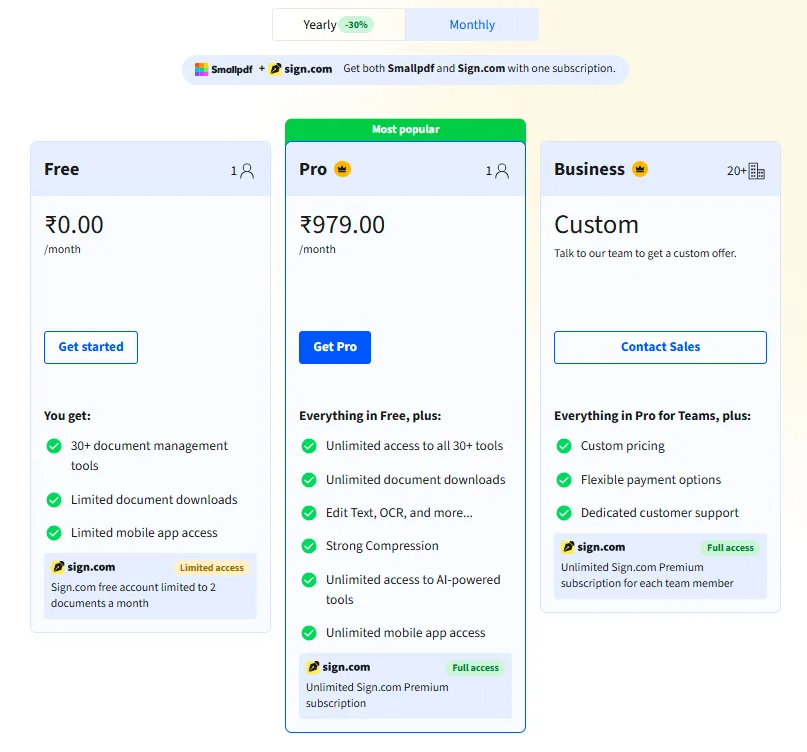
The Pro plan at $10/month billed annually offers good value, combining PDF management, AI tools, and Sign.com features in one package. However, the free plan’s severe limitations can leave a negative first impression, which is problematic for a platform that should be easy to evaluate before committing.
Privacy, Data Security, and Trust
Smallpdf is a Swiss company, giving it a stronger regulatory position compared to many US-based competitors. Switzerland has an adequacy decision from the EU, indicating its data protection standards align with GDPR. The platform is ISO/IEC 27001 certified and complies with GDPR, CCPA, and nFADP.
Smallpdf’s privacy policy states that uploaded file content is not used for AI training or advertising. Files are used only for the requested task and deleted within one hour. That is a clear, specific commitment that is worth calling out, because a lot of tools in this space are vague about exactly this point.
Users retain full ownership of their content, and Smallpdf does not claim ownership rights over uploaded files. Access to data is limited to support and technical troubleshooting.
Data collection includes personal information such as IP addresses, email addresses, device details, and usage metrics gathered via website visits, app interactions, and third-party services. This is standard practice and not particularly concerning.
The infrastructure operates on EU-based servers, ensuring uploaded documents are not exposed to foreign government surveillance. TLS encryption secures data in transit, and the platform undergoes regular security audits with ISO certification.
Overall, Smallpdf offers a strong privacy stance compared to many competitors. Its file deletion policy is clear, the commitment not to use files for AI training is explicit, and the Swiss legal framework adds credibility. For users handling sensitive or work-related documents, this is a notable advantage.
Smallpdf versus PDF.ai
Feature
Smallpdf
PDF.ai
Primary focus
PDF management + AI features
AI document chat and analysis
Chat with PDF
Available, with page citations
Available, more conversational depth
Document summarization
Clean, structured, surface-level
More analytical in approach
Question generation
MCQ, True and False, open-ended, five at a time
Not a core feature
Non-AI PDF tools
Extensive (30 plus tools)
Extensive
Free plan
Very restrictive (2 uploads/session)
More usable free tier
Pro pricing
$10/month annually
More expensive but better feature quality
My choice between the two depends on the specific use case. For AI-driven document analysis and deeper content interaction, PDF.ai is superior. For those needing a comprehensive PDF toolkit—including compression, conversion, signing, and editing—Smallpdf performs well, though these features are also available in PDF.ai at a slightly higher price. Personally, I favor PDF.ai.
Final Assessment
Smallpdf reliably performs its core functions. Its PDF management tools are comprehensive and polished, and the AI features are adequate for routine tasks. Chat with PDF provides accurate answers with citations; the question generator exceeds expectations; and the summarizer offers quick, reliable overviews. The AI PDF Assistant proves useful once its purpose is clear.
It is not a tool that will revolutionize how people work with documents. The AI lacks depth and interpretive insight; it mainly retrieves, generates, and summarizes without meaningful analysis. Additionally, the free plan’s severe restrictions make it less appealing for those unwilling to pay upfront.
For those already using the Pro plan for PDF management, the AI features are a useful bonus at no additional charge. For regular PDF users seeking a reliable, secure, and affordable solution, Smallpdf is a solid choice. However, I would not recommend it primarily for its AI functions. It performs adequately but did not leave a strong impression beyond the question generator and AI PDF Assistant. ‘Below average’ might seem harsh, but it accurately reflects my overall impression.
Overall Score: 4.5 out of 10
Frequently Asked Questions
Smallpdf offers a range of PDF management tools including compression, conversion, merging, editing, signing, and AI features. The AI features include Chat with PDF, AI PDF Assistant, AI PDF Summarizer, Translate PDF, and AI Question Generator. These tools are designed to assist with various PDF tasks and provide AI-assisted functionalities.
Smallpdf’s free plan is quite restrictive, allowing only two PDF uploads per session. It provides access to over 30 document management tools but with limitations on downloads and mobile app usage. This plan is more of a demo and may not be suitable for thorough testing or regular use without subscribing to a paid plan.
Smallpdf offers several pricing tiers. The Pro plan costs $10 per month when billed annually or $15 per month on a monthly basis. The Pro for Teams plan is $8 per user per month billed annually or $12 per user per month billed monthly, with a minimum of two users. There is also a custom-priced Business plan for organizations with 20+ users.
Smallpdf is a Swiss company compliant with GDPR, CCPA, and nFADP regulations. It is ISO/IEC 27001 certified and ensures that uploaded files are not used for AI training or advertising. Files are deleted within one hour of upload, and data is secured with TLS encryption. This strong privacy stance makes it a reliable choice for handling sensitive documents.
Smallpdf and PDF.ai serve different primary focuses. Smallpdf is more oriented towards comprehensive PDF management with added AI features, while PDF.ai specializes in AI document chat and analysis. Smallpdf offers a more extensive set of non-AI PDF tools and a cheaper Pro plan, but PDF.ai provides more in-depth AI-driven document interaction and analysis.
Smallpdf’s AI features are competent but lack depth and interpretive insight. The Chat with PDF provides accurate answers with citations but feels template-like. The summarizer offers quick overviews without additional insights, and the question generator, while useful, is limited to five questions at a time. These features are adequate for routine tasks but may not meet the needs of users requiring advanced AI analysis.
Yes, Smallpdf is well-suited for office professionals and individuals who handle PDFs frequently. It offers a clean, fast, and no-install solution with a range of PDF management tools. The AI features, while not groundbreaking, provide useful assistance for routine tasks, making it a reliable choice for daily PDF needs.
Subscribe to our email newsletter to get the latest posts delivered right to your email.
Comments