Conclusion
ChatDOC is a focused, highly dependable document analysis tool designed primarily for academics, researchers, and technical developers. Its strict refusal to hallucinate facts, combined with precise, clickable source citations, makes it exceptionally trustworthy for interrogating complex literature. However, its functional scope remains noticeably narrow compared to full-featured PDF suites. With no native mind mapping, missing AI detection tools, and an annualized price tag that outweighs broader alternatives, it serves a specialized workflow rather than everyday document needs.
Pros:
- Extremely accurate source citations with zero fabricated facts or broken page links
- Dedicated academic search engine (ChatPaper) for finding and interrogating research papers
- Broad file format support and native dark mode interface right out of the box
- Technical PDF Parser that converts documents into structured code elements
Cons:
- Narrow feature set lacking native mind maps, AI detection, or basic PDF editing tools
- Annual pricing ($89.9/year) feels expensive relative to broader all-in-one competitors
- Technical tools like the PDF Parser offer little practical utility for general office workers
Table of Contents
- First Impressions & User Experience
- Core Features & Real Usage Testing
- Performance, Reliability & Everyday Usability
- Pricing, Free Plan & Limitations
- Privacy, Data Handling & Account Control
- Comparison: ChatDOC vs HiPDF
- Final Verdict & Overall Score
I tested ChatDOC this time around, and going in I already knew this one was going to be a smaller review than usual, mostly because the tool itself only really does three things. There’s ChatDOC itself, which is the chat with PDF feature, then there’s ChatPaper, which is more research paper focused, and then PDF Parser, which is a completely different beast altogether. I wanna be frank here, I did not expect much depth from a tool this narrow, but I went in anyway because narrow doesn’t automatically mean bad, sometimes it means focused.
I think this tool suits researchers and developers more than it suits general working professionals, which is a bit different from most of the tools I’ve reviewed so far. It is very good at what it does, but what it does is genuinely limited compared to the bigger PDF suites I’ve tested recently.
First Impressions & User Experience
The interface felt clean honestly, dark theme available right out the gate which I really appreciated. I stay up late working a lot and a bright white screen just irritates my eyes after a while, so seeing a proper dark mode option here was a small win before I even touched any of the actual features.
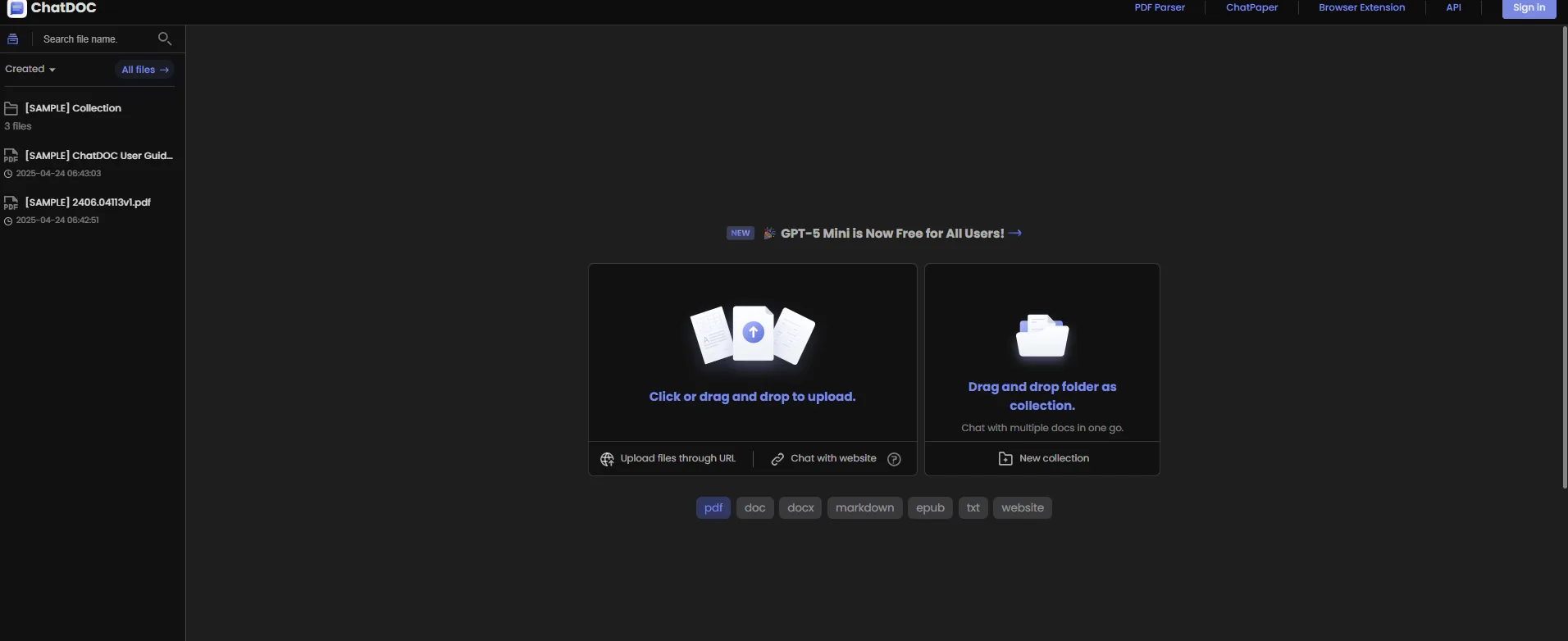
Uploading was simple too, drag and drop or click to upload, and it supports a decent range of formats, PDF, DOC, DOCX, EPUB, website links, TXT, markdown. That range is genuinely good, it just goes to show that ChatDoc is serious about what it does.
Navigating between the three tools, namely ChatDOC, ChatPaper, PDF Parser is done through a top nav bar, so switching between them doesn’t feel disjointed, it still feels like one product rather than three bolted together tools, even though functionally they don’t really talk to each other much.
Core Features & Real Usage Testing
ChatDOC – the chat feature
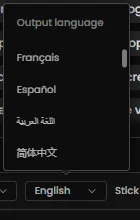
This works pretty much how I’d expect from any chat with PDF tool at this point, upload a file, EPUB, or website link, and start asking questions. There’s a language selector too, I saw options for French, Spanish, Arabic, Simplified Chinese among others, so that’s a nice touch for anyone working across languages.
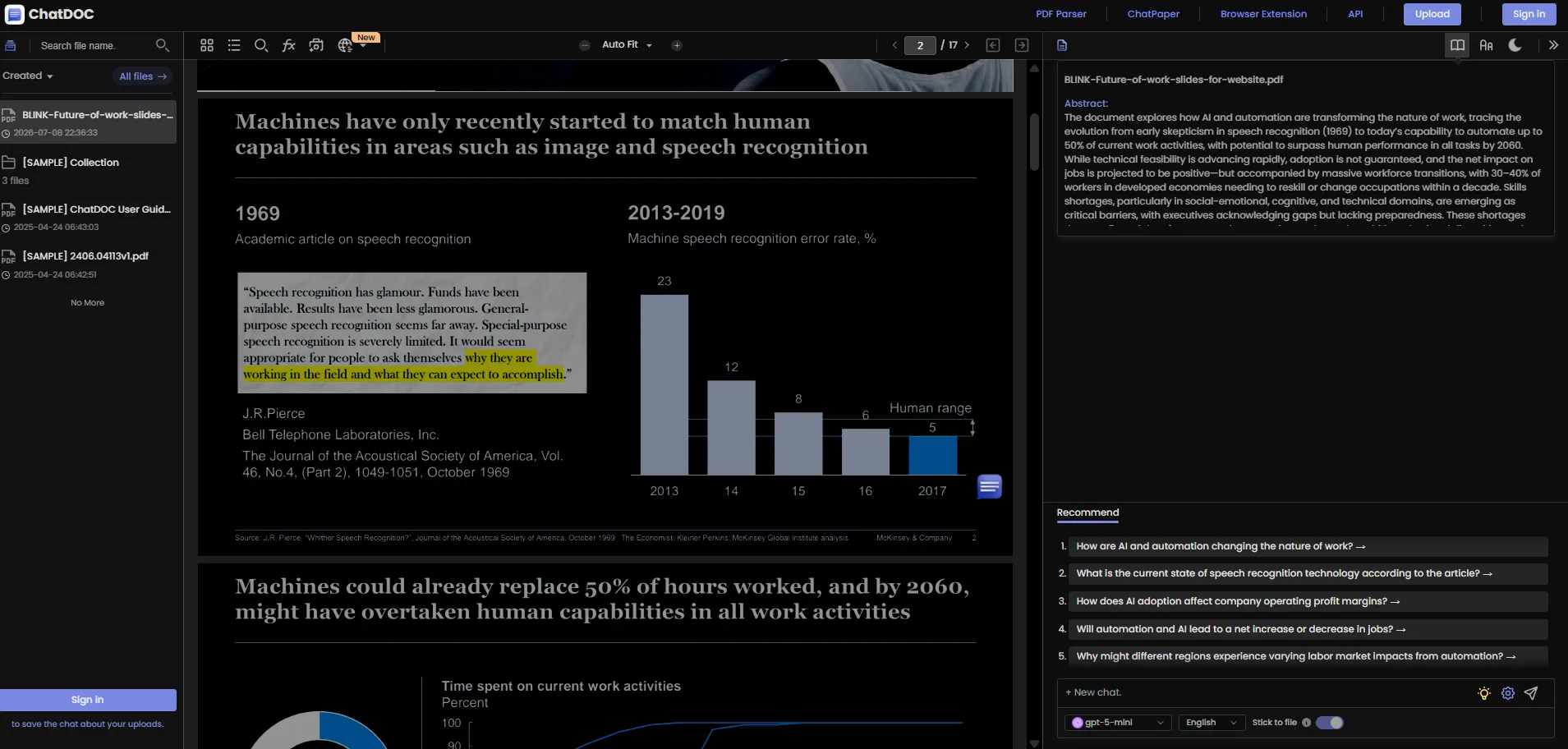
What stood out to me though was the citation system. Every answer came with a clickable reference showing exactly which page the information was pulled from, and when I clicked through, it actually matched. I tested this deliberately, asking a few questions I already knew the answers to just to see if it would make anything up or misattribute a source, and it didn’t. No hallucinated facts and no fabricated citations, which honestly isn’t exactly something I can say for every AI tool. A lot of these LLM powered tools tend to fumble here eventually, inventing a page number or confidently stating something that isn’t actually in the document, but ChatDOC held up across the multiple documents I threw at it.
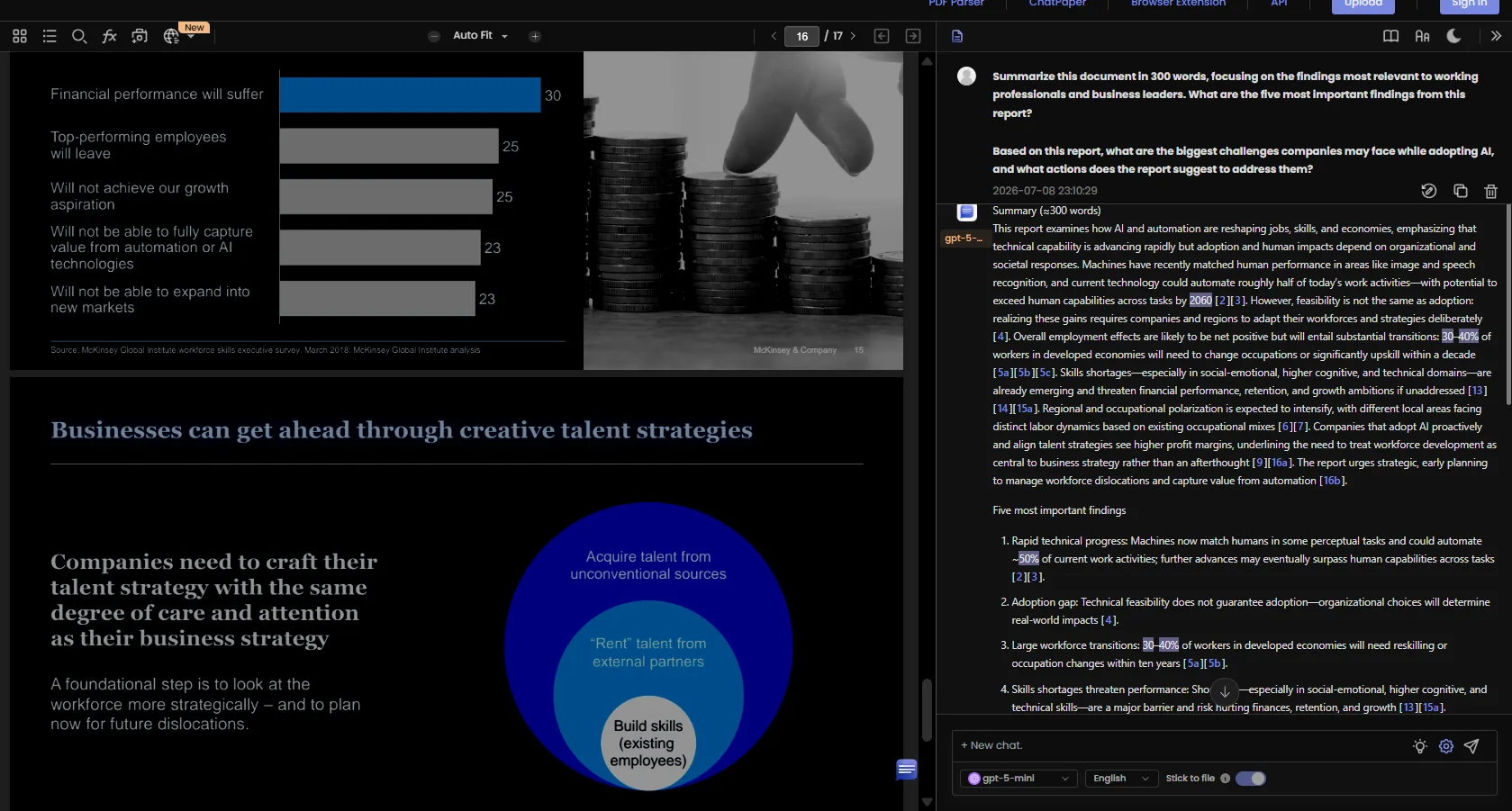
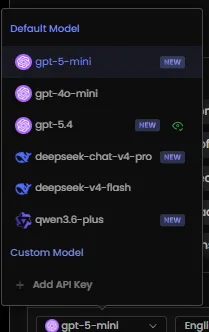
I also noticed it lets me pick between different underlying models too, I saw gpt-5-mini as the default, along with gpt-4o-mini, gpt-5.4, deepseek-chat-v4-pro, deepseek-v4-flash, and qwen3.6-plus as options, plus the ability to add a custom API key. That’s more model flexibility than I expected from a niche tool like this.
One thing worth flagging, there’s no mind map feature here. I went looking for it since I’ve gotten used to that feature from other tools recently, and it’s just not available. Not a dealbreaker on its own, but worth knowing going in if that’s something someone specifically wants.
PDF Parser
This one’s a bit of an odd feature honestly, and I don’t think it’s meant for the average person using this tool. What it does is take an uploaded PDF and convert the entire thing into code, which looked to me like HTML and CSS elements based on what I could see in the output, breaking the document down into its structural elements, paragraphs, headings, tables, all tagged and organized.
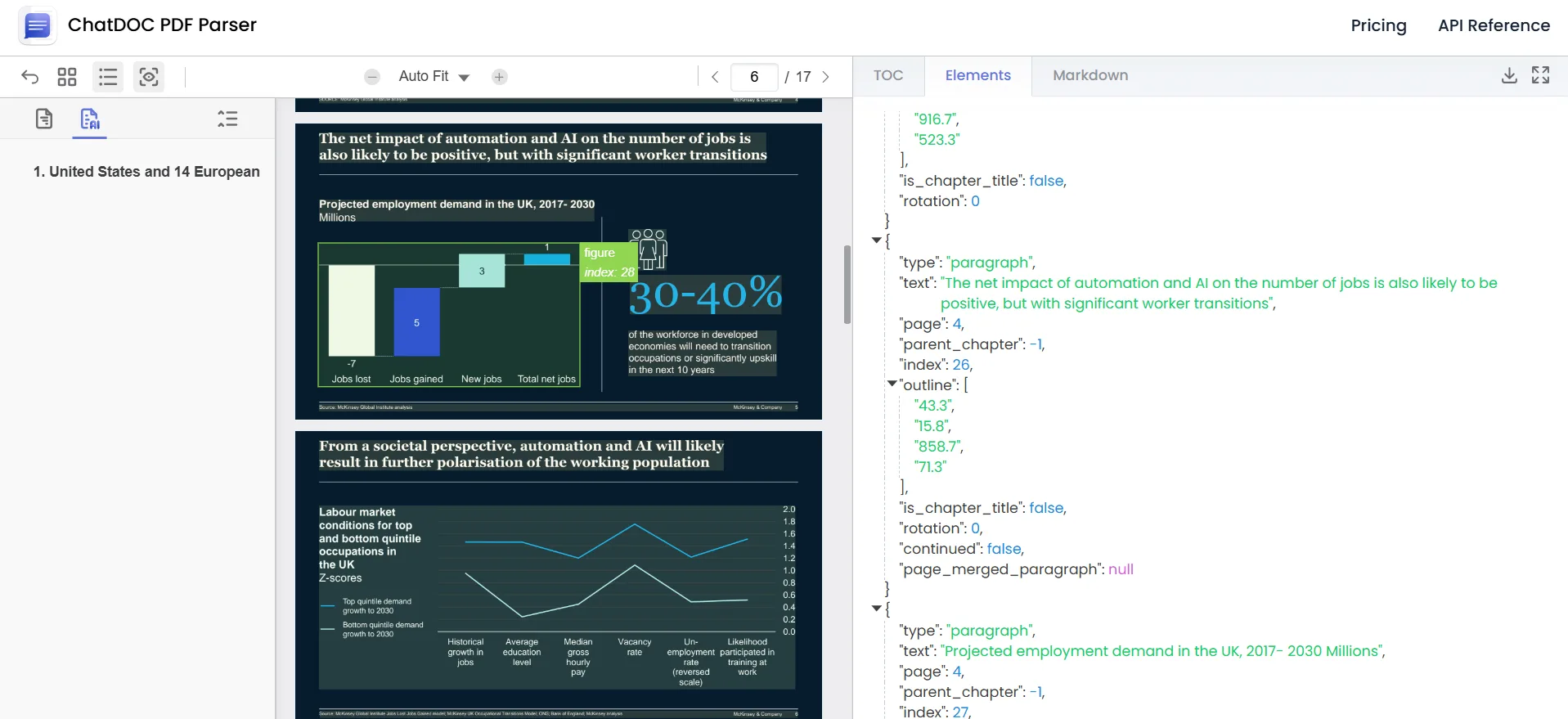
For a developer, I can genuinely see the appeal here. Being able to directly edit the code representation of a PDF instead of fighting with some clunky PDF editor interface is actually a smart use case. But for any average person, whose work consists of mostly reading, summarizing, and referencing documents rather than rebuilding them from scratch, I didn’t find a ton of practical use in this feature beyond just poking around to see how it worked. It does what it says, I’ll give it that, the parsing looked accurate and organized, but its audience is narrow.
ChatPaper
This one works a lot like Google Scholar honestly, except with an AI chat layer bolted on top. I searched for a topic and I went with deepfake detection since there’s a lot of recent research there, and it pulled up a list of relevant academic papers, complete with publication tags, dates, and the institutions behind them.
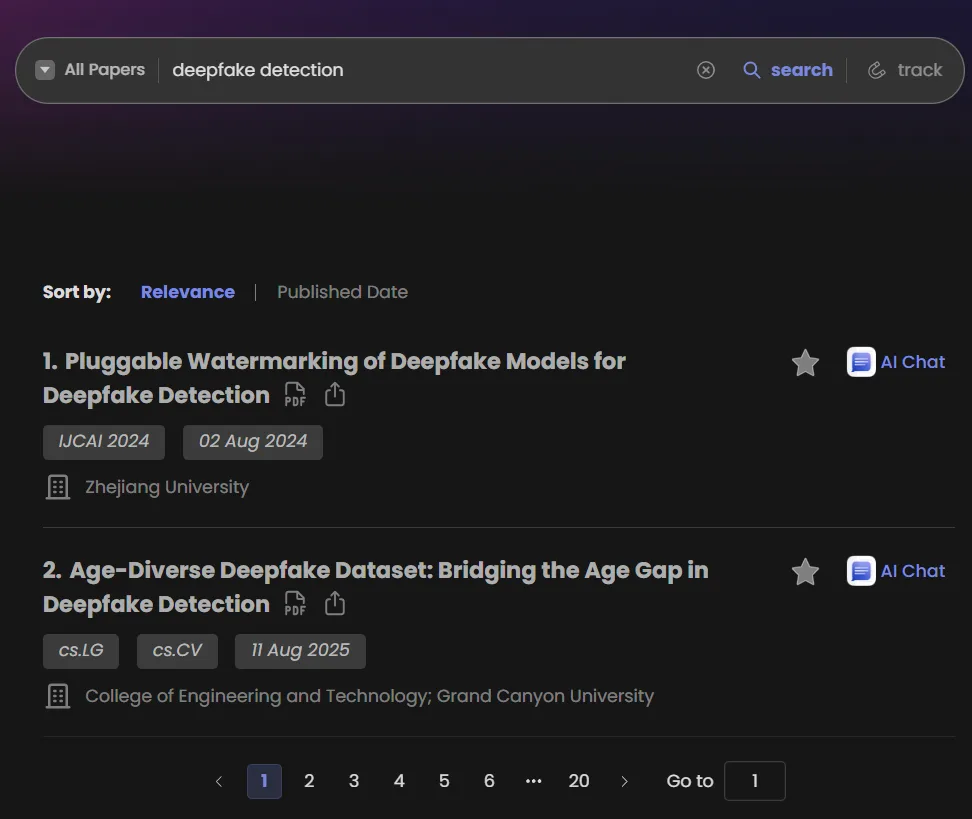
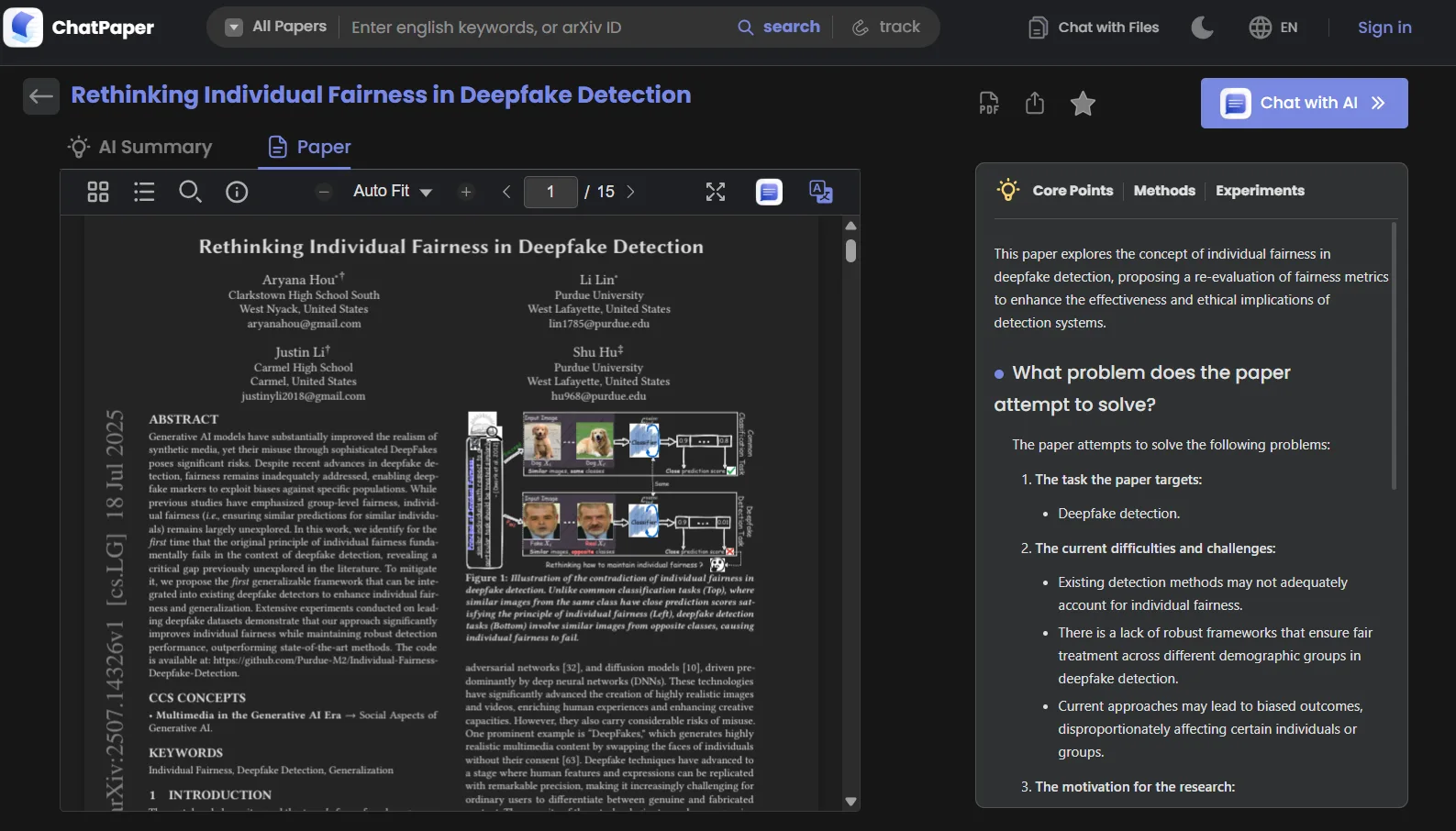
From there I could open a paper and chat with it directly, same as the main ChatDOC feature, asking questions about methodology, findings, whatever I needed. For a researcher, this is genuinely useful, being able to search, then immediately interrogate a paper’s contents without needing to read the whole thing front to back first saves a real amount of time. I tested this on a paper about individual fairness in deepfake detection and it broke down the core problem, methods, and experiments sections accurately when I asked it to summarize each part separately.
That said, beyond the research use case, I don’t see this having much broader appeal. It’s very niche, and I want to be clear that niche doesn’t mean poorly built, because ChatPaper does what it aims to do well. It’s just not something I’d reach for outside of academic or research contexts.
Performance, Reliability & Everyday Usability
Performance wise, everything just worked. No lag that I noticed, no weird buffering between switching tools, no dropped context mid conversation. I tested longer chat sessions with follow up questions building on earlier answers and it held onto that context fine throughout.
My actual issue with ChatDOC isn’t really a performance complaint at all, it’s more that the tool just doesn’t do a lot. It does its narrow set of features reliably, but reliability alone doesn’t make up for the fact that its scope is so limited compared to what else is out there right now.
Pricing, Free Plan & Limitations
Here’s the breakdown from the pricing page:
Plan | Price | File Uploads | Questions | Page Limit | File Size |
|---|---|---|---|---|---|
Free | $0 | 5/day, 10 total | 20/day, 100 total | 300 pages | 60MB |
Pro | $89.9/360 days (roughly $7.5/month annualized) | 300/30 days | 300/day | Unlimited | 200MB |
The Pro plan also unlocks OCR, image analysis (which is a paid add on even on Pro from what I saw), formula recognition, unlimited file translation, and support for more file types like DOC, DOCX, scanned documents, website links, and markdown.
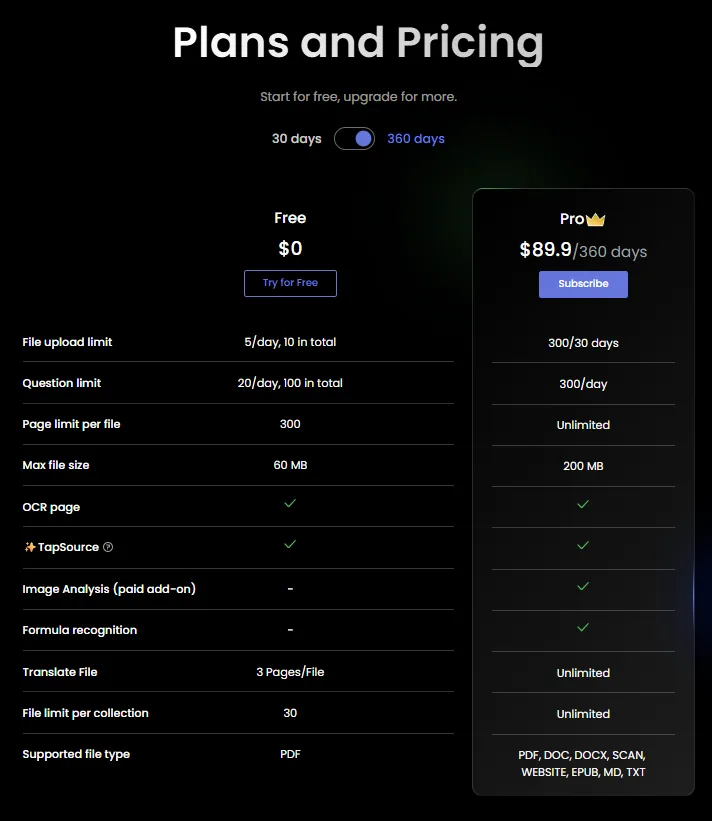
At first glance $89.9 for the year sounded like a lot, almost $90 flat just jumps out. But once I broke it down monthly it comes out closer to $7 to $7.5 a month, which isn’t actually unreasonable on its own. My real hesitation is comparing this against what else exists at a similar or even lower price point that offers a lot more functionality across the board. I’ll get into that more in the comparison section, but the short version is, the price isn’t the problem, the value relative to that price is where I start questioning it.
Privacy, Data Handling & Account Control
I pulled this directly from ChatDOC’s official privacy policy, and there are only few practical points worth knowing:
- ChatDOC states it has not sold or shared personal information to third parties for a business or commercial purpose in the past twelve months
- It does disclose certain categories of information to service providers under written contracts, and those providers are bound by the same privacy obligations
- Personal info may be used internally for research and product development purposes
- Data may be transferred and processed internationally, meaning outside a user’s home country, so anyone in the EEA or UK should know their data might not get the same protections as under GDPR depending on where it lands
- Users get standard rights under frameworks like CCPA and Virginia’s CDPA, meaning the ability to request access, correction, or deletion, with a response window of up to 45 days, extendable once by another 45 days if needed
Nothing alarming here honestly, it reads like a fairly standard SaaS privacy policy. The commitment to not selling data stood out as a positive, and the third party disclosures seem limited to operational necessities rather than anything resembling ad targeting.
Comparison: ChatDOC vs HiPDF
Since I reviewed HiPDF earlier, I think putting these two side by side makes sense, both are PDF focused AI tools, but they take very different approaches to what they actually offer.
Feature | ChatDOC | HiPDF |
|---|---|---|
Chat with PDF | Yes, with accurate citations | Yes, with page citations |
Mind Map | No | Yes, detailed and well branched |
AI Detector | No | Yes, text/image/document |
Dedicated research tool (ChatPaper) | Yes | No |
PDF to code conversion | Yes (PDF Parser) | No |
Full PDF suite (convert, edit, protect) | No | Yes |
Dark theme | Yes | No |
Pricing | $89.9/year (~$7.5/month) | $39.99 billed yearly |
This is honestly where my hesitation with ChatDOC comes together. HiPDF, at an even lower effective monthly cost, which is lower than half the price of ChatDoc annually, depending on the billing cycle, gives a mind map generator, an AI detector, and an entire suite of conversion and editing tools on top of the chat functionality. ChatDOC gives a chat tool, a research paper search tool, and a PDF to code converter, and while each of those individually works well, none of them are exclusive enough to justify picking ChatDOC over something broader at a lower price.
If someone specifically needs the PDF to code conversion for development work, or does heavy academic research and wants ChatPaper’s search plus chat combo, ChatDOC earns its place. But for general document work, I keep landing on the same question, why pay a greater amount for something narrower when an alternative exists that covers more ground.
Final Verdict & Overall Score
What worked well for me was the citation accuracy which was genuinely solid, no hallucinated facts or made up page references across everything I tested. The dark theme was a small but appreciated touch. ChatPaper is a legitimately useful tool for anyone doing academic research, and PDF Parser, while niche, does exactly what it claims for developers who need it.
What didn’t work as well for me though was the overall scope which is just too narrow relative to what else is available right now at a similar price. No mind map, no AI detector, no broader PDF utility suite. It’s not that ChatDOC does anything poorly, it’s that it does very little compared to competitors, and that limits how strongly I can recommend it.
Would I keep using it? For general PDF chat work, probably not as my main tool, since HiPDF covers that same ground plus more for similar money. But if I ever needed the ChatPaper research angle specifically, I’d come back to it without hesitation. I wouldn’t blindly recommend this to everyone, but for the right narrow use case, researchers especially, it’s a genuinely solid pick. I would suggest to just weigh the options first before committing.
Overall Score: 6.2/10.
Frequently Asked Questions:
ChatDOC provides exact, clickable page citations alongside every answer. In hands-on testing, the citations consistently led directly to the exact source text with no hallucinated facts or fabricated references.
While ChatDOC allows you to upload and chat with your own documents, ChatPaper acts as an academic discovery engine similar to Google Scholar. It lets users search published academic papers by topic, filter by institution or date, and interrogate research methodologies directly through AI.
Yes, ChatDOC supports a wide selection of file types, including DOC, DOCX, EPUB, TXT, Markdown, scanned documents, and live website URLs.
The PDF Parser is a developer-centric utility that deconstructs an uploaded PDF into structured code elements (such as HTML and CSS tags), breaking down headings, paragraphs, and tables for easier programmatic use or structural editing.
Subscribe to our email newsletter to get the latest posts delivered right to your email.
Comments