Conclusion
NotebookLM stands out as an exceptionally useful tool in the realm of AI-powered research and knowledge management. Its ability to generate accurate, source-grounded responses and a variety of useful outputs like audio overviews, slide decks, and mind maps makes it a standout choice for researchers, students, and professionals. While it lacks real-time voice dictation and is tightly integrated into Google’s ecosystem, these are minor drawbacks compared to its overall performance and accessibility. The free tier offers substantial functionality, making it a highly accessible and valuable tool for serious research work.
Pros
- Accurate and source-grounded responses
- Impressive audio overview feature
- Variety of useful outputs like slide decks and mind maps
- Free tier offers substantial functionality
- User-friendly interface and gentle learning curve
Cons
- Lacks real-time voice dictation
- Tightly integrated into Google’s ecosystem
Table of Contents
- First Impressions & User Experience
- Core Features & Real Usage Testing
- Performance, Reliability & Everyday Usability
- Privacy, Data Handling & Account Control
- Final Verdict & Overall Score
To be honest, I approached this review with a degree of skepticism. Not because NotebookLM had a bad reputation, but because I’ve seen enough of AI research tools to know that most of them sound impressive on paper and then fall flat the moment actual work is involved. They either completely make up things and hallucinate too freely, ignore the sources entirely, or just give generic summaries that a five second Google search would’ve produced anyway. So when I started testing NotebookLM properly, I was genuinely ready to be disappointed. I wasn’t.
This might be one of the most unexpectedly useful tools I’ve encountered in this category. NotebookLM is Google’s AI-powered research and knowledge tool, and unlike general-purpose chatbots, it doesn’t try to answer from broad internet training. Everything it produces is grounded in the sources that are actually uploaded to the notebook. PDFs, websites, Google Drive files, YouTube videos, audio files, copied text, all of it becomes the knowledge base, and the AI only draws from that. The concept is clever, and the execution is even more impressive, if I may say so myself.
Who is this suited for? Researchers, students, or professionals who regularly handle large volumes of documents and need to understand their content rather than merely store it. Anyone who deals with reports, academic material, course content, lengthy documents or needs to turn raw information into something presentable. Who it probably doesn’t suit is someone looking for a general chatbot or a basic notes app. This isn’t that. People expecting a general-purpose chatbot or simple notes app will likely be disappointed—not because the tool is lacking, but because they’re approaching it incorrectly. If used correctly though? This has ample of potential and it actually delivers on its promises.
First Impressions & User Experience
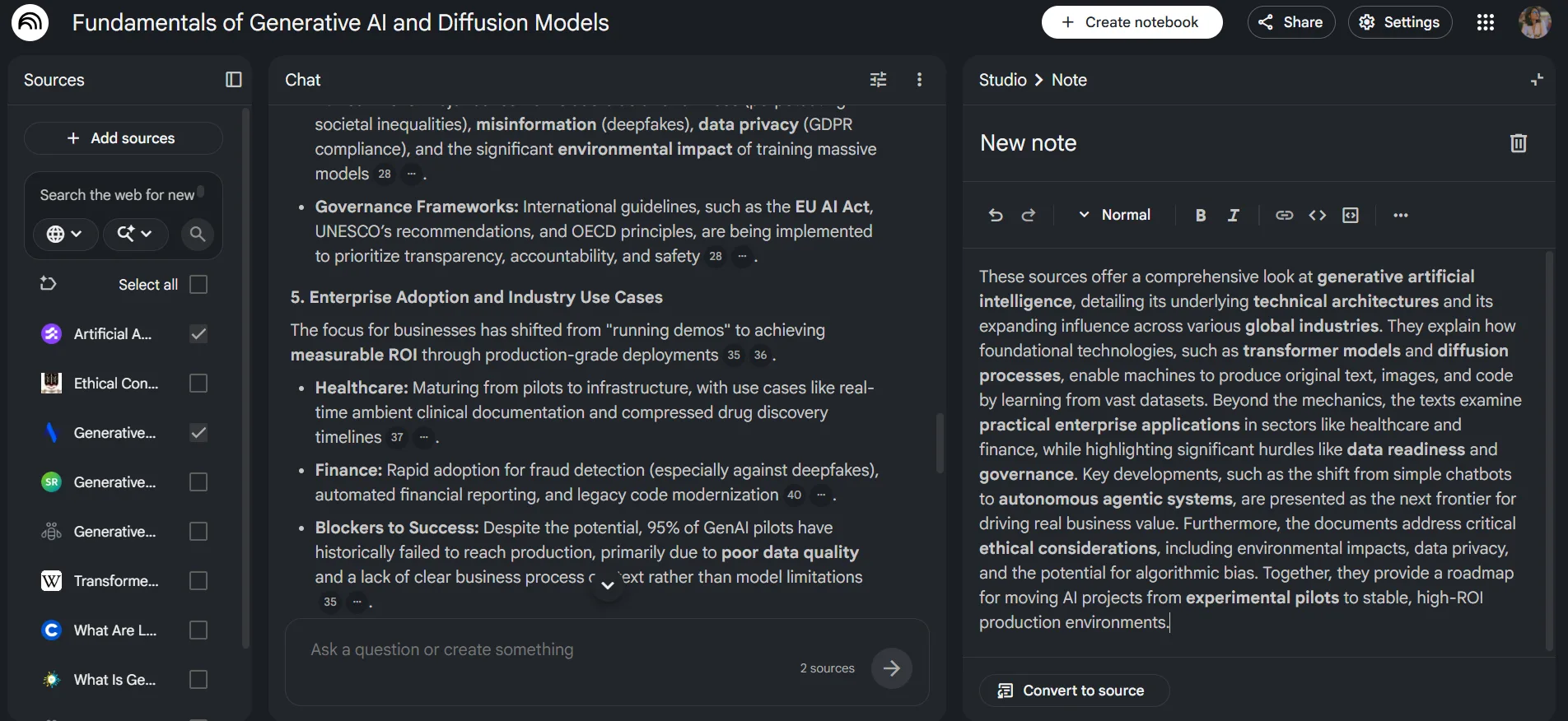
The interface features a three-panel layout. Sources on the left, Chat in the center, Studio on the right. It’s dark, clean, and feels modern without trying too hard. The first time I opened an empty notebook, the source upload panel was the first thing I interacted with, and the options available right away are quite broad. Files can be uploaded directly, websites can be added via URL, Google Drive is connected natively, copied text can be pasted in, and YouTube video links can be dropped in too. It indicates that audio processing is possible, which I tested later.
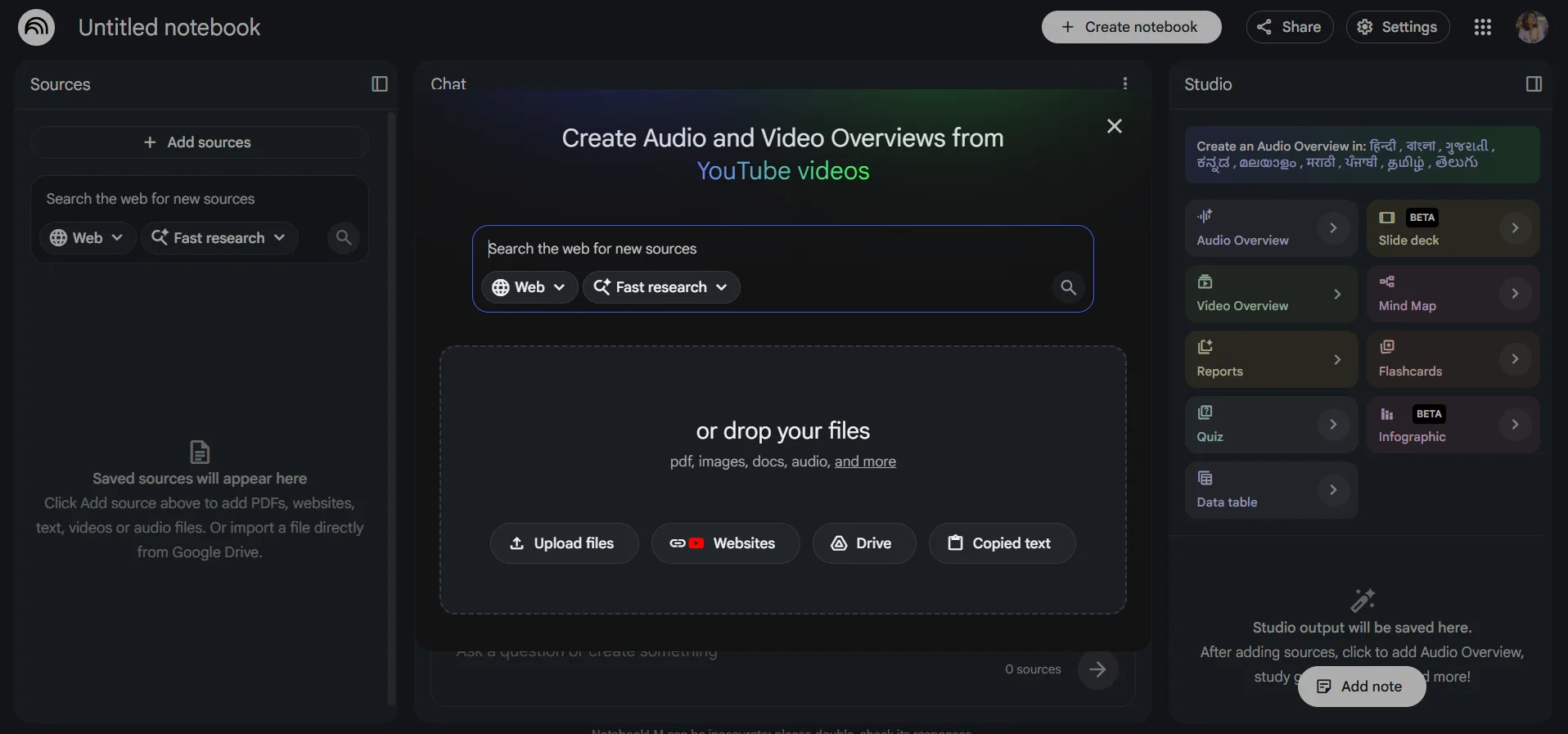
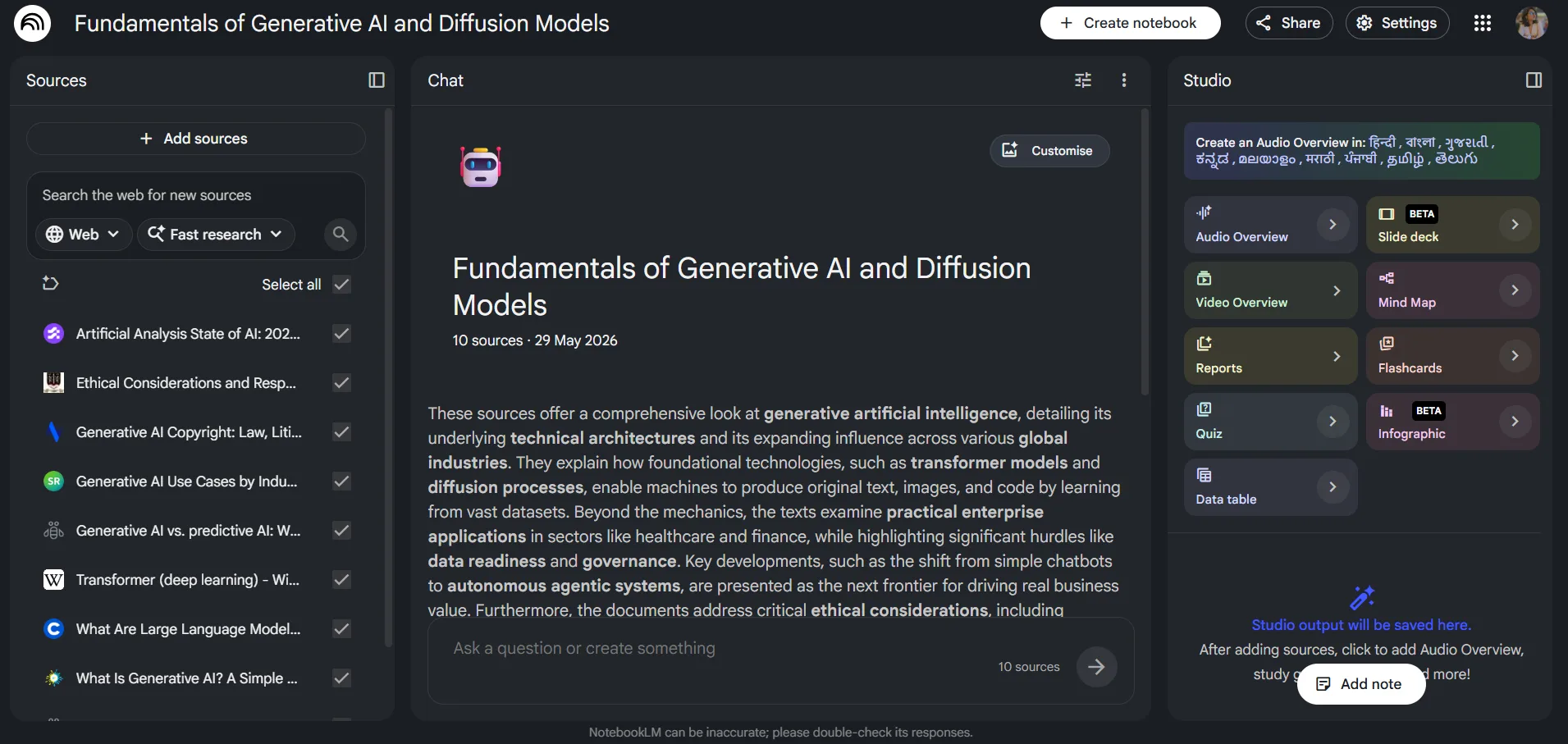
The learning curve is quite gentle; it almost felt nonexistent to me. The key thing to understand with NotebookLM is that it is not a general AI assistant. It’s a source-bounded one. So the quality of what it gives back depends entirely on what’s been uploaded. Once you understand that mental model, using it becomes very intuitive. Before grasping this, it might feel somewhat limiting if users expect it to know information outside the uploaded sources. It took about ten minutes to adjust, after which the session proceeded smoothly.
The Studio panel on the right is where the real interest lies, and I spent considerable time exploring its features.
Core Features & Real Usage Testing
I evaluated NotebookLM through two primary use cases. The first was a proper professional research setup. I uploaded course material on generative AI, across roughly ten sources including articles, transcripts, and documents. The second was a deliberate edge case, something I was curious about but didn’t fully expect to work.
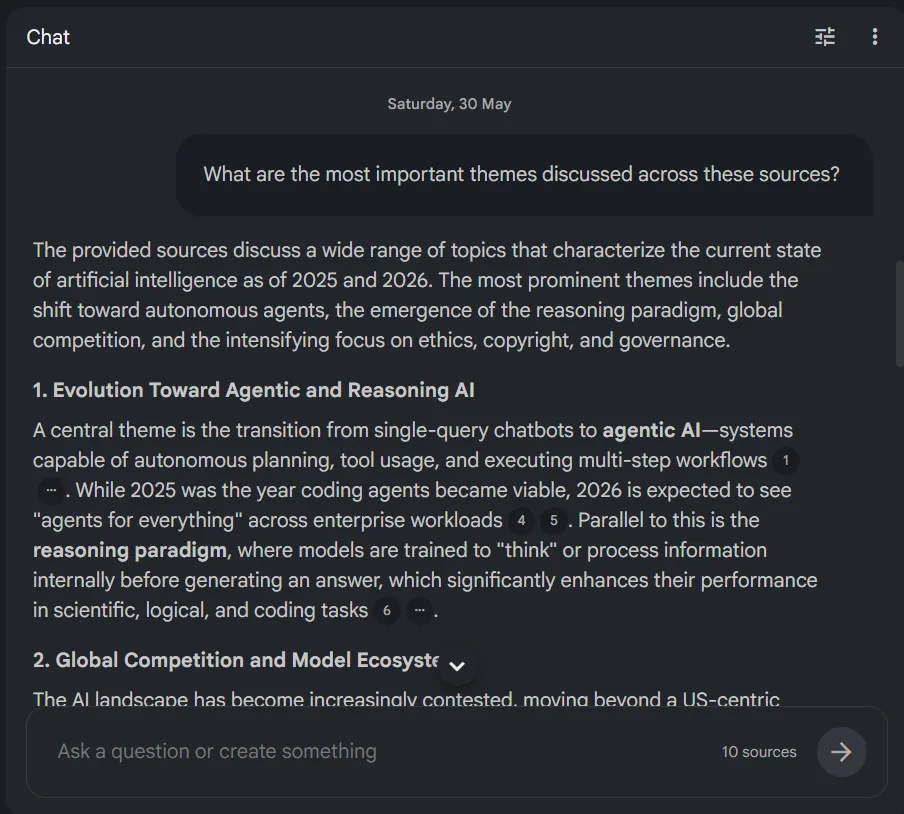
Beginning with the chat: I uploaded the AI-related material and queried it directly about the content. The responses were accurate, well-organized, and most importantly, based on the uploaded sources. Each reply includes inline citations referencing the exact source and passage, which I found very helpful. There’s no guessing whether the AI invented something. The trail is very clearly visible to the users from the get go and I think it’s a good deal.
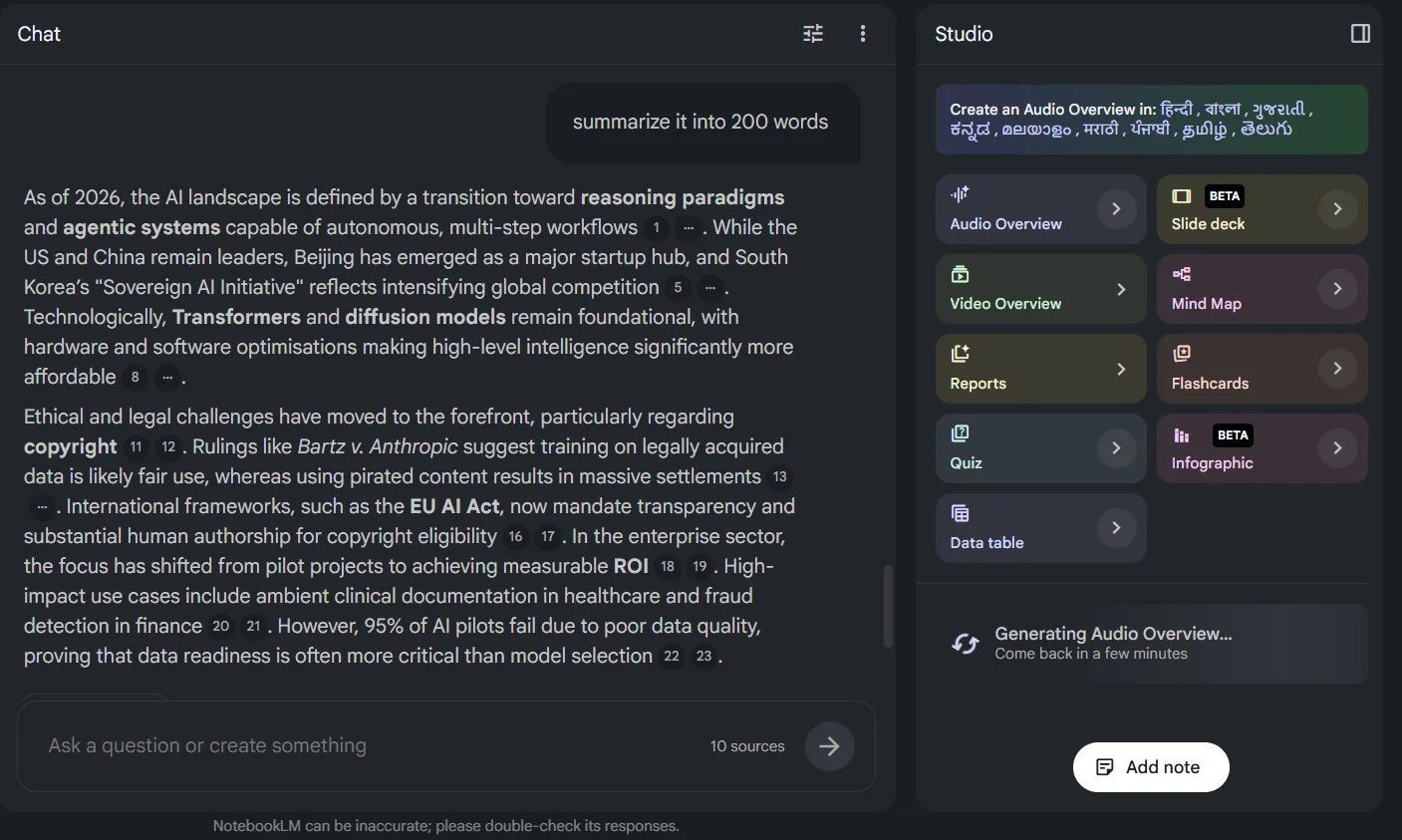
The Studio outputs are where this tool truly distinguishes itself from others:
- Audio Overview: This was my most intriguing feature. NotebookLM creates a podcast-style audio summary of selected sources, featuring two AI voices engaging in a conversational discussion. I genuinely did not expect it to sound the way it did. It didn’t sound AI-generated at all; it felt like two real humans were having a conversation. The dialogue felt natural and organic, with a realistic pace and genuine interaction between the voices, not just reading bullet points. I’ve heard AI generated audio before and it usually has a certain flatness to it. This didn’t. Generating audio for a notebook with ten sources took a few minutes, which is understandable considering the complexity.
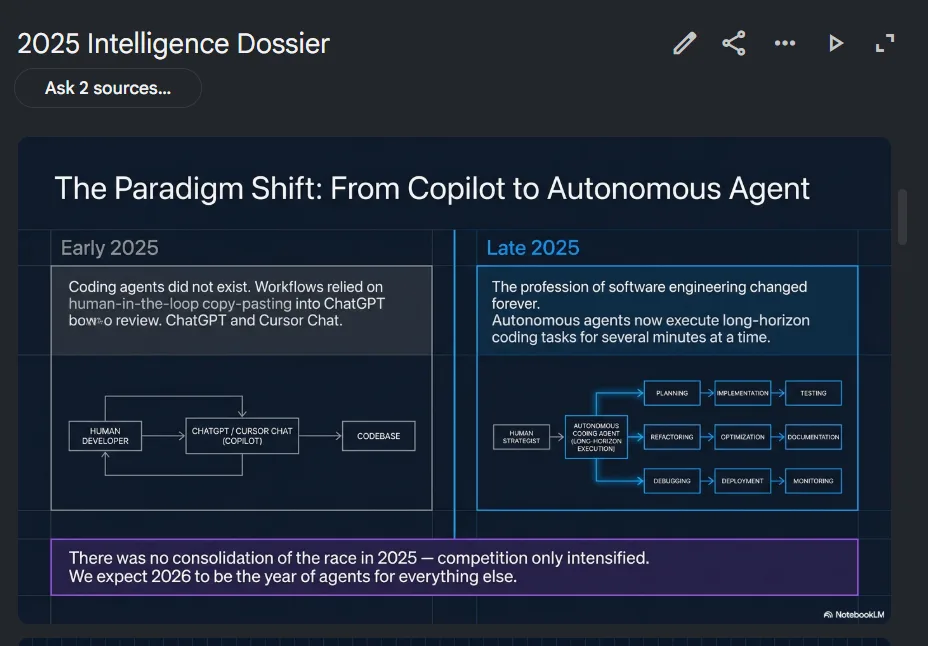
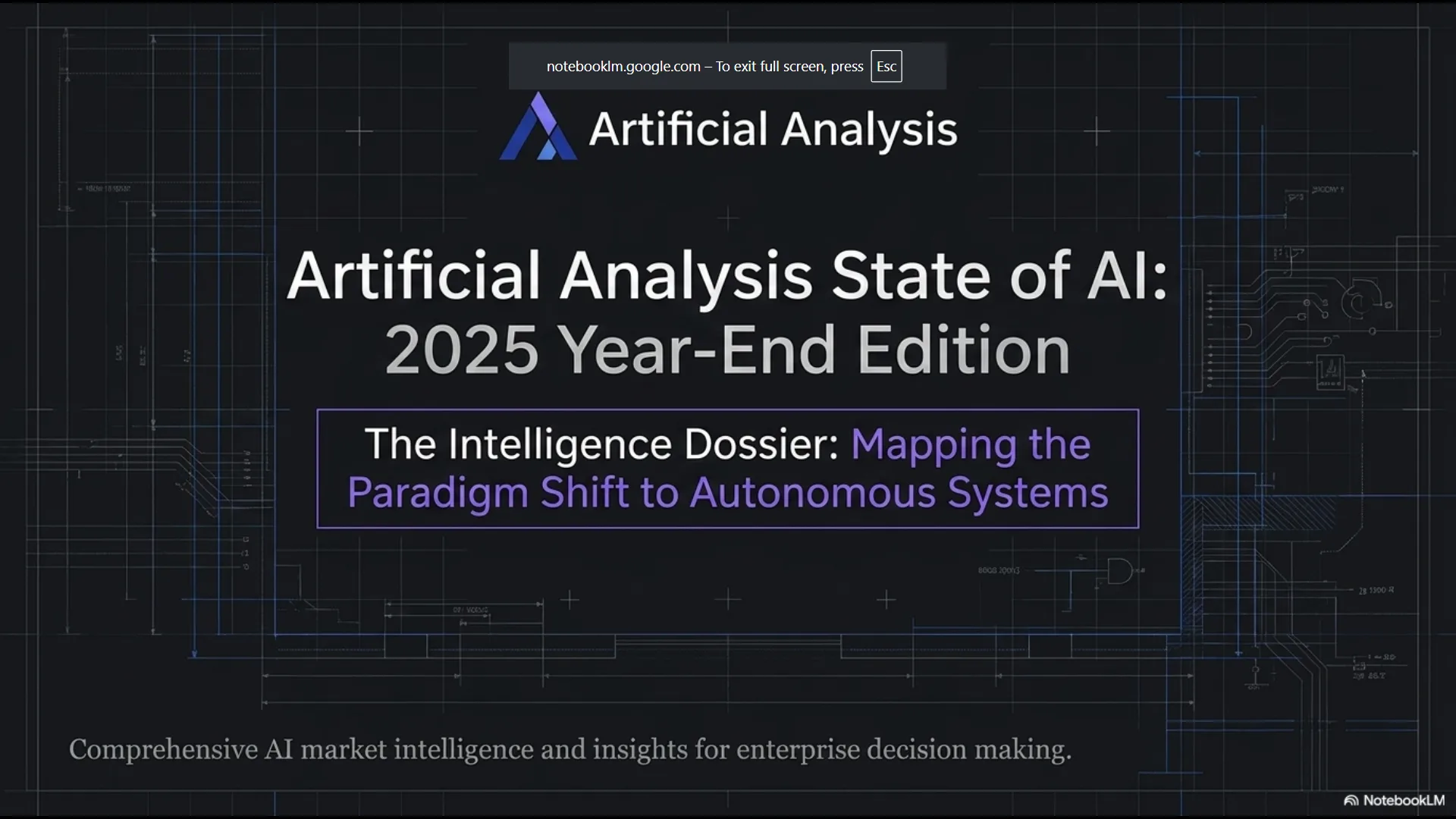
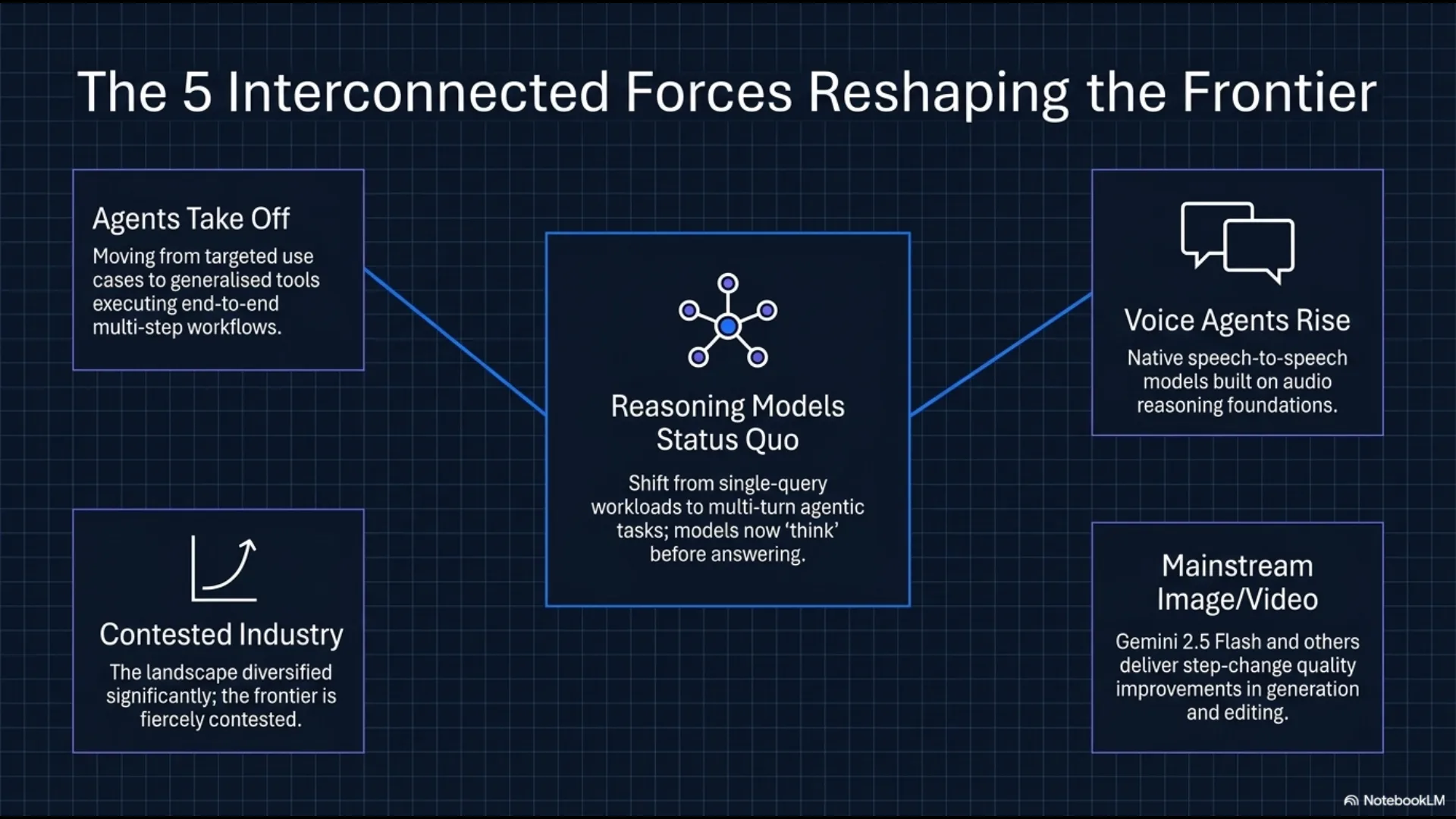
- Slide Deck: I created a presentation from the same AI-generated content, and the results were genuinely impressive. The slides were logically structured, with content organized sensibly and an appropriate amount of information per slide. As a draft, it looked considerably better than what many could produce manually from the same sources.
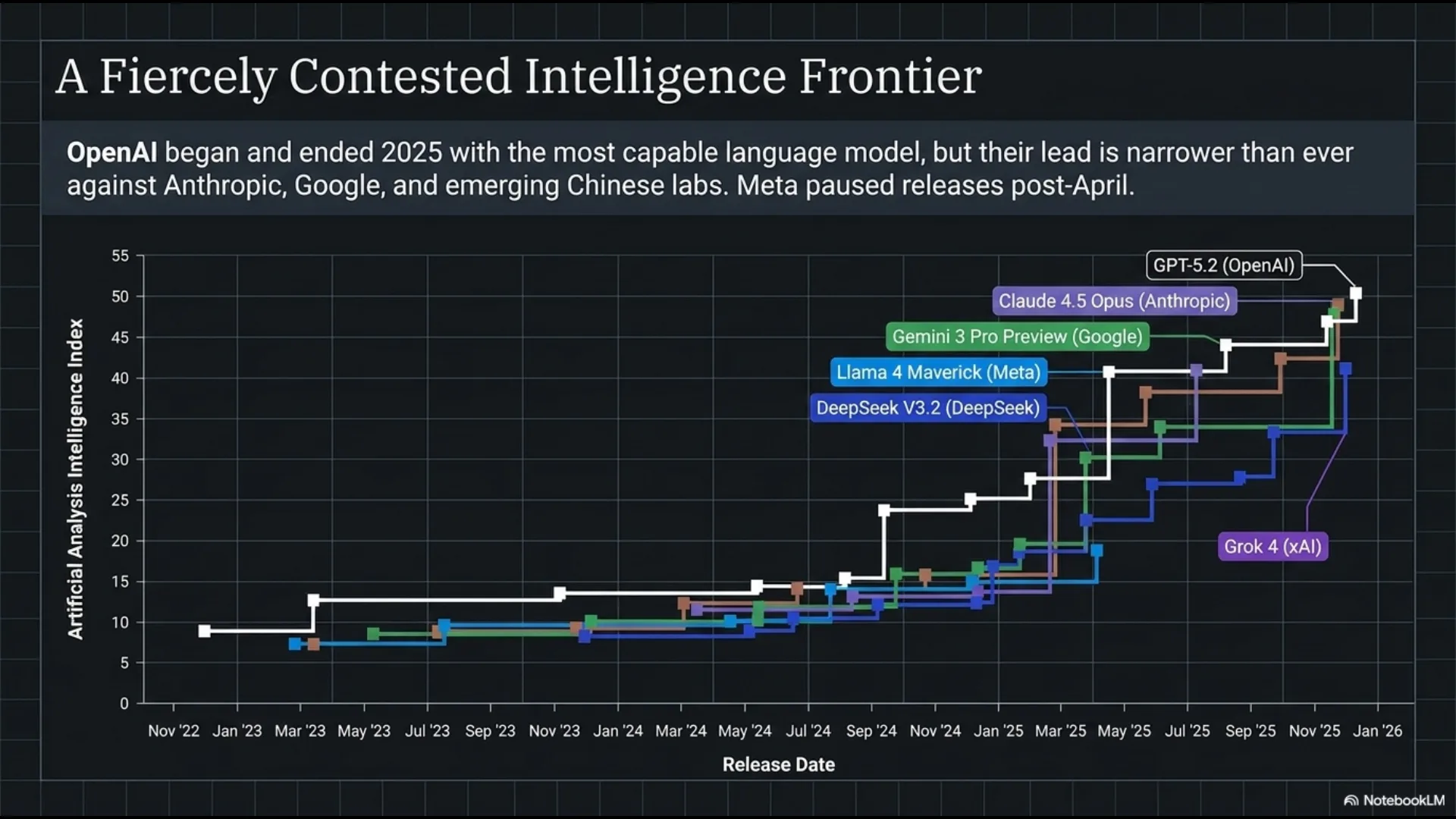
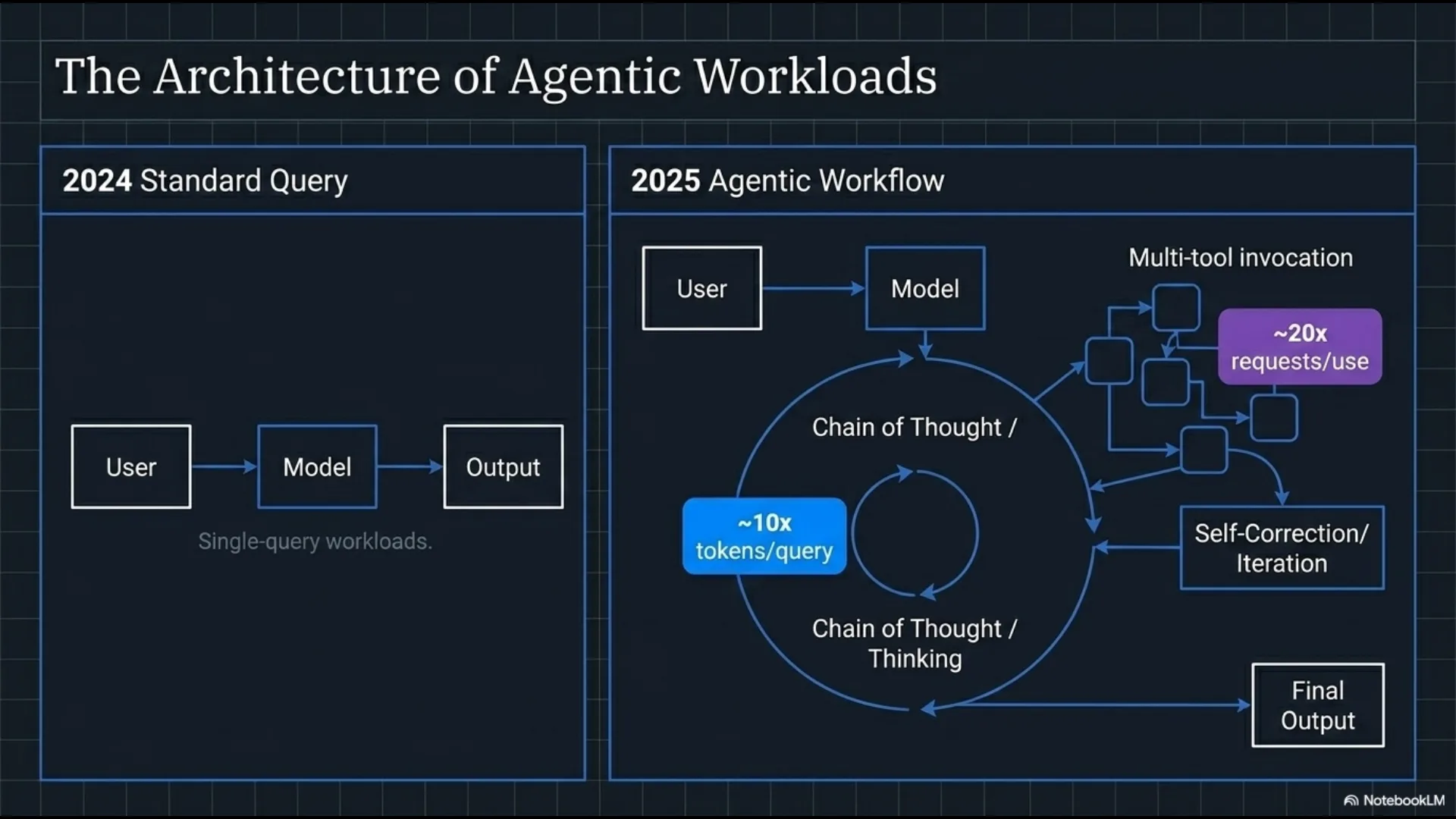
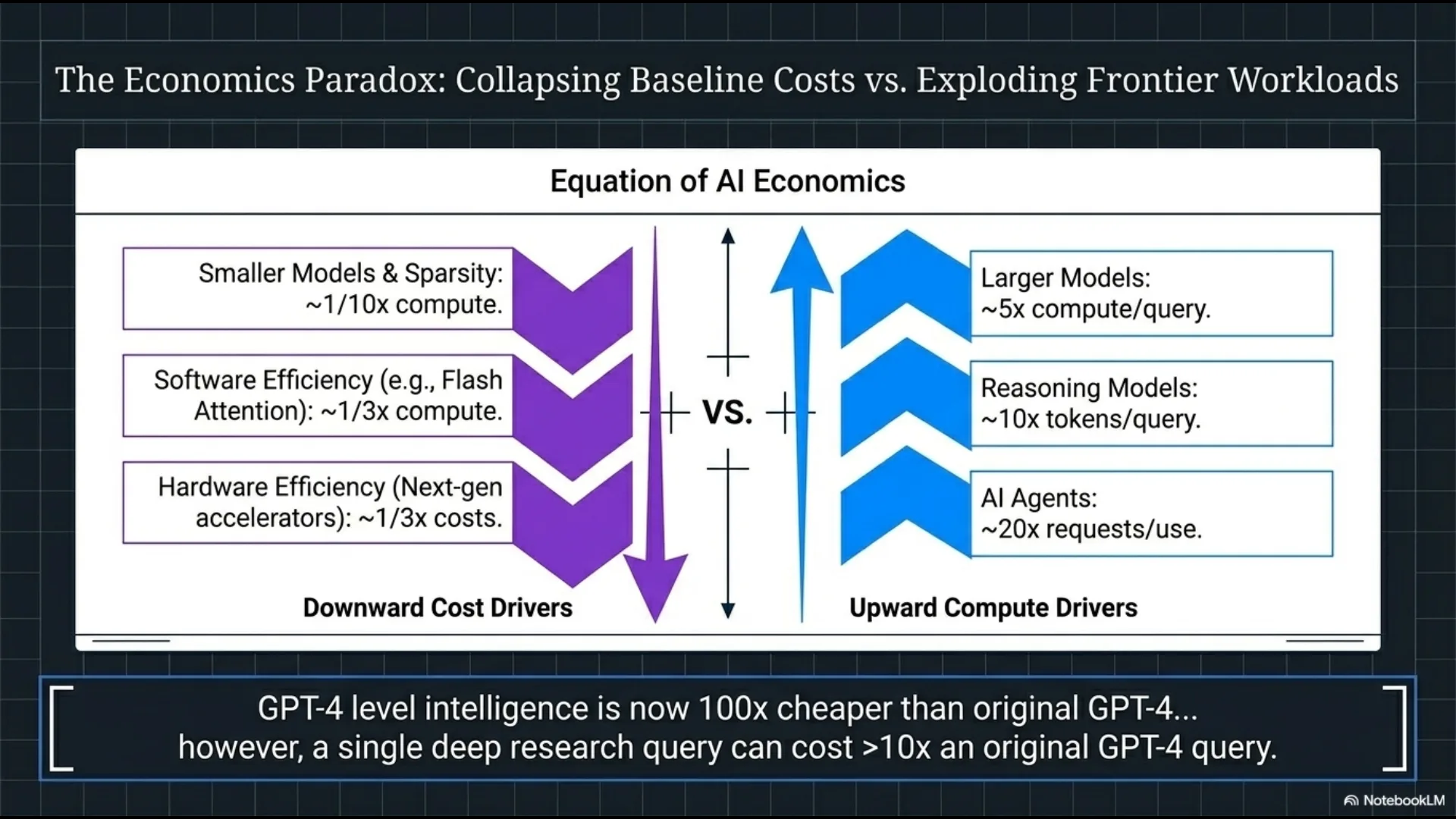
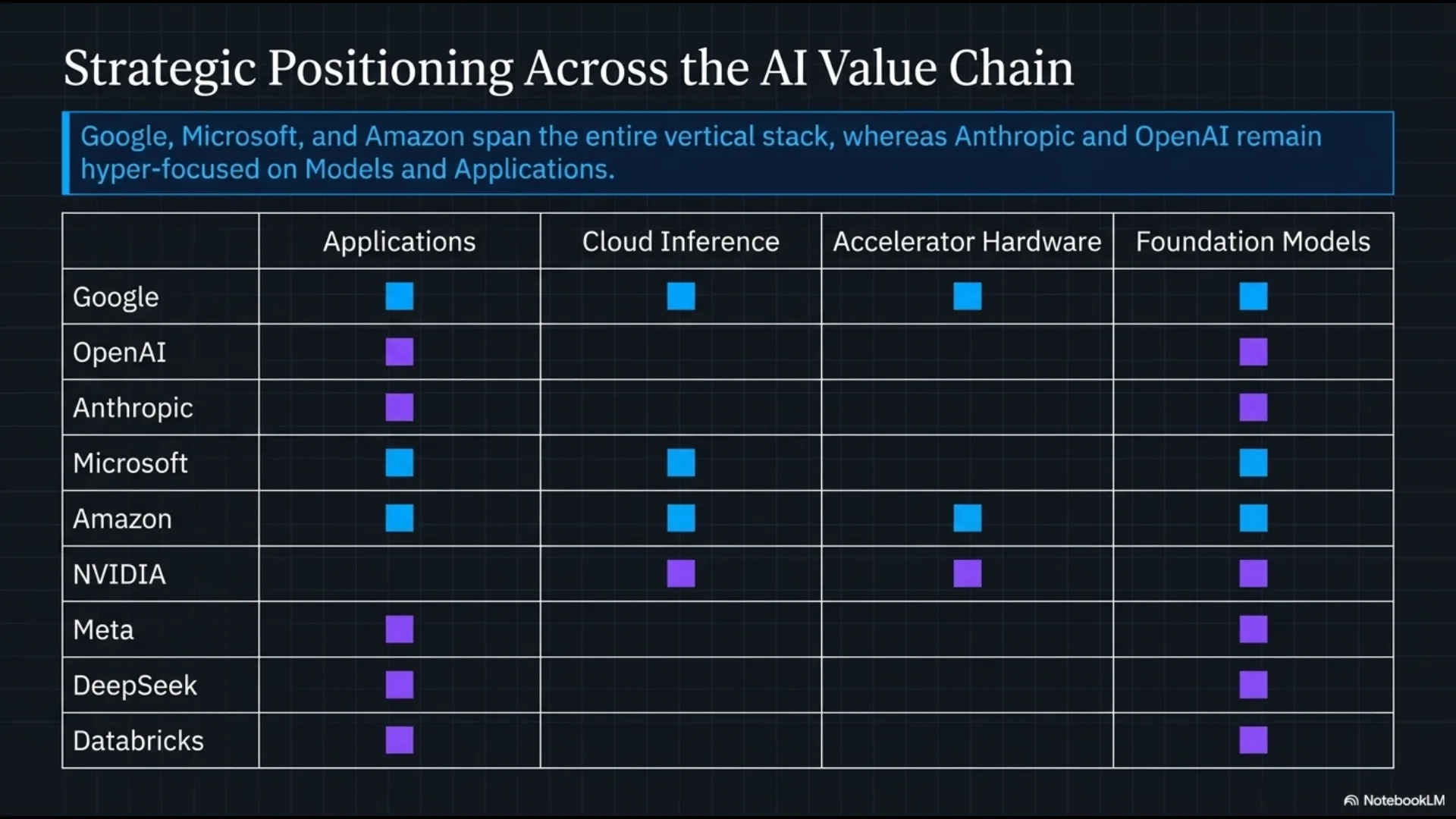
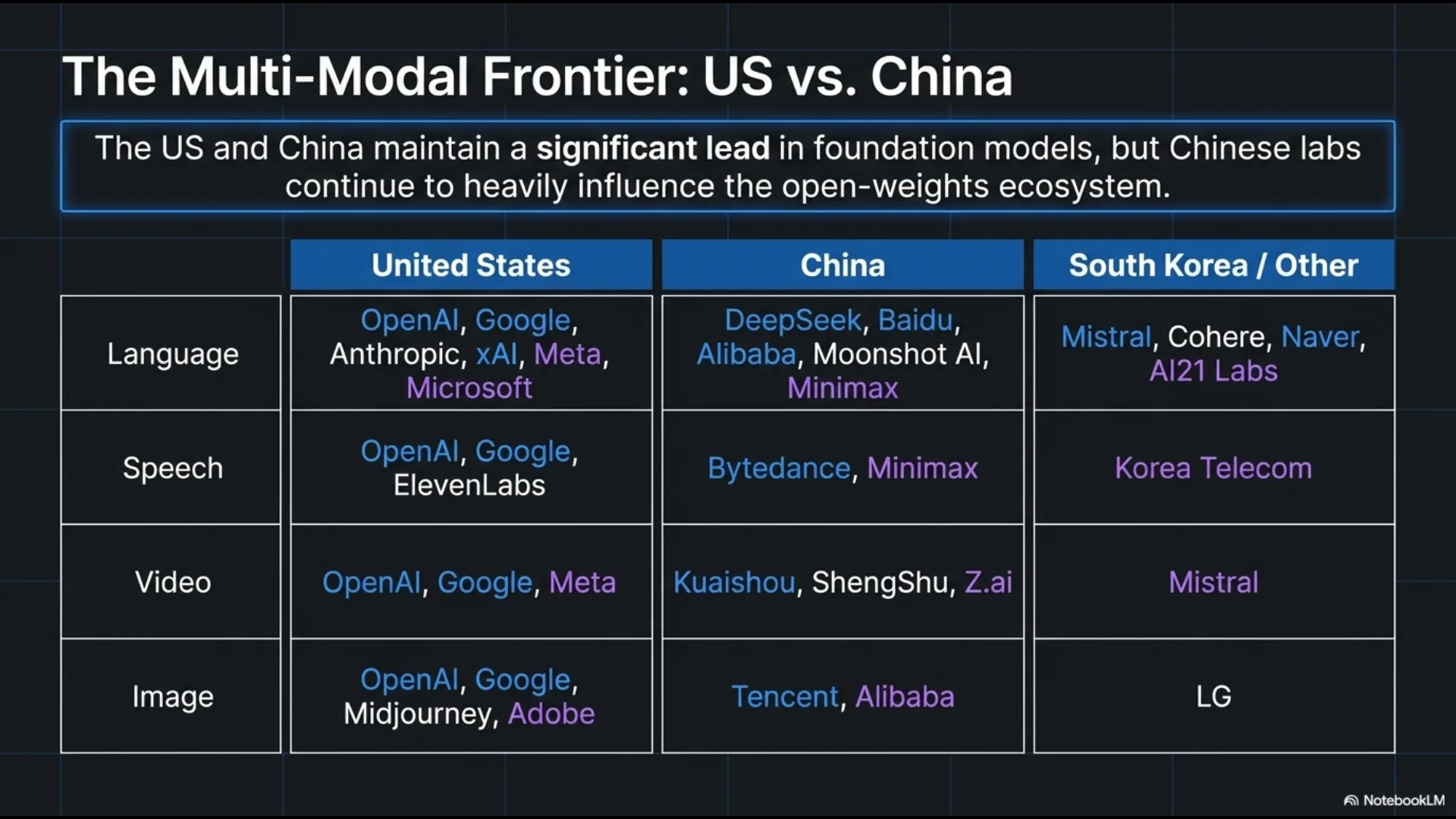
- Infographic (beta): This Studio feature creates a single, visually dense infographic summarizing key points from the sources, separate from the slide deck. The one generated from the AI material was colorful, well-structured, and had a real pop of visual energy to it. While fully AI-generated—noticeable upon close inspection or even at a glance—it surprisingly communicates complex content effectively in visual form, without typical spelling errors often seen in AI-created infographics.
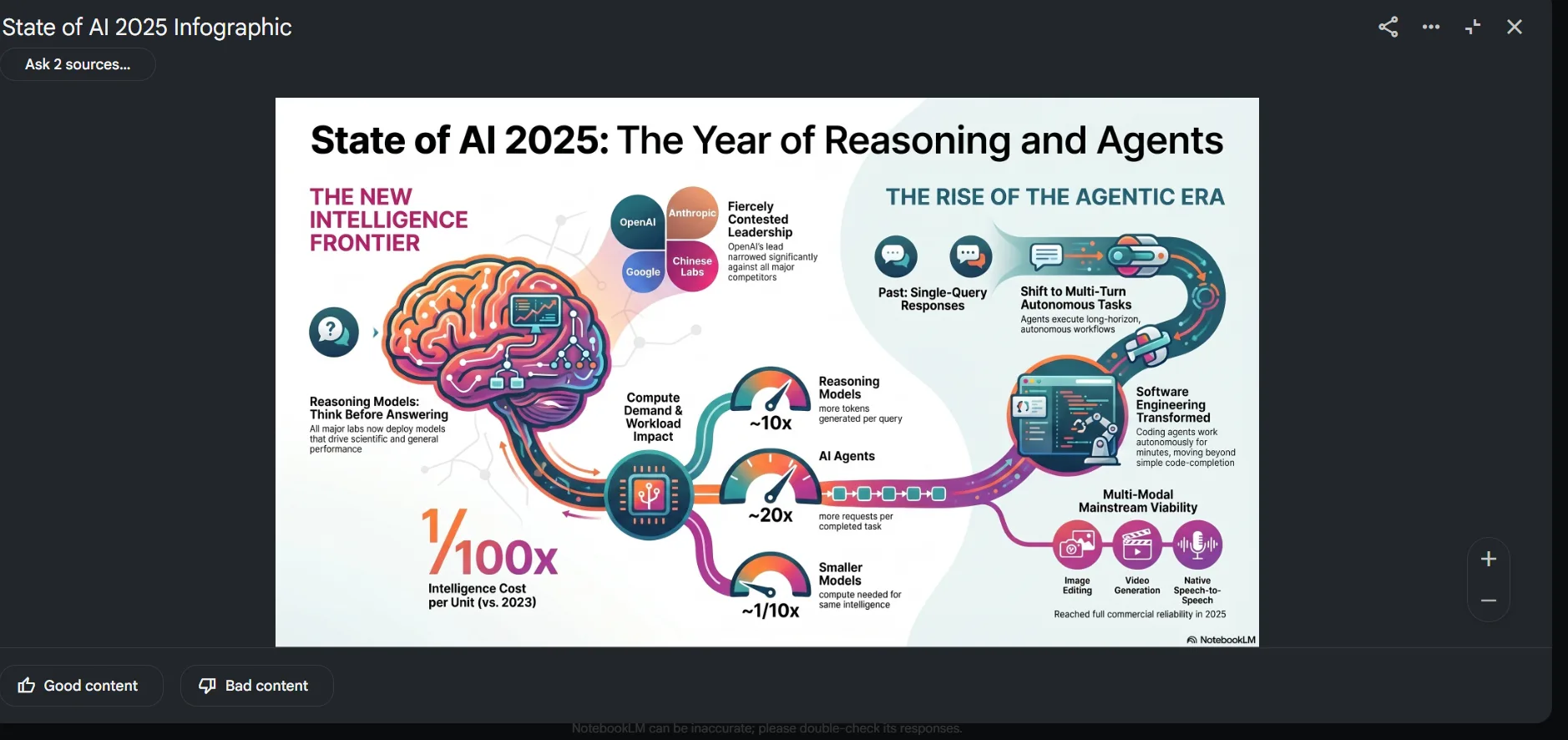
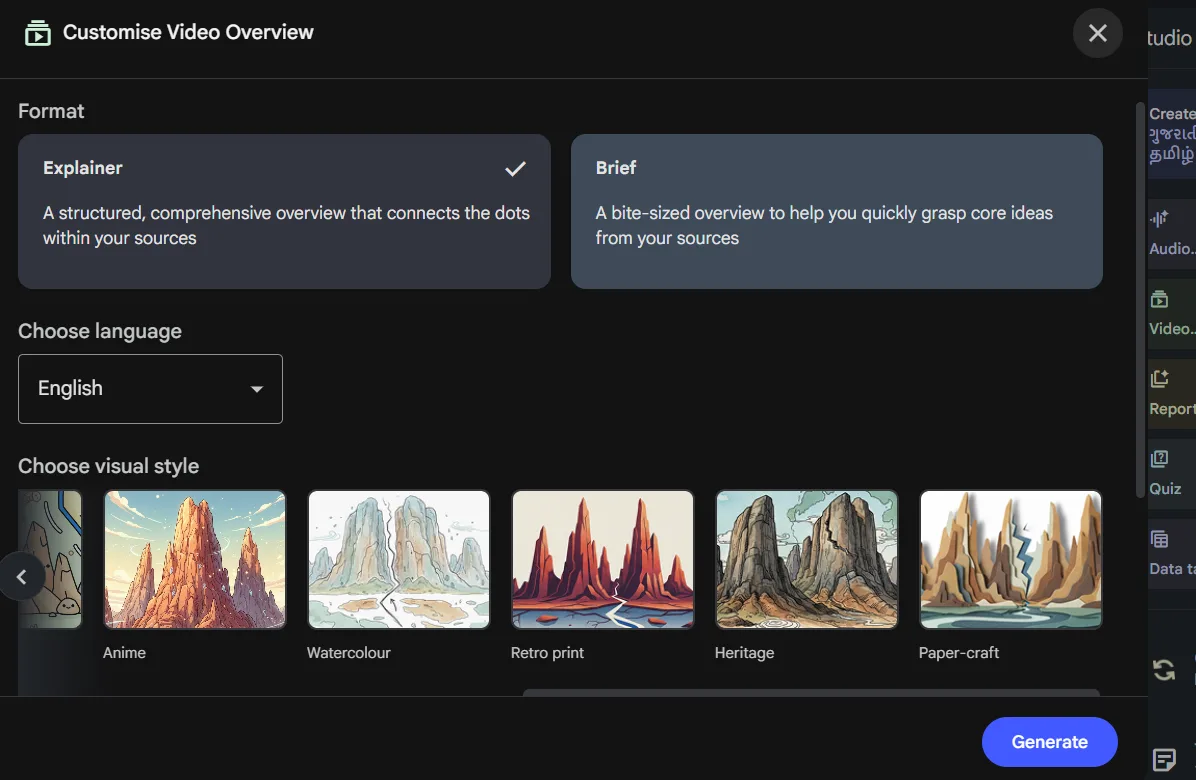
- Video Overview: Arguably the most surprising Studio feature is the ability to generate short video summaries, complete with animated visuals and narration. Before generating, there’s a customization screen where format can be set to either Explainer or Brief, language can be selected, and a visual art style can be chosen from options like Anime, Watercolour, Retro print, Heritage, Paper-craft and more. The resulting video was about a minute long, animated, and genuinely engaging to watch. It took longer to generate than other Studio outputs, which is expected given it produces a complete video. The art style options make it feel like a real product rather than a beta experiment. This is a genuinely unique feature; I haven’t encountered anything similar before.
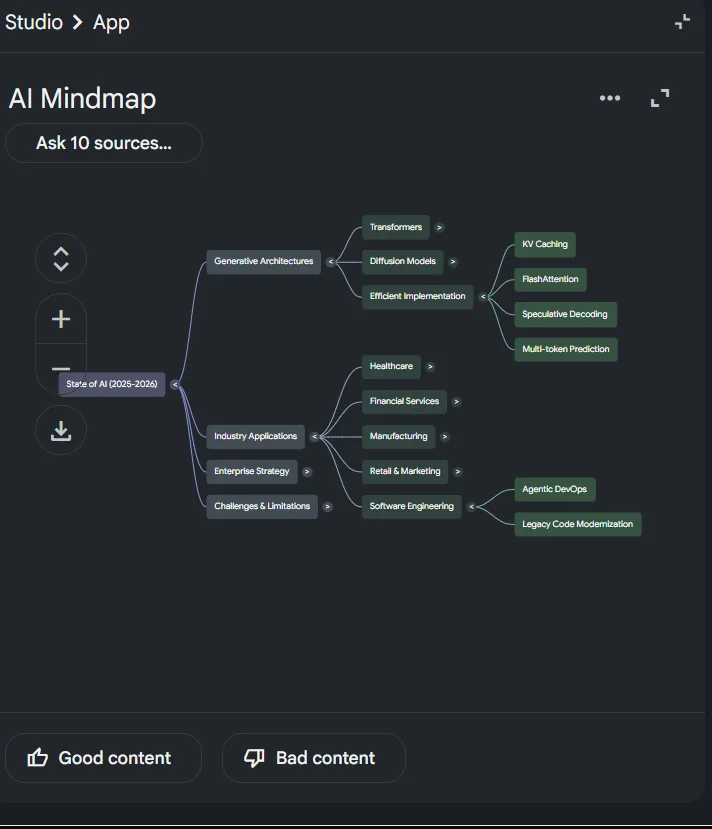
- Mind Map: This one surprised me too. From ten sources, it constructed an expandable mind map highlighting major themes. The main nodes were logical—Generative Architectures, Industry Applications, Enterprise Strategy, Challenges and Limitations—and each expanded into relevant subcategories. This hierarchical organization of dense information is genuinely helpful for understanding the big picture before delving into details.
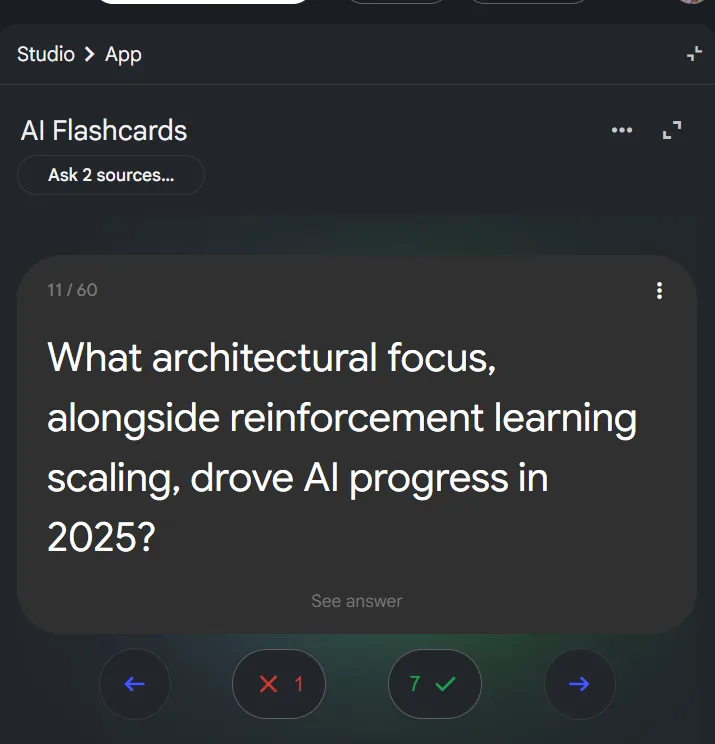
- Flashcards: Automatically generated from source material, the set I tested included 60 cards, each with a substantive question and a toggle for the answer. The questions were meaningful, not trivial. For example, one card asked: “What architectural focus, alongside reinforcement learning scaling, drove AI progress in 2025?”—a specific, recall-based question that enhances learning.
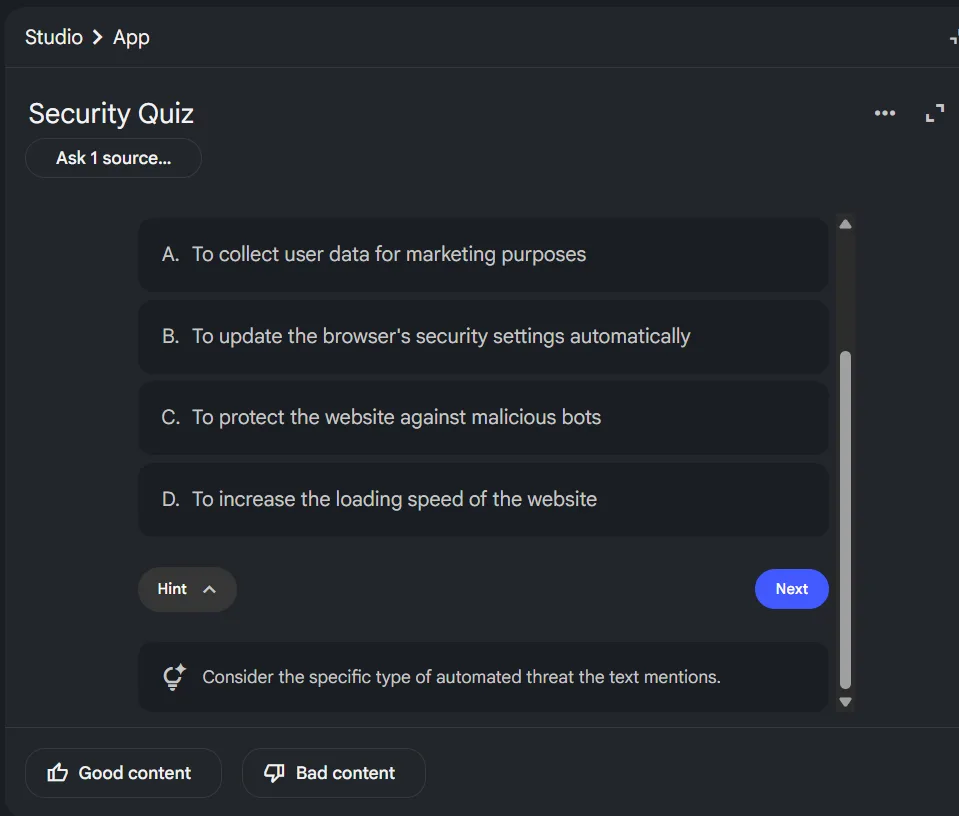
- Quiz: The quiz feature functions as expected: multiple-choice questions derived from the source, with hints that guide rather than reveal answers. The questions were relevant and thoughtfully crafted, designed to assess understanding rather than mere recognition. Useful, straightforward, no complaints.
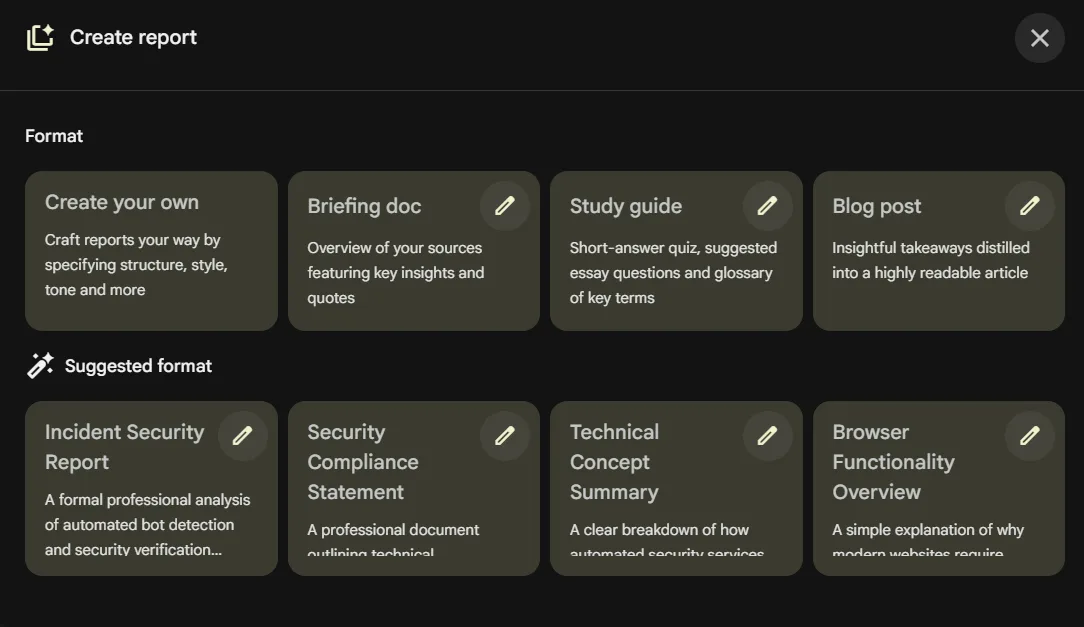
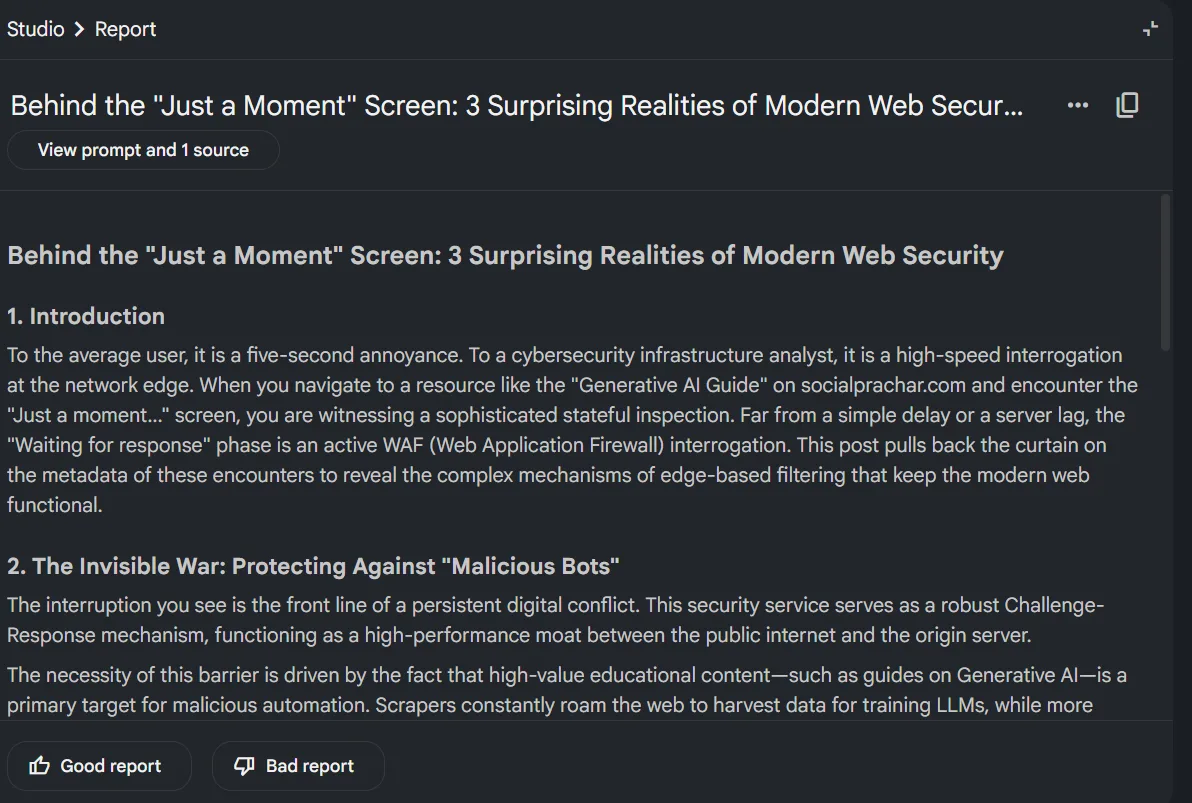
- Reports: This one has more depth than I initially expected. When opening the report generator, it doesn’t just dump a summary, it gives a whole selection of formats to choose from. Briefing doc, study guide, blog post, and even a “create your own” option where structure, tone and style can be specified manually. It also suggests formats based on the uploaded content; for example, on a source about generative AI, it proposed options like Technical Concept Summary or Browser Functionality Overview, which were highly relevant. I went with the blog post format and it produced something coherent and readable, though on the shorter side. For a blog output specifically I would’ve appreciated a longer word count. But the variety of report types available is honestly one of the more underrated parts of this tool.
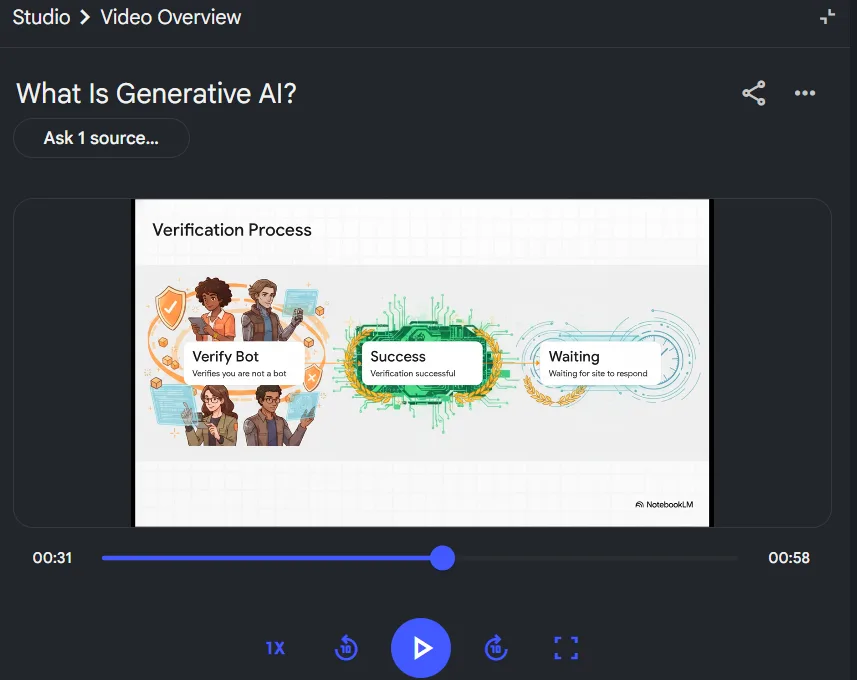
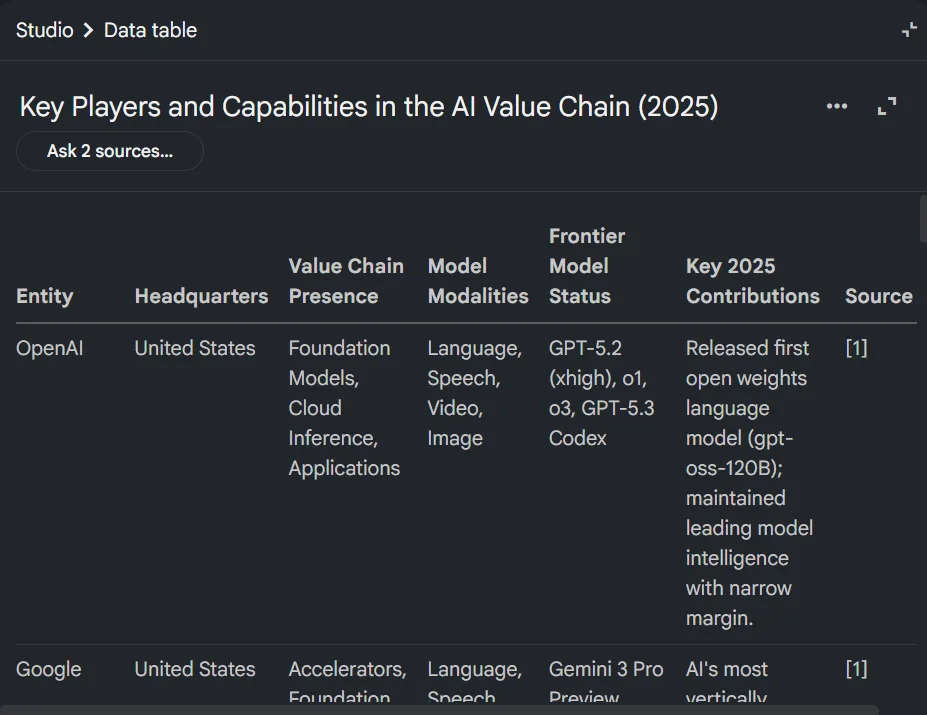
- Data Tables: For structured or comparative data, it can generate organized tables. This worked well with AI landscape data, creating a “Key Players and Capabilities” table covering organizations like OpenAI, Google, and Anthropic.
- Notes Panel: Within the Studio, there is a notes panel where freeform notes can be taken. These notes can optionally be converted into sources, allowing research notes to feed back into the knowledge base.
Now for the edge case test. I uploaded a WhatsApp audio file—essentially a song in Hindi and Bengali—to see how the tool would handle it. I asked it to transcribe and summarize professionally. It returned a complete transcription of the lyrics, labeled as professional, along with a summary accurately describing the audio as an emotive song exploring themes of love and longing. This was unexpected: the transcription was accurate, the summary coherent and professional, and it managed the bilingual content seamlessly. I was genuinely impressed by that one.
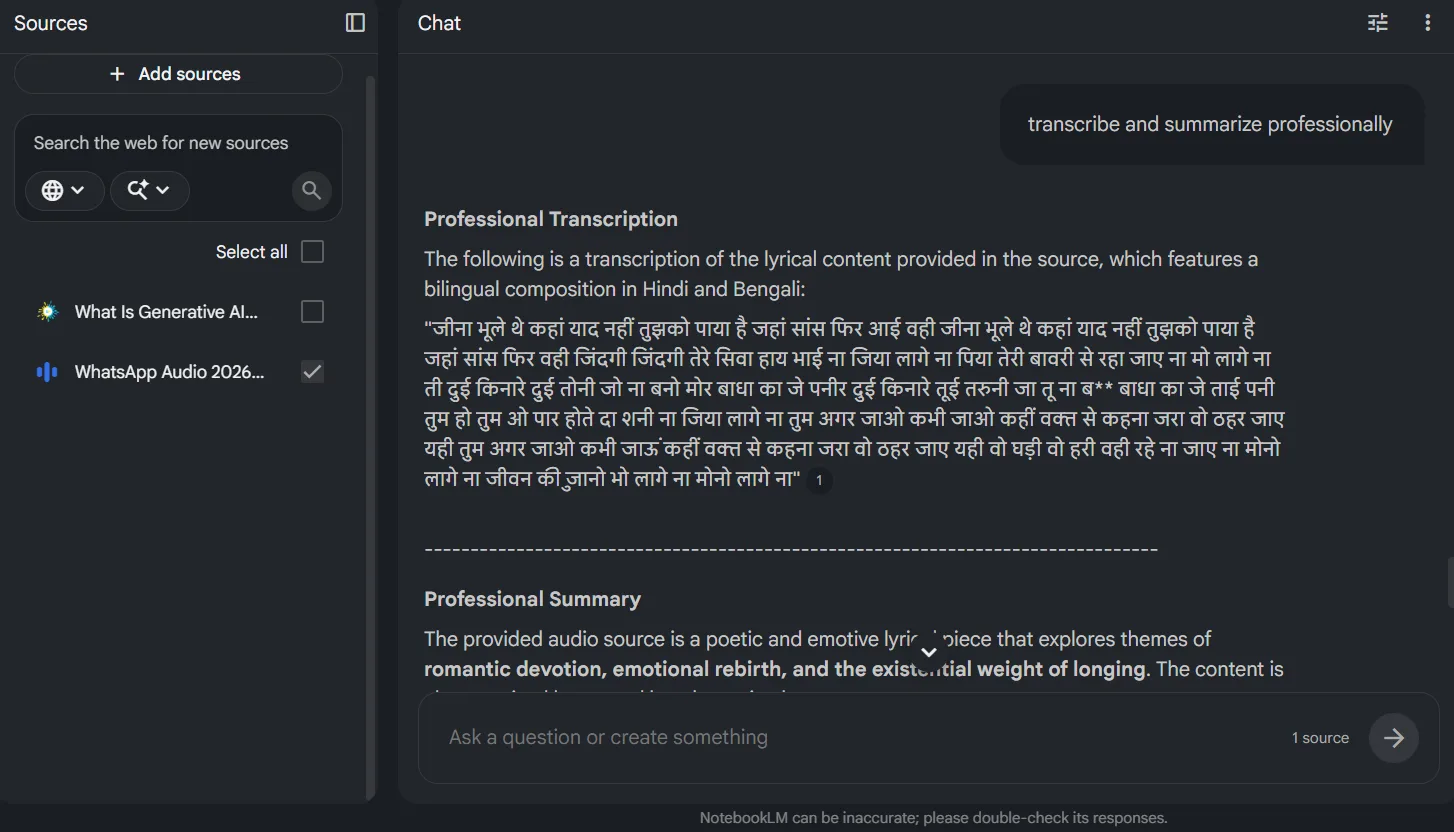
A notable limitation is that NotebookLM does not support real-time voice dictation or live audio input. Uploading a pre-recorded audio file works, as shown above, but there is no option to speak into it directly and have it transcribe in real time. That would be an obvious and useful addition, and it’s noticeably absent. If that existed, the use case for working professionals and researchers taking live notes would expand considerably.
Performance, Reliability & Everyday Usability
Throughout testing, the tool remained stable; nothing crashed or froze, and responses stayed accurate to the uploaded sources. Chat responses were consistently reliable and accurate.
A key performance consideration is the number of sources used. With all ten sources selected, generating the Audio Overview took a few minutes, longer than expected. When fewer sources were selected, generation was noticeably faster. That’s expected behavior, not a flaw, but it’s something to be aware of when working with large notebooks. Using fewer sources results in faster, more targeted outputs.
- Chat responses are quick and based accurately on sources.
- Audio overview generation duration increases with more sources, as expected.
- All Studio outputs—slides, mind maps, flashcards, quizzes, and reports—were generated without issues.
- Handling the edge case audio was better than anticipated, with accurate transcription on the first try.
- The session ran smoothly, with no synchronization issues, glitches, or crashes across nearly a dozen feature tests.
- The interface became more intuitive as the session progressed.
Pricing, Free Plan & Limitations
This is genuinely one of the most accessible tools in this space from a cost perspective. NotebookLM’s standard tier is completely free, and the free plan is actually usable for real work, not a stripped-down demo. The pricing tiers are structured as follows:
- Standard (Free): $0/month. Covers 100 notebooks, 50 sources per notebook, and access to all core Studio features including Audio Overview, Slide Deck, Mind Map, Flashcards, Quiz, Reports, Data Tables, and the chat interface. All the features tested in this review were available on the free tier.
- Plus: $7.99/month via Google AI Plus. Doubles the generation limits compared to free, raises sources to 100 per notebook, and includes early access to new features.
- Pro: $19.99/month via Google AI Pro. 500 notebooks, 300 sources per notebook, 500 daily chat queries, 20 Audio Overviews and 20 Video Overviews per day, 100 reports per day. Also bundles Gemini Advanced, Gemini in Gmail and Docs, and 2TB of cloud storage.
- Ultra: $99.99/month or $200/month via Google AI Ultra, depending on the storage and limit tier needed.
- Workspace Business Standard: $14/user/month, includes NotebookLM Plus as part of the bundle.
- Student deal: $9.99/month for Google AI Pro, which includes the Pro NotebookLM tier.
NotebookLM cannot be purchased as a standalone product. It comes bundled as part of Google’s AI subscription tiers. For most individual users and students, the free plan is enough. I tested everything in this review on the free tier and didn’t hit a single wall. The jump to Plus at $7.99 makes sense for anyone generating outputs frequently, and Pro is clearly aimed at power users or professionals who want NotebookLM as a core daily tool rather than an occasional one. The Ultra tier is for enterprise-level usage and the pricing reflects that.
Compared to something like Evernote’s Advanced plan at $250 a year, the value here is remarkable. Especially since the free plan genuinely doesn’t feel hobbled.
Privacy, Data Handling & Account Control
NotebookLM falls under Google’s privacy policy since it’s a Google product. The relevant details, based on Google’s official documentation:
- What’s collected: Files uploaded, queries, chat history, and generated outputs are used to build the notebook knowledge base and assist with research tasks.
- AI training: The content in NotebookLM will not be used to train Google’s foundational AI models, as long as feedback isn’t explicitly submitted. If thumbs up or down feedback is given, the associated content including prompts, sources, and outputs may be reviewed by trained human teams and retained for up to three years, disconnected from the Google Account.
- Workspace and school accounts: For users accessing NotebookLM through a work or school account, uploads, queries, and model responses will not be reviewed by human reviewers and will not be used to train AI models at all.
- Third-party sharing: Data shared with other Google services such as Gemini is handled per the Google Privacy Policy and relevant service notices.
- Account deletion and data control: Standard Google account controls apply, including the ability to delete notebooks and uploaded files.
- Data storage: All data is processed and stored on Google’s servers, consistent with Google’s infrastructure policies.
The AI training stance for personal users has one condition worth paying attention to: feedback submission is the trigger. As long as feedback buttons aren’t used, content doesn’t go into training pipelines. For Workspace users the protection is stronger and unconditional. For most casual users the free tier handling is adequate, but those working with sensitive or proprietary documents should either use a Workspace account or be careful about what they submit as feedback.
Overall trust is reasonable. As a Google product, it inherits the typical data handling caveats, but NotebookLM’s AI training policies are transparent and well-defined.
Final Verdict & Overall Score
My initial expectations were uncertain, but I emerge with one of the most positive impressions of any tool I’ve tested in this field. The Audio Overview is legitimately impressive, not in a “for AI” kind of way but in an actually sounds like something worth listening to kind of way. The slide deck output, the mind maps, the flashcards, the accurate bilingual audio transcription on an edge case audio file, all of it worked and worked well. The chat is source-accurate and citable. The Studio panel covers more output types than I’ve seen in any comparable tool.
The lack of real-time voice input remains a notable gap—an obvious next step, especially considering the high quality of audio transcription for uploaded files.
Pricing is largely irrelevant for most users, as the free plan offers comprehensive functionality. That alone makes this one of the most accessible serious research tools currently available.
Would I use it regularly? Absolutely, I am already planning to. For anyone who regularly processes dense material and needs to extract real value from it rather than just skim the surface, this is probably the best tool available right now for that specific job.
The main limitations are the absence of real-time dictation and its dependence on Google’s ecosystem. But within its lane, this is as good as it gets.
Final score: 9.6 out of 10
Frequently Asked Questions
NotebookLM is Google’s AI-powered research tool that generates responses based solely on the sources uploaded to it, such as PDFs, websites, and audio files. Unlike other AI tools, it doesn’t rely on broad internet training, ensuring that its outputs are accurate and grounded in the provided sources.
NotebookLM is particularly suited for researchers, students, and professionals who need to process and understand large volumes of documents. It’s ideal for those who work with reports, academic material, or lengthy documents and need to transform raw information into presentable formats.
NotebookLM offers several impressive features, including an audio overview that generates a podcast-style summary, slide deck creation, mind maps, flashcards, quizzes, and video overviews. These features make it a versatile tool for various research and presentation needs.
Yes, NotebookLM offers a free tier that includes substantial functionality. The free plan covers 100 notebooks, 50 sources per notebook, and access to all core Studio features, making it highly accessible for serious research work without any major limitations.
NotebookLM lacks real-time voice dictation, which could be a useful addition for live note-taking. Additionally, it is tightly integrated into Google’s ecosystem, which might be a limitation for users who prefer a more standalone tool.
NotebookLM falls under Google’s privacy policy. It does not use uploaded content to train AI models unless explicit feedback is provided. Workspace and school accounts have stronger protections, ensuring that data is not reviewed by humans or used for training AI models.
NotebookLM offers several pricing tiers: Standard (Free) at $0/month, Plus at $7.99/month, Pro at $19.99/month, and Ultra at $99.99/month or $200/month. There is also a Student deal at $9.99/month. Each tier offers different limits on notebooks, sources, and daily queries.
NotebookLM has a gentle learning curve and is quite intuitive once users understand that it is a source-bounded tool. The interface is clean and modern, with a three-panel layout that makes it easy to navigate and use effectively.
Subscribe to our email newsletter to get the latest posts delivered right to your email.
Comments