Conclusion
PDF.ai is a tool that seems to have a clear target audience in mind, likely developers or teams needing structured data extraction from documents at scale. While its Parse, Extract, and API features appear capable in demos, the tool falls short for individual researchers or students due to its restrictive free tier and high cost at the paid level. The single-document free limit is particularly frustrating, making it difficult to fairly evaluate the tool’s capabilities. Although the utility tools are a plus, they don’t significantly enhance the core research use case, and the overall value proposition doesn’t stand up well against more affordable and feature-rich alternatives like Humata.
Pros
- Clean and intuitive interface
- Extensive range of utility tools for PDF manipulation
- Fast performance and reliable operation
- Privacy-conscious features like temporary chat sessions
Cons
- Free plan is extremely limited, allowing only one PDF upload
- High cost for paid plans compared to competitors
- Most interesting features are locked behind paywalls
- Quiz generator and chat output quality are not particularly impressive
Table of Contents
- First Impressions & User Experience
- Core Features & Real Usage Testing
- Performance, Reliability & Everyday Usability
- Pricing, Free Plan & Limitations
- Privacy, Data Handling & Account Control
- Comparison PDF.ai vs Humata
- Final Verdict & Overall Score
PDF.ai is not a poor tool in an absolute sense, but by the time I reached it, I had already tested NotebookLM, ChatPDF, and Humata, and those experiences set the benchmark. Expecting PDF.ai to be significantly different was probably misguided, and my findings confirmed that quickly. It is mainly a PDF chat tool, and like most in this space, it attempts to go beyond that core function. Whether it succeeds in doing so is debatable, and my conclusion is… not quite.
PDF.ai centers around three main functions: chatting with PDFs, parsing and extracting structured data from documents, and providing API access for developer workflows. There is also an expanding set of utility tools, including PDF splitting, merging, watermarking, OCR, format conversion, and some AI-powered features like a quiz generator, resume scanner, and invoice scanner. While this range of tools sounds impressive on paper, during testing I found that much of this functionality was hidden behind a paywall, and the free trial was somewhat limited, making it difficult to fully assess the tool.
Who is this tool suited for? Primarily developers or teams needing a PDF-focused API with a chat overlay, and who are prepared to pay for it. For casual research or document Q&A, there are alternatives with more generous free tiers. Students aiming to generate flashcards or quizzes without immediate restrictions might find it less suitable. For anyone simply wanting to chat with a PDF and gauge AI performance, it is functional—though most competitors offer similar capabilities.
First Impressions & User Experience
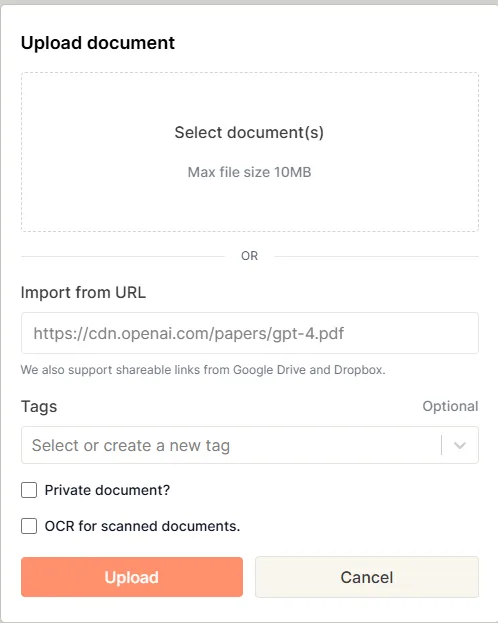
The interface is clean, bright, and arranged around three quick-access panels on the home screen: Chat with PDFs, Parse, Extract & Split, and Developer. The layout is minimalistic, and navigation is intuitive. A filter bar allows sorting uploaded files by type—Chat, Parse, Extract, Split, or Shared—helpful for managing multiple documents. Uploading supports drag-and-drop, URL import from Google Drive and Dropbox, with optional tagging and toggles for marking documents as private or enabling OCR for scanned files.
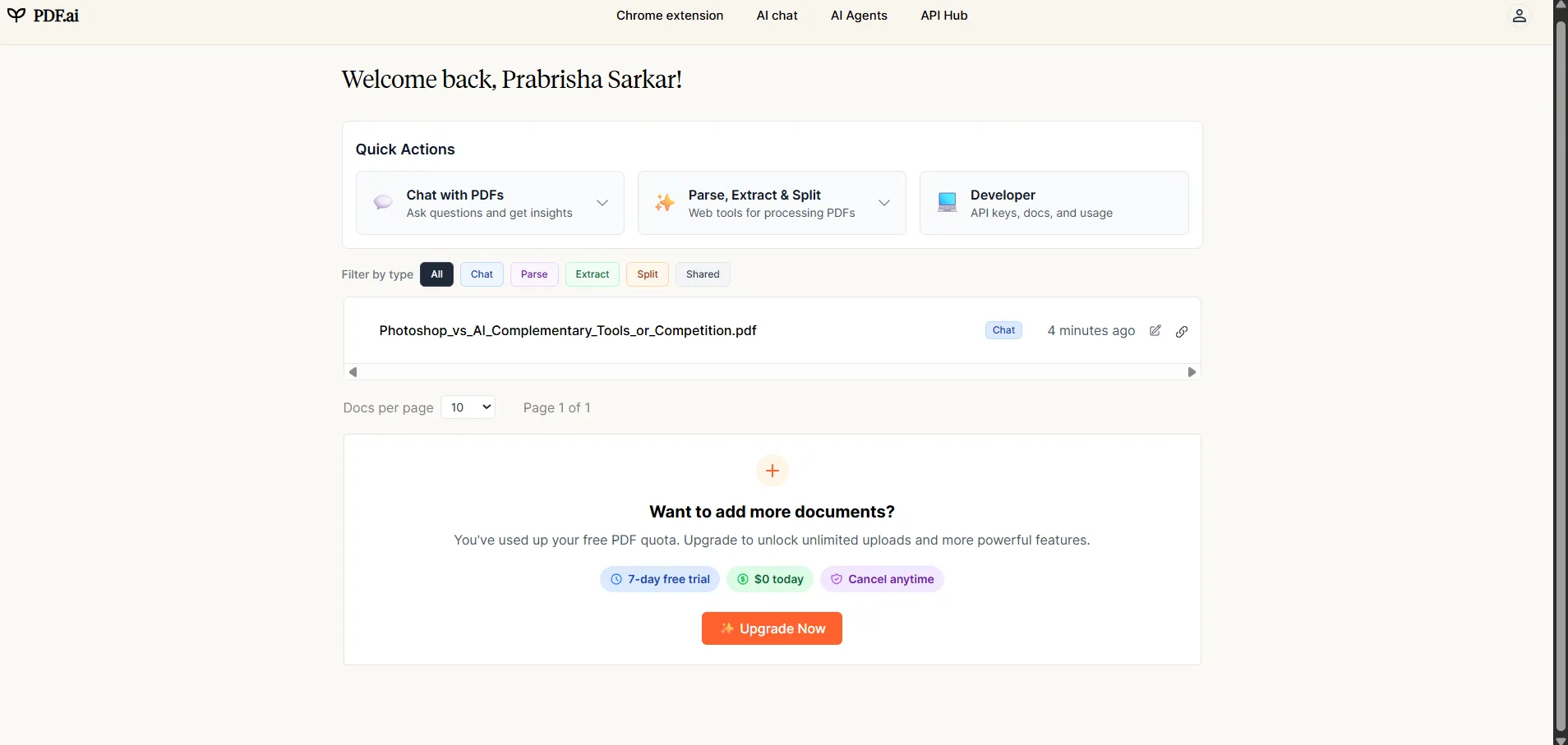
The design is inoffensive and clean. No dark mode available, which is slightly disappointing to my personal tastes, but the light interface is at least well organized and nothing feels cluttered. There’s no learning curve. Everything is where it should be. The immediate problem isn’t the interface, it’s what happens when features are actually tried.
- Clean home screen with three main workflow categories
- Import from URL with Google Drive and Dropbox support
- OCR toggle on upload for scanned documents, a useful detail
- No dark mode
- Free plan limited to a single PDF upload before hitting a paywall prompt
Core Features & Real Usage Testing
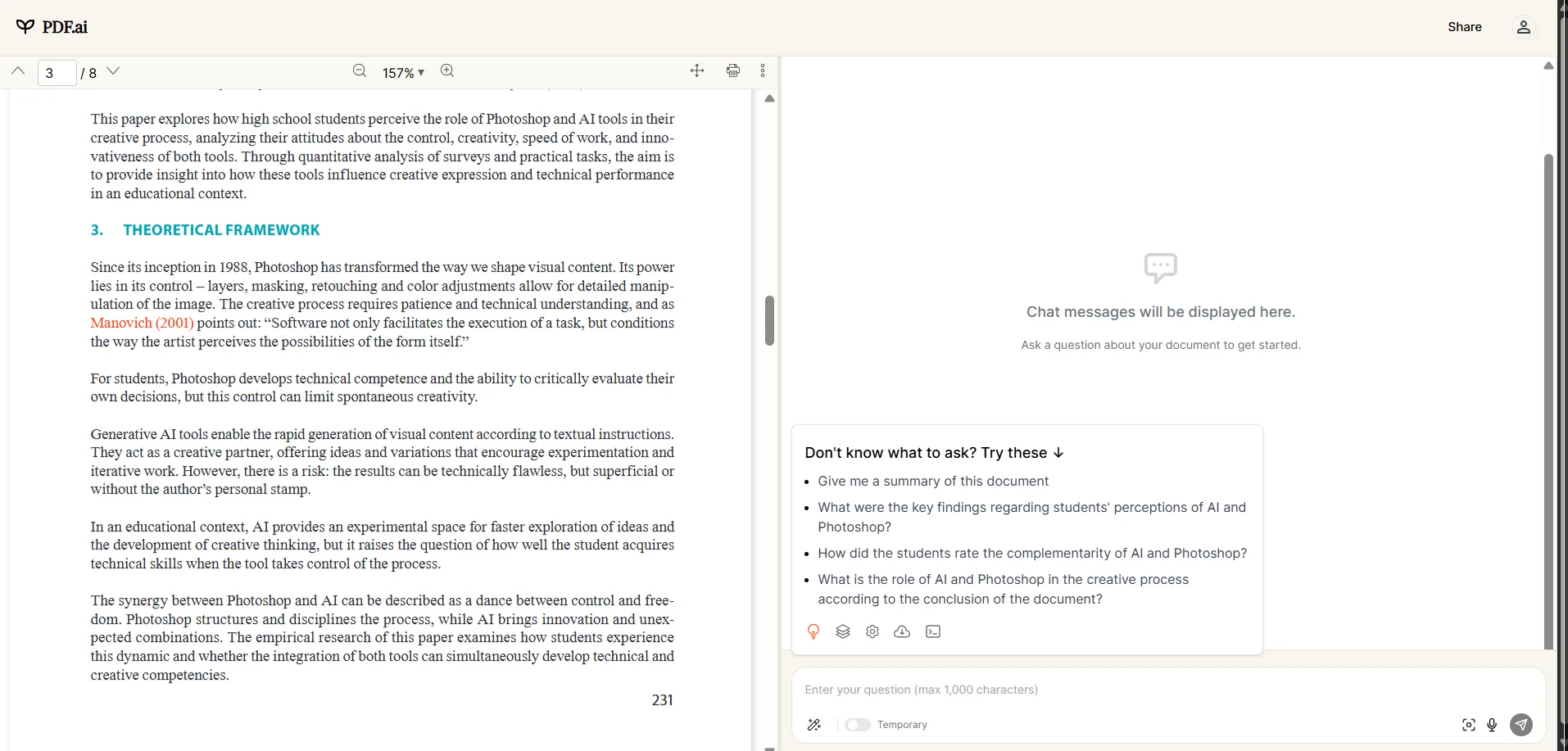
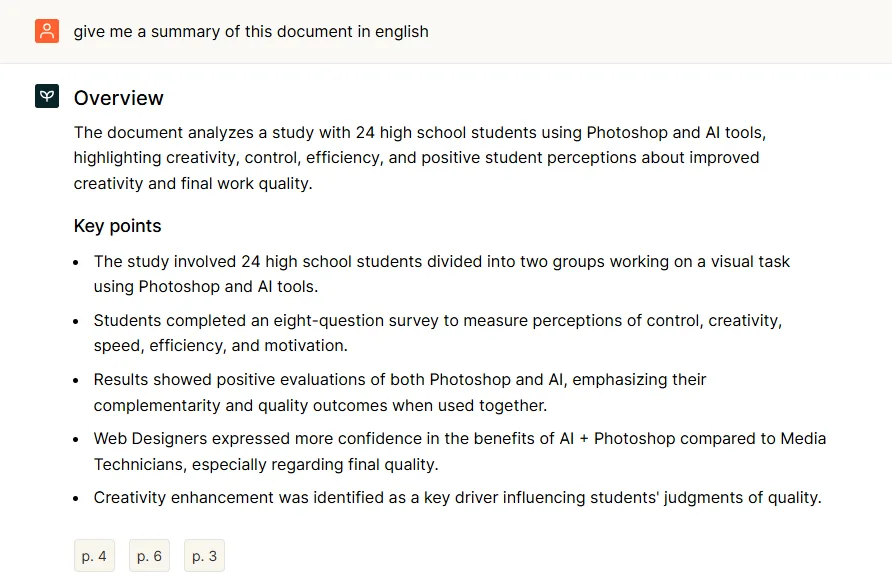
Focusing on the core feature: chatting with PDFs. I uploaded a PDF and requested a summary. The response was well-structured, providing an overview with key points and page citations at the end. The summary was accurate and easy to read. Follow-up questions also worked well. The AI remained on topic, answers were relevant, and citations correctly linked back to the source pages. So, it was functional so far.
However, issues quickly accumulated. The free plan permits only one PDF upload. Just one. After that, any additional document triggers a paywall message: “You’ve used up your free PDF quota. Upgrade to unlock unlimited uploads.” For a tool aimed at researchers and professionals handling multiple documents, restricting free use to a single upload hampers a fair assessment of its capabilities with real workloads.
The interface includes voice input features, such as text-to-speech dictation for questions and screenshot icons in the chat window. The screenshot function appears intended for capturing screen content to provide additional context rather than uploading image files directly. The voice icon transcribes speech into text, similar to Humata, rather than enabling actual voice commands. There is also a read-aloud feature, but it behaves more like Humata’s, sounding quite artificial—at one point, it even read out a heading with a “##” prefix, which felt quite off. This was the first time I encountered such an overly AI-like read-aloud.

The AI chat toggle includes a “Temporary” session option, which is a privacy-conscious touch. It suggests the conversation isn’t saved after the session ends, which is useful for anyone working with sensitive documents who doesn’t want a chat trail persisting.
Moving on to other features:
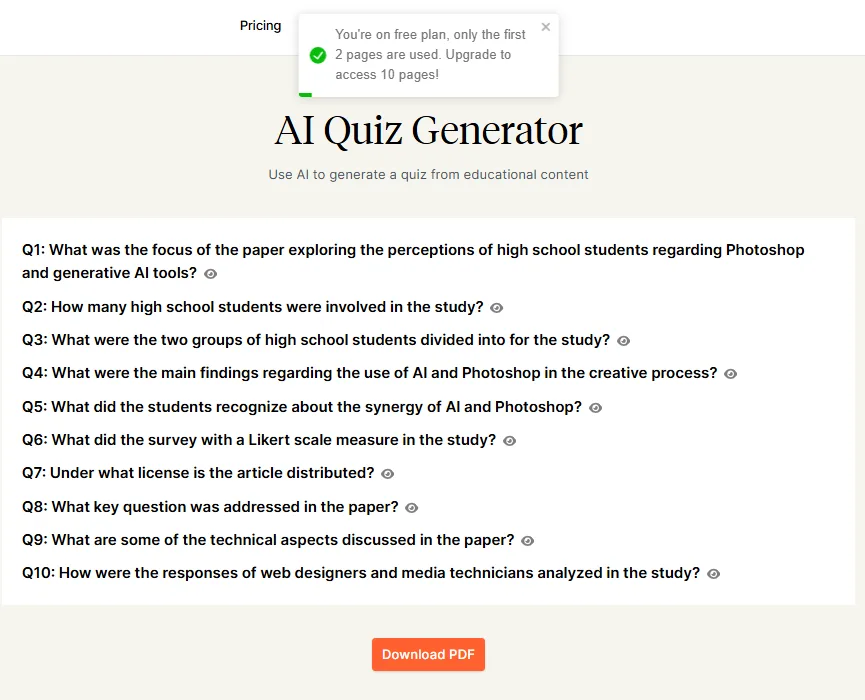
- Quiz Generator: Located in the utility tools section, I tested this feature. The free plan restricted me to the first two pages of the uploaded PDF. Consequently, the generated questions came from a very limited part of the document. The output resembled a list of questions with toggleable answer options rather than an interactive quiz. It was functional but quite basic, and the page cap made it less useful for assessing the feature’s full potential.
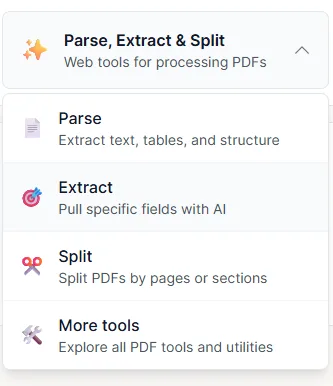
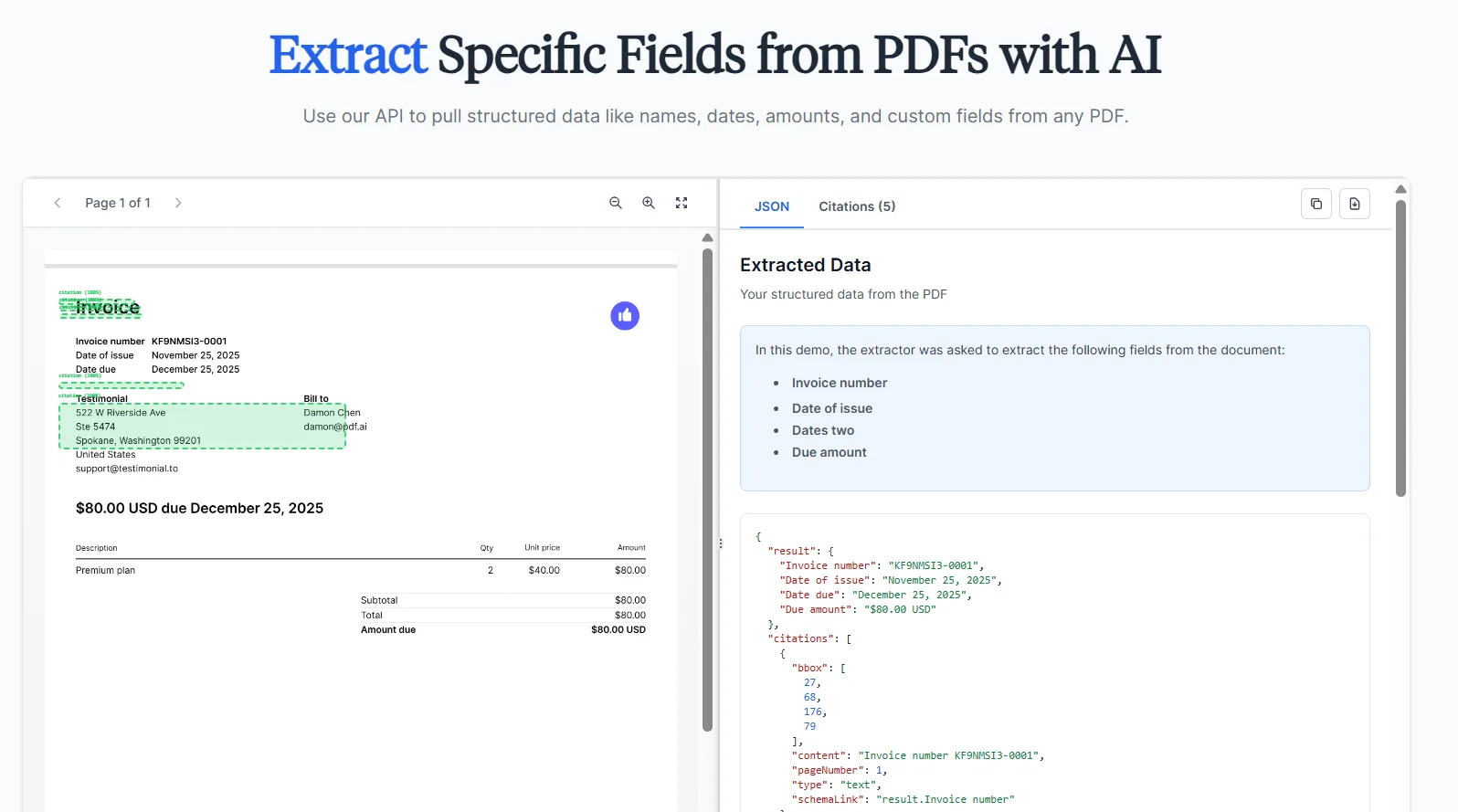
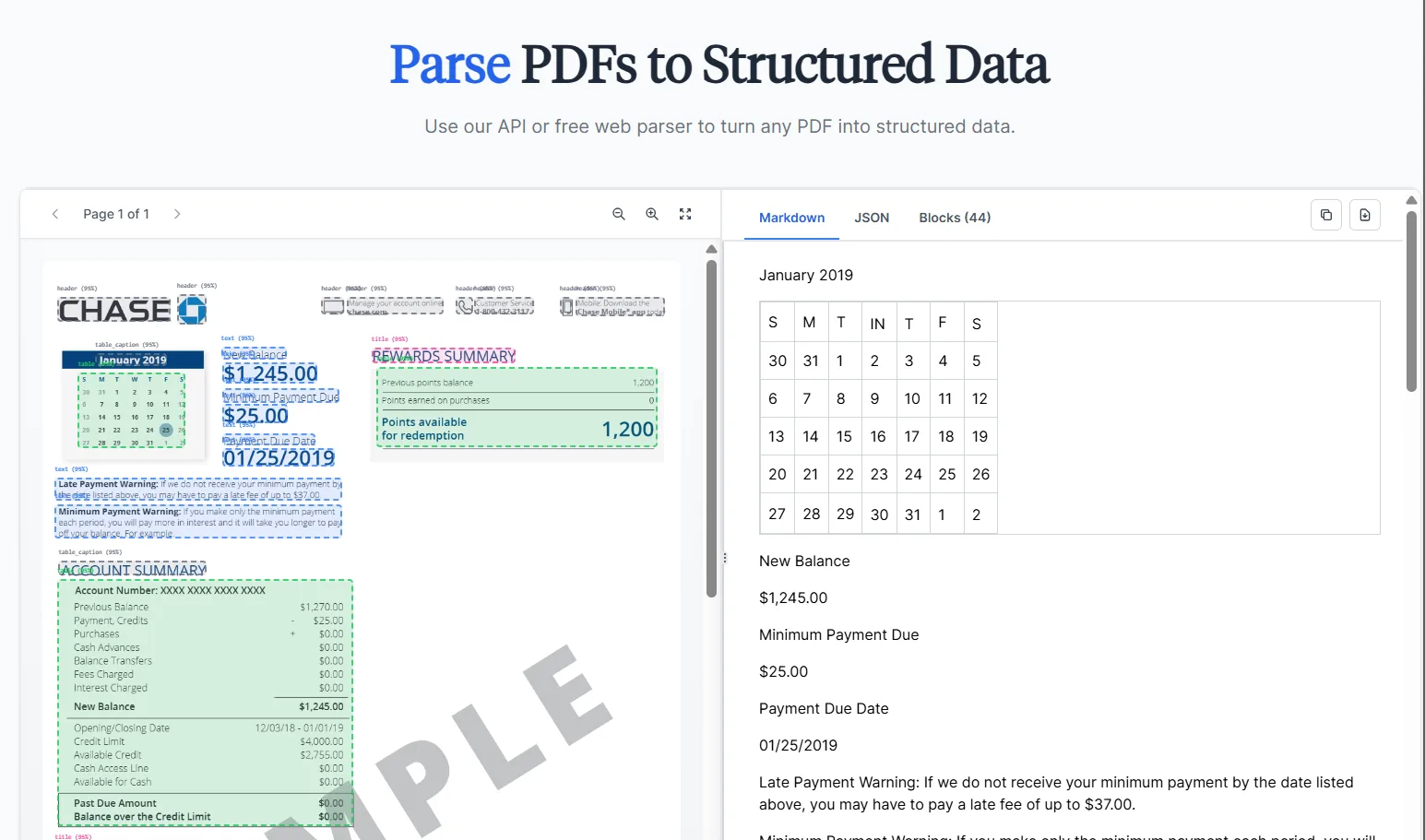
- Parse, Extract & Split: These functions are part of the developer tools section and require API access. Based on the screenshots, Parse can convert PDFs into structured formats such as Markdown, JSON, and Block output, handling complex documents like financial or bank statements effectively, with well-organized data. Extract retrieves specific fields like invoice numbers, dates, and amounts, outputting JSON with citations. Both features are impressive in demos, but they were not directly accessible in the free tier without an API plan, which is a significant limitation for non-developer users evaluating the tool.
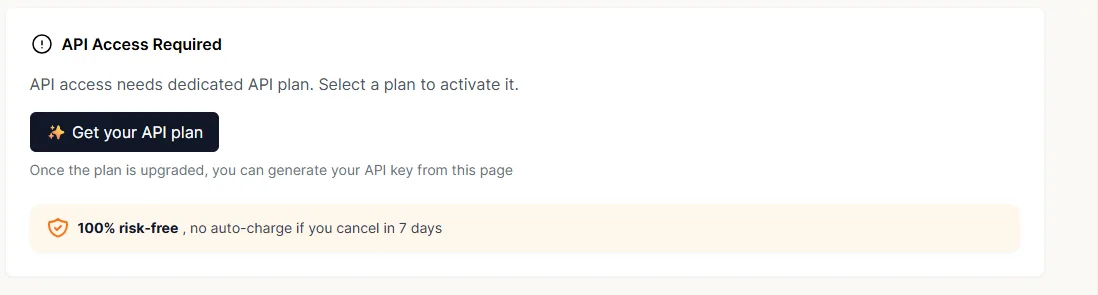
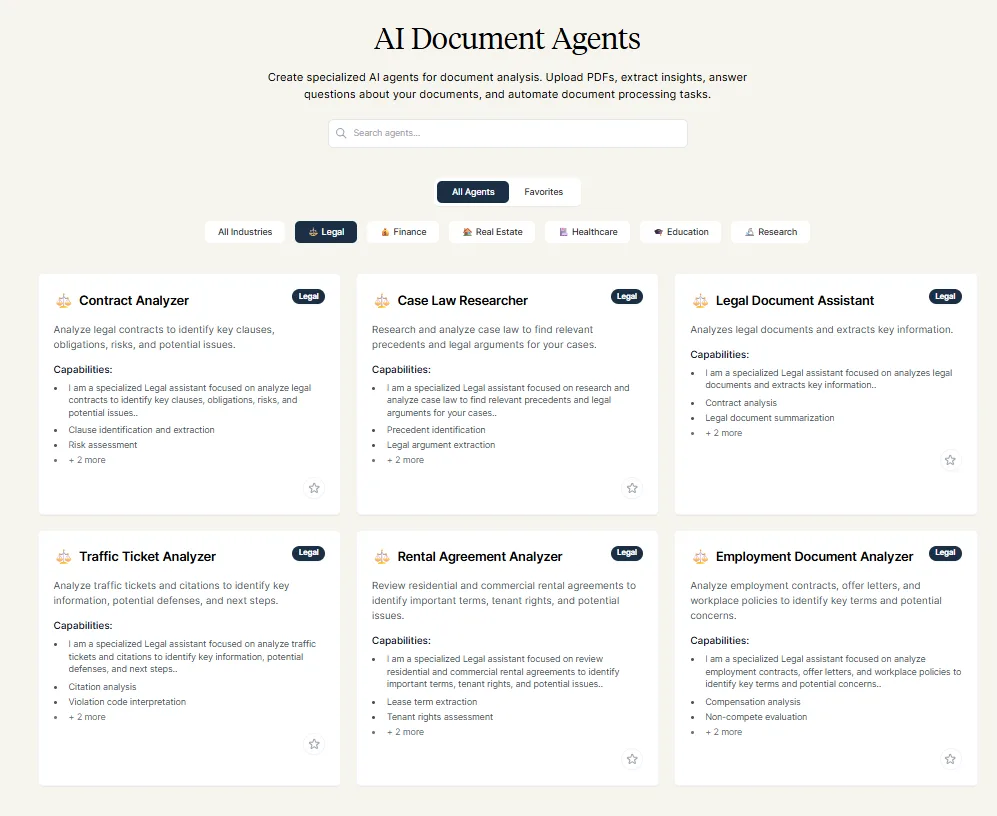
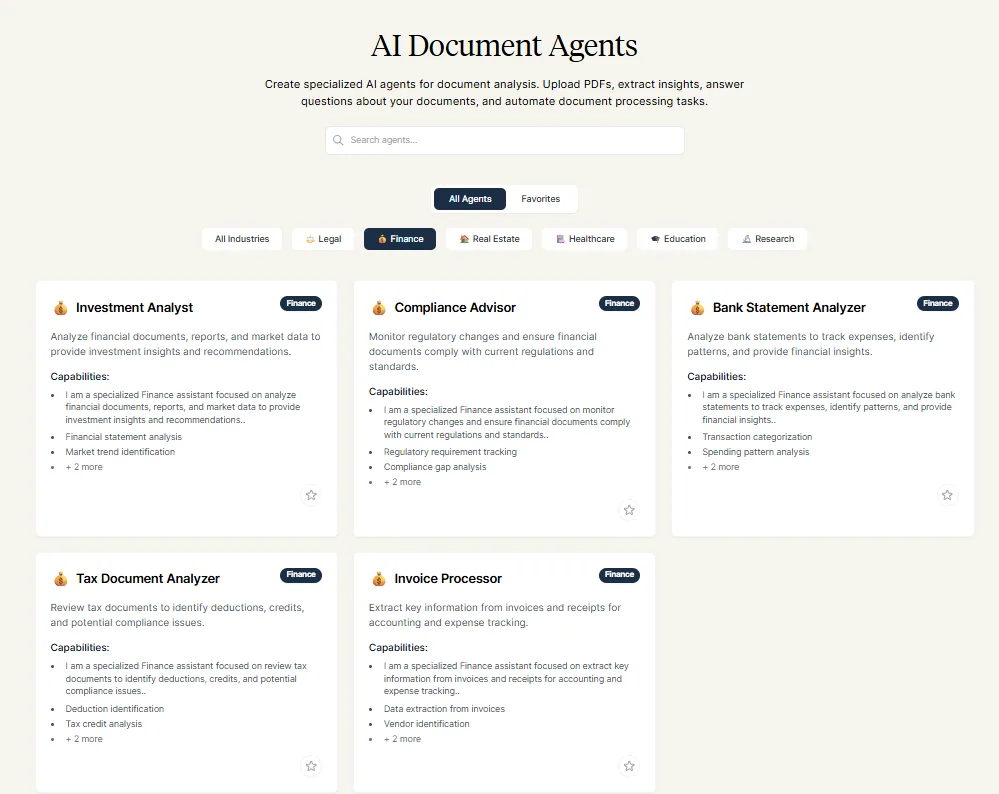
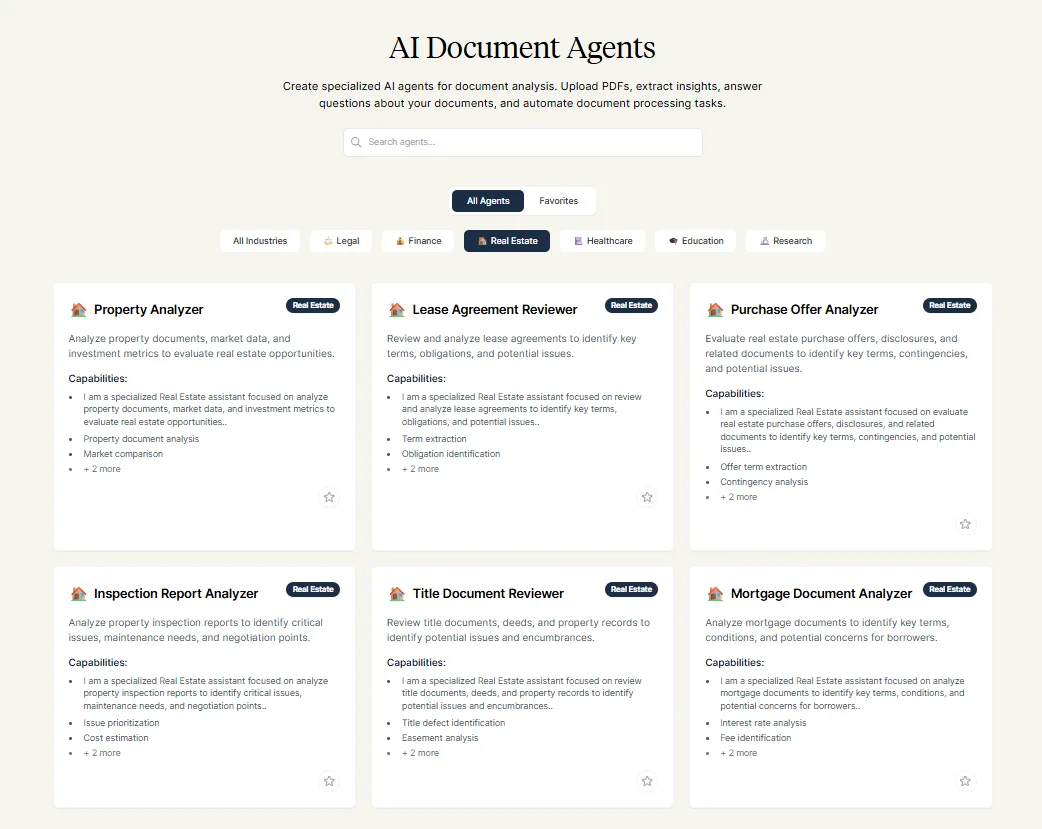
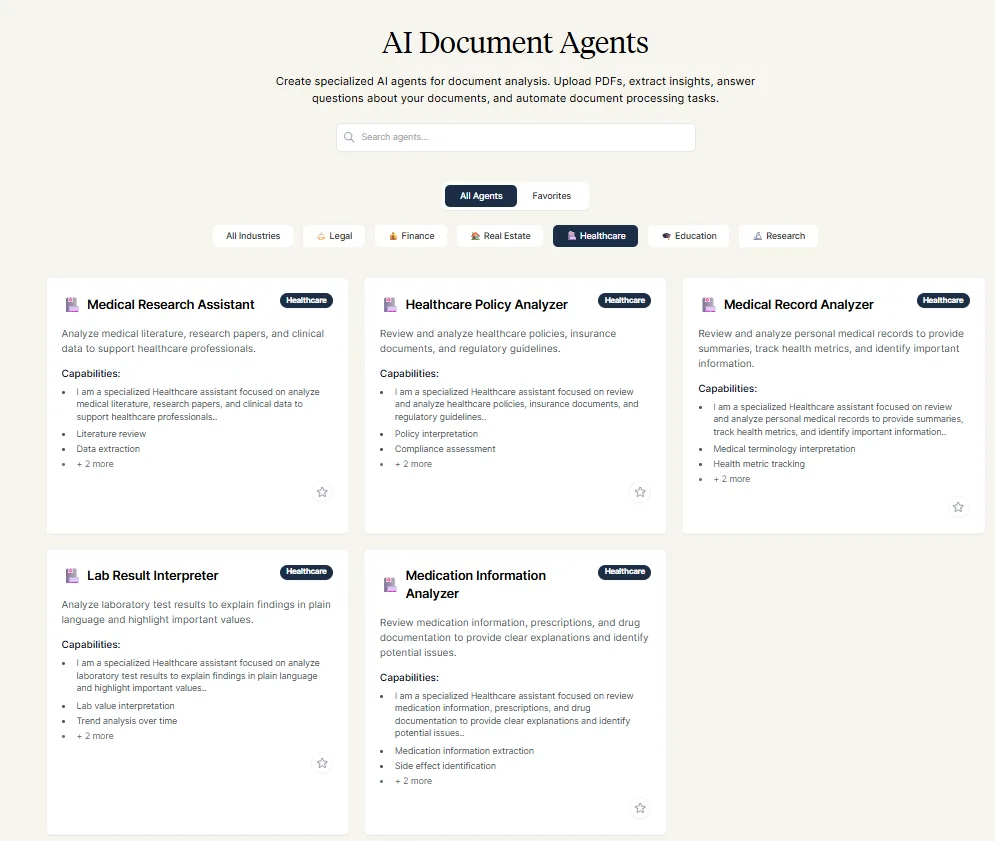
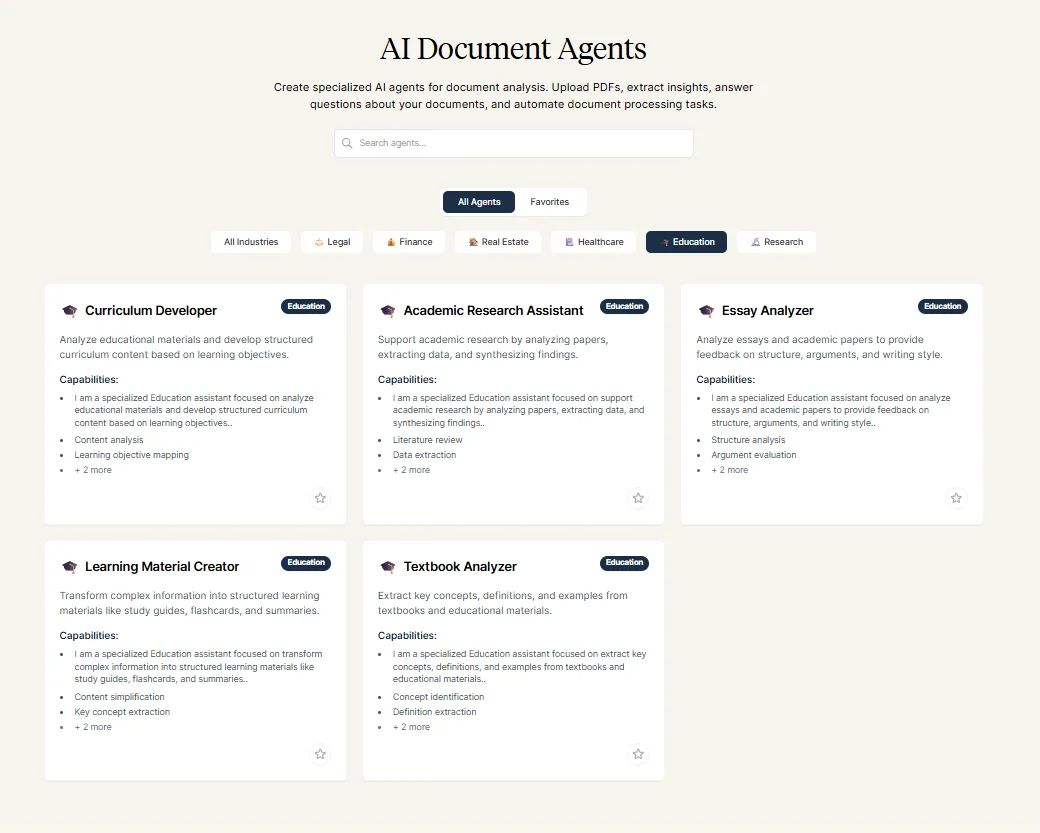
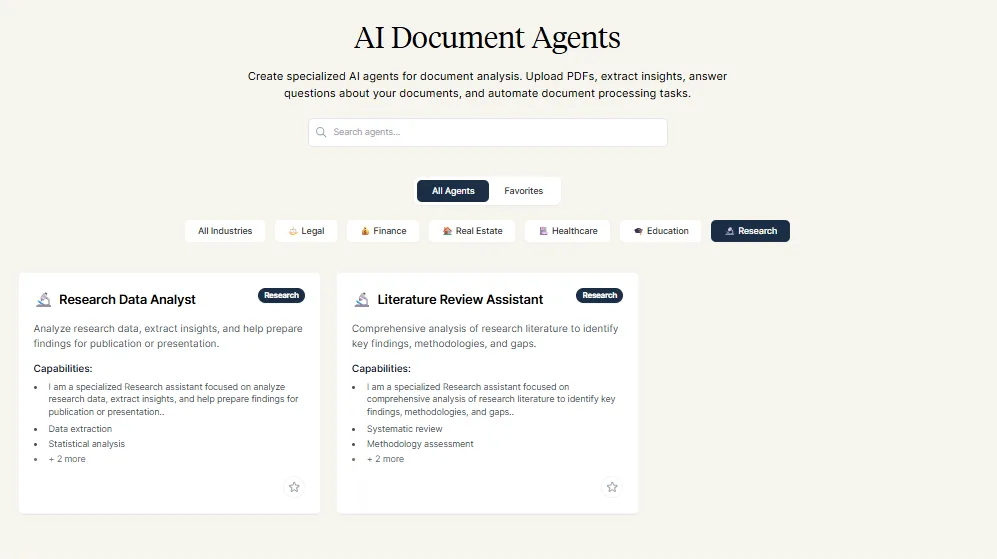
- AI Agents: The platform includes an AI Agents section with categories like Legal, Finance, Real Estate, Healthcare, Education, and Research. However, despite its prominent placement in the navigation, this feature was locked behind the Ultimate and Enterprise plans. As a Hobby plan user, I could view the categories but was unable to test their functionality or output quality.

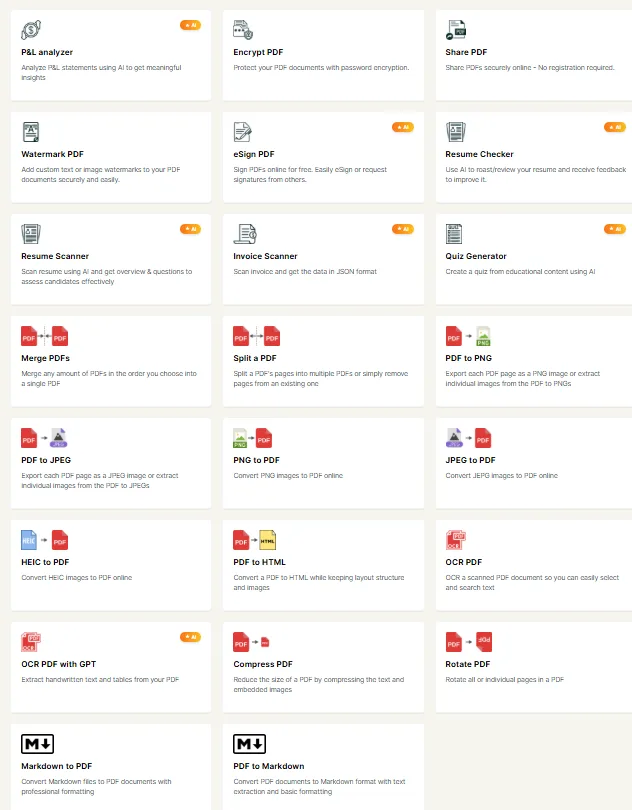
- Utility PDF tools: This suite includes Merge PDFs, Split PDFs, PDF to PNG, PDF to JPEG, PDF to HTML, OCR PDF, OCR PDF with GPT, Compress PDF, Rotate PDF, HEIC to PDF, Watermark PDF, eSign PDF, Markdown to PDF, PDF to Markdown, among others. Additionally, there are AI-enhanced tools like P&L Analyzer, Resume Scanner, Resume Checker, Invoice Scanner, and Quiz Generator. The range is extensive, and most of the conversion tools are free and operational. However, the AI-powered tools tend to be more limited in the free tier.
The AI chat quality was adequate but not exceptional. The summaries were well-structured, citations functioned correctly, and responses remained relevant to the document. However, compared to Humata’s thoroughness and ChatPDF’s polished interface, it lagged behind. Nothing particularly impressed during the session, and the frequent paywalls were a notable frustration.
Performance, Reliability & Everyday Usability
All tested features operated smoothly without technical problems. PDFs uploaded swiftly, chat responses were prompt, and the quiz generator functioned error-free. There were no crashes, timeouts, or unusual interface behaviors. Performance was satisfactory.
- PDF upload and processing was fast
- Chat responses came back quickly and stayed on topic
- Quiz generator ran without errors but was limited by the page cap
- No crashes or interface issues during testing
- Single-PDF free limit made it impossible to evaluate multi-document scenarios
The performance wasn’t the issue. The issue was the scope of what’s actually accessible without paying, and the feeling that the most interesting parts of the tool are deliberately kept out of reach during evaluation.
Pricing, Free Plan & Limitations
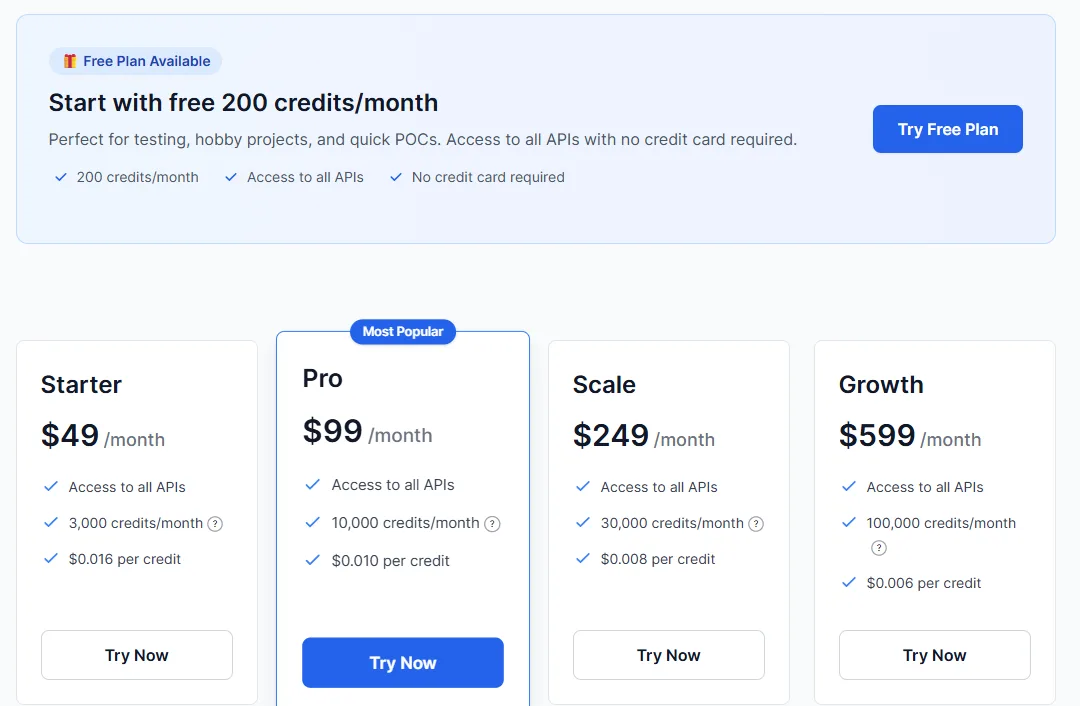
This is where costs escalate quickly. Based on the pricing screenshots:
- Free: $0 — 200 credits per month, access to all APIs, no credit card needed. Intended for testing, hobby projects, or quick proof-of-concept work.
- Starter: $49/month — 3,000 credits per month, $0.016 per credit, access to all APIs
- Pro: $99/month — 10,000 credits per month, $0.010 per credit, access to all APIs
- Scale: $249/month — 30,000 credits per month, $0.008 per credit
- Growth: $599/month — 100,000 credits per month, $0.006 per credit
For the consumer-facing side, the free plan allows one document upload before hitting the upgrade prompt.
One thing that genuinely frustrated me during testing was the disconnect between PDF.ai’s marketing and what I actually encountered after signing up. The pricing page prominently advertises a free API tier with 200 monthly credits, access to all APIs, and no credit card requirement. Naturally, I expected to be able to experiment with those API features after creating an account. That was not the case though in my experience.
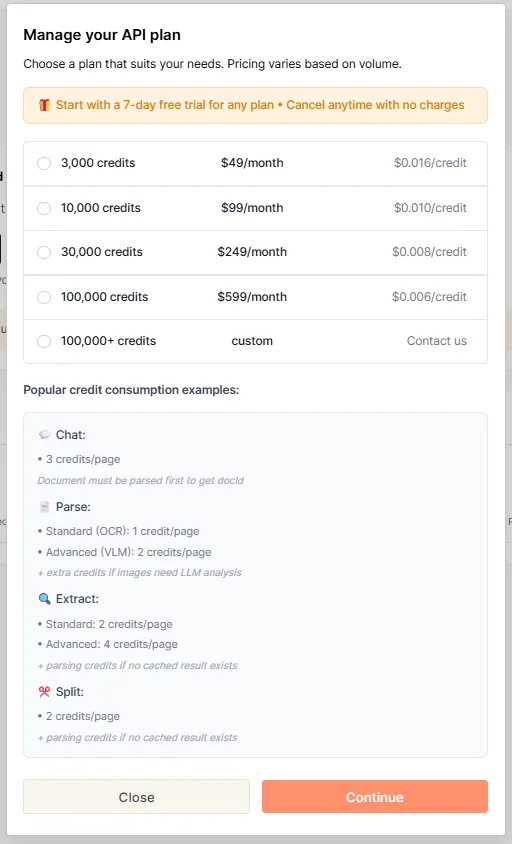
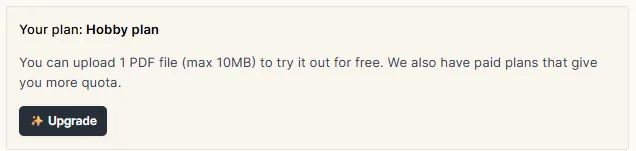
After signing in and browsing the API section, I was consistently directed towards paid plans and upgrade prompts. I could not locate the advertised 200 free credits or access API usage details without being forced into a paid subscription. The same issue occurred when trying to explore AI agents and other developer features, where upgrading was mandatory.
At $49 a month for the Starter plan, PDF.ai is asking significantly more than ChatPDF at $19.99 or Humata at $9.99, for what is in practical terms a similar core function at the non-developer tier. The only scenario where the pricing makes clear sense is if the Parse and Extract API features are the primary use case, in which case the credit-based model is at least transparent. For everything else, it’s a difficult sell. And on top of that, I couldn’t find the promised 200 credits in the hobby plan, so despite not wanting to call out marketing strategies as lies… well, PDF.ai leaves much to be wanted especially with its Free plan if I could even call it that.
The free tier being limited to one document isn’t a free tier in any meaningful sense. It’s a demo. Most tools in this space give at least enough breathing room to test across a few documents. This one doesn’t, and that shapes the impression significantly.
Privacy, Data Handling & Account Control
PDF.ai processes documents to enable chat and extraction features, and explicitly states it does not own user data or use it for any purposes beyond providing the service. From the official documentation:
- Data collected: Uploaded documents are processed to enable the chat and parsing features. Basic account information is collected on signup.
- AI training: PDF.ai states it does not use uploaded documents for anything beyond providing the requested service, and does not claim ownership over user content.
- Third-party sharing: No indication of data being sold. Google Analytics is used for traffic tracking on the site.
- Data deletion: The temporary session toggle in the chat interface suggests session data can be kept non-persistent. No explicit 30-day deletion commitment like Humata, but documents can be deleted manually from the account.
- Security: Encrypted transfer is standard, and the platform supports shareable document links for controlled access.
The trust level here is moderate. The privacy stance is reasonable and the no-ownership commitment is clear, but the documentation is less detailed than some other tools’ like Humata or NotebookLM. Fine for everyday use, but anyone handling sensitive material should read the current policy before uploading anything significant.
Comparison PDF.ai vs Humata
|
Feature |
PDF.ai |
Humata AI |
|
Multi-source querying |
No, single PDF on free plan |
Yes, multiple sources on free plan |
|
Source types |
PDF, URL, Google Drive, Dropbox |
PDF, URL, YouTube |
|
AI report generation |
No |
Yes, comprehensive with citations |
|
Quiz generator |
Yes, basic, page-capped on free |
No |
|
Parse/Extract to structured data |
Yes, via API (paid) |
No |
|
PDF utility tools |
Extensive (split, merge, OCR, etc.) |
No |
|
AI Agents |
Yes, paid API tier |
No |
|
Free plan usability |
Very limited, 1 document upload |
More usable, 60 pages, 10 answers |
|
Paid plan entry |
$49/month (Starter) |
$9.99/month (Expert) |
|
Chat output quality |
Not exactly outstanding |
More comprehensive and cited |
Humata wins this comparison without much argument. The multi-source capability on Humata’s free plan alone is a significant practical advantage over PDF.ai’s single-document limit. The AI report feature in Humata produces genuinely comprehensive, well-cited outputs that PDF.ai simply doesn’t have an equivalent for. And Humata’s entry-level paid plan at $9.99 is dramatically cheaper than PDF.ai’s $49 Starter plan, for what is functionally a similar core experience. The one area where PDF.ai has an edge is the PDF utility suite, the splitting, merging, OCR, format conversion tools and the Parse and Extract API features for developers. Those are real and functional differentiators. But for the research and document understanding use case, which is what both tools are being evaluated on here, Humata is the better choice. The output quality is higher, the free plan is more generous, and the pricing is considerably more reasonable.
Final Verdict & Overall Score
PDF.ai is a tool that has clearly been built with a particular user in mind, and that user is probably a developer or a team that needs structured data extraction from documents at volume. The Parse, Extract, and API features are the core of what makes this tool different from its competitors, and they look genuinely capable in the demos. But for an individual researcher, student, or professional who wants to upload a few documents and get useful answers out of them, PDF.ai is frustrating to evaluate on the free tier, expensive at the paid tier, and doesn’t match the output quality of tools like Humata or the feature depth of ChatPDF at comparable price points.
The single-document free limit is the biggest issue. It communicates either a lack of confidence in the product or a very aggressive conversion strategy, and neither interpretation is particularly flattering. A tool that gives only one use before asking for payment isn’t really giving anyone enough to form a fair opinion.
The quiz generator was basic. The chat output was decent but not impressive. The utility tools are a genuine plus but don’t address the core research use case strongly enough to change the overall impression. And at $49/month to actually unlock meaningful usage, the value case just doesn’t hold up against what else is available.
Has the bones of something more useful, mostly for developers. For everyone else, there are better and cheaper options in this exact category.
Overall Score: 4.5/10
Frequently Asked Questions
PDF.ai centers around three main functions: chatting with PDFs, parsing and extracting structured data from documents, and providing API access for developer workflows. It also offers a range of utility tools such as PDF splitting, merging, watermarking, OCR, format conversion, and some AI-powered features like a quiz generator and invoice scanner.
PDF.ai’s free plan is quite limited, allowing only one PDF upload before hitting a paywall. This is significantly more restrictive compared to competitors like Humata, which offers more generous free tiers with multiple document uploads and more comprehensive features.
PDF.ai offers several pricing tiers: Free ($0 with very limited access), Starter ($49/month), Pro ($99/month), Scale ($249/month), and Growth ($599/month). The free plan is quite restrictive, and the paid plans are relatively expensive compared to similar tools in the market.
PDF.ai is primarily suited for developers or teams needing structured data extraction from documents at scale. Its Parse, Extract, and API features are the core of what makes this tool different. However, for casual research or document Q&A, there are more affordable and feature-rich alternatives available.
PDF.ai states that it does not own user data or use it for any purposes beyond providing the service. Uploaded documents are processed to enable chat and parsing features, and the platform supports encrypted transfer and shareable document links for controlled access. However, the documentation is less detailed than some other tools.
Pros of PDF.ai include a clean and intuitive interface, extensive range of utility tools for PDF manipulation, fast performance, and privacy-conscious features like temporary chat sessions. Cons include a very limited free plan, high cost for paid plans compared to competitors, and many interesting features locked behind paywalls.
Humata offers a more generous free plan with multi-source querying and comprehensive AI report generation, which PDF.ai lacks. Humata’s entry-level paid plan is also significantly cheaper at $9.99 compared to PDF.ai’s $49. While PDF.ai has an edge with its PDF utility suite and API features for developers, Humata is generally the better choice for research and document understanding use cases.
PDF.ai received an overall score of 4.5/10. It is a tool that seems to have a clear target audience in mind, likely developers or teams needing structured data extraction from documents at scale. However, for individual researchers or students, the restrictive free tier and high cost at the paid level make it less suitable compared to more affordable and feature-rich alternatives.
Subscribe to our email newsletter to get the latest posts delivered right to your email.
Comments